


Fast answer
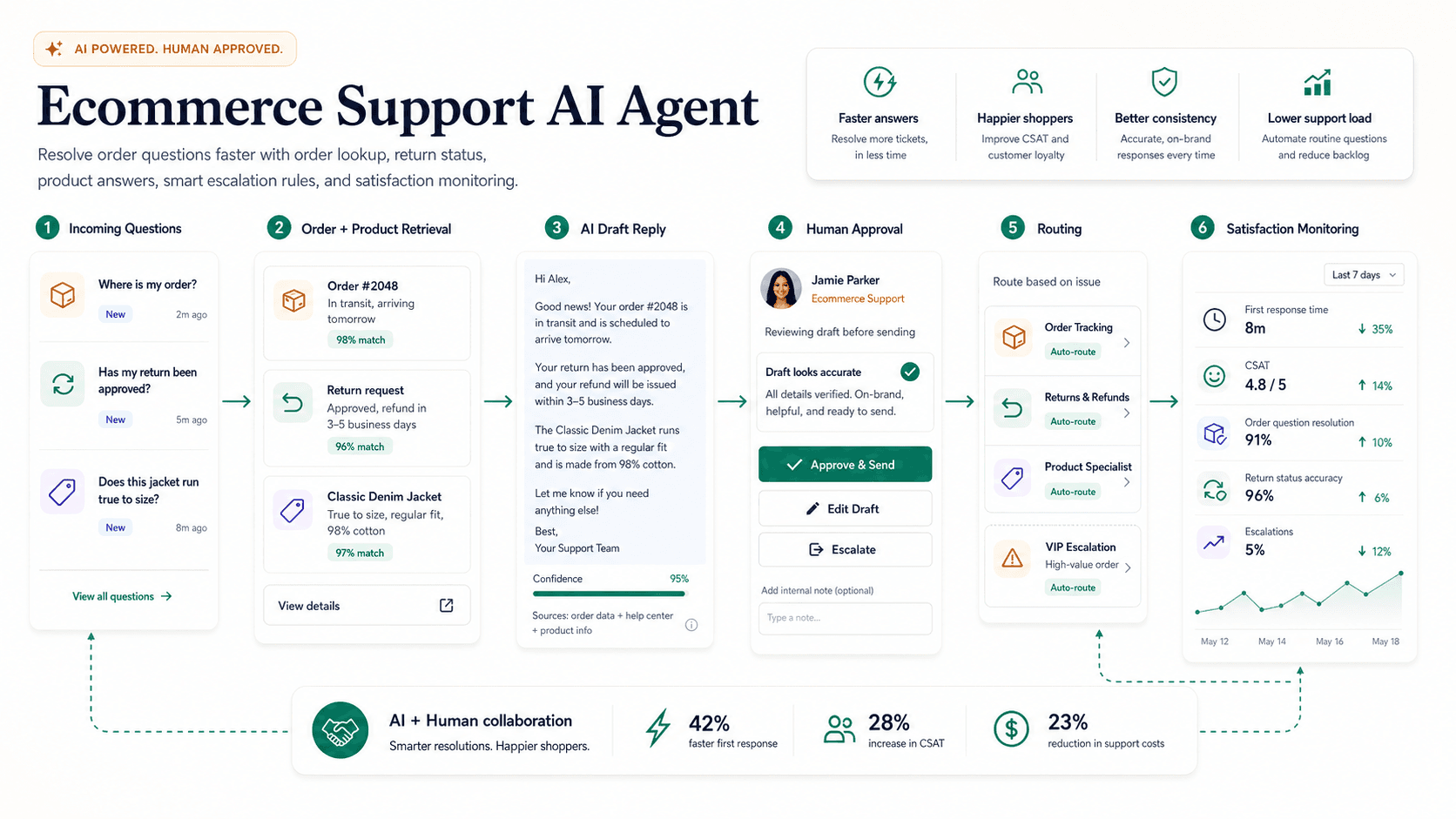
An ecommerce support AI agent handles order tracking, returns, product questions, shipping status, and inventory alerts automatically, resolving high-volume, repetitive tickets by connecting directly to your order management system and pulling real-time data for customers. Unlike a general support agent, it gives deterministic answers from order, shipping, and inventory systems rather than relying only on knowledge base lookups. Start by mapping ticket categories and identifying which have deterministic answers from system data versus those needing judgment. Integrate the OMS, shipping carriers, and inventory database so the agent never guesses when live data is available. Build structured FAQ answers for sizing, materials, care, compatibility, and policies from product pages and approved brand voice. Route damaged items, fraud flags, high-value orders, repeated contacts, and angry customers to humans, with small automatic refunds under a threshold like $25 expanding as accuracy improves. Track first-contact resolution, handle time, escalation rate, and CSAT per category weekly.
On this page
What this page covers
A use-case visitor should understand the workflow, the source data required, where humans review, and what a safe first version looks like.
- 01Store policies
- 02Order integrations
- 03Return workflows
- 04Product knowledge
- 05Escalations
- 06KPIs
Why does this matter now?
Ecommerce support volume spikes unpredictably around launches, sales, and holidays, exactly when human capacity is hardest to add. Most of that volume is order status and return questions that have a single correct answer sitting in a system the customer cannot see. An agent that reads the order, shipping, and inventory systems and answers those instantly protects CSAT during surges and keeps response times steady when the queue explodes. That frees human agents for the cases that actually need judgment, such as damaged goods, fraud disputes, and upset high-value customers.
Internal path
Where to go next from this page
These links are part of the A8gent learning and conversion path. Use them to move from concept, to diagnosis, to workflow build, to course.
What you should be able to do after this
- Answer order questions
- Route return and refund requests
- Recommend products responsibly
- Reduce peak-season ticket load
How do you do it, step by step?
1. Map ticket categories
Separate order status, returns, exchanges, product questions, shipping delays, payment issues, and inventory inquiries. Identify which categories have deterministic answers from system data versus those requiring judgment. Prioritize the deterministic, high-volume categories, because those are where an integrated agent is both safest and most valuable.
2. Connect to the order system
Integrate with your OMS, shipping carriers, and inventory database so the agent pulls real-time tracking, return eligibility, and stock levels. Ensure the agent never guesses a date or status when live data is available. Handle integration failures gracefully by escalating rather than inventing an answer when a system is down.
3. Build FAQ knowledge base
Create structured answers for sizing, materials, care instructions, compatibility, and policies, sourced from product pages, return policies, and approved brand voice guides. Keep it distinct from the live-data path so the agent knows when to look up a fact versus quote a policy. Assign an owner to update it when policies or product lines change.
4. Define refund and action authority
Decide which actions the agent may take on its own, such as issuing a small goodwill refund or sending a return label, and which require a human. Start with a low refund ceiling like a small dollar threshold and widen it only as accuracy proves out. Log every action so finance can reconcile and audit what the agent did.
5. Set escalation rules
Route damaged items, fraud flags, high-value orders, repeated contacts, chargebacks, and angry customers to human agents with the full order context attached. Detect emotional or urgent language and hand off early rather than frustrating the customer further. Give the agent a clear instruction to escalate any question it cannot resolve from data or approved policy.
6. Handle peak and multichannel load
Confirm the agent holds up on chat, email, and social under holiday-level volume, and load-test before a big sale. Keep answers consistent across channels so a customer gets the same resolution wherever they ask. Have a fallback plan to widen human coverage the moment automated quality dips during a surge.
7. Pilot before full rollout
Run the agent on one or two categories in draft or limited-action mode and compare its resolutions against what human agents did. Fix the recurring failure patterns, then expand category by category. Keep a fast rollback so you can revert a category to human handling if reopen rate climbs.
8. Measure resolution rate
Track first-contact resolution, average handle time, escalation rate, CSAT per category, refund accuracy, and revenue saved from prevented cancellations. Watch reopen rate closely, since a fast wrong answer costs more than a slow correct one. Review a weekly sample against human benchmarks to catch drift before customers feel it.
What mistakes should you avoid?
- Providing estimated delivery dates from stale carrier data instead of real-time tracking.
- Approving returns or refunds outside policy without clear escalation thresholds.
- Answering product compatibility questions without verified specifications.
- Ignoring repeat-contact patterns that signal a deeper unresolved issue.
- Inventing an answer when an integration is down instead of escalating to a human.
- Leaving the FAQ knowledge base unowned so it quotes outdated policies or discontinued products.
FAQ
How does this differ from a general support agent?
It connects directly to order, shipping, and inventory systems to give deterministic answers rather than relying only on knowledge base lookups. That lets it resolve order status and return eligibility with certainty instead of best guesses.
What refund authority should the agent have?
Start with small automatic refunds under a low threshold, then expand based on demonstrated accuracy. High-value refunds and policy exceptions should always escalate to a human, and every action should be logged for finance.
When should I deploy this versus hiring more agents?
Deploy when order status and return eligibility make up a large share of ticket volume, since those are fully automatable with system integrations. It scales through peaks without the lead time and cost of hiring seasonal staff.
What happens if an integration goes down?
The agent should escalate rather than guess when it cannot reach live data. Design the fallback so a system outage produces a human handoff, not a confidently wrong answer.
Will it handle holiday spikes?
That is one of its main advantages, but only if you load-test before the surge and keep a plan to widen human coverage if quality dips. Consistent answers across chat, email, and social matter most when volume is highest.
What should this link to internally?
Pair it with the customer support AI agent for the knowledge base foundation and the AI agent ROI calculator to size the savings against your ticket mix.
Sources & further reading
Done for you
Want a ecommerce support agent built for your business?
Tell us the workflow. We scope, build, and ship the agent with guardrails and the numbers to prove it worked. The scoping call is free.
Free scoping call. You own the code.
Was this page helpful?