

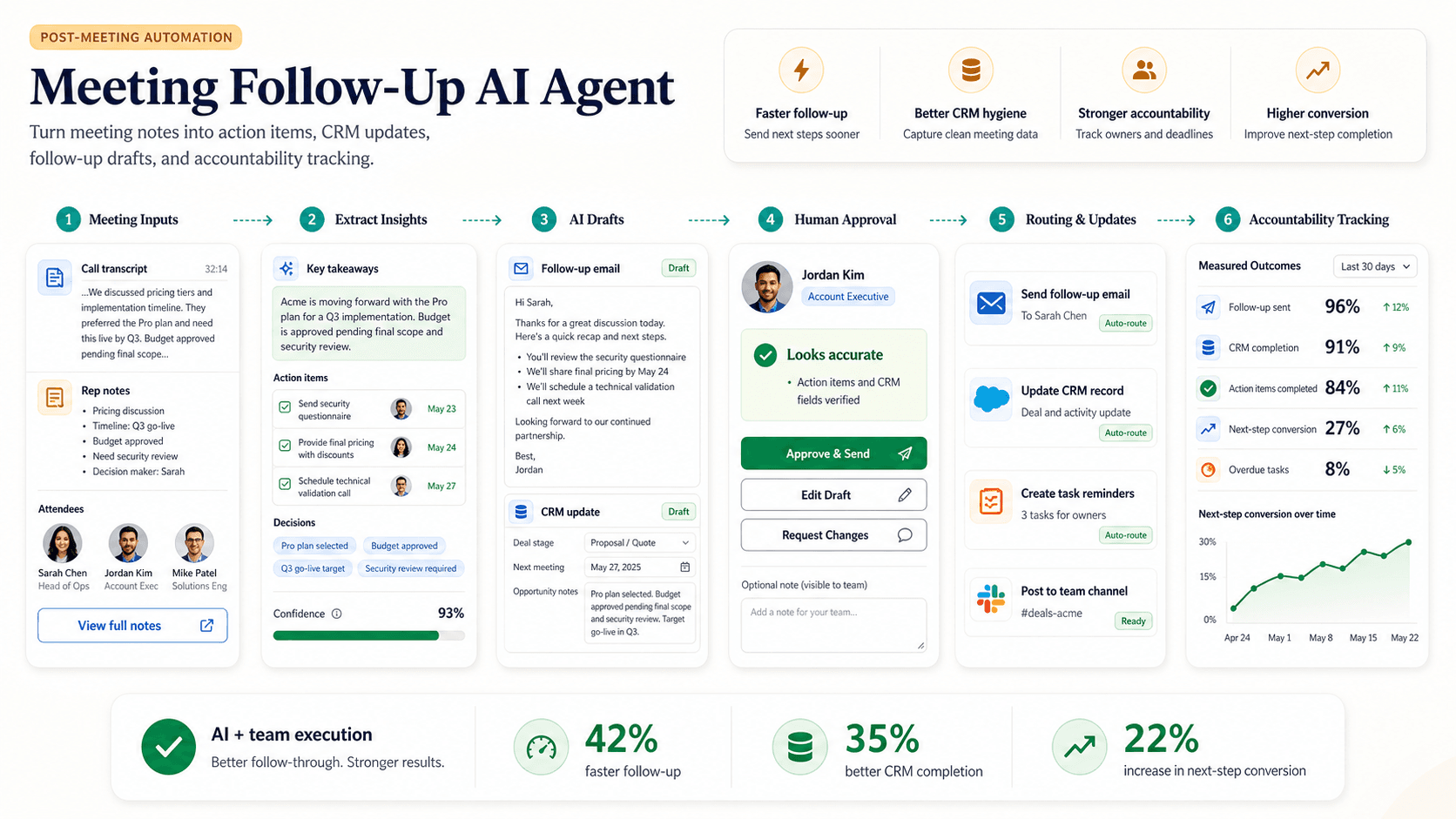

Fast answer
A meeting follow-up AI agent turns calls into summaries, decisions, owners, deadlines, CRM notes, and follow-up emails. It is useful when meetings create work that often gets lost afterward, because most teams do not need more transcripts; they need decisions captured and next steps completed. Start by defining meeting types such as sales calls, customer onboarding, client reviews, internal planning, hiring interviews, and executive meetings. Set a consistent summary format for decisions, action items, risks, open questions, deadlines, and responsible people. Decide what should update the CRM, project board, ticket system, customer success notes, or follow-up email queue. Have the meeting owner review external emails, CRM notes, and sensitive summaries before they are sent or saved, and keep internal notes out of customer-facing emails. Close the loop by sending reminders, detecting overdue commitments, and preparing the next meeting brief. The best first workflow is internal summaries and draft follow-up emails for sales, onboarding, or client calls.
On this page
What this page covers
A use-case visitor should understand the workflow, the source data required, where humans review, and what a safe first version looks like.
- 01Meeting inputs
- 02Summary format
- 03Action tracking
- 04CRM updates
- 05Quality review
- 06Rollout
Why does this matter now?
Most teams already record and transcribe their meetings, so the problem is not capturing what was said but doing something with it. Decisions get made and commitments get promised in a call, then quietly evaporate because nobody turned them into tracked work. A meeting follow-up agent extracts the decisions, owners, and deadlines, drafts the follow-up, and pushes the right items into the CRM or project tools so the conversation becomes accountable work. The value is in the closing of the loop, since a summary nobody acts on is just a shorter transcript.
Internal path
Where to go next from this page
These links are part of the A8gent learning and conversion path. Use them to move from concept, to diagnosis, to workflow build, to course.
What you should be able to do after this
- Capture decisions
- Assign action items
- Draft follow-up emails
- Keep CRM and project tools current
How do you do it, step by step?
1. Define meeting types
Separate sales calls, customer onboarding, client reviews, internal planning, hiring interviews, and executive meetings, because each needs a different summary and a different handoff. A sales call feeds the CRM while a planning meeting feeds the project board. Decide which meeting types the agent handles first rather than switching it on everywhere at once.
2. Set the summary format
Use a consistent structure covering decisions, action items, risks, open questions, deadlines, and the person responsible for each item. A fixed format makes summaries fast to scan and easy to push into other systems. Require an owner and a due date on every action so nothing is left ambiguous.
3. Extract decisions, not transcripts
Direct the agent to pull out what was decided and what happens next, not to hand back a wall of text. Have it distinguish firm commitments from ideas that were only floated. Flag anything unclear as an open question for the owner to resolve rather than guessing intent.
4. Create system handoffs
Decide exactly what updates the CRM, the project board, the ticket system, customer success notes, or the follow-up email queue. Map each action-item type to its destination so the summary turns into real records automatically. Keep the handoffs narrow at first and widen them as accuracy proves out.
5. Separate internal from external
Keep internal-only notes clearly apart from anything customer-facing so private commentary never lands in a client email. Have the agent produce an internal summary and a separate external draft rather than one blended note. This boundary avoids the most embarrassing failure mode of meeting automation.
6. Require human approval
Have the meeting owner review external emails, CRM notes, and sensitive summaries before they are sent or saved. Keep the owner responsible for accuracy and for the relationship, with the agent doing the drafting. Only routine internal summaries should move without a review once the format is trusted.
7. Close the loop
Send reminders, detect overdue commitments, and prepare the next meeting's brief from the last agreed actions. Surface what was promised but not done so the next conversation starts from reality. This follow-through is what converts good notes into completed work.
8. Review and refine
Sample recent summaries against what actually happened in the call to catch misattributed commitments early. Fix the meeting types or formats where extraction is weak. Expand to more meeting types and more automatic handoffs as trust in the accuracy grows.
What mistakes should you avoid?
- Keeping a long transcript instead of extracting decisions, owners, and deadlines.
- Sending follow-ups that contain incorrect or invented commitments.
- Mixing internal notes into customer-facing emails.
- Forgetting to update the CRM or project tools after the summary is approved.
- Leaving action items without an owner or a due date, so they go nowhere.
- Switching the agent on for every meeting type at once before accuracy is proven.
FAQ
What is the best first meeting workflow?
Start with internal summaries and draft follow-up emails for sales, onboarding, or client calls. They are high-value and low-risk because a human reviews before anything external goes out.
Does this replace meeting notes?
It replaces the manual formatting, extraction, and reminder work, but the meeting owner still reviews accuracy and owns the relationship. The agent produces the draft; the human confirms it.
How accurate is the commitment extraction?
It is good at pulling clear decisions and owners but can misread ambiguous discussion, which is why review matters on anything external. Requiring an owner and due date per item and flagging unclear points keeps errors visible.
Will private discussion end up in a client email?
Not if you keep internal and external outputs separate and gate external sends behind approval. The agent should produce a distinct internal summary and external draft rather than one blended note.
How long does it take to set up?
Defining meeting types, the summary format, and the system handoffs is the main work and can be done in a couple of weeks. It plugs into your existing recording and transcription rather than replacing it.
Which A8gent pages are related?
Link it to the operations AI agent, the customer onboarding AI agent, the sales prospecting AI agent, and the workflow planner for scoping the handoffs.
Sources & further reading
Done for you
Want a meeting follow-up agent built for your business?
Tell us the workflow. We scope, build, and ship the agent with guardrails and the numbers to prove it worked. The scoping call is free.
Free scoping call. You own the code.
Was this page helpful?