

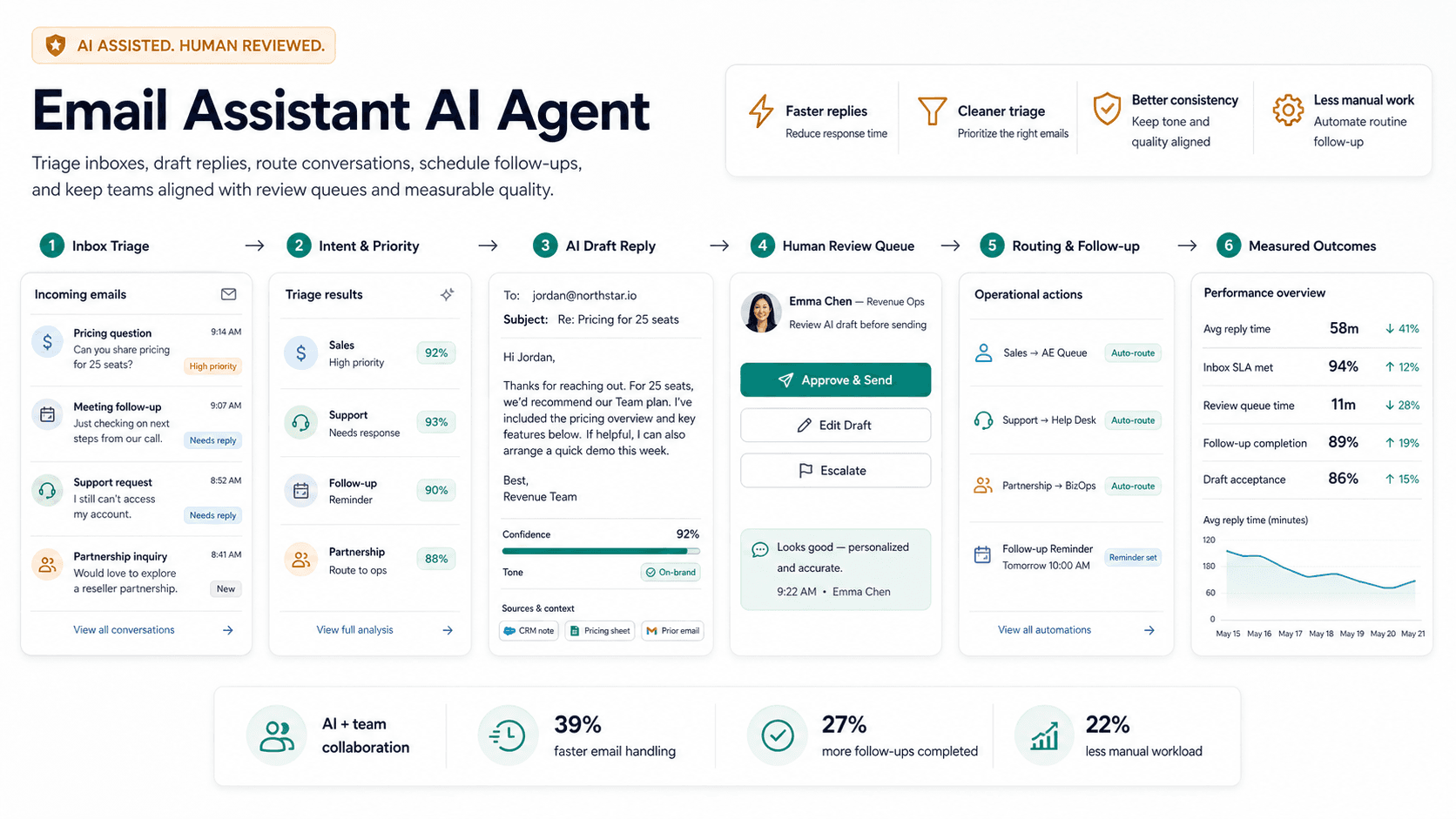

Fast answer
An email assistant AI agent triages messages, drafts replies, pulls context from approved sources, creates tasks, and flags urgent items. The safest version queues drafts for review and never sends sensitive replies without approval; start with triage and draft mode, then allow automatic sends only for narrow low-risk categories. Begin by classifying inbox categories such as customer issues, internal requests, scheduling, sales, vendor messages, invoices, newsletters, and urgent executive items. Create priority rules for who matters, which phrases signal urgency, what can wait, and what becomes a task or calendar hold. Connect context safely from CRM notes, project docs, policies, previous approved replies, and calendar, avoiding unnecessary private data. Ask for concise drafts with source notes, open questions, and suggested next actions, then turn promises and waiting-on items into reminders with owners, due dates, and links to the thread. Founder, executive, support, sales, and account management inboxes with repeated patterns are strong candidates.
On this page
What this page covers
A use-case visitor should understand the workflow, the source data required, where humans review, and what a safe first version looks like.
- 01Inbox rules
- 02Context sources
- 03Draft workflow
- 04Approval boundaries
- 05Escalations
- 06Measurement
Why does this matter now?
Inbox work drains founders, executives, and client teams because a single stream mixes priorities, admin, decisions, and follow-up with no separation. The cost is not just time but missed commitments, since promises made in email quietly fall through when the volume is high. A well-scoped email agent triages the inbox, drafts replies from approved context, and turns promises into tracked tasks so attention goes to what needs judgment. Keeping it in draft mode at first protects against the real risk, which is an automated reply going out wrong before the team trusts it.
Internal path
Where to go next from this page
These links are part of the A8gent learning and conversion path. Use them to move from concept, to diagnosis, to workflow build, to course.
What you should be able to do after this
- Triage high-volume inboxes
- Draft replies from trusted context
- Flag urgent requests
- Reduce missed follow-ups
How do you do it, step by step?
1. Classify inbox categories
Separate customer issues, internal requests, scheduling, sales, vendor messages, invoices, newsletters, and urgent executive items. Start by labeling incoming mail so the rest of the workflow has clean categories to act on. Decide which categories the agent may draft for and which it should only flag.
2. Create priority rules
Define who gets immediate attention, which phrases signal urgency, what can wait for a batch, and what should become a task or calendar hold. Encode the senders and topics that always jump the queue. Make the rules explicit so the triage is predictable rather than a black box.
3. Connect context safely
Give the agent CRM notes, project docs, policies, previously approved replies, and calendar context, and nothing beyond what it needs. Withhold sensitive data that is not required for drafting, since broad access is a privacy and security risk. Point it at approved reply examples so its drafts match how the team actually writes.
4. Draft reviewable responses
Ask for concise drafts that include the sources used, any open questions, and a suggested next action so a human can approve in seconds. Have the agent say when it lacks the context to answer rather than writing a confident guess. Keep every draft in a review queue until the category has earned auto-send.
5. Set send guardrails
Keep everything in draft mode to start, then allow automatic sending only for narrow, low-risk categories like meeting confirmations once accuracy is proven. Never let the agent send anything touching money, legal, HR, or sensitive customer matters without approval. Keep a fast way to pull back auto-send if quality slips.
6. Track follow-ups and commitments
Turn promises and waiting-on items into reminders with owners, due dates, and links back to the original thread. Detect threads that went quiet after a commitment so nothing is dropped. Surface overdue items daily so they get closed rather than forgotten.
7. Review and expand weekly
Sample triaged mail and drafts, correct miscategorizations, and refine the priority rules from what actually mattered. Track how often drafts are sent unedited as your signal for widening auto-send. Add categories gradually rather than opening the whole inbox at once.
What mistakes should you avoid?
- Letting the agent send messages before draft accuracy and trust are earned.
- Giving broad inbox access without category, privacy, and data-minimization rules.
- Drafting confident replies when the context to answer is actually missing.
- Failing to track commitments after a reply is sent, so promises quietly slip.
- Auto-sending on sensitive categories like money, legal, or HR without approval.
- Never reviewing miscategorizations, so triage rules drift out of date.
FAQ
Should an email agent send automatically?
Usually not at first. Start with triage and draft mode, then allow automatic sends only for narrow, low-risk categories once the unedited-send rate is consistently high. Sensitive topics should always require approval.
What inboxes are best suited for this?
Founder, executive, support, sales, and account management inboxes with repeated patterns are strong candidates. The more predictable the mail, the more the agent helps.
Is my email data safe?
It is as safe as the access you grant. Give the agent only the context it needs to draft, withhold sensitive data that is not required, and keep sends gated so nothing goes out unreviewed early on.
What can it not do?
It should not make judgment calls on sensitive customer, legal, or personnel matters, and it should not answer when it lacks context. Those cases get flagged for a human rather than guessed at.
How long until it is useful?
Triage and drafting for a few common categories can be running within a couple of weeks. Widening auto-send happens gradually as the team watches the edit rate.
What should this link to?
Connect it to the executive assistant AI agent, the operations AI agent, and the AI agent prompt pack for drafting structure.
Sources & further reading
Done for you
Want a email assistant agent built for your business?
Tell us the workflow. We scope, build, and ship the agent with guardrails and the numbers to prove it worked. The scoping call is free.
Free scoping call. You own the code.
Was this page helpful?