

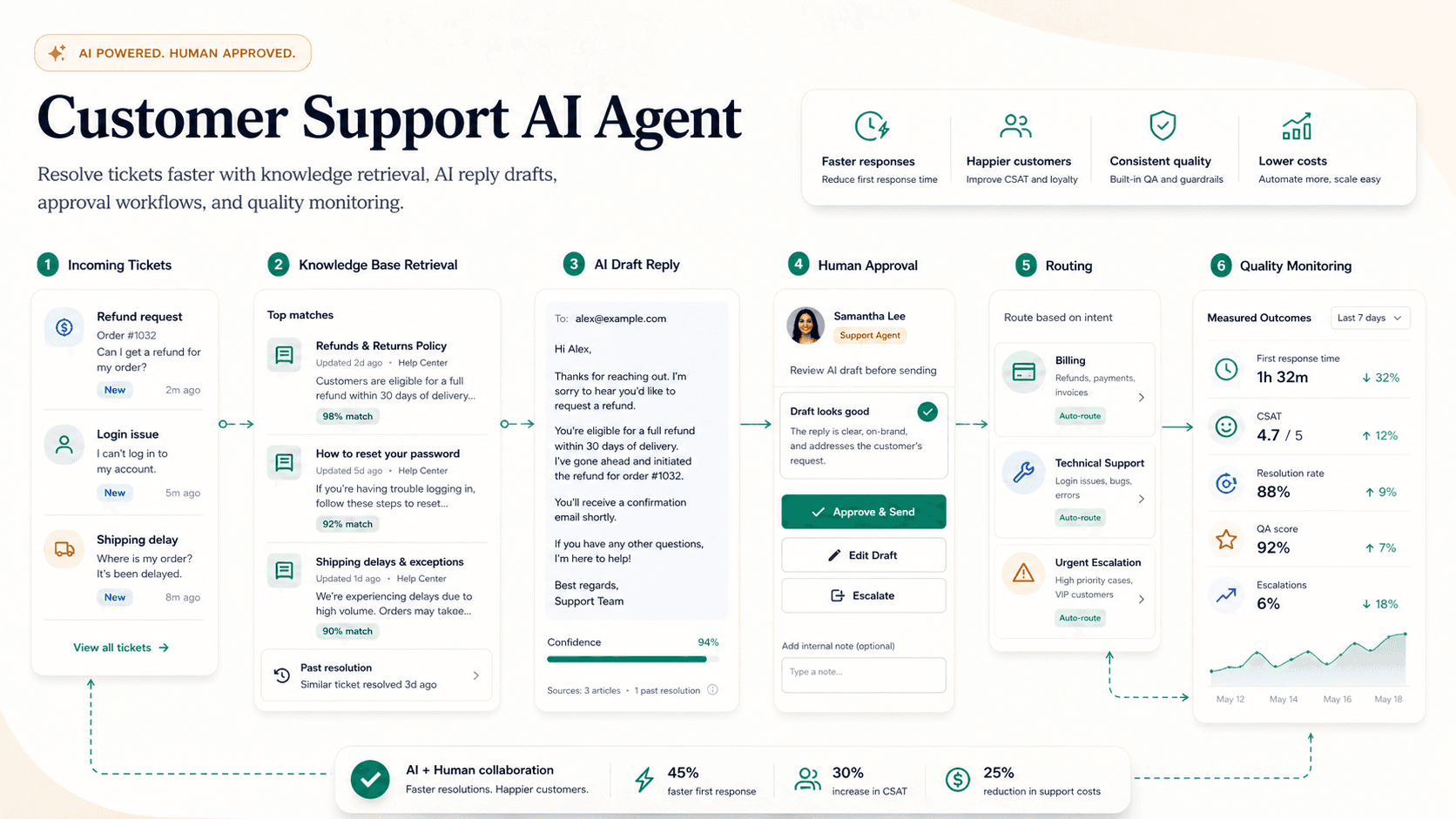

Fast answer
A customer support AI agent answers repetitive questions from an approved knowledge base, drafts replies, tags and prioritizes tickets, routes edge cases, and escalates anything uncertain to a human. The safest first version works beside agents as a draft-and-suggest layer rather than replying to customers directly. To build one, group ticket types such as billing, login, feature, refund, bug, and account questions, and start with categories where policy is clear. Clean the knowledge base first, using help docs, policy pages, product notes, and prior approved replies as the source of truth, removing stale or conflicting answers before connecting the agent. Set escalation rules so angry customers, legal concerns, out-of-policy refunds, security issues, and low-confidence answers reach a person. Measure first response time, handle time, customer satisfaction, reopen rate, and review time, not just deflected tickets. Refund exceptions, legal issues, and account judgment should always go to a human.
On this page
What this page covers
A use-case visitor should understand the workflow, the source data required, where humans review, and what a safe first version looks like.
- 01Use cases
- 02Architecture
- 03Tools needed
- 04Implementation steps
- 05Risks
- 06Course path
Why does this matter now?
Support is a strong first agent use case because questions repeat, response time matters, and quality can be measured against clear benchmarks. Most support volume clusters into a handful of predictable intents, so even a narrow agent that only drafts replies for the top five categories can remove real load from a queue. Response speed is one of the biggest drivers of satisfaction, and a draft-and-suggest layer lets a team answer faster without losing the human judgment that protects the brand. A8gent teams should treat it as a controlled support layer tied to help docs, ticket history, escalation rules, and the AI agent ROI calculator.
Internal path
Where to go next from this page
These links are part of the A8gent learning and conversion path. Use them to move from concept, to diagnosis, to workflow build, to course.
What you should be able to do after this
- Map support intents
- Connect help docs safely
- Escalate risky tickets
- Measure deflection without hurting quality
How do you do it, step by step?
1. Group ticket types
Pull the last few months of tickets and sort them into billing, login, feature, refund, bug, and account questions. Rank each category by volume and by how clear the policy is, then start only with the high-volume categories where the correct answer is unambiguous. Leave judgment-heavy or rare categories for later phases once the agent has proven accurate.
2. Clean the knowledge base
Use help docs, policy pages, product notes, and prior approved replies as the single source of truth the agent is allowed to quote. Remove stale, duplicate, or conflicting answers before connecting the agent, because it cannot tell which of two contradictory articles is current. Assign an owner to keep the knowledge base fresh, since answer quality degrades the moment the docs drift from reality.
3. Define the trigger and channel scope
Decide which channels the agent watches first, such as email and web form, and hold off on live chat until draft quality is proven. Set the trigger so a new inbound ticket in an approved category generates a draft, while everything else waits for a human. Tag each incoming ticket with intent, sentiment, and priority so routing and reporting stay consistent.
4. Design the draft workflow
Let the agent suggest a reply, the tags, the detected sentiment, the priority, and the recommended next action, but keep a human on the approve step for tone, policy, and exceptions. Show the source article behind each suggested answer so the reviewer can confirm it in seconds. Track how often reviewers edit versus send as-is, because that edit rate is your best early signal of readiness.
5. Set escalation and guardrails
Route angry customers, legal concerns, refunds outside policy, security issues, account changes, and any low-confidence answer straight to a person. Give the agent an explicit instruction to say it is not sure and hand off rather than guess when the knowledge base does not cover a question. Cap any action that touches money or account access behind human approval regardless of confidence.
6. Pilot on a subset before wider rollout
Run the agent in shadow or draft mode on one team or one category for a few weeks and compare its drafts against what agents actually sent. Fix the recurring failure patterns, expand to the next category, and only then consider auto-send for the narrowest, safest intents. Keep a fast rollback path so you can revert to full human handling if quality slips.
7. Measure quality and savings
Track first response time, handle time, customer satisfaction, reopen rate, escalation rate, and reviewer time instead of only counting deflected tickets. Watch reopen and CSAT closely, because a fast wrong answer creates more work than a slow correct one. Review a sample of agent-handled tickets weekly to catch drift before customers feel it.
What mistakes should you avoid?
- Letting the agent invent policy or improvise answers when the knowledge base does not cover the question.
- Training from messy historic replies without cleaning out stale or off-policy examples first.
- Measuring deflection while ignoring customer satisfaction, reopen rate, and escalation quality.
- Skipping human review and turning on auto-send before draft accuracy is proven on real tickets.
- Giving the agent access to refunds, account changes, or security actions without hard approval gates.
- Leaving the knowledge base unowned so answers drift out of date and the agent quotes obsolete policy.
FAQ
Should a support agent answer customers directly?
Only after the draft workflow is accurate, monitored, and limited to safe categories. Most teams should begin with suggested replies that a human approves, then allow auto-send for a few narrow, low-risk intents once the edit rate is consistently low.
What should be excluded from automation?
Refund exceptions, legal issues, angry customers, security questions, and anything requiring account judgment should always go to a person. The agent can still tag and route these, but it should not attempt the resolution itself.
How accurate is it and how do we keep it that way?
Accuracy depends almost entirely on knowledge base quality and how narrow the scope is. Keep a named owner for the docs, review a weekly sample of handled tickets, and watch reopen rate so you catch drift before customers do.
How long does it take to set up?
Cleaning the knowledge base and grouping ticket types is usually the longest part, not the agent itself. A focused pilot on the top few categories can be running in draft mode in a few weeks, with wider rollout following as trust builds.
Will it replace our support team?
No. It removes repetitive drafting and tagging so agents spend more time on complex, emotional, or high-value cases. The team shifts toward reviewing, handling escalations, and improving the knowledge base.
What should this link to internally?
Pair it with the AI agent ROI calculator, the AI agent risk checklist, and the ecommerce support AI agent page when support volume is tied to orders and needs live system data.
Sources & further reading
Done for you
Want a customer support agent built for your business?
Tell us the workflow. We scope, build, and ship the agent with guardrails and the numbers to prove it worked. The scoping call is free.
Free scoping call. You own the code.
Was this page helpful?