

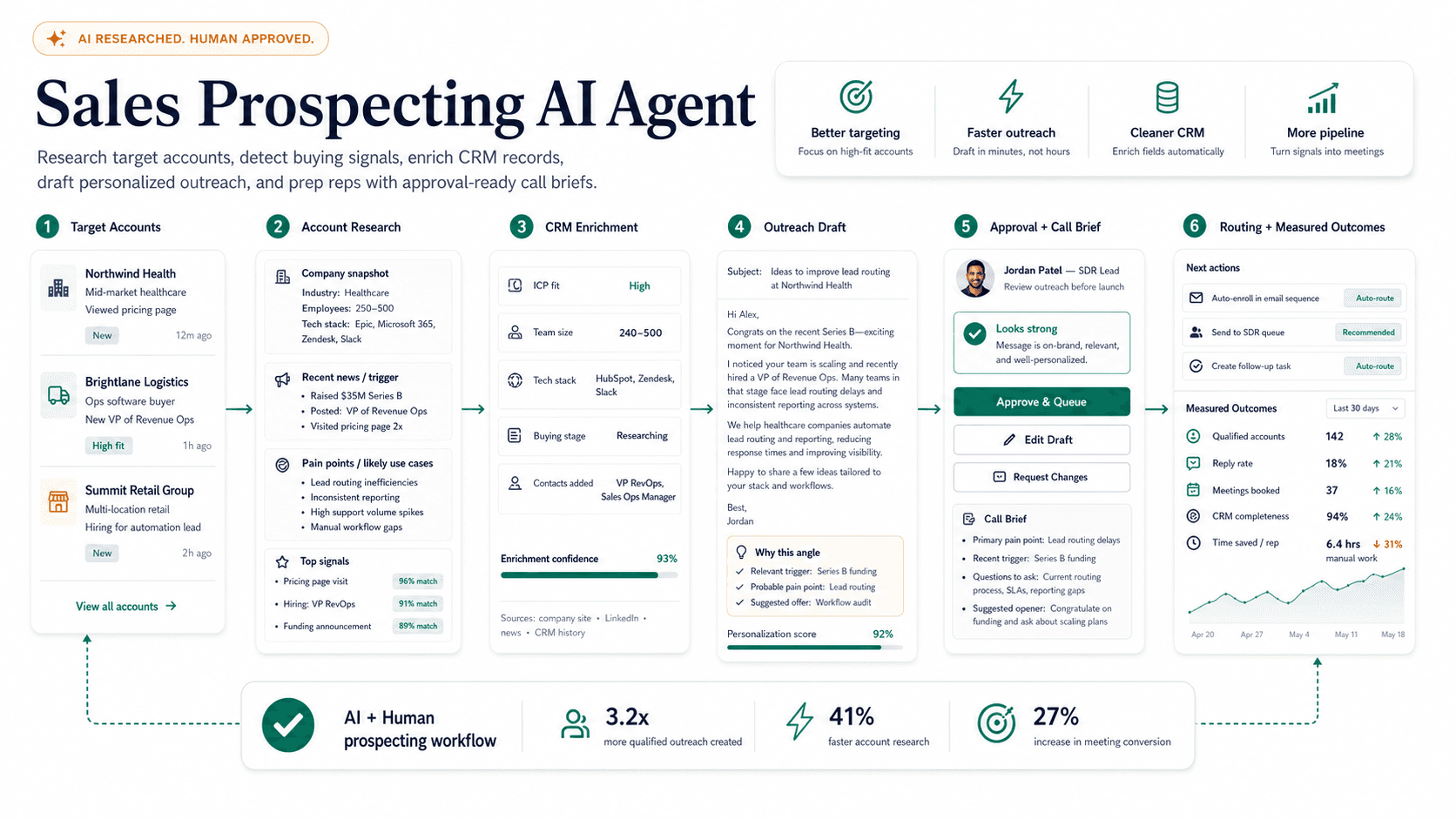

Fast answer
A sales prospecting AI agent researches accounts, finds relevant buying triggers, summarizes prospects, and drafts outreach so reps get a reviewable draft with sources. It should make reps sharper, not send generic messages to more people, and it cannot replace the offer, judgment, timing, and relationship that still close deals. Start by defining the ICP with firmographic filters, pain signals, disqualifiers, and examples of good and bad accounts. Map research sources such as company sites, CRM data, job posts, funding news, technology signals, reviews, and public announcements, storing source links with every summary. Look for triggers like hiring, funding, product launches, technology changes, compliance deadlines, expansion, or public complaints. Use that research to write short, specific outreach a human edits quickly, avoiding fake personalization and unverified claims. Sync the CRM with the source, angle, next step, and human edits. The safest first workflow is account research summaries and draft emails queued for rep approval.
On this page
What this page covers
A use-case visitor should understand the workflow, the source data required, where humans review, and what a safe first version looks like.
- 01Workflow map
- 02Data sources
- 03Prompt stack
- 04CRM handoff
- 05Quality checks
- 06Templates
Why does this matter now?
Sales teams waste hours switching between LinkedIn, company websites, the CRM, news, call notes, and email just to prepare a single relevant message. That research tax means reps either send generic outreach at volume or spend so long personalizing that they contact too few accounts. A useful A8gent workflow assembles the context, surfaces a credible reason to reach out, and hands the rep a reviewable draft with sources so they can approve or sharpen it in seconds. The point is fewer, better-aimed touches, not more spray, because reply quality and pipeline are what managers actually care about.
Internal path
Where to go next from this page
These links are part of the A8gent learning and conversion path. Use them to move from concept, to diagnosis, to workflow build, to course.
What you should be able to do after this
- Define ideal customer profiles
- Research leads faster
- Draft personalized sequences
- Avoid spammy automation
How do you do it, step by step?
1. Define the ICP precisely
Give the agent firmographic filters, pain signals, disqualifiers, and concrete examples of good and bad accounts so it does not waste effort on poor fits. Include the segments you win most often and the ones you consistently lose, since that history is the strongest signal. Write down what makes an account out of scope so the agent skips it rather than forcing an angle.
2. Map research sources
Point the agent at company sites, CRM history, job posts, funding news, technology signals, review sites, and public announcements. Require it to store a source link with every claim so a rep can verify anything questionable before it goes out. Exclude sources you consider unreliable so the agent does not repeat rumor or outdated information.
3. Detect real buying triggers
Have the agent watch for hiring in relevant roles, funding rounds, product launches, leadership changes, technology migrations, compliance deadlines, expansion, or public complaints. Rank triggers by how well they historically predict a reply so reps work the strongest signals first. A dated, specific trigger is what separates a relevant note from generic outreach.
4. Assemble the account brief
For each target, produce a short brief covering what the company does, the likely pain, the trigger, the recommended angle, and the contacts worth reaching. Keep it scannable so a rep can absorb it in under a minute before a call or before editing a draft. Flag anything the agent is unsure about instead of presenting guesses as fact.
5. Draft outreach with restraint
Use the research to write short, specific messages a human can edit quickly, and forbid fabricated personalization or unverified claims. Give the agent your proven message structures rather than letting it write in a generic template voice. Keep the draft in a queue for rep approval instead of sending automatically.
6. Sync the CRM and log everything
Write the source, the angle, the next step, and any human edits back to the CRM so managers can audit quality and the workflow improves. Capture which triggers and angles led to replies so the agent learns what works for your market. Keep a clean record so nothing is double-worked across reps.
7. Review and tune weekly
Sample recent drafts and their outcomes, cut angles that consistently fall flat, and reinforce the ones that book meetings. Watch reply rate and meetings booked rather than raw send volume, because volume without quality burns your domain and your list. Adjust the ICP and trigger weighting as you learn which accounts actually convert.
What mistakes should you avoid?
- Using AI to generate fake or hollow personalization that prospects immediately recognize as automated.
- Letting the agent contact leads without a rep reviewing the draft and the reasoning behind it.
- Optimizing for send volume instead of reply quality and meetings booked.
- Forgetting to capture source links and confidence notes, so reps cannot verify claims before sending.
- Ignoring disqualifiers and pushing outreach at accounts that are clearly out of scope.
- Never reviewing outcomes, so weak angles keep going out and burn the list and the sending domain.
FAQ
Can AI replace SDRs?
No. It can cut research and drafting time dramatically, but the offer, timing, judgment, and relationship still close deals. Reps become more effective per hour rather than unnecessary.
What is the safest first workflow?
Account research summaries and draft emails queued for rep approval are the best starting point. You get the time savings without the risk of the agent sending something inaccurate or off-brand.
How do we keep outreach from sounding robotic?
Feed the agent your best-performing message structures and require a specific, verifiable trigger in every draft. Keep a human on the approve step so anything generic gets sharpened before it sends.
Will this hurt our sender reputation?
Only if you use it to increase volume without improving relevance. Used correctly it lowers volume and raises reply rates, which protects deliverability rather than harming it.
How much setup does it take?
The ICP definition and source mapping are the real work and can take a couple of weeks to get right. Once those are dialed in, the research and drafting run continuously with light weekly tuning.
Which A8gent pages support this?
Use the AI agent prompt pack for outreach structure and the meeting follow-up AI agent for the post-call handoff into next steps and CRM notes.
Sources & further reading
Done for you
Want a sales prospecting agent built for your business?
Tell us the workflow. We scope, build, and ship the agent with guardrails and the numbers to prove it worked. The scoping call is free.
Free scoping call. You own the code.
Was this page helpful?