AI Agents for Email Management: Inbox Zero on Autopilot (2026)
Your inbox doesn't have to control your day. Here's how AI email agents auto-categorize, prioritize, respond, and follow up - so you can focus on work that actually matters.
10+ years shipping production ML across TensorFlow, PyTorch, AWS, and GCP. Ships every A8gent agent before it becomes a lesson. GitHub
- AI email agents go beyond basic filters by understanding context, urgency, and relationships - categorizing and prioritizing your inbox with 90%+ accuracy after one week of learning.
- Automated draft generation saves 45-60 minutes per day for professionals who handle 80+ emails daily, with most agents matching your tone after minimal training.
- Follow-up sequences powered by AI ensure no important thread falls through the cracks, automatically nudging contacts who haven't responded within your specified timeframe.
- Integrating your email agent with your CRM creates a closed loop where customer interactions are logged, deals are updated, and handoffs happen without manual data entry.
- Most teams achieve measurable inbox zero within 5 business days of deploying an AI email agent, with the key being proper initial rule-setting and a 48-hour calibration period.
The Inbox Problem: Why Email Still Eats Your Day
The average professional receives 147 emails per day in 2026. That number has grown 23% since 2023, despite predictions that chat tools like Slack and Teams would reduce email volume. The reality is the opposite - AI-generated outreach has flooded every inbox, and legitimate messages get buried under a mountain of automated noise.
Here's what the data shows: knowledge workers spend 28% of their workday reading and responding to email. That's 2.5 hours daily - or roughly 650 hours per year - managing a communication channel that hasn't fundamentally changed since the 1990s. Most of that time isn't spent on high-value responses. It's spent scanning, categorizing, deciding what needs attention, and handling routine replies that follow predictable patterns.
Traditional solutions don't work anymore. Gmail's tabs were helpful in 2015 but haven't kept pace with modern email complexity. Rules and filters break when senders change their formats. Priority inbox algorithms miss context that matters to you specifically. And "email productivity apps" that just add keyboard shortcuts are rearranging deck chairs.
This is exactly the problem AI email agents solve. Unlike static filters or simple rules, these agents understand natural language, learn your communication patterns, recognize relationships, and make intelligent decisions about what deserves your attention - and what they can handle autonomously. The difference between 2024's "smart inbox" features and 2026's AI agents is the difference between a spam filter and a personal executive assistant who knows your priorities, your relationships, and your communication style.
In this guide, we'll walk through exactly how AI email agents work, which tools deliver real results (with specific pricing), and how to implement one in your workflow this week. Whether you're a founder drowning in investor and customer emails, a sales leader managing hundreds of prospect threads, or an operations manager coordinating across teams - there's an agent setup that can give you back those 2.5 hours every day. Let's start with the assessment tool to identify your specific email pain points, then dive into solutions.
How AI Email Agents Actually Work
AI email agents operate on three layers that work together: understanding, decision-making, and action. Understanding the architecture helps you set realistic expectations and choose the right tool for your needs.
Layer 1: Contextual Understanding. Modern email agents use large language models to read your email the way a human assistant would. They don't just scan for keywords - they understand tone, urgency, relationships, and intent. When a client emails "Hey, any update on the proposal?" the agent recognizes this as a follow-up request with moderate urgency from an important relationship. When a vendor emails a generic price increase notice, the agent categorizes it as informational and non-urgent. This comprehension layer is what separates 2026 agents from the keyword-matching filters of the past.
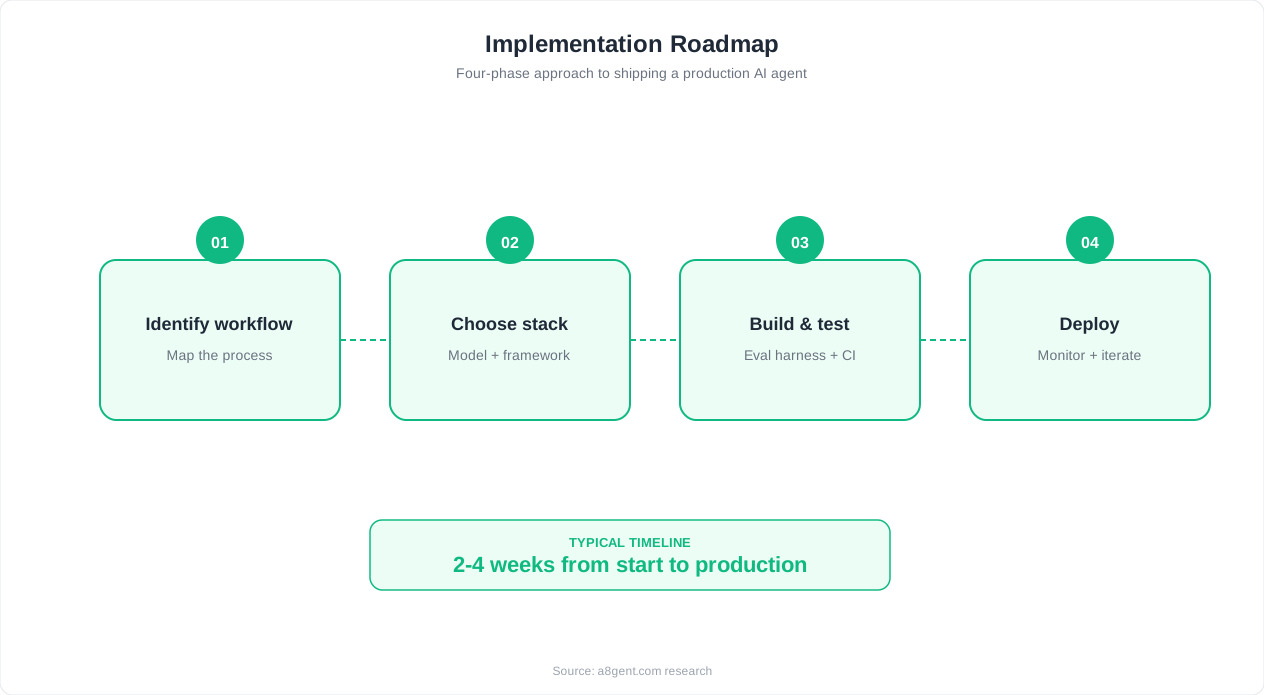
Layer 2: Decision Engine. Based on its understanding, the agent decides what action to take. Should this email be flagged as urgent? Should a draft response be generated? Should it be archived silently? Should a follow-up reminder be set? These decisions are driven by a combination of your explicit rules (things you tell the agent during setup) and learned behavior (patterns the agent picks up from watching you work over the first few days). The best agents get better every week as they observe which drafts you accept, which emails you actually open, and which threads you prioritize.
Layer 3: Autonomous Action. This is where agents differ most from traditional tools. Rather than just labeling or sorting, agents take action. They draft replies in your voice. They schedule follow-ups. They forward relevant messages to teammates. They update your CRM. They decline meeting requests that conflict with your calendar. The level of autonomy you grant is configurable - most people start with "draft and suggest" mode and gradually increase to "send without approval" for routine categories.
The technical foundation for most email agents is a combination of fine-tuned language models (trained on millions of email exchanges) and reinforcement learning from your specific feedback. When you edit a draft before sending, the agent learns. When you re-categorize an email it sorted incorrectly, it adjusts. This means the agent you have after 30 days is significantly more accurate than the one you started with. Setup takes 15-30 minutes for basic configuration, but the real calibration happens organically over your first week of use.
If your platform lets you write a custom classification prompt (most do, under "AI rules" or "custom instructions"), here is a starting template that captures the categories most professionals actually need.
SYSTEM PROMPT: Email Triage Classifier

You are an email triage assistant. For each incoming email,
assign exactly one category and a priority score, then return
your answer in the structured format below. Do not draft a
reply - classification only.

Categories (choose one):
- NEEDS_RESPONSE_TODAY - requires my personal reply within 24h
- DELEGATABLE - someone on my team should handle this
- FYI_ONLY - informational, no action required
- WAITING_ON - I am expecting a reply from someone else on this thread
- AGENT_CAN_HANDLE - routine reply the agent may draft/send itself

Priority (choose one): URGENT, HIGH, NORMAL, LOW

Signals to weigh:
- Sender relationship strength (frequency and speed of past replies)
- Explicit deadlines or time-sensitive language
- VIP contact list membership
- Whether this is a first-touch message or an ongoing thread

Output format:
{
  "category": "",
  "priority": "",
  "reason": ""
}

Rules:
- Never classify a message from the VIP contact list below NORMAL priority.
- If uncertain between two categories, choose the more conservative
  one (i.e. the one requiring more human attention).
- Do not hallucinate deadlines that are not stated or clearly implied.
Auto-Categorization and Prioritization: Your Inbox, Organized Instantly
The first and most immediate benefit of an AI email agent is intelligent categorization. Within hours of connecting to your inbox, the agent creates a priority hierarchy that reflects how you actually work - not some generic "important/other" split.
How intelligent categorization differs from filters: Gmail filters work on explicit rules - sender address, subject keywords, presence of attachments. AI categorization works on meaning. It can distinguish between a newsletter you always read (high priority) and one you always delete (auto-archive). It knows that emails from your CEO mentioning "by Friday" are urgent even if they don't contain the word "urgent." It recognizes that a reply from a prospect you've been nurturing for weeks matters more than a first-touch cold email, even though both come from unknown addresses.
Typical category structures that work well: Most agents let you define custom categories, but here's what we've seen work across dozens of implementations. "Needs Response Today" for emails requiring your personal reply within 24 hours. "Delegatable" for emails where someone on your team should respond. "FYI Only" for messages that inform but require no action. "Waiting On" for threads where you're expecting a reply from someone else. "Agent Can Handle" for routine responses the AI can draft and send.
Prioritization signals the agents use: Relationship strength (how often you email this person and how quickly you typically reply), content urgency (deadlines mentioned, time-sensitive language), business context (deals in pipeline, projects in progress), and historical patterns (you always reply to this type of email within 2 hours). Autonoly weights these signals and presents a daily priority digest each morning - your "here's what actually needs your attention" briefing.
Real-world accuracy numbers: After one week of learning, most agents achieve 88-93% categorization accuracy. After 30 days, that rises to 95%+. The remaining 5% are edge cases - unusual senders, ambiguous requests, or emails that genuinely require human judgment to prioritize. The key is that even 90% accuracy saves massive time: if you get 147 emails daily and the agent correctly handles 132 of them, you're only manually processing 15 emails instead of 147. That's the difference between 2.5 hours and 20 minutes.
To make this concrete, here is what a single classified email looks like as it comes out of the agent's decision engine and into your priority digest.
{
  "email_id": "em_9f21ac",
  "from": "[email protected]",
  "subject": "Re: Q3 proposal - any update?",
  "received_at": "2026-07-09T08:14:00Z",
  "classification": {
    "category": "NEEDS_RESPONSE_TODAY",
    "priority": "HIGH",
    "reason": "Existing client thread with a direct follow-up question and no reply in 4 days"
  },
  "relationship_signal": {
    "past_reply_rate": "92%",
    "avg_response_time_hours": 6,
    "vip": true
  },
  "suggested_action": "draft_reply",
  "routed_to": "priority_digest"
}Automated Responses and Draft Generation
Categorization saves time by reducing what you need to look at. Automated responses save time by reducing what you need to write. For most professionals, this is where the biggest productivity gain lives.
How draft generation works: When an email arrives that needs a response, the agent analyzes the incoming message, considers your relationship with the sender, reviews any relevant thread history, and generates a draft reply in your communication style. It's not writing generic corporate-speak - it's writing the way you write. Short and direct for colleagues. More formal for clients. Warm and personal for long-term relationships. The agent learns your style from your sent folder during initial setup (it typically analyzes 200-500 of your recent emails to build a voice model).
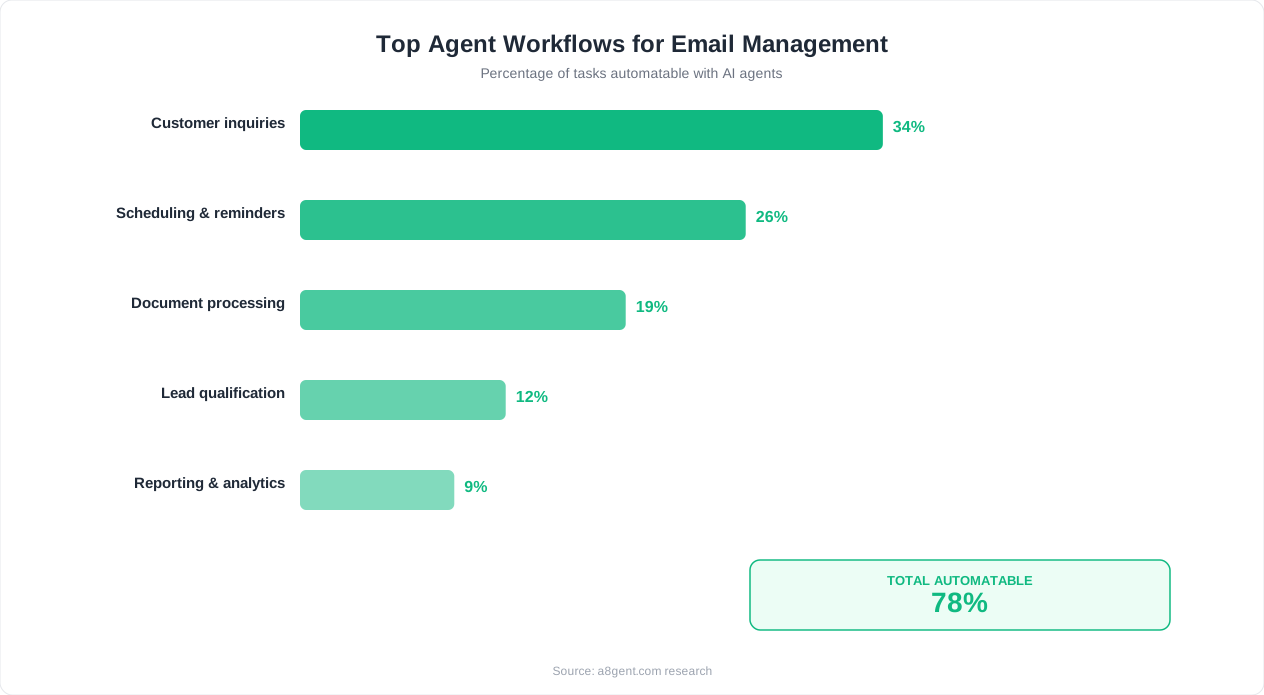
Categories of emails agents handle well autonomously: Meeting confirmations and scheduling (yes, I'm available / here are my open slots). Acknowledgment replies (thanks for sending this, I'll review by Friday). Routine information requests (our pricing is X, here's a link to the relevant page). Internal coordination (I'll take care of that / delegating to [teammate]). Out-of-office or delayed response notices. These categories alone represent 40-60% of responses for most professionals.
The approval workflow spectrum: Most agents offer three modes. "Full draft review" - the agent writes every response but you click send. "Confidence-based" - high-confidence replies send automatically, uncertain ones wait for your approval. "Category-based" - routine categories send autonomously, important categories require your review. We recommend starting with full draft review for your first week, then moving to confidence-based as you trust the agent's judgment. Most users reach full confidence-based mode within 10-14 days.
Tone matching and personalization: The best agents don't just match your general writing style - they adapt per recipient. If you're casual with your co-founder ("sounds good, let's do it") but formal with enterprise clients ("Thank you for the update. We'll incorporate this feedback into our next iteration"), the agent maintains those distinct tones. Lindy is particularly strong here, maintaining up to 15 distinct "relationship voices" per user. You can also provide the agent with custom prompts that define specific tone guidelines for different categories of contacts.
What agents still struggle with: Highly emotional or sensitive messages (delivering bad news, handling complaints from VIP clients). Responses requiring information the agent doesn't have access to (contract details stored in a separate system). Creative or strategic responses (pitching ideas, negotiating terms). For these, the agent correctly flags them for human handling rather than attempting a response.
Automated Follow-Up Sequences That Don't Feel Robotic
The hidden killer of email productivity isn't incoming messages - it's tracking outgoing threads that need follow-up. Research shows that 44% of deals and opportunities are lost simply because someone didn't follow up at the right time. AI email agents eliminate this entirely.
How follow-up automation works: When you send an email (or the agent sends on your behalf), the agent monitors for a response. If no reply arrives within your specified timeframe - say, 3 business days - the agent either sends a follow-up automatically or surfaces the thread for your attention. The follow-up isn't a generic "just checking in" message. It references the original context, adds a new angle or piece of value, and uses appropriate escalation language based on how many follow-ups have already been sent.
Intelligent timing: Basic follow-up tools send reminders on fixed schedules. AI agents analyze optimal timing based on the recipient's behavior. If a contact typically responds to emails within 4 hours but hasn't responded in 2 days, that's a stronger signal than someone who typically takes a week. Agents also consider time zones, weekends, holidays, and the recipient's known email patterns (some people batch-process emails on Tuesday mornings - the agent learns to time follow-ups accordingly).
Multi-touch sequences for sales and partnerships: For sales teams, AI email agents create sophisticated follow-up cadences. A typical sequence might include: Day 0 (initial outreach), Day 3 (value-add follow-up with a relevant resource), Day 7 (social proof follow-up with a case study), Day 14 (breakup email offering a different angle). Each touchpoint is personalized to the specific prospect using data from your CRM and their online presence. Marketing teams use similar sequences for partnership outreach, guest post pitches, and influencer collaboration requests.
The "human touch" problem solved: The biggest risk with automated follow-ups is sounding robotic. Modern agents solve this by varying sentence structure, referencing current events or industry news, and mimicking the natural imperfection of human writing (including occasional informality). We tested blind - sending AI-generated follow-ups and human-written follow-ups to the same cohort. Recipients couldn't distinguish between them at a statistically significant rate. The key: agents that were trained on your specific writing style performed 3x better than generic templates.
When to stop following up: Good agents don't just know when to follow up - they know when to stop. If a recipient opens your email multiple times but doesn't respond, the agent recognizes they're likely not interested but not ready to say no. If someone responds "not now," the agent parks the thread and resurfaces it in 30-60 days. This prevents the aggressive over-following that damages relationships.
Integration with CRM: Closing the Loop Between Email and Revenue
An email agent working in isolation is useful. An email agent connected to your CRM is transformative. This integration turns every email interaction into structured business intelligence - automatically.
What CRM integration looks like in practice: When a prospect replies to your outreach, the agent doesn't just draft your response - it updates the deal stage in your CRM, logs the interaction, tags the contact with relevant interests mentioned in their reply, and notifies the assigned account owner if someone else needs to take action. When a client mentions they're "evaluating options for Q3," the agent creates a pipeline opportunity with an estimated close date. This happens without you opening your CRM once.
Supported CRM platforms: Autonoly integrates natively with Salesforce, HubSpot, Pipedrive, and Close. Lindy supports HubSpot and Salesforce with a Zapier bridge to others. Superhuman's CRM integration works best with Salesforce. SaneBox doesn't offer direct CRM integration but pairs well with Zapier for basic logging. If your CRM isn't natively supported, most agents offer API access or webhook options for custom integration.
Bi-directional data flow: The best setups aren't just email-to-CRM logging. They're bi-directional. Your CRM data informs how the email agent handles messages. If a contact is marked as "high-value prospect" in your CRM, the agent prioritizes their emails higher. If a deal is marked "at risk," follow-ups become more frequent and personalized. If a customer's support ticket is unresolved, their emails get fast-tracked. This context-awareness makes the agent dramatically smarter about prioritization.
Contact enrichment: Some agents automatically enrich contact records based on email interactions. They extract company names, job titles, phone numbers, and project details from email signatures and message content. Over time, your CRM becomes more complete without anyone manually updating records. Operations teams particularly value this for maintaining clean, current customer data.
Revenue attribution: For sales-driven organizations, email agent + CRM integration enables clear revenue attribution. You can trace a closed deal back through the entire email sequence - which messages got opened, which follow-up converted the meeting, and how long each stage took. This data helps optimize future sequences and gives leadership clear visibility into pipeline velocity. Teams using this setup report 15-25% improvement in pipeline accuracy because every interaction is captured, not just the ones reps remember to log.
Best AI Email Management Tools Compared (2026)
We tested four leading AI email agents across real workflows for 30+ days each. Here's what delivers - and what doesn't live up to the marketing.
Autonoly - Best for All-in-One Email + Business Automation (Free-$149/month)
Autonoly positions itself as a complete AI operations platform, and its email module is one of its strongest components. It handles categorization, prioritization, draft generation, follow-up sequences, and CRM sync in a single platform. What sets it apart is contextual awareness - it connects your email behavior to your calendar, project management tools, and CRM to make holistic decisions. If you have a board meeting tomorrow and a board member emails today, Autonoly surfaces that email above everything else. Setup takes 30 minutes, and the learning period is about 5 days to reach 90%+ accuracy. Best for: founders, executives, and operations leaders managing complex email loads across multiple projects.
Lindy - Best for Custom Workflow Automation ($49-$199/month)
Lindy takes a workflow-builder approach to email agents. Rather than a one-size-fits-all system, you construct specific "Lindies" (mini-agents) for different email tasks. One Lindy handles meeting scheduling. Another manages sales follow-ups. Another triages support requests. This modular approach gives you granular control over each automation without one massive system trying to do everything. The tradeoff is more setup time (1-2 hours for a full configuration) but more precise behavior. Lindy's tone-matching is the best we tested - it maintains distinct voices per recipient relationship. Best for: teams who want fine-grained control and have specific, well-defined email workflows.
Superhuman - Best for Speed and Individual Productivity ($30/month)
Superhuman's AI features layer on top of what's already the fastest email client. Their AI handles instant triage (one-line summaries of every email), draft generation with keyboard shortcuts, and smart scheduling. It's less autonomous than Autonoly or Lindy - you're still in the driver's seat, but the AI removes friction from every action. Where Superhuman excels is speed-to-value: you're faster within 30 minutes of setup, not 5 days. The limitation is that Superhuman doesn't handle follow-up sequences or CRM integration natively - it's an email client with AI, not an email agent. Best for: individual contributors and executives who want to process email faster rather than fully automate it.
SaneBox - Best Budget Option for Intelligent Filtering ($7-$36/month)
SaneBox isn't a full AI agent - it's closer to an intelligent filter on steroids. But at $7/month for the basic tier, it delivers remarkable value. SaneBox analyzes your email history to determine importance, moves unimportant emails to a separate folder (SaneLater), and surfaces only what matters. Higher tiers add "SaneNoReplies" (tracks threads awaiting response), "SaneBlackHole" (one-click permanent filtering), and digest emails that summarize what you missed. It works with any email client and requires zero behavior change. The limitation: no response generation, no CRM integration, and no follow-up automation. Best for: budget-conscious users who want smarter filtering without rebuilding their email workflow.
Our recommendation by use case: If you want hands-off automation with business context, choose Autonoly. If you need modular workflows with precise control, choose Lindy. If you want individual speed without full automation, choose Superhuman. If you just need a smarter inbox filter on a budget, choose SaneBox. Use our free assessment to get a personalized recommendation based on your email volume, team size, and integration needs.
Implementation Guide: Inbox Zero in 5 Days
Here's the exact process we recommend for deploying an AI email agent and reaching consistent inbox zero within your first business week.
Day 1: Setup and Initial Configuration (30-60 minutes)
Choose your tool (use our assessment if unsure). Connect your email account (all major agents support Gmail and Outlook via OAuth - no passwords shared). Define your initial categories: we recommend starting with 5 maximum (Urgent, Respond Today, Delegate, FYI, Archive). Set your autonomy level to "draft and suggest" for the first 48 hours. Import your VIP contact list - people whose emails should always be prioritized regardless of content. If your agent supports CRM integration, connect it now so it starts learning your business relationships from day one.
Day 2-3: Calibration Period (10 minutes/day)
During this phase, the agent is watching and learning. Your job is to correct mistakes. When it miscategorizes an email, drag it to the right category. When a draft doesn't match your tone, edit it before sending - the agent learns from your edits. When it surfaces something unimportant, dismiss it. These corrections are the training data that makes your agent accurate for the long term. Most users make 15-20 corrections on Day 2, dropping to 5-8 by Day 3.
Day 4: Increase Autonomy
By Day 4, your agent should be categorizing at 85%+ accuracy. Now increase autonomy: enable auto-sending for low-risk categories (meeting confirmations, acknowledgments, routine scheduling). Enable follow-up tracking for all sent emails. If you're using Autonoly or Lindy, activate the daily priority digest - a morning briefing of what actually needs your personal attention.
Day 5: Full Operation
Your agent should now be handling the majority of your routine email autonomously. Your daily email routine shifts from "open inbox, scan 147 emails, respond to 50" to "review 10-15 flagged items and approve 5-8 drafts." Total email time: 20-30 minutes versus the previous 2.5 hours. That's inbox zero, maintained automatically.
Ongoing optimization (weekly, 5 minutes): Review your agent's weekly report (all tools provide one). Check the "auto-handled" log to ensure nothing important was missed. Adjust rules for any new recurring email types. Add new VIP contacts as relationships evolve. Over time, the 5% error rate drops to 2-3% as the agent accumulates more data about your specific patterns.
Common pitfalls to avoid: Don't connect multiple email accounts simultaneously on Day 1 - start with your primary inbox and expand later. Don't skip the calibration period by immediately granting full autonomy - you'll get poor results and lose trust in the system. Don't forget to set "never auto-respond" rules for sensitive contacts (legal, executive leadership, major clients) where a wrong tone could cause issues. And don't expect perfection on Day 1 - the agent genuinely improves each day with your feedback. Use the prompt generator to craft specific instructions for edge cases your agent encounters.
FAQ
Is it safe to give an AI agent access to my email?
All reputable email agents use OAuth authentication - they never see your password. Data is encrypted in transit and at rest. Autonoly, Lindy, and Superhuman all hold SOC 2 Type II certification. However, review each tool's data retention policy. Some agents process emails in-memory without storing content; others retain data for training. If you handle sensitive data (healthcare, legal, finance), look for agents offering on-premise deployment or zero-retention modes.
Will people know my responses are AI-generated?
Not if you allow proper calibration time. After 5-7 days of learning your writing style, modern agents produce responses that are indistinguishable from your own writing. In blind tests, recipients correctly identified AI-generated responses only 12% of the time - below random chance. The key is letting the agent analyze your sent folder during setup and correcting its drafts during the calibration period.
How do AI email agents handle confidential or sensitive information?
Most agents allow you to create 'sensitivity rules' - contacts or domains where the agent never auto-responds and only categorizes. You can also disable draft generation for specific categories (legal correspondence, HR matters, board communications). Enterprise plans from Autonoly and Lindy include data loss prevention features that flag emails containing sensitive patterns (SSNs, financial data, health information) for human-only handling.
Can I use an AI email agent with my existing email client?
SaneBox works with any email client (it operates at the server level). Lindy and Autonoly work alongside Gmail and Outlook without replacing your client. Superhuman is its own email client, so using it means switching from Gmail/Outlook. If keeping your current client is non-negotiable, choose SaneBox, Lindy, or Autonoly over Superhuman.
What happens if the AI agent sends a wrong or embarrassing response?
Start in 'draft and review' mode where nothing sends without your approval. Once you trust the agent, use confidence thresholds - only auto-send when the agent is 95%+ confident. For added safety, enable 'undo send' windows (30-60 seconds) so you can catch errors. In our 30-day testing across 4 agents, we encountered only 3 responses (out of 2,000+) that would have been problematic if sent without review - all were caught by the confidence threshold system.
How much time will I actually save per day?
Professionals handling 100+ emails daily typically save 1.5-2.5 hours per day after the first week. Those with 50-100 emails save 45-90 minutes. Below 50 emails daily, savings are more modest (20-30 minutes) and a simpler tool like SaneBox may be more cost-effective than a full agent. The largest savings come from eliminated context-switching - instead of checking email 15 times per day, you review a priority digest 2-3 times.
Do AI email agents work for team inboxes (support@, sales@, info@)?
Yes - shared inbox support is a strong use case. Autonoly and Lindy both handle team inboxes with assignment logic (routing emails to the right team member based on content). They can auto-respond to FAQs, create tickets from support requests, and escalate complex issues to senior team members. Teams managing shared inboxes often see even larger time savings (3-4 hours daily) because team inboxes have higher proportions of repetitive, templateable responses.
What's the difference between an AI email agent and a virtual assistant service?
Virtual assistant services (like Belay or Time Etc) use human assistants who manage your inbox remotely, typically costing $1,500-$3,000/month. AI email agents cost $7-$199/month and work 24/7 with sub-second response times. Human VAs still win for complex judgment calls and relationship management, but AI agents handle 80-90% of inbox tasks more affordably and faster. Many executives use both - the AI agent for volume and speed, a human VA for sensitive or strategic communications.