How to Evaluate AI Agent Tools: The Business Owner's Checklist (2026)
With hundreds of AI agent platforms available in 2026, choosing the right one is overwhelming. This systematic evaluation checklist helps business owners compare tools on the criteria that actually matter: integration depth, true cost, reliability, and time-to-value.
10+ years shipping production ML across TensorFlow, PyTorch, AWS, and GCP. Ships every A8gent agent before it becomes a lesson. GitHub
- The most important evaluation criterion is integration depth with your existing tools - an AI agent that cannot connect to your current software stack creates more work than it eliminates, regardless of how impressive its features appear in demos.
- True cost of an AI agent platform includes subscription fees, implementation time, learning curve, maintenance overhead, and opportunity cost of choosing wrong - the cheapest option often costs more when you factor in the 40-60 hours of setup time for complex platforms.
- Reliability and uptime matter more than feature count: a platform that works flawlessly on 5 core automations delivers more value than one offering 50 features that frequently break or require constant maintenance.
- Time-to-value should be measured in days, not months - if a platform cannot show demonstrable results within 14 days of signup, it is either too complex for your needs or poorly designed for business users.
- Always test with your actual workflows before committing annually - every platform looks good in demos with ideal scenarios, but the real test is whether it handles your specific edge cases, data formats, and integration requirements.
Why Choosing the Right AI Agent Tool Is the Most Important Decision
The AI agent tool market in 2026 has a problem: there are too many options and not enough clarity on how to choose between them. A quick search reveals hundreds of platforms, each claiming to automate your business, save you hours, and deliver magical ROI. The marketing is polished. The demos look impressive. And yet most business owners who deploy AI agents report that their first platform choice was wrong.
This is not because the tools are bad. It is because the evaluation criteria most people use - features, price, and brand recognition - are the wrong criteria for making this decision. The right AI agent tool for your business depends on factors that are rarely highlighted in marketing materials: how deeply it integrates with your specific software stack, how quickly a non-technical person can deploy it, how reliably it operates without babysitting, and how it handles the inevitable edge cases in your unique workflows.
Getting this decision right matters enormously. The right platform delivers immediate, compounding value - every automation you build works reliably, integrations flow smoothly, and each month brings more efficiency. The wrong platform creates a different kind of compounding: frustration. Broken automations, clunky workarounds, integration gaps that require manual bridging, and the slow realization that you need to migrate to a different tool - losing all the setup work you have invested.
We have seen this pattern hundreds of times. A business owner signs up for an annual plan (attracted by the discount), spends 20-40 hours building workflows, then discovers a critical limitation three months in. Maybe it cannot handle their CRM's custom fields. Maybe it goes down every Tuesday during their peak hours. Maybe the "unlimited" plan has hidden usage caps that trigger overage fees. These are expensive lessons that a proper evaluation process prevents entirely.
This guide provides a systematic evaluation framework - a checklist you can apply to any AI agent platform to determine whether it is genuinely right for your specific business. We will cover the seven evaluation dimensions that actually predict long-term success, the red flags that indicate future problems, and the testing methodology that reveals a platform's real capabilities versus its demo-day best.
If you want a shortcut to platform recommendations tailored to your specific business, take our free assessment. It evaluates your current tools, automation goals, and technical capacity to recommend platforms that genuinely fit. Otherwise, let us build your evaluation framework from scratch.
Criterion 1: Integration Depth - Does It Actually Connect to Your Stack?
Integration depth is the single most important evaluation criterion - and the one most commonly underestimated. A platform might advertise "500+ integrations" but that number tells you nothing about whether its connection to YOUR specific tools is deep enough to be useful.
Surface Integrations vs. Deep Integrations
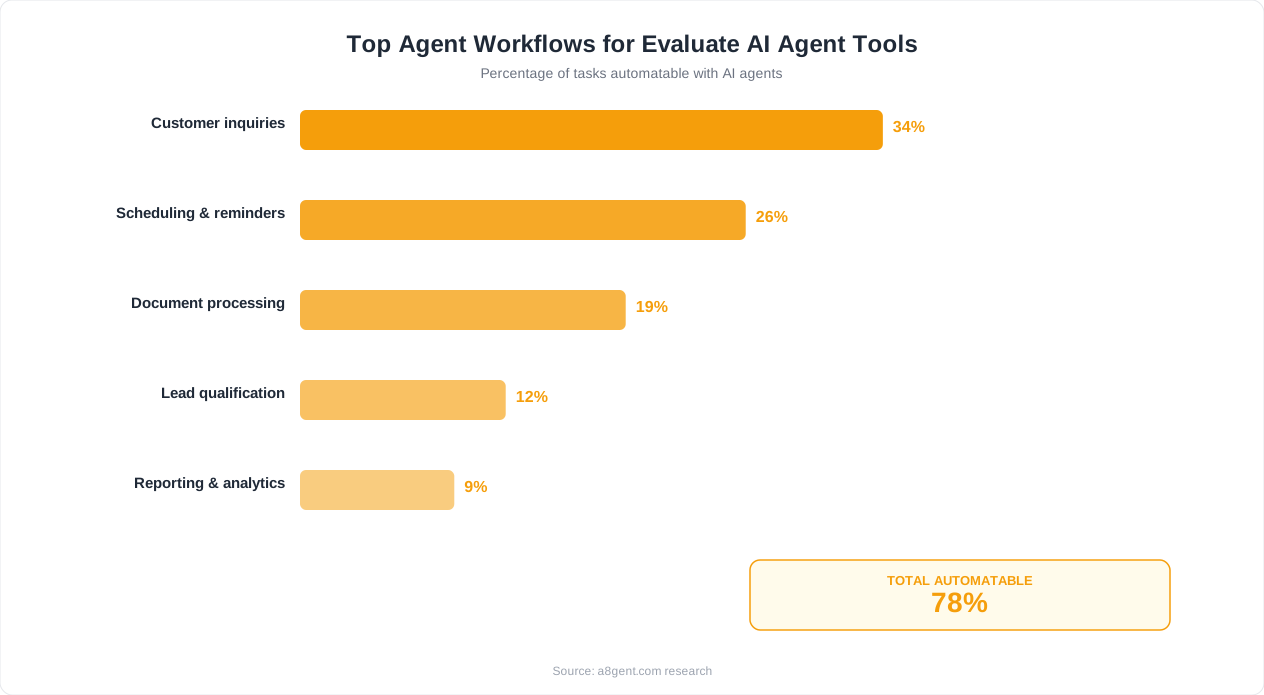
There is a critical difference between a platform that connects to a tool and one that deeply integrates with it. A surface integration might connect to your CRM but only read contact names and emails. A deep integration reads and writes to custom fields, triggers on specific events, handles attachments, respects permission levels, and maps complex data structures. When evaluating, ask: can the AI agent access ALL the data fields I need? Can it write back to my tools with the same granularity? Can it trigger based on specific events (not just polling on a schedule)?
The Integration Checklist
For each critical tool in your business stack, verify: read access (can the AI pull the specific data points it needs?), write access (can it update records, create entries, modify status?), trigger capability (can it react to events in real-time or only poll periodically?), authentication method (OAuth preferred over API keys for security and maintenance), rate limits (will the platform hit API limits at your data volume?), and custom field support (does it handle your customizations or only default fields?). If any critical tool fails this checklist, that platform is not viable for your business regardless of other strengths.
Testing Integration Quality
During your trial period, test integrations with your actual data - not just the demo scenario. Send a complex record through the integration (one with special characters, empty fields, custom objects). Test what happens when the connected tool has an API hiccup. Verify that data maps correctly in both directions. Try the integration at your actual volume - some connections that work perfectly with 10 records break at 1,000. These real-world tests reveal integration quality in ways that documentation and demos never do.
Native vs. Third-Party Connectors
Some platforms build their own integrations (native) while others rely on third-party middleware like Zapier or Make for connections. Native integrations are typically deeper, more reliable, and faster. Third-party connectors add another dependency (and potential failure point) to your automation chain. When a platform says it integrates with your tool "via Zapier," understand that means: slower execution, potential data loss in translation, additional cost for the middleware, and two systems to troubleshoot when something breaks. Native is almost always preferable for your critical workflows.
Future Integration Needs
Think 12 months ahead. Are you likely to switch CRMs? Add an ERP? Adopt new communication tools? Evaluate the platform's integration roadmap and its history of adding new connections. A platform that ships 5 new integrations monthly is safer for future needs than one that ships 2 per year. Also check: does it offer a generic webhook/API option so you can build custom connections for tools not yet officially supported?
Use our integration checker to quickly verify whether your specific tool stack is supported by the platforms you are considering - it cross-references your tools against each platform's actual integration capabilities, not just their marketing claims.
Criterion 2: True Cost - Beyond the Monthly Subscription
The advertised price of an AI agent platform is rarely the actual cost. True cost includes visible fees plus hidden costs that accumulate over time. Understanding total cost of ownership prevents budget surprises and ensures accurate ROI calculations.
Visible Costs
Start with the obvious: monthly or annual subscription fee, per-user charges, per-automation or per-task fees, and overage charges for exceeding plan limits. Get specific numbers: How many automations are included? How many executions per month? How many connected tools? How many team members? Platforms that advertise "$49/month" often mean "$49/month for 1,000 tasks" - and your business might need 10,000 tasks/month, making the real cost $200+ once overages kick in.
Hidden Cost: Implementation Time
How many hours will it take to get your first automation running? For a non-technical business owner, implementation time ranges wildly: 2 hours for the simplest platforms to 40+ hours for complex ones. At your hourly value (or your team's hourly rate), implementation time is a real cost. A platform at $99/month that takes 4 hours to deploy costs less in year one than a $49/month platform that takes 60 hours. Calculate this honestly using your projected implementation hours.
Hidden Cost: Learning Curve
Beyond initial setup, how long until you can confidently build new automations without consulting documentation or support? Some platforms are intuitive enough that you are self-sufficient after day one. Others require weeks of learning, video tutorials, community forum diving, and trial-and-error. Factor in: how many team members need to learn the platform? How often will you need to build new workflows? A steep learning curve costs more for teams that build automations frequently.
Hidden Cost: Maintenance Overhead
Once deployed, how much ongoing attention does the platform require? Questions to ask: How often do automations break without human intervention? When integrations update, does the platform adapt or do workflows need manual fixing? How much time per week do you spend monitoring, debugging, and maintaining existing automations? The best platforms run unattended for weeks. The worst require daily babysitting. Over 12 months, maintenance overhead of just 2 hours/week at $50/hour adds $5,200 to your annual cost.
Hidden Cost: Switching
If you choose wrong, what does it cost to switch? Consider: time invested in building workflows on the current platform (typically lost during migration), data and history stored in the platform, team knowledge of the current system, any annual contract obligations, and the implementation time for the replacement. High switching costs create lock-in - a platform knows you are unlikely to leave once you have invested 100+ hours building workflows. This is why thorough evaluation upfront saves exponentially more than it costs.
The True Cost Formula
Annual True Cost = (Subscription x 12) + (Implementation Hours x Hourly Rate) + (Learning Hours x Hourly Rate) + (Monthly Maintenance Hours x 12 x Hourly Rate) + (Expected Overage Fees x 12). Calculate this for each platform you are considering. The platform with the lowest subscription often does NOT have the lowest true cost. See our guide to cheapest AI automation tools for detailed cost comparisons across the major platforms with true-cost analysis included.
Getting Accurate Numbers
Ask vendors directly: "What does a typical customer at my size spend after 6 months including overages?" Ask for references at your company size and ask those references about unexpected costs. Check review sites for complaints about billing surprises. And always calculate based on your ACTUAL expected usage - not the minimum plan limits that demos stay within.
Criterion 3: Reliability and Uptime - When It Matters Most
An AI agent that works 99% of the time still fails 3.65 days per year. If those failures happen during your peak hours, customer interactions, or critical business processes, the cost of unreliability vastly exceeds any subscription savings. Reliability separates tools you can trust from tools you must constantly watch.
Uptime Track Record
Check the platform's public status page and historical uptime data. Look for: What is their stated SLA (99.9%? 99.5%? None?)? How many incidents occurred in the past 6 months? What was the longest outage? How quickly were incidents resolved? Were customers notified proactively or did they discover issues themselves? A platform without a public status page is a red flag - it suggests they either do not track uptime or do not want you to see the numbers.
Failure Mode Analysis
When the platform fails, what happens to your automations? The best platforms queue failed actions and retry automatically once service restores - meaning you might have a delay but no data loss. Others simply drop failed executions silently - meaning tasks disappear and you never know they were missed unless you audit manually. During your trial, deliberately test failure modes: disconnect an integration mid-workflow, exceed a rate limit, send malformed data. Observe whether the platform retries gracefully, alerts you clearly, or fails silently.
Execution Reliability vs. Platform Uptime
A platform can have 99.9% uptime while individual automation executions still fail frequently. These are different metrics. Platform uptime means the service is accessible. Execution reliability means your specific workflows complete successfully every time they run. Ask: what is the typical execution success rate? What percentage of triggered workflows complete without error? How does the platform handle partial failures (step 3 of 5 fails - does it roll back, skip, or halt)?
Dependency Chain Reliability
Your automations depend on external services (your CRM's API, email providers, payment processors). When those external services have issues, how does the AI platform handle it? Smart platforms implement exponential backoff retry, alerting after multiple failures, and graceful degradation. They distinguish between "my workflow is broken" and "the external service is temporarily down." Less mature platforms simply fail and blame the external service without recovery mechanisms.
Monitoring and Alerting
How will you know when something goes wrong? Evaluate: Does the platform send alerts for failed executions? Can you set custom alert thresholds (alert me if more than 3 failures in an hour)? Is there a dashboard showing execution health at a glance? Can you set up dead-man-switch alerts (alert me if a workflow that should run daily has NOT run)? Without robust monitoring, you only discover problems when a customer complains or a deadline passes - by which point damage is done.
Scalability Under Load
Test how the platform performs when your business has a spike. If you normally process 100 tasks/day but a marketing campaign drives 1,000 in an hour, does the platform handle it? Ask about: concurrent execution limits, queue processing speed, rate limiting behavior, and whether sudden spikes trigger throttling. Some platforms perform beautifully at steady-state but collapse under burst traffic - exactly when you need them most.
Red Flags for Reliability
Avoid platforms that: have no public status page or incident history, cannot provide uptime SLA numbers, have no automated retry mechanism for failed tasks, send no alerts for failures, have reviews mentioning frequent unexplained failures, or require you to manually re-trigger failed workflows. These are signs of immature infrastructure that will cost you more in lost time and missed tasks than any subscription savings could justify.
Criterion 4: Ease of Use - Can Your Team Actually Operate It?
A powerful platform that nobody on your team can operate is worthless. Ease of use is not about dumbing things down - it is about whether the people who will actually use this tool daily can build, modify, and troubleshoot automations without constant external help.
The Builder Experience
Who on your team will build automations? If it is you (the business owner), you need a visual, no-code interface that maps to business logic rather than programming concepts. If it is a technical team member, they might prefer code-level access for complex logic. The key evaluation question: give the person who will actually build workflows a trial account and a clear goal ("automate our new customer onboarding emails"). How long does it take them to succeed? If it takes more than 2 hours for a straightforward workflow, the platform is too complex for that user profile.
The Operator Experience
Building is one thing. Daily operation is another. Evaluate: How easy is it to check if everything is running normally? When something fails, how quickly can a non-expert diagnose and fix it? Can team members trigger manual runs or pause workflows without builder-level access? Is the dashboard clean and informative or overwhelming with technical metrics? The operator experience matters more than the builder experience because operating happens every day while building happens occasionally.
Documentation and Learning Resources
Evaluate the quality of: getting-started guides (can you go from signup to first automation using only the docs?), integration-specific documentation (does it cover YOUR integrations with step-by-step instructions?), troubleshooting guides (when things break, can you self-serve a fix?), video tutorials (for visual learners), and community forums or knowledge bases (are questions answered? How old are unresolved threads?). Poor documentation is an ongoing tax on your team's time.
Support Quality and Speed
During your trial, contact support with a realistic question. Measure: response time, answer quality (did they actually solve the problem or give a generic response?), channel options (chat, email, phone, screen share?), and availability hours (does support exist when YOU work, or only during another timezone's business hours?). After deployment, you will inevitably need support. The difference between a 2-hour response and a 48-hour response during a critical automation failure is enormous.
Template and Pre-built Workflow Quality
Most platforms offer pre-built templates for common automations. Evaluate: Are templates available for your specific use cases? Do templates actually work out-of-the-box or require significant modification? Are they well-documented (explaining what each step does and why)? Can you customize them without breaking them? Good templates accelerate your deployment by 5-10x because you start from a working foundation rather than a blank canvas.
The "Week 2" Test
Many platforms feel easy during initial setup (guided wizards, sample data, helpful tooltips). The real test is week 2: when you need to build your second workflow without guided help, modify your first workflow because requirements changed, troubleshoot something that stopped working, and connect a tool that is not covered by the getting-started guide. If week 2 feels natural and productive, the platform has genuine ease of use. If week 2 feels like hitting a wall, the "easy" first experience was just clever onboarding masking underlying complexity.
For a comparison of platforms ranked by ease of use for non-technical business owners, see our guide on no-code business automation which includes hands-on ratings from actual business owner testers.
Criterion 5: Scalability - Will It Grow With Your Business?
The platform that is perfect for your business today might be completely inadequate in 12 months. Evaluating scalability means asking: as my automation needs grow, will this platform grow with me or become a bottleneck I need to migrate away from?
Volume Scalability
Your business will grow. More customers mean more automated interactions. More transactions mean more data processing. More team members mean more workflows. Evaluate: What happens to pricing as volume doubles? Triples? 10x? Some platforms scale linearly in cost (2x volume = 2x price) while others have progressive tiers that become increasingly expensive per-unit at higher volumes. Map out your expected growth and calculate what the platform will cost at each stage. A platform that is affordable at 1,000 tasks/month might be prohibitively expensive at 10,000.
Complexity Scalability
As you automate more, your workflows will become more sophisticated. Today you might automate a simple email sequence. In 6 months you might need: conditional branching based on customer data, multi-step workflows with error handling at each stage, cross-workflow dependencies (workflow A triggers workflow B under certain conditions), data transformation and calculation steps, and custom logic that does not fit standard templates. Does the platform support these advanced patterns? Or will you hit a ceiling where your automation needs exceed the platform's capabilities?
Team Scalability
As your team grows, evaluate: Can multiple people build and manage automations without conflicts? Are there role-based permissions (builder, operator, viewer)? Can you organize workflows by department or function? Is there an audit trail showing who changed what and when? Do collaboration features exist (comments, version history, shared templates)? A platform that works for a solo operator may not support a team of 5 without chaos and accidental overwrites.
Multi-Department and Multi-Location Needs
If your business has multiple departments, locations, or brands, evaluate: Can workflows be segmented by department while sharing common integrations? Can different teams have their own workspace without seeing (or breaking) other teams' automations? Can data flow between departmental workflows when needed? Can you enforce different permission levels per department? These organizational features seem unnecessary when you start but become critical as adoption expands across your business.
Data and History Retention
As automations run over months and years, execution history, logs, and data accumulate. Evaluate: How long does the platform retain execution history? Can you export historical data? Are there storage limits that affect long-term use? For compliance or audit purposes, can you access records from 12+ months ago? Some platforms purge data after 30-90 days, making retrospective analysis or compliance documentation impossible.
Platform Maturity Indicators
Scalability is partly about current capability and partly about platform trajectory. Indicators of a platform likely to scale well: regular feature releases (monthly or faster), growing customer base (more users means more investment in infrastructure), public roadmap with enterprise features in development, venture funding or profitable financials (resources to invest in growth), and established enterprise customers already using it at scale. A platform that is growing and investing will solve tomorrow's scalability challenges. One that is stagnant will not.
To understand which platforms are genuinely built for growth versus which will become limiting as you scale, explore our detailed comparison in best AI agent platforms for small business which rates each platform on growth readiness.
Criterion 6: Security, Privacy, and Compliance
Your AI agent platform will access sensitive business data: customer information, financial records, internal communications, and operational details. Security and compliance are not optional evaluation criteria - they are requirements that eliminate platforms incapable of protecting your business.
Data Handling Fundamentals
Every platform should clearly answer: Where is data stored geographically? Is data encrypted in transit (TLS 1.2+) and at rest (AES-256)? Who can access your data within the platform company? How is data isolated between customers (multi-tenant architecture)? What happens to your data if you cancel? Can you request complete data deletion? If a platform cannot answer these questions clearly in their documentation or via their sales team, treat that as a disqualifying red flag. Legitimate platforms are transparent about data handling because they have invested in doing it properly.
Authentication and Access Control
Evaluate: Does the platform support SSO (Single Sign-On) for team access? Is two-factor authentication available (and enforceable)? Can you set granular permissions (some team members build, others only view)? Are API keys and OAuth tokens stored securely? Can you revoke access instantly if a team member leaves? Is there an audit log of who accessed what and when? These controls prevent unauthorized access to your automation logic and the sensitive data flowing through it.
Compliance Certifications
Depending on your industry, you may need specific compliance: SOC 2 Type II (general data security - should be baseline for any business platform), HIPAA (healthcare data - required if automations touch patient information), GDPR (European data - required if you serve EU customers), PCI DSS (payment data - required if automations handle credit card information), and CCPA (California consumer data). Ask for certification documentation, not just claims. "We are HIPAA compliant" means nothing without a BAA (Business Associate Agreement) and actual audit documentation.
Third-Party Dependency Security
Your platform's security is only as strong as its weakest integration. When the platform connects to your tools, how are those credentials stored? Are OAuth refresh tokens encrypted? If the platform is breached, could attackers access your connected tools? Does the platform follow the principle of least privilege (requesting only the minimum permissions needed from each integration)? A platform that requests full admin access to your CRM when it only needs read access to contacts is over-permissioned and higher risk.
Data Processing Agreements
For GDPR compliance and general data governance, verify: Is there a clear Data Processing Agreement (DPA) available? Does it specify the platform's role as data processor versus controller? Are sub-processors listed (third parties who might access your data)? Are data retention periods clearly defined? Can you fulfill customer data deletion requests (right to be forgotten) within the platform? These legal documents matter - especially if you handle customer data from regulated jurisdictions.
Incident Response
Security incidents happen even to the best platforms. Evaluate their preparedness: Do they have a documented incident response plan? What is their notification timeline for breaches? Have they experienced past incidents and how were they handled (transparency is actually a good sign)? Do they conduct regular penetration testing? Is there a bug bounty program? A platform that has never had an incident either has not been tested or is not being transparent. The question is not IF but how they respond.
For businesses in regulated industries, see our comprehensive guide to AI agents for business which includes an industry-specific compliance matrix showing which platforms meet which regulatory requirements.
The Evaluation Process: A Step-by-Step Testing Methodology
Knowing what to evaluate is half the battle. The other half is having a systematic process for actually testing platforms before committing. Here is the methodology that consistently produces correct platform selections.
Phase 1: Shortlist (1 hour)
Start with 3-4 platforms maximum. Use our Agent Finder tool to get recommendations based on your specific needs, or apply these filters manually: Does it integrate natively with my 3 most critical tools? Is pricing within my budget at my expected volume? Does it serve businesses my size (check customer logos and case studies)? Is it a no-code platform if I am non-technical, or does it offer code access if I need it? Eliminate any platform that fails these basic filters before investing time in deeper evaluation.
Phase 2: Documentation Review (30 minutes per platform)
Before signing up for trials, review each platform's documentation: Read the getting-started guide to estimate implementation complexity. Check integration docs for your specific tools to verify depth. Review pricing pages for hidden limits and overages. Look at the changelog or release notes to assess development velocity. Read their security/compliance page for your requirements. This phase eliminates platforms with obvious gaps without costing you trial signup time.
Phase 3: Trial Deployment (3-5 days per platform)
Sign up for free trials on your remaining 2-3 platforms. For each one, build the SAME automation - your #1 priority workflow. Measure: time from signup to first working automation, number of roadblocks encountered, quality of support when you hit issues, how the automation handles your actual data (not sample data), and whether the result actually saves you time or creates new work. Use identical test cases across platforms so you can compare directly.
Phase 4: Edge Case Testing (2-3 days)
After basic deployment works, test the hard stuff: What happens with malformed data? How does it handle your largest record/dataset? What occurs when a connected service is slow or unavailable? Can it handle your peak-volume scenarios? Does it manage timezone-dependent logic correctly? How does it behave with special characters, long text fields, or empty values? Edge cases are where platform quality differences become obvious. A platform that handles edge cases gracefully is one you can trust with real business operations.
Phase 5: Team Evaluation (2-3 days)
If others will use the platform, involve them now. Can they understand the automation you built without your explanation? Can they make a simple modification? Can they troubleshoot a deliberately broken step? Do they find the interface intuitive or confusing? Their feedback is more valuable than yours because they represent the ongoing user experience while your evaluation perspective is temporary.
Phase 6: Decision and Negotiation
After testing, you should have a clear preference backed by evidence. Before purchasing: ask about annual discount vs monthly flexibility trade-off, request an extended trial if you need more testing time, inquire about startup or small business pricing if applicable, ask for onboarding support inclusion at no extra cost, and clarify cancellation terms and data portability. Most platforms have flexibility on pricing and terms - especially for annual commitments or larger plans.
Post-Decision: The 30-Day Validation
Even after committing, treat the first 30 days as extended validation. Track: actual time saved versus projected time saved, number of automation failures and resolution time, support interactions and their quality, unexpected costs or limitations, and team adoption and satisfaction. If the platform is not delivering within 30 days, escalate with the vendor or begin evaluating alternatives. Do not sunk-cost yourself into 12 months of poor performance because you already committed time to setup.
Red Flags and Green Flags: Quick Signals for Platform Quality
Beyond the formal evaluation criteria, certain signals quickly indicate whether a platform is likely to serve you well or cause problems. These are patterns we have observed across hundreds of platform deployments.
Red Flags - Proceed with Extreme Caution
No free trial or extremely limited trial (less than 7 days): Platforms confident in their product let you test extensively. Restrictive trials suggest the product does not retain customers after real use. Pricing that requires "contact sales" for any plan: Usually means pricing is high and flexible based on how much they think you will pay - not standardized based on value. Legitimate at enterprise level; a red flag for SMB-focused tools. No public status page or uptime history: Indicates either poor infrastructure tracking or intentional opacity about reliability. Both are bad. Reviews mentioning frequent breaking changes: A platform that regularly breaks existing workflows with updates values new features over existing customer stability. Documentation that is sparse, outdated, or contradictory: Reveals either a team too small to maintain docs or one that ships faster than it documents - both create problems for users. Support that takes 48+ hours for initial response: If pre-sale support is slow, post-sale support will be worse. Long responses predict long resolution times when your automation is down.
Green Flags - Positive Indicators
Generous free trial with full feature access (14+ days): Shows confidence that the product sells itself through use. Transparent, published pricing with clear limits: Indicates honest positioning and predictable costs. Active community forum with staff participation: Suggests a healthy ecosystem and responsive team that listens to users. Regular, well-documented release notes: Shows active development and respect for users who need to understand changes. Quick, helpful support during trial (under 4 hours): Pre-sale support quality is the floor for post-sale quality. Customer case studies at your business size: Means the platform is designed for businesses like yours, not just marketed to them.
The "Sunday Night" Test
Ask yourself: if an automation breaks at 10 PM on Sunday and it affects Monday morning operations, can I fix it myself using the platform's documentation and error messages? If yes, the platform has sufficient self-service capability. If no - if you would need to email support and wait until Monday - that is a reliability gap you need to factor into your risk assessment.
Reference Check Questions
When speaking with existing customers (ask vendors for references at your business size), ask: What surprised you most (positively or negatively) after 3 months of use? What is the most common reason you contact support? Have you ever had a critical automation fail during business hours? How long did resolution take? If you were choosing again, would you pick the same platform? What would you want them to improve? These open-ended questions reveal real experiences that marketing materials carefully omit.
The Decision Framework Summary
Weight your evaluation: Integration depth (30% of decision) - because nothing else matters if it cannot connect properly. Reliability (25%) - because unreliable automation is worse than no automation. Ease of use (20%) - because unused tools deliver zero value. True cost (15%) - because overspending reduces ROI. Scalability (10%) - because future-proofing has diminishing present value. Apply these weights to your evaluation scores and the right platform usually becomes clear. For a guided recommendation based on your specific inputs, take our free assessment or explore our automation courses for hands-on platform comparison training.
FAQ
How long should I spend evaluating AI agent platforms before deciding?
Plan for 2-3 weeks of total evaluation time: 1-2 days for research and shortlisting, 5-7 days running parallel trials on 2-3 platforms, and 3-5 days for edge case testing and team feedback. Spending less than a week risks choosing wrong (costly migration later). Spending more than a month means analysis paralysis is costing you the automation benefits you could already be receiving.
Should I choose the platform with the most features?
No. Feature count is one of the least predictive criteria for success. A platform with 50 features where you use 5 creates more complexity and maintenance burden than a platform with 15 features where you use 12. Choose based on depth in the features you actually need, reliability of those features, and ease of use for your team. Unused features are not free - they add interface complexity and decision overhead.
Is it better to start with a free plan and upgrade later?
Free plans are excellent for evaluation but poor for production use. They typically have significant execution limits, slower processing, limited support, and missing features (like team access or advanced integrations). Start on a free plan to validate the platform works for your use case, then move to a paid plan for production deployment. Trying to run real business operations on a free tier usually creates more problems than the cost savings justify.
What if no single platform meets all my criteria?
This is common. Two approaches work: Option 1 - choose the platform that best covers your highest-priority criterion (usually integration depth) and accept limitations elsewhere. Option 2 - use two platforms for different purposes (one for customer-facing automation, another for internal operations). Avoid trying to force a single platform to do everything if it means compromising on your critical workflows.
How important is the platform's AI model quality versus workflow features?
For most business automation, workflow reliability and integration depth matter more than raw AI intelligence. A less sophisticated AI model running reliably inside well-designed workflows delivers more consistent business value than a cutting-edge AI model in a platform with poor integrations or frequent failures. Exception: if your primary use case is content generation or complex decision-making, AI model quality becomes more important.
Should I factor in the platform's financial stability?
Yes, especially for platforms you plan to rely on heavily. A platform that shuts down or gets acquired (and discontinued) forces expensive migration. Check: Is the company profitable or well-funded? How long have they been operating? Are they growing (new customers, new hires, regular updates)? Do they have enterprise customers providing stable revenue? Platforms with 3+ years of operation, active development, and visible customer growth are safer long-term bets.
Can I negotiate pricing with AI agent platform vendors?
Almost always for annual commitments and mid-to-enterprise tiers. Common negotiation opportunities: annual payment discount (typically 15-25% off monthly pricing), additional users or executions at the same tier price, extended trial period for thorough evaluation, included onboarding or setup assistance, and custom enterprise features or integrations. Vendors are most flexible at quarter-end and when you can demonstrate you are actively comparing competitors.
What is the average time-to-value for AI agent platforms?
For well-matched platforms with pre-built templates for your use case: 1-3 days to first working automation, 1-2 weeks to measurable time savings, 30 days to clear ROI. For platforms requiring significant customization: 1-2 weeks to first working automation, 30-45 days to measurable savings, 60-90 days to clear ROI. If a platform cannot show any value within 14 days of signup, it is likely too complex for your current needs or poorly suited to your use case.