How to Automate Appointment Reminders With AI Agents (2026)
No-shows cost appointment-based businesses thousands of dollars every month. AI agents send intelligent, personalized reminders via SMS, email, and voice - reducing no-shows by 40-70% while eliminating the hours your team spends on manual confirmation calls. Here is the complete setup guide for 2026.
10+ years shipping production ML across TensorFlow, PyTorch, AWS, and GCP. Ships every A8gent agent before it becomes a lesson. GitHub
- No-shows cost appointment-based businesses an average of $200-500 per missed slot when accounting for lost revenue, idle staff, and rebooking overhead - AI reminders reduce no-shows by 40-70%.
- AI agents go beyond basic reminders by personalizing message timing, channel, and content based on each client's communication preferences and past behavior patterns.
- Multi-channel reminder sequences (SMS + email + voice) achieve significantly higher confirmation rates than single-channel approaches, and AI agents manage this complexity automatically.
- Smart rescheduling agents detect likely no-shows early and proactively offer alternative times, filling gaps before they happen rather than reacting after the missed appointment.
- Setup takes less than one hour with platforms like Autonoly or Lindy - connect your calendar, define your reminder sequence, and the agent handles everything from first reminder to post-appointment follow-up.
The No-Show Problem: Why Manual Reminders Are Not Enough
If you run an appointment-based business - a medical practice, dental office, salon, consulting firm, law office, real estate agency, coaching business, or any service where people book time slots - you know the frustration of no-shows. A client books a 2 PM appointment. You block the time, prepare materials, and show up ready. They do not. That slot is gone forever - revenue evaporated, staff time wasted, and another client who could have filled that spot turned away.
The numbers are painful. Average no-show rates across appointment-based industries range from 10 to 30 percent. For a business with 20 appointments per day at an average revenue of $150 per appointment, a 20 percent no-show rate means 4 missed appointments daily - $600 per day, $13,200 per month, $158,400 per year in lost revenue. That is not a rounding error. That is a full-time employee's salary (or two) disappearing because people forgot, got busy, or changed their mind without telling you.
Most businesses fight this with manual reminders. Someone on your team calls or texts each client the day before their appointment. This helps - reducing no-shows by 20-30 percent on average - but it introduces its own costs. The labor to make 20-40 reminder calls per day (at 2-3 minutes each) adds up to 1-2 hours daily. Staff hate doing it. Calls go to voicemail. Texts get sent at random times. There is no consistent follow-up system. And when the person making calls is out sick or on vacation, no reminders go out at all.
AI agents solve this problem completely. They send personalized reminders via the right channel (SMS, email, voice call) at the right time (based on what works for each client), handle responses intelligently (rescheduling requests, cancellation processing, confirmation acknowledgments), and adapt their approach based on results. They never forget, never take days off, and never get tired of making the same reminder for the hundredth time today.
But modern AI reminder agents go far beyond simple scheduled text messages. They analyze patterns to identify likely no-shows before they happen. They proactively offer rescheduling to at-risk appointments. They fill cancelled slots from waitlists automatically. They handle the entire communication lifecycle from booking confirmation to post-appointment follow-up. In this guide, we will show you exactly how to set this up for your business - step by step, no technical skills required. Take our free assessment to get a recommendation tailored to your specific appointment volume and business type.
How AI Appointment Reminders Work (Beyond Simple Text Messages)
A basic reminder system sends a text 24 hours before the appointment. That is a starting point, but it leaves enormous value on the table. AI reminder agents are fundamentally more sophisticated - they manage the entire communication journey around each appointment and adapt based on what works. Here is what that looks like in practice.
Intelligent Timing
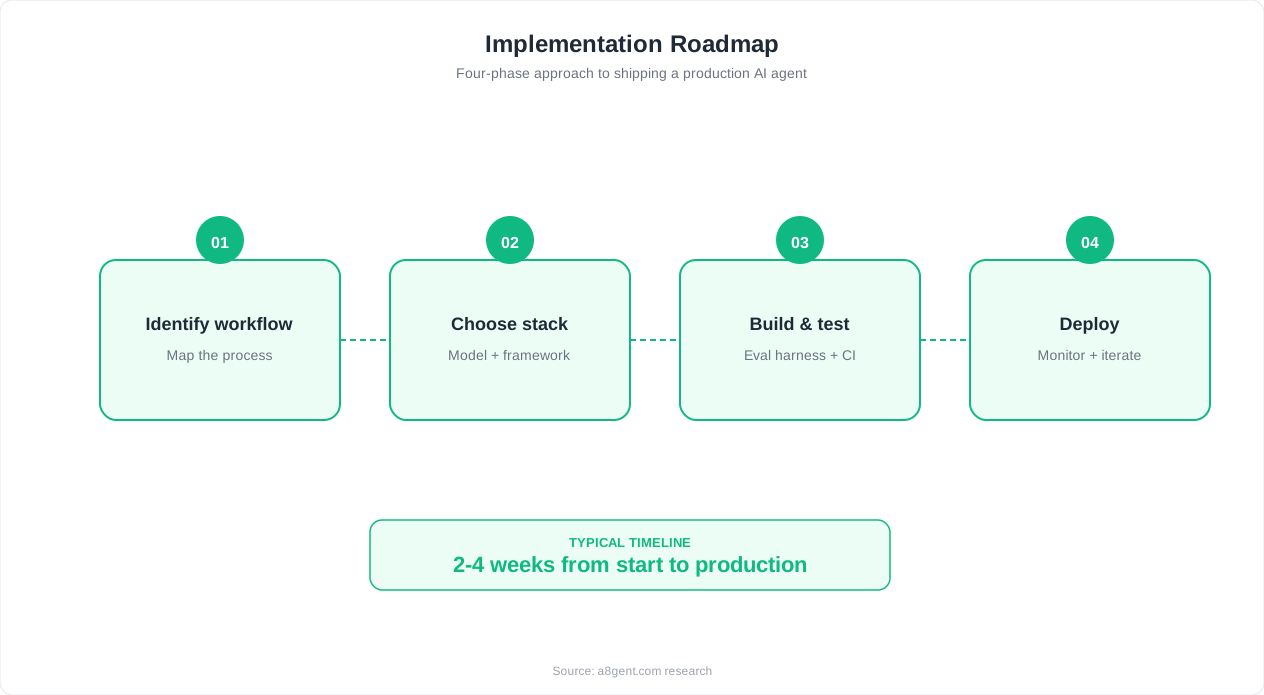
Not every client responds best to the same reminder timing. Some people need a reminder three days before to plan their schedule. Others only pay attention to same-day reminders. An AI agent learns these patterns. It tracks which clients confirm quickly after a 48-hour reminder versus which ones need a same-morning nudge. Over time, it optimizes the reminder schedule for each individual client, sending messages when they are most likely to see them and respond.
Channel Optimization
Some clients respond to text messages instantly. Others ignore texts but open every email. A growing segment responds best to voice reminders. AI agents test multiple channels and converge on what works for each person. For a client who has ignored the last three text reminders but confirmed after an email, the agent learns to lead with email. For a client who always confirms via text within minutes, it sticks with SMS. This personalization dramatically improves confirmation rates without annoying clients with excessive contact.
Conversational Intelligence
When a client responds to a reminder, an AI agent understands what they are saying - regardless of how they phrase it. "Can I move to next week?" triggers rescheduling. "Running 10 min late" gets acknowledged and communicated to your team. "I need to cancel" initiates your cancellation policy. "See you then!" gets a friendly confirmation. The agent does not need rigid keyword matching - it understands natural language and responds appropriately.
Predictive No-Show Detection
This is where AI agents truly differentiate from basic reminder tools. By analyzing patterns - which clients tend to no-show, what day of week and time of day have highest no-show rates, whether a client confirmed but has no-showed after confirming before, how far in advance they booked (last-minute bookings have higher no-show rates) - the agent can flag appointments at high risk of no-show. For flagged appointments, it sends additional touchpoints, requests reconfirmation closer to the time, or proactively reaches out to reschedule.
Waitlist Management
When a cancellation opens a slot, the AI agent immediately contacts clients on your waitlist, offering the newly available time. It prioritizes based on preference match (the client wanted this day and time), recency (how recently they were added to the waitlist), and likelihood to accept. This happens in seconds - often filling the slot before you even know it was empty. No revenue lost, no manual phone calls to waitlisted clients.
Platforms like Lindy and Autonoly offer these capabilities out of the box, with pre-built templates for appointment-based businesses. You describe your reminder sequence, connect your calendar system, and the agent handles everything from there. Explore our operations automation guide for detailed comparisons of reminder platforms.
Under the hood, this all runs off a calendar webhook. Here is what a typical "new appointment booked" payload looks like, and how you would map it into your reminder sequence in a no-code tool:
// Example webhook payload from Calendly/Acuity-style booking tool
{
  "event": "appointment.created",
  "appointment_id": "apt_50231",
  "client": {
    "name": "Sarah Chen",
    "email": "[email protected]",
    "phone": "+15551234567",
    "is_new_client": false,
    "no_show_history_count": 0
  },
  "provider_name": "Dr. Smith",
  "appointment_type": "Follow-up Consultation",
  "start_time": "2026-07-14T14:00:00Z",
  "duration_minutes": 30,
  "location": "123 Main St, Suite 200",
  "booked_at": "2026-07-09T09:15:00Z"
}

// Field mapping (n8n/Zapier style):
// Trigger: "Appointment Created" (Calendly/Acuity connector)
//   -> Step 1: Schedule reminder nodes relative to start_time
//        48h before  -> Email using client.email, provider_name
//        24h before  -> SMS using client.phone, start_time
//        2h before   -> SMS, only if status = "confirmed"
//   -> Step 2: Risk flag node
//        IF client.no_show_history_count > 1
//           OR (booked_at to start_time) < 24 hours
//        THEN tag appointment "high_risk" -> add extra
//             reconfirmation touchpoint at 20h before
//   -> Step 3: On any client reply, route to AI response
//        handler node (see reminder message templates above)
Step-by-Step: Setting Up AI Appointment Reminders (Under 1 Hour)
Ready to eliminate no-shows and stop manually calling clients? Here is your setup guide. The entire process takes under one hour with modern AI agent platforms, and you will have reminders going out by tomorrow.
Step 1: Choose Your Platform (5 minutes)
Lindy is excellent for businesses that want conversational AI reminders capable of handling natural language responses, rescheduling requests, and complex interactions. Autonoly is ideal if you want your reminder agent coordinated with other business automation (invoicing, follow-ups, marketing). Both require zero coding and offer free trials sufficient to test with your real appointment load.
Step 2: Connect Your Calendar (10 minutes)
Connect the platform to wherever your appointments live - Google Calendar, Outlook, Calendly, Acuity, Mindbody, Jane App, or your industry-specific scheduling tool. Most platforms offer one-click OAuth connections for popular calendars. Once connected, the agent can see all upcoming appointments, including client contact information, appointment type, duration, and any notes.
Step 3: Define Your Reminder Sequence (15 minutes)
Set up when and how reminders go out. A proven sequence for most businesses:
- First reminder: 48 hours before appointment (email) - gives time to reschedule if needed
- Second reminder: 24 hours before (SMS) - catches those who missed the email
- Final reminder: 2 hours before (SMS) - last-minute confirmation and directions
Customize the content for each message. Keep it brief, friendly, and include essential information: appointment time, location (with a maps link for in-person), and what to bring or prepare. Include easy one-tap options: "Reply YES to confirm, or let me know if you need to reschedule." Write your messages in your brand's voice - formal for a law firm, casual for a salon, warm for a healthcare practice.
Here are copy-pasteable reminder templates with merge fields you can paste straight into your platform's message editor:
// 48-hour reminder (email)
Subject: Your appointment with [PROVIDER_NAME] - [APPT_DATE]

Hi [CLIENT_FIRST_NAME],

Just confirming your appointment:

  Date: [APPT_DATE]
  Time: [APPT_TIME]
  With: [PROVIDER_NAME]
  Location: [LOCATION_ADDRESS] ([MAPS_LINK])

[PREP_INSTRUCTIONS]

Need to change anything? Reply to this email or click below.

[RESCHEDULE_LINK]

See you soon,
[BUSINESS_NAME]

---

// 24-hour reminder (SMS, under 160 characters)
Hi [CLIENT_FIRST_NAME], reminder: your appointment with
[PROVIDER_NAME] is tomorrow at [APPT_TIME]. Reply C to confirm
or R to reschedule.

---

// 2-hour reminder (SMS, confirmed clients only)
[CLIENT_FIRST_NAME], see you at [APPT_TIME] today!
[LOCATION_ADDRESS] - [MAPS_LINK]. [PARKING_NOTE]

---

// No-response follow-up (sent if no reply by evening before)
Hi [CLIENT_FIRST_NAME], just want to make sure you saw this -
your appointment with [PROVIDER_NAME] is tomorrow at [APPT_TIME].
If the time no longer works, reply R and I'll find a better slot.
No worries either way, just let me know.
Step 4: Configure Responses and Actions (15 minutes)
Tell your agent what to do when clients respond. "Confirmed" → mark confirmed in your system and stop further reminders. "Need to reschedule" → offer available alternatives from your calendar. "Cancel" → process according to your cancellation policy (with or without fee, depending on how far in advance). "Running late" → acknowledge and notify your team. No response to any reminder → flag as high-risk and send one more touchpoint the morning of.
Step 5: Set Up Cancellation and Waitlist Logic (10 minutes)
Configure what happens when a slot opens. If you maintain a waitlist, connect it so the agent automatically offers open slots to waiting clients. Set the order of outreach (first come first served, or prioritized by some criteria). Define how long to wait for a response before offering the slot to the next person. This alone can recover 30-50 percent of cancelled appointments.
Step 6: Test and Go Live (5 minutes)
Book a test appointment for yourself and verify the reminder sequence works correctly - right timing, right channel, right content, right response handling. Make any final adjustments. Then turn it on for all appointments. By tomorrow, your first real reminders will go out automatically. Take our assessment if you want a platform recommendation based on your specific appointment volume, industry, and existing tools before you start.
Multi-Channel Reminder Strategy: SMS, Email, and Voice
The single biggest factor in reminder effectiveness is reaching people through the channel they actually pay attention to. A text message has a 98 percent open rate but some clients never respond to texts. An email can carry more detail but sits unread in cluttered inboxes. A voice call is impossible to ignore but feels intrusive for some people. The answer is not to pick one channel - it is to use all three strategically.
SMS Reminders
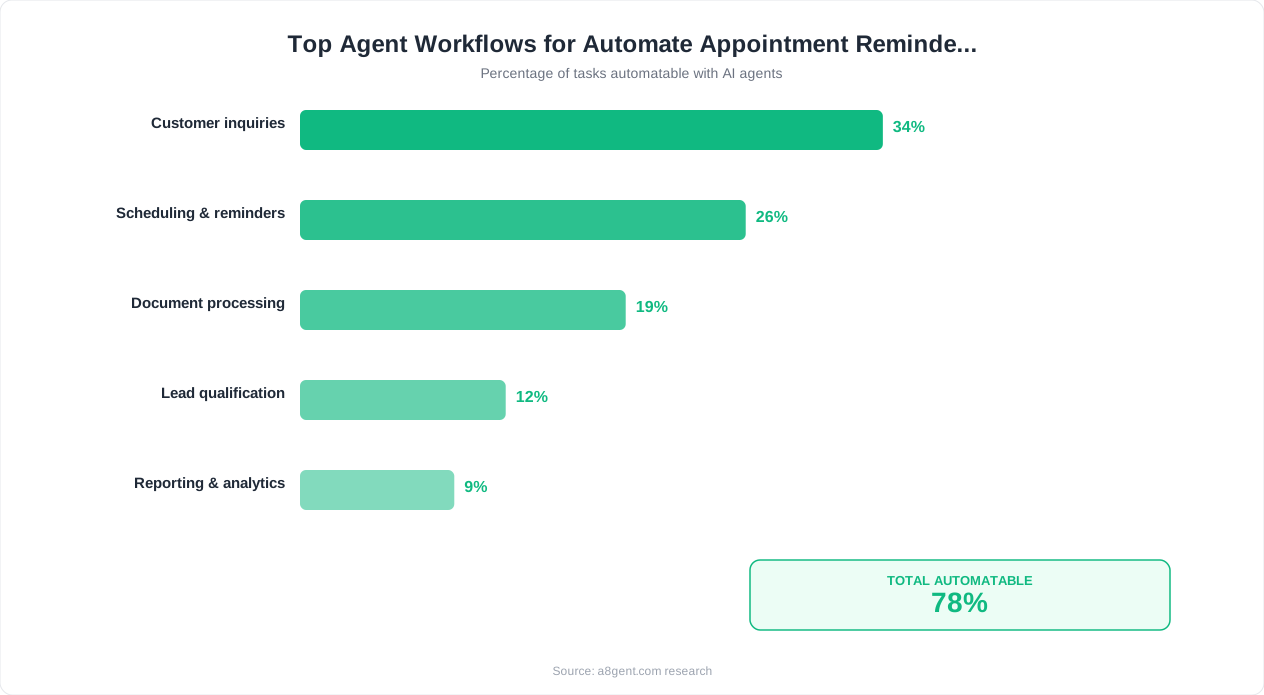
Text messages are the backbone of most reminder systems because they get seen almost immediately. Average response time to SMS is 90 seconds. For appointment reminders, SMS works best for short confirmations, day-before and same-day reminders, and time-sensitive communications. Keep messages under 160 characters when possible. Include the key info (time, date, location) and a clear call to action. "Your appointment with Dr. Smith is tomorrow at 2 PM. Reply C to confirm or R to reschedule." Simple, clear, actionable.
Email Reminders
Email is better for initial confirmations and reminders sent 2-7 days in advance. It allows more detail - preparation instructions, directions, links to pre-appointment forms, cancellation policy reminders, and what to expect. Email also creates a reference document that clients can search for later when they cannot remember their appointment time. Use email for the informational heavy lifting and SMS for the confirmation nudges.
Voice Reminders
AI voice agents can now make phone calls that sound natural and conversational. For certain demographics (older clients, less tech-savvy populations) and certain industries (healthcare, legal), a phone call reminder dramatically outperforms text and email. Voice reminders are also effective as a final escalation for clients who have not responded to text or email - if nothing else gets their attention, a ringing phone will. AI voice agents can leave personalized voicemails, handle live conversations, and process confirmations or rescheduling requests in real time.
The Optimal Multi-Channel Sequence
Based on data from millions of appointment reminders across industries, here is the highest-performing sequence for most businesses:
- Day of booking: Email confirmation with all details, preparation instructions, and calendar invite
- 3 days before: Email reminder with option to reschedule (captures schedule conflicts early)
- 24 hours before: SMS with simple confirmation request
- If no confirmation by evening: Voice call or additional SMS
- 2 hours before: Brief SMS with location/directions (confirmed clients only)
AI agents make this multi-channel complexity manageable by handling the orchestration automatically. You set the sequence once and the agent executes it for every appointment, adapting channels based on each client's response history. A client who always confirms after the 24-hour SMS never gets the voice call. A client who never responds to SMS gets moved to email-first with voice follow-up. This personalization happens automatically without you managing individual client preferences manually.
The combined effect of multi-channel reminders is powerful. Single-channel SMS reminders typically reduce no-shows by 25-35 percent. Multi-channel sequences with AI optimization reduce no-shows by 40-70 percent. That difference - going from 20 percent no-shows to 6-12 percent - translates directly to revenue for your business. Lindy and Autonoly both support multi-channel reminder sequences with built-in SMS, email, and voice capabilities.
Smart Rescheduling: Filling Gaps Before They Happen
The most valuable feature of AI reminder agents is not the reminder itself - it is what happens when the reminder reveals a likely no-show. Traditional systems wait until the appointment time passes and the client does not show up. By then, the slot is wasted. AI agents act proactively, detecting cancellation and no-show signals early and filling gaps before they materialize as lost revenue.
Early Detection of Likely No-Shows
Your AI agent learns which signals predict no-shows in your specific business. Common predictive signals include: no response to any reminder (the strongest indicator), multiple rescheduling of the same appointment, booking pattern (clients who book far in advance and then cancel are different from those who book same-week), historical no-show behavior, and appointment type (consultations have higher no-show rates than recurring treatments). When the agent identifies a high-risk appointment, it takes action well before the scheduled time.
Proactive Rescheduling Offers
For high-risk appointments, the agent sends a gentle additional touchpoint that makes rescheduling easy and judgment-free. "Hi Sarah - just checking in about your appointment tomorrow at 3 PM. If your schedule has changed, no worries at all - I can find a better time this week or next. Just let me know!" This approach works because many no-shows are not malicious - the client meant to cancel but felt awkward about it, or their schedule genuinely changed and they kept putting off the call. Making it easy and pressure-free gets cancellations early enough to fill the slot.
Automatic Waitlist Fulfillment
When a cancellation comes in - whether proactively generated by the agent or initiated by the client - the agent immediately works to fill the gap. It checks your waitlist for clients who wanted this day or time. It contacts them in priority order with a specific offer: "Good news - a 3 PM slot just opened up on Thursday. Would you like it? Reply YES to confirm." The speed matters here. If you contact the first waitlist client within 5 minutes of the cancellation, acceptance rates are 40-60 percent. Wait an hour and rates drop to 20-30 percent. AI agents respond in seconds.
Overbooking Intelligence
For businesses comfortable with a strategic overbooking approach (common in healthcare and wellness), AI agents can recommend optimal overbooking levels based on predicted no-show probability. If your historical no-show rate for Monday mornings is 25 percent and you have 8 slots, the agent might suggest opening a 9th appointment knowing statistically that 2 of your 9 confirmed clients will not show up. This approach requires careful calibration but can increase utilization rates significantly without creating scheduling conflicts.
Here is a system prompt template that covers both the proactive rescheduling nudge and the waitlist fill offer described above - built so the same agent can handle either case depending on which inputs it receives:
SYSTEM PROMPT: Rescheduling and Waitlist Outreach Agent

You send short, judgment-free messages related to appointment
gaps. There are two modes - use the one matching the input.

MODE A - Proactive reschedule offer (sent to a high-risk client
before their appointment):
INPUTS: client_first_name, appt_time, appt_date, risk_signal
  (e.g. "no_reminder_response", "repeat_reschedule")
RULES:
  - Never imply the client is at fault or likely to no-show.
  - Frame the message as a convenience check-in, not a warning.
  - Offer to reschedule AND leave the original time as valid.
  - Max 50 words.

MODE B - Waitlist slot offer (sent when a slot opens up):
INPUTS: client_first_name, open_slot_date, open_slot_time,
  provider_name, response_deadline_minutes
RULES:
  - Lead with the good news framing ("a slot just opened").
  - State one clear reply keyword to claim it.
  - State the deadline explicitly so the client acts fast.
  - Max 40 words.

OUTPUT: plain text message body only.

EXAMPLE - MODE A INPUT:
client_first_name: "Sarah", appt_time: "3 PM", appt_date:
"tomorrow", risk_signal: "no_reminder_response"

EXAMPLE - MODE A OUTPUT:
"Hi Sarah - just checking in about your appointment tomorrow at
3 PM. If your schedule has changed, no worries at all - I can
find a better time this week or next. Just let me know!"

EXAMPLE - MODE B INPUT:
client_first_name: "Marcus", open_slot_date: "Thursday",
open_slot_time: "3 PM", provider_name: "Maria",
response_deadline_minutes: 15

EXAMPLE - MODE B OUTPUT:
"Good news, Marcus - a 3 PM slot with Maria just opened up on
Thursday. Reply YES within 15 minutes to grab it before it's
offered to the next person on the list."
Post-Cancellation Rebooking
When a client cancels entirely (not just reschedules), you do not want to lose them permanently. The agent notes the cancellation and follows up at an appropriate interval - a week later, or at whatever cadence makes sense for your business - to offer rebooking. "Hi Sarah - hope everything is going well. Just wanted to let you know we have availability next week if you'd like to rebook your appointment. Here are some times that work." This gentle persistence recovers 15-25 percent of cancellations that would otherwise become lost clients.
The combination of these capabilities - early detection, proactive rescheduling, waitlist fulfillment, and rebooking - transforms your scheduling from a reactive, gap-filled mess into a proactively managed, consistently full calendar. Take our assessment to understand which of these features would deliver the most value for your specific business model and no-show patterns.
Industry-Specific Examples: Healthcare, Beauty, Professional Services
The fundamentals of AI appointment reminders apply across all industries, but the specifics - message content, timing, compliance requirements, and integration needs - vary significantly. Here is how businesses in the most common appointment-based industries are implementing AI reminders in 2026.
Healthcare and Dental
Medical and dental practices face unique requirements. Reminders must comply with HIPAA (no detailed health information in messages). They often need to include preparation instructions (fasting requirements, what to bring, forms to complete). And the financial impact of no-shows is particularly high - a missed specialist appointment might represent $300-500 in lost revenue. Healthcare AI reminder agents are configured to: send HIPAA-compliant messages (appointment time and location only, no health details), include pre-visit preparation checklists, link to patient portal forms for pre-visit completion, and route cancellations to rebooking before the slot is lost. Practices report 45-65 percent no-show reductions and significant improvements in pre-visit form completion rates.
Salons and Beauty Services
Beauty businesses have appointment-specific needs: reminders should include what service is booked (so clients prepare appropriately), cancellation policies with late-cancel fees, and options to add additional services. The tone is casual and friendly. AI agents for salons often include upsell capabilities in reminders: "Reminder: Your haircut with Maria is tomorrow at 2 PM. Would you like to add a deep conditioning treatment? It takes an extra 15 minutes and keeps your color vibrant. Reply ADD to include it." This approach generates incremental revenue from existing appointments - some salons report 10-15 percent of clients adding services through reminder upsells.
Professional Services (Legal, Consulting, Financial)
Law firms, consultants, and financial advisors need reminders that convey professionalism and often include preparation requirements. "This is a reminder of your consultation with Attorney Johnson tomorrow at 10 AM. Please bring: your signed retainer agreement, relevant documents related to your case, and a list of questions you would like to discuss. Our office is located at [address]. Please arrive 10 minutes early for check-in." AI agents for professional services emphasize preparation completeness, document readiness, and scheduling efficiency. They also handle complex scheduling needs like multi-party meetings where multiple calendars must align.
Fitness and Wellness
Gyms, yoga studios, personal trainers, and wellness practitioners face class-based scheduling challenges in addition to one-on-one appointments. AI agents manage both: individual appointment reminders and class waitlist notifications. When a class member cancels, the agent immediately fills the spot from the waitlist. For personal training sessions, the agent sends workout preparation tips and tracks attendance patterns to identify clients at risk of dropping off - triggering re-engagement messages before they stop booking entirely.
Home Services (Cleaning, Repair, Landscaping)
Home service businesses need reminders that include arrival windows (not exact times), access instructions (gate codes, parking details), and preparation requirements (clear the driveway, put pets away). AI agents for home services also handle day-of-service communication: "Your technician Mike is on his way and will arrive in approximately 20 minutes. Here's his photo so you know who to expect." This reduces missed appointments caused by clients forgetting and leaving the house, and improves the customer experience with proactive communication.
Regardless of your industry, Autonoly and Lindy offer customizable templates that you can adapt to your specific needs. Take our assessment for industry-specific recommendations and setup guidance.
Measuring Results: Track No-Show Reduction and Revenue Recovery
Once your AI reminder agent is running, you need to know if it is working - and how well. Here are the specific metrics to track, how to calculate them, and what good performance looks like across industries in 2026.
Primary Metric: No-Show Rate
This is your headline number. Calculate it monthly: (number of no-shows / total scheduled appointments) × 100. Track this before deploying your agent (your baseline) and after. Most businesses see meaningful improvement within the first two weeks, with full optimization reached by week four. Good performance benchmarks: if your baseline was 20-25 percent no-shows, an AI reminder agent should bring you to 8-12 percent within 30 days. If your baseline was 15 percent, target 5-8 percent.
Confirmation Rate
Track the percentage of clients who actively confirm their appointment (versus simply not cancelling). Higher confirmation rates correlate with lower no-show rates. An active confirmation (client responds "yes" or clicks a confirmation link) reduces no-show probability for that specific appointment to under 3 percent. Target 70-85 percent active confirmation rate from your reminder sequence. If your rate is lower, experiment with timing, channel, and message content.
Revenue Recovery
Calculate how much revenue your reduced no-show rate saves monthly. Formula: (previous no-show count - current no-show count) × average appointment revenue. If you went from 80 no-shows per month to 30 no-shows, and your average appointment is worth $150, that is 50 × $150 = $7,500 per month in recovered revenue. This is direct, measurable impact that more than justifies any AI agent subscription cost.
Slot Fill Rate on Cancellations
When appointments cancel, what percentage get filled from your waitlist? Track this separately from no-show reduction because it represents additional revenue recovery. Good AI agents with waitlist management fill 30-50 percent of cancelled slots. At $150 per slot and 20 cancellations per month, filling 40 percent means 8 additional appointments = $1,200 per month in revenue that would otherwise be lost.
Channel Effectiveness
Track confirmation rates by channel (SMS, email, voice) and by timing (how many hours before the appointment). This data helps you optimize your sequence. You may discover that your specific client base responds best to SMS sent exactly 20 hours before (not 24), or that adding a voice call for first-time clients dramatically improves their show rate. Let data drive your refinements rather than guessing.
Cost Per Reminder
Most AI agent platforms charge based on message volume or a flat monthly fee. Calculate your cost per reminder sent and compare to your cost per no-show prevented. Typically, reminder costs are $0.01-0.10 per message (combining platform fee and SMS costs). If each prevented no-show saves $150 in revenue and it takes an average of 4 messages to get a confirmation, your cost to save $150 is $0.04-0.40. That is a 375-3,750x return on each reminder message. Few business investments offer comparable ROI.
Long-Term Trends
Monitor your no-show rate weekly and look for trends. Are certain days worse? Are certain appointment types higher risk? Do new clients no-show more than established ones? Use these insights to refine your agent's strategy - perhaps new clients get an additional reminder, or Friday afternoon appointments get a morning-of confirmation request. Explore our operations guide for metric tracking templates and dashboard examples specific to appointment-based businesses.
Beyond Reminders: Complete Appointment Lifecycle Automation
Once you have reminders working, you will realize the same AI agent infrastructure can manage your entire appointment lifecycle - from initial booking to post-visit follow-up. Here is how to expand your automation to cover the full client journey.
Intelligent Booking
Let an AI agent handle appointment booking, not just reminding. A booking agent on your website or responding to messages can understand requests like "I need a haircut sometime next Wednesday afternoon" and find the optimal slot, confirm it, and send all details - no back-and-forth emails, no phone tag, no staff time spent scheduling. For businesses where booking happens primarily by phone, AI voice agents can answer calls, understand scheduling requests, and book appointments conversationally - sounding natural and handling the nuances of real conversation.
Pre-Appointment Preparation
Your AI agent can send preparation materials at the optimal time before each appointment type. For a medical consultation: send intake forms three days before, a preparation checklist one day before, and directions two hours before. For a financial review: send a document checklist a week before, a reminder to bring specific statements three days before, and a meeting agenda one day before. This preparation automation reduces in-appointment time spent on administrative tasks, making each session more productive for both you and your client.
Day-of Communication
On the appointment day, your agent handles real-time communication. Running late on your side? The agent proactively notifies affected clients and offers to reschedule if the delay is significant. Client running late? The agent acknowledges their message and adjusts your schedule. Parking instructions, check-in procedures, COVID protocols (if applicable) - all sent at exactly the right moment so clients arrive prepared and the visit starts smoothly.
Post-Appointment Follow-Up
After the appointment, your agent handles follow-up automatically. Send a thank-you message. Request a review (with a direct link to Google, Yelp, or your preferred platform). Deliver post-visit instructions or care notes. Schedule the next appointment based on the recommended follow-up interval. Send relevant content (aftercare tips for beauty services, exercise recommendations for physical therapy, next steps for consulting engagements). This follow-up builds relationships and drives rebooking without requiring your team to remember and execute for every single client.
Rebooking and Retention
For recurring appointments (dental cleanings every 6 months, haircuts every 6 weeks, quarterly business reviews), your agent tracks when each client is due and proactively reaches out to schedule. "Hi Maria - it's been about 6 weeks since your last visit. Would you like to book your next appointment? I have availability next Tuesday and Thursday afternoons." This proactive rebooking keeps your schedule full and prevents client drift - the gradual loss of clients who simply forget to rebook and never return.
The Complete Stack
When you combine booking, preparation, reminders, day-of communication, and follow-up into one coordinated system, you create an exceptional client experience that differentiates your business. Every touchpoint is timely, relevant, and helpful - without requiring any additional staff time. Platforms like Lindy and Autonoly support this full lifecycle management, with each component building on the same client data and communication infrastructure. Start with our assessment to map out which lifecycle components would deliver the most value for your business, then implement them progressively over 30-60 days.
FAQ
How much does AI appointment reminder automation cost?
Most AI agent platforms offering appointment reminders cost between $30 and $200 per month depending on appointment volume. SMS costs add $0.01-0.05 per message. For a business with 20 appointments per day sending 3 reminders each, total monthly cost is typically $50-150. Compare this to the value of even one prevented no-show ($100-500 depending on your appointment value), and the ROI is immediate.
Can AI reminders integrate with my existing scheduling software?
Yes. Major AI agent platforms integrate with virtually all scheduling tools including Google Calendar, Outlook, Calendly, Acuity Scheduling, Mindbody, Jane App, Square Appointments, Vagaro, Booksy, and many industry-specific platforms. Integration is typically a one-click authorization process that takes less than 5 minutes.
Are AI appointment reminders HIPAA compliant for healthcare?
Reputable platforms offer HIPAA-compliant configurations for healthcare providers. This means reminders contain only appointment time and location (no health information), data is encrypted and stored according to HIPAA requirements, and the platform will sign a Business Associate Agreement. Always verify HIPAA compliance with your specific platform before sending patient reminders.
What if a client wants to reschedule through the reminder?
AI agents handle rescheduling conversationally. When a client responds with a rescheduling request, the agent checks your calendar availability, offers alternatives, and confirms the new time - all without human involvement. The client experience feels like texting with a helpful assistant. Complex rescheduling (multiple participants, specific requirements) can be escalated to your team with context.
How quickly do AI reminders reduce no-show rates?
Most businesses see meaningful no-show reduction within the first week of deployment. Full optimization - where the agent has learned your clients' response patterns and optimized timing and channels - takes 2-4 weeks. Typical results: 25-40% no-show reduction in week one, improving to 40-70% reduction by week four as the system optimizes.
Can AI agents make actual phone call reminders?
Yes. Modern AI voice agents can make outbound phone calls that sound natural and conversational. They deliver the reminder, handle responses (confirmations, rescheduling requests, questions), and leave personalized voicemails if the client does not answer. Voice reminders are particularly effective for older demographics and for high-value appointments where you want maximum reach.
Will clients find AI reminders annoying or impersonal?
When done well, clients appreciate AI reminders because they are helpful, timely, and consistent. The key is personalization (using their name, referencing their specific appointment), appropriate frequency (not over-messaging), and easy opt-out options. Studies show that 80% of clients prefer automated reminders to no reminders, and 60% prefer them to manual phone calls because they can respond on their own time.
How do AI reminders handle last-minute cancellations?
When a client cancels within your specified window (e.g., less than 24 hours), the agent can apply your cancellation policy (charging a fee if applicable), immediately contact waitlisted clients to fill the slot, and offer the cancelling client alternative future dates. This three-step process minimizes revenue loss from last-minute cancellations while maintaining a professional client relationship.