OpenAI Agents SDK: Build Your First Agent (Tutorial)
A practical tutorial on OpenAI's Agents SDK (formerly Swarm). Learn the Agent class, handoffs, tool use, guardrails, tracing, and multi-agent orchestration with architecture patterns for real-world applications.
10+ years shipping production ML across TensorFlow, PyTorch, AWS, and GCP. Ships every A8gent agent before it becomes a lesson. GitHub
- The OpenAI Agents SDK provides a minimal, opinionated framework with four core primitives - Agent, Handoff, Tool, and Guardrail - that handle 90% of agent use cases without the complexity of graph-based frameworks.
- Handoffs enable multi-agent orchestration by allowing one agent to transfer control to another agent mid-conversation, with the receiving agent getting the full conversation history and its own specialized instructions and tools.
- Guardrails run in parallel with the agent's main LLM call to validate inputs and outputs, enabling real-time safety checks without adding latency to the critical path - a design choice that prioritizes both safety and performance.
- The built-in tracing system captures every LLM call, tool invocation, handoff, and guardrail check with timing data, providing complete observability out of the box without external instrumentation.
- The SDK is best suited for OpenAI-model-centric applications with straightforward orchestration needs. For complex stateful workflows, persistent checkpointing, or multi-model architectures, LangGraph or custom frameworks offer more flexibility.
Understanding the OpenAI Agents SDK
The OpenAI Agents SDK is OpenAI's official framework for building AI agents. It evolved from the experimental Swarm project (released late 2024) into a production-ready SDK that ships as the openai-agents Python package. The SDK reflects OpenAI's philosophy on agent development: provide a small set of well-designed primitives, handle the common patterns elegantly, and stay out of the way for everything else.
The SDK is built around four core concepts: Agents (LLM configurations with instructions and tools), Handoffs (mechanisms for transferring control between agents), Tools (functions the agent can call), and Guardrails (validators that check inputs and outputs). If you have used the OpenAI Chat Completions API with function calling, the Agents SDK will feel familiar - it builds on the same underlying model capabilities but adds orchestration, state management, and safety layers on top.
The design philosophy differs significantly from graph-based frameworks like LangGraph. Where LangGraph gives you a directed graph with explicit state, nodes, edges, and checkpoints, the Agents SDK gives you a conversation-centric model. The agent runs in a loop: receive messages, call the model, execute any tool calls, and repeat until the model produces a final response (no tool calls). Handoffs redirect this loop to a different agent. There is no explicit graph - the flow emerges from the agents' instructions and handoff decisions.
This simplicity is both the SDK's greatest strength and its primary limitation. For straightforward agent patterns - a customer service bot that routes to specialized agents, a coding assistant with tool access, a research agent that gathers and synthesizes information - the SDK gets you to production faster than any graph-based alternative. You define your agents, give them tools and instructions, and run them. No graph compilation, no state schema design, no edge definitions. But for complex stateful workflows with conditional branching, parallel execution, persistent checkpointing, or human-in-the-loop approval steps, you will find yourself working against the SDK's abstractions rather than with them.
The SDK is Python-only and tightly integrated with OpenAI's model API. While it technically supports any model that implements the OpenAI Chat Completions API format (including local models served through compatible APIs), the handoff and guardrail features are optimized for OpenAI models. If your architecture requires using Claude, Gemini, or open-source models alongside OpenAI, the SDK is not the right choice - consider LangGraph or a custom framework instead. For a detailed comparison, see our OpenAI Agents SDK vs LangGraph comparison.
With that context established, let us dive into each primitive and understand how to use them effectively. For a structured learning path with hands-on projects, our OpenAI AgentKit Course covers everything from basic agents to production multi-agent systems.
The Agent Class: Configuration, Instructions, and Tools
The Agent class is the fundamental building block. Each agent is a configured LLM with a name, instructions (system prompt), a set of tools, and optional configuration. Creating an agent is straightforward: Agent(name="researcher", instructions="You are a research assistant...", tools=[search_web, read_document], model="gpt-4.1").
Here is that researcher agent defined in full, imports included:
from agents import Agent, Runner, function_tool

@function_tool
def search_web(query: str) -> str:
    """Search the web for the given query and return a summary of results."""
    ...

researcher = Agent(
    name="researcher",
    instructions="You are a research assistant. Search for primary sources "
                 "and cite them with URLs.",
    tools=[search_web],
    model="gpt-4.1",
)
The instructions field is the system prompt that defines the agent's personality, capabilities, and constraints. This is where you encode the agent's expertise and behavioral rules. Effective instructions are specific and action-oriented. Instead of "You are a helpful assistant that can search the web," write "You are a research analyst. When asked a question, search for primary sources using the search_web tool. Cross-reference at least two sources before answering. Cite your sources with URLs. If you cannot find reliable information, say so explicitly rather than speculating." The more specific your instructions, the more reliably the agent behaves.
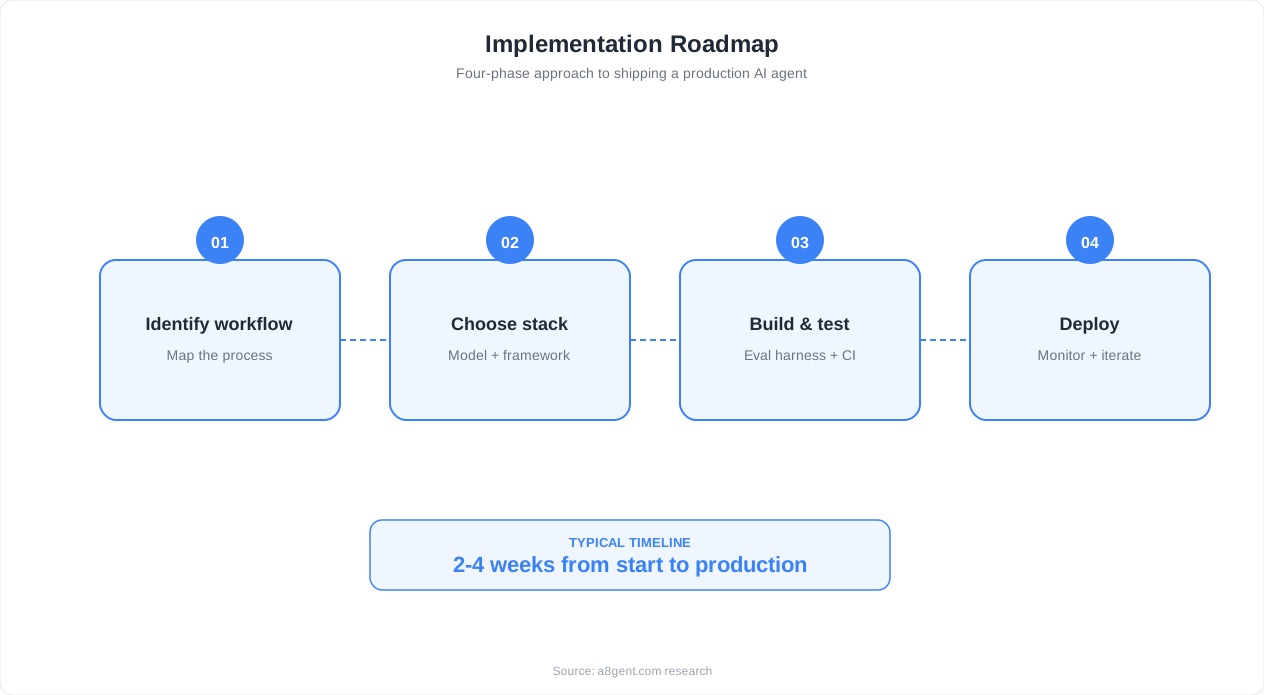
Instructions can be dynamic - instead of a static string, you can provide a callable that receives the current context and returns instructions. This enables personalization (include the user's name and preferences), context-awareness (include relevant data from the current session), and adaptive behavior (adjust instructions based on the conversation stage). For example, a customer service agent's instructions might include the customer's account details and recent interaction history, fetched at runtime.
Tools are Python functions decorated with the SDK's tool decorator or defined as FunctionTool objects. The SDK automatically generates the JSON Schema for the tool's parameters from the function's type hints and docstring. This is a significant developer experience improvement over manually writing JSON Schema definitions. A tool function takes typed parameters and returns a string result. The SDK handles serialization, deserialization, and error formatting.
Tool design principles for the Agents SDK mirror general function-calling best practices but with a few SDK-specific considerations:
- Keep tools focused. One tool, one action. A
search_and_summarizetool that searches and summarizes in one call might seem convenient, but it prevents the agent from searching without summarizing or summarizing pre-existing content. Separate them intosearchandsummarize. - Return structured strings. The SDK converts tool results to string content for the model. Return well-structured text (formatted lists, key-value pairs, markdown tables) rather than raw JSON dumps. The model processes structured text more accurately than nested JSON.
- Handle errors in the tool. If a tool raises an exception, the SDK converts it to an error message for the model. But a generic traceback is less useful than a clear error message. Catch expected exceptions and return descriptive error strings: "Database connection failed. The database server may be down. Try again in a few minutes." rather than letting a ConnectionError propagate.
- Type your parameters carefully. The SDK infers the JSON Schema from type hints. Use
Literal["low", "medium", "high"]for enums,Optional[str]for optional parameters, and clear docstring descriptions for each parameter. The generated schema directly affects how well the model calls the tool.
A focused, single-purpose tool following these principles looks like this:
from typing import Literal
from agents import function_tool

@function_tool
def search_orders(customer_id: str, status: Literal["active", "shipped", "delivered", "all"] = "all") -> str:
    """Search for a customer's orders, optionally filtered by status."""
    try:
        orders = order_service.search(customer_id, status)
        return format_orders_as_text(orders)
    except ConnectionError:
        return "Order service is temporarily unavailable. Please try again shortly."
The model parameter lets you assign different models to different agents. A triage agent that routes conversations might use gpt-4.1-mini (fast, cheap) while a complex reasoning agent uses gpt-4.1 (more capable). This model-per-agent pattern is a cost optimization lever - use expensive models only where the task demands it.
You can also configure model parameters like temperature, top_p, and max_tokens per agent. A creative writing agent might use temperature 0.9 while a code generation agent uses temperature 0.1. These parameters, combined with specialized instructions and tools, let you create agents with distinct personalities and behaviors from the same underlying model family.
Handoffs: Multi-Agent Orchestration Patterns
Handoffs are the mechanism that makes the Agents SDK a multi-agent framework rather than just a single-agent toolkit. A handoff transfers control from one agent to another, carrying the full conversation history. The receiving agent takes over the conversation loop with its own instructions, tools, and model configuration. From the model's perspective, a handoff is just a special tool call - the current agent "calls" the handoff tool, and the SDK routes execution to the target agent.
You define handoffs by including target agents in the current agent's handoffs list: Agent(name="triage", handoffs=[billing_agent, technical_agent, sales_agent]). The SDK automatically generates a handoff tool for each target agent.
Wiring a triage agent up to its specialists is just a matter of listing them:
from agents import Agent

triage_agent = Agent(
    name="triage",
    instructions="Classify the user's request and transfer to the right "
                 "specialist: billing, technical, or sales.",
    handoffs=[billing_agent, technical_agent, sales_agent],
    model="gpt-4.1-mini",
)
The triage agent sees these as tools named transfer_to_billing_agent, transfer_to_technical_agent, etc. The agent's instructions guide when to use each handoff: "If the user has a billing question, transfer to the billing agent. If they need technical support, transfer to the technical agent."
Pattern 1: Triage Router. The most common multi-agent pattern. A lightweight triage agent analyzes the user's intent and hands off to a specialized agent. Each specialized agent has domain-specific instructions and tools. The triage agent uses a fast, cheap model (gpt-4.1-mini). Specialized agents use whatever model fits their complexity needs. The triage agent does not attempt to answer questions - it classifies and routes. This pattern scales to dozens of specialized agents without making any single agent's tool set or instructions unwieldy.
Pattern 2: Escalation Chain. Agent A handles most requests. When it encounters something beyond its capabilities, it hands off to Agent B (more capable, more expensive). Agent B can hand off to Agent C (human-assisted or maximum capability). Each escalation level has more tools, better models, and broader permissions. The key design decision is the escalation criteria - encode this clearly in each agent's instructions: "If the customer's issue involves a refund over $500 or a complaint about service quality, transfer to the senior_support_agent."
Pattern 3: Pipeline. Agent A performs step 1 (research), hands off to Agent B (analysis), which hands off to Agent C (report generation). Each agent adds to the conversation history, and the next agent builds on the previous agent's work. This is a linear pipeline encoded as handoffs. It works well when each stage has distinct tool requirements - the research agent needs search tools, the analysis agent needs calculation tools, the report agent needs formatting tools.
Pattern 4: Collaborative Loop. Agent A (planner) creates a plan, hands off to Agent B (executor) to carry it out, and Agent B hands back to Agent A to evaluate results and decide on next steps. This loop continues until the task is complete. Implementing this requires handoffs in both directions: Agent A can hand off to Agent B, and Agent B can hand off back to Agent A. The conversation history grows with each iteration, providing context for the next cycle. Watch the context window - long loops can exceed the model's context limit.
Handoff data and context. By default, the receiving agent gets the full conversation history. You can customize what context is transferred by using handoff filters - functions that process the message history before passing it to the target agent. This is useful for removing irrelevant earlier conversation, summarizing long histories, or adding context that the receiving agent needs but was not in the original conversation. For example, when handing off to a billing agent, you might prepend the customer's account summary to the conversation.
An important architectural consideration: handoffs are one-way transfers, not function calls. When Agent A hands off to Agent B, Agent A's execution ends. Agent B takes over completely. If Agent B needs to "return" to Agent A, it needs its own handoff back to Agent A. This is different from LangGraph where a subgraph can execute and return control to the parent graph. The implication is that complex back-and-forth between agents requires careful handoff design to avoid infinite loops. Always include a terminal condition - an agent that produces a final response without handing off, ending the conversation loop.
For a deeper understanding of how these orchestration patterns compare to LangGraph's graph-based approach, see our OpenAI Agents SDK vs LangGraph comparison. And for general principles of designing agent workflows, our guide on AI agent workflow design covers the conceptual framework.
Guardrails: Input and Output Validation
Guardrails are the SDK's safety mechanism. They validate the agent's inputs (what the user sends) and outputs (what the agent generates) against rules you define. The key architectural decision in the Agents SDK is that guardrails run in parallel with the agent's main LLM call, not sequentially. When the agent processes a message, the guardrail LLM calls and the main agent LLM call happen simultaneously. If a guardrail triggers, the SDK cancels the main agent response and returns the guardrail's error message instead. This parallel design means guardrails add minimal latency - you get safety checks essentially for free in terms of response time.
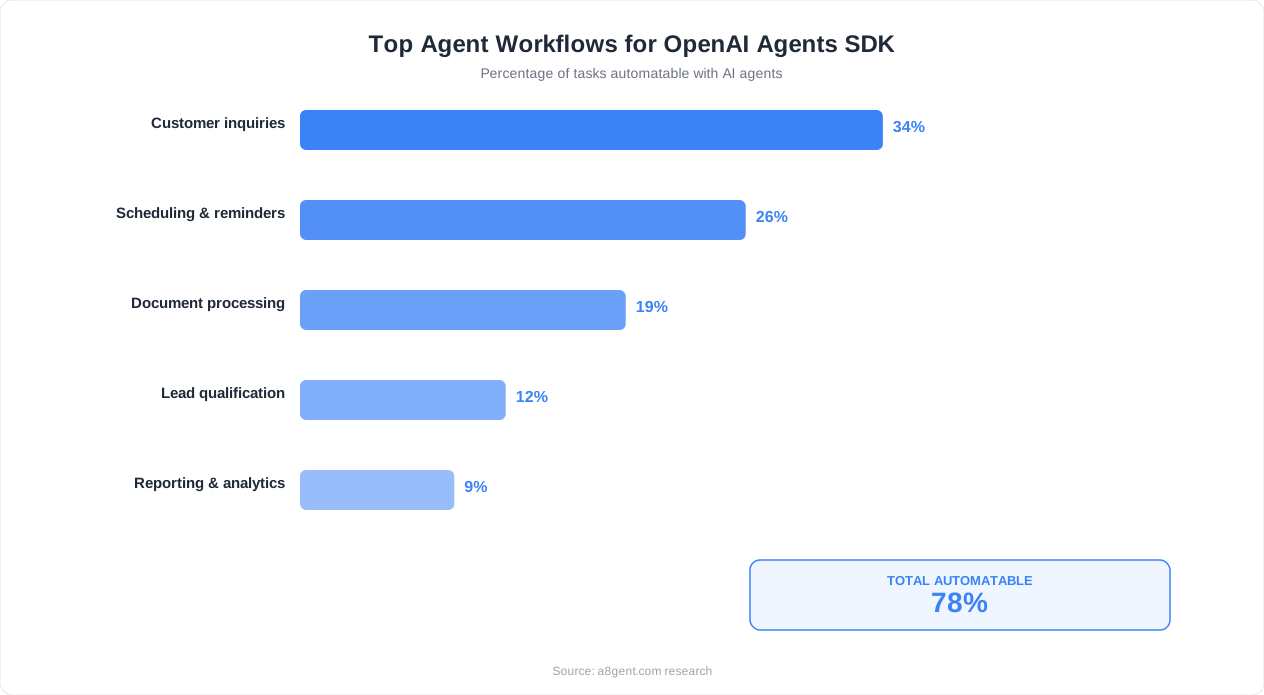
There are two types of guardrails: input guardrails and output guardrails. Input guardrails validate the user's message before the agent processes it. They catch prompt injection attempts, off-topic requests, harmful content, and policy violations. Output guardrails validate the agent's response before it is returned to the user. They catch hallucinated information, policy-violating content, leaked system prompt details, and inappropriate responses.
A minimal classification-style input guardrail, wired into an agent, looks like this:
from agents import Agent, input_guardrail, GuardrailFunctionOutput

@input_guardrail
async def block_injection(ctx, agent, user_input: str) -> GuardrailFunctionOutput:
    is_injection = await classify_injection(user_input)
    return GuardrailFunctionOutput(
        output_info={"is_injection": is_injection},
        tripwire_triggered=is_injection,
    )

support_agent = Agent(
    name="support",
    instructions="You handle customer support requests.",
    input_guardrails=[block_injection],
)
Implementing an input guardrail involves creating a function that takes the agent's context and the user input, and returns a GuardrailResult indicating whether the input is allowed. The guardrail function typically uses an LLM call to classify the input - this is the call that runs in parallel with the main agent. For example, an input guardrail for a customer service bot might classify whether the user's message is a legitimate support request, an attempt to jailbreak the agent, or an abusive message. The classifier prompt is separate from the agent's instructions, so it can be specifically optimized for safety classification.
Output guardrails follow the same pattern but validate the agent's generated response. A common output guardrail checks whether the response contains PII (personally identifiable information), internal system details, or commitments the agent is not authorized to make (e.g., promising a refund that requires manager approval). Output guardrails are particularly important for customer-facing agents where a single inappropriate response can have legal or reputational consequences.
Guardrail design patterns:
- Classification guardrail. Use a fast model (gpt-4.1-mini or gpt-4.1-nano) to classify inputs/outputs into allowed/blocked categories. This is the most common pattern. Keep the classifier prompt focused and include concrete examples of blocked content. A classifier that tries to catch everything catches nothing - be specific about what you are guarding against.
- Rule-based guardrail. For simple checks, skip the LLM entirely. Check for keywords, regex patterns, content length, or format compliance. Rule-based guardrails are faster and more predictable than LLM-based ones. Use them for straightforward policies: block messages over 10,000 characters, block messages containing SQL keywords if you have a database tool, block responses that contain email addresses.
- Composite guardrail. Combine multiple guardrails. Run a fast rule-based check first (microseconds), then an LLM classification for messages that pass the rule check. This layers defenses - the rule-based check catches obvious violations cheaply, and the LLM check catches subtle violations. The SDK supports running multiple guardrails, and all must pass for the message to proceed.
- Context-aware guardrail. The guardrail function receives the agent's context, which includes conversation history and any context variables you have set. Use this to implement guardrails that depend on the conversation state. A guardrail might be more strict during the first message (when the user's intent is unknown) and relax after the conversation is established. Or it might block certain topics based on the user's permission level.
A critical nuance: guardrails are not a substitute for proper tool-level validation. If your agent has a tool that sends emails, the tool itself must validate the recipient, content, and sending limits regardless of guardrails. Guardrails catch agent-level issues (the model deciding to do something it should not). Tool validation catches execution-level issues (the model calling a tool with bad parameters). Both layers are necessary for a robust system.
One limitation to be aware of: the SDK's guardrail mechanism is synchronous within a single turn. It does not support stateful guardrails that track patterns across multiple turns (e.g., detecting a multi-turn jailbreak attempt where each individual message seems benign but the sequence is adversarial). For multi-turn safety, you need to implement your own conversation-level analysis, either as a separate post-processing step or by including conversation history analysis in your guardrail prompt.
Tracing and Observability: Understanding Agent Behavior
The Agents SDK includes a built-in tracing system that captures a detailed record of every agent execution. Each run produces a trace containing: every LLM call (model, messages, parameters, response, latency), every tool invocation (tool name, arguments, result, latency), every handoff (source agent, target agent, conversation state), and every guardrail check (type, result, latency). This comprehensive tracing is enabled by default - you do not need to add instrumentation code.
Traces are structured as a tree of spans. The root span represents the entire agent run. Child spans represent individual operations: an LLM call span, a tool call span, a handoff span. Spans can be nested - a tool call that internally makes an HTTP request would have the HTTP request as a child span of the tool call span. This hierarchy lets you drill down from "the agent took 8 seconds" to "the agent made 3 LLM calls (2s each) and 2 tool calls (1s each)" to "the database query in the second tool call took 800ms."
The SDK provides a default trace processor that sends traces to OpenAI's trace viewer in the dashboard. If you log into the OpenAI platform, you can see your agent runs visualized as a timeline with each span color-coded by type. This is invaluable for debugging: you can see exactly which tool calls the model made, what parameters it used, what results it received, and how it incorporated those results into its response. When an agent misbehaves, the trace tells you why.
For production systems, you will want to export traces to your own observability stack. The SDK supports custom trace processors - classes that implement a simple interface for handling trace events. You can build processors that export to: OpenTelemetry (for integration with Jaeger, Zipkin, Datadog, Honeycomb), your application's logging system (structured JSON logs with trace correlation IDs), a custom analytics database (for building agent performance dashboards), or multiple destinations simultaneously.
Key metrics to monitor from traces:
- Tokens per turn. How many input and output tokens each agent uses. Spikes indicate the agent is struggling (making many tool calls, receiving large results, or generating verbose responses). Track this to control costs and identify optimization opportunities.
- Tool call accuracy. How often the agent calls the right tool with correct parameters on the first attempt versus needing retries. Low accuracy indicates your tool descriptions or agent instructions need improvement.
- Handoff patterns. Which agents hand off to which other agents, and how often. Unexpected handoff patterns (the billing agent frequently handing off to the technical agent) indicate misclassification in your triage logic.
- Guardrail trigger rate. How often input and output guardrails fire. A high input guardrail rate might indicate your agent is attracting adversarial users. A high output guardrail rate might indicate your agent's instructions are too permissive.
- End-to-end latency breakdown. Where time is spent in the agent execution. If 80% of latency is in a single tool call, optimize that tool. If latency is spread across many small LLM calls, consider whether you can batch or eliminate some calls.
Debugging with traces. When a user reports that the agent gave a wrong answer, pull the trace for that conversation. Walk through the spans: What did the user ask? How did the agent interpret it? Which tools did it call? What results did those tools return? How did the model incorporate the results? Often the bug is not in the agent's reasoning but in a tool returning unexpected data, a guardrail incorrectly blocking a valid response, or a handoff sending the user to the wrong specialized agent. Traces make these issues visible in minutes rather than hours of log searching.
One practical consideration: traces can contain sensitive data (user messages, tool results with PII, internal system details). Implement trace sanitization before exporting to shared observability systems. The SDK's custom trace processors let you redact or hash sensitive fields before export. For compliance-sensitive environments, you may need to store raw traces in a restricted access system and export only sanitized summaries to your general observability platform.
Real-World Architecture: Building a Multi-Agent Support System
Let us design a complete multi-agent system using the Agents SDK: an automated customer support system for a SaaS product. This example illustrates how the SDK's primitives compose into a production architecture and highlights the design decisions you face in real-world applications.
The agent topology. Five agents, organized in a triage-and-specialize pattern:
- Triage Agent (gpt-4.1-mini): Receives all incoming messages. Classifies intent and hands off to the appropriate specialist. Has no tools - its only job is routing. Instructions include classification rules with examples for each category. Handoffs to all four specialist agents.
- Billing Agent (gpt-4.1): Handles subscription, payment, and invoice questions. Tools:
get_subscription_details,get_invoice_history,apply_credit,update_payment_method. Can hand off to Escalation Agent for refunds over $500. - Technical Agent (gpt-4.1): Handles bugs, feature questions, and integration issues. Tools:
search_docs,check_service_status,get_user_config,create_bug_report. Can hand off to Escalation Agent for unresolved issues after 3 troubleshooting attempts. - Account Agent (gpt-4.1-mini): Handles account settings, permissions, and profile changes. Tools:
get_account_info,update_settings,manage_team_members. Lower capability model because these tasks are more formulaic. - Escalation Agent (gpt-4.1): Handles complex cases that specialist agents cannot resolve. Tools: all specialist tools plus
create_support_ticket,schedule_callback,issue_refund. Has broader permissions and more detailed instructions for handling edge cases. Can create tickets for human follow-up.
Guardrail configuration. Two guardrails protect the system. The input guardrail runs on every incoming message and classifies it as: legitimate support request (allow), prompt injection attempt (block with "I can only help with support questions"), abusive content (block with "Please keep our conversation respectful"), or off-topic (allow but with a gentle redirect in the agent's instructions). The output guardrail runs on every agent response and checks for: PII leakage (block if the response contains other customers' data), unauthorized commitments (block if the agent promises something outside its authority - the guardrail prompt includes the list of authorized actions), and system information leakage (block if the response reveals internal system details, API keys, or infrastructure information).
Context management. Before the triage agent receives a message, the application layer enriches the context with the customer's account information: subscription tier, account age, recent support interactions, and feature flags. This context is passed through the context_variables parameter and available to all agents via dynamic instructions. The billing agent's instructions include "The customer is on the {plan_name} plan, paying {monthly_price}/month, with {days_remaining} days until renewal." This pre-fetching avoids unnecessary tool calls for basic account information that every agent needs.
Session management. The SDK's Runner.run() returns the complete conversation state including the active agent and message history. The application stores this state in Redis (keyed by session ID) between user messages.
A minimal call into the triage agent, and reading the result, looks like this:
from agents import Runner

result = await Runner.run(triage_agent, "My last invoice looks wrong")
print(result.final_output)
When the next message arrives, the application loads the state and continues the run with the same agent that was active at the end of the last turn. This means if the user was talking to the billing agent, their next message goes directly to the billing agent - it does not re-triage. The triage agent only runs on the first message or if the user explicitly changes topics.
Deployment architecture. The agent system runs as a stateless web service (FastAPI) behind a load balancer. Each request loads the session from Redis, runs the agent, saves the updated session, and returns the response. Stateless design means you can scale horizontally. Traces are exported to Datadog for monitoring. A dashboard tracks: messages per agent, handoff rates, guardrail trigger rates, average response latency, and tool call error rates. Alerts fire if error rates exceed thresholds or latency spikes beyond acceptable limits.
This architecture handles typical SaaS support volumes (thousands of conversations per day) with response latencies under 3 seconds for most interactions. The triage-and-specialize pattern keeps each agent focused and manageable, the guardrails prevent safety issues, and the tracing provides complete visibility into agent behavior. For a hands-on walkthrough of building this type of system, see our OpenAI AgentKit Course.
When to Use the Agents SDK vs LangGraph vs Custom
Choosing the right framework is as important as choosing the right model. The OpenAI Agents SDK, LangGraph, and custom implementations each have sweet spots. Here is an honest assessment of when to use each, based on practical experience building production agents with all three.
Use the OpenAI Agents SDK when:
- You are committed to the OpenAI model ecosystem (GPT-4.1, o3, o4-mini) and do not need multi-provider support.
- Your agent patterns are conversation-centric: triage, routing, escalation, handoffs between specialized agents.
- You want to move fast. The SDK's convention-over-configuration approach means less boilerplate and fewer design decisions. A functional multi-agent system can be built in hours, not days.
- Your observability requirements are met by the built-in tracing or can be handled with a custom trace exporter.
- You do not need persistent checkpointing, human-in-the-loop approval flows, or complex state machines.
Use LangGraph when:
- You need explicit control over execution flow: conditional branching, parallel execution, cycles with termination conditions, human-in-the-loop interrupts.
- Your agent needs persistent state across sessions - LangGraph's checkpointing stores complete state to PostgreSQL, enabling pause-resume workflows that span hours or days.
- You need multi-model support: use Claude for reasoning, GPT for code generation, and an open-source model for classification, all in the same graph.
- Your workflow is complex enough to benefit from visual graph representation - seeing the flow as nodes and edges helps teams understand and maintain the system.
- You need production features like time-travel debugging (replay from any checkpoint), state branching, and graph versioning.
Build custom when:
- Your agent pattern does not fit either framework's model. Highly specialized domains (real-time trading, robotic control, game AI) often have unique execution requirements that frameworks cannot accommodate.
- You need maximum performance. Framework overhead is small but non-zero. If you are optimizing for sub-100ms response times or processing millions of agent runs per day, direct API calls with custom orchestration may be necessary.
- You need deep integration with existing infrastructure. If your organization has an existing workflow engine, message queue, or orchestration system, it may be more practical to add agent capabilities to that system than to adopt a new framework.
- Your team has the engineering capacity to build and maintain custom orchestration. This is a significant ongoing investment - do not underestimate the maintenance burden.
The hybrid approach. In practice, many production systems use multiple approaches. A common pattern: use the Agents SDK for the conversational interface (triage, routing, specialist agents), LangGraph for complex backend workflows (approval chains, multi-step data processing), and custom code for performance-critical paths (real-time classification, high-throughput batch processing). The key is choosing the right tool for each component rather than forcing one framework to do everything.
One final consideration: team familiarity and ecosystem lock-in. The Agents SDK is the easiest to learn for teams already using the OpenAI API. LangGraph has a steeper learning curve but broader applicability. Custom solutions require the most expertise but provide the most flexibility. Consider your team's skills, your timeline, and how tightly you want to couple your architecture to a specific framework or model provider.
For an in-depth comparison of specific features and performance characteristics, see our OpenAI Agents SDK vs LangGraph comparison. And for a broader perspective on evaluating agent tools, our guide on AI agent workflow design provides the conceptual framework for making these architectural decisions.
FAQ
What happened to OpenAI Swarm? Is the Agents SDK its replacement?
Yes. Swarm was an experimental, educational framework released by OpenAI in late 2024 to demonstrate multi-agent orchestration patterns. The Agents SDK is its production-ready successor, shipping as the openai-agents Python package. The core concepts (agents, handoffs, tools) are the same, but the SDK adds guardrails, tracing, proper error handling, and production-grade reliability. If you built prototypes with Swarm, migrating to the Agents SDK is straightforward - the API is similar but more polished.
Can I use the Agents SDK with models other than OpenAI?
The SDK is designed for OpenAI models but technically works with any model that implements the OpenAI Chat Completions API format. Some open-source model servers (vLLM, Ollama with OpenAI compatibility mode) can work as drop-in replacements. However, advanced features like structured outputs, parallel tool calls, and handoff optimization are tuned for OpenAI models. For multi-provider architectures, LangGraph is a better choice because it natively supports multiple model providers.
How does the Agents SDK handle state between conversation turns?
The SDK itself is stateless - each call to Runner.run() takes the current messages and returns updated messages plus the active agent. Your application is responsible for persisting state between turns. Most implementations store the conversation state (messages, active agent name, context variables) in Redis or a database, keyed by session ID. This is simpler than LangGraph's built-in checkpointing but means you handle serialization, TTLs, and state cleanup yourself.
What is the performance overhead of the Agents SDK compared to raw API calls?
The SDK's overhead is minimal - a few milliseconds per turn for orchestration logic, plus the guardrail LLM calls if configured. The guardrails run in parallel with the main call, so they typically add zero wall-clock latency (they finish before the main response). The main performance consideration is handoffs: each handoff is a new LLM call with the full conversation history, so multi-handoff conversations accumulate latency linearly. Optimize by minimizing unnecessary handoffs and using fast models for triage agents.
Can I add human-in-the-loop approval to the Agents SDK?
The SDK does not have built-in HITL support like LangGraph's interrupt mechanism. You can implement basic approval by having a tool that pauses execution and waits for external input (e.g., a webhook callback), but this blocks the agent process. For production HITL workflows with persistent state, durable pausing, and asynchronous approvals, LangGraph is the better choice. The Agents SDK is optimized for real-time conversational flows, not pause-and-resume workflows.