What Are AI Agents? A Plain-English Guide for Business Owners (2026)
AI agents are software programs that can independently complete tasks for your business - from answering customers to booking meetings to writing reports. This guide explains exactly how they work, what they can do, and how to get started without any technical background.
10+ years shipping production ML across TensorFlow, PyTorch, AWS, and GCP. Ships every A8gent agent before it becomes a lesson. GitHub
- AI agents are autonomous software programs that complete multi-step tasks on your behalf - unlike chatbots, they take action, not just answer questions.
- Every AI agent has four components: a language model brain, memory of past interactions, tools to connect with your apps, and a runtime that keeps it running.
- Business owners are using agents today to automate lead follow-up, customer support, content creation, invoicing, and dozens of other repetitive tasks.
- You do not need to write code - platforms like Lindy, n8n, and Clay let you build agents with drag-and-drop interfaces or simple English instructions.
- The best way to start is to take a free assessment, identify one painful repetitive task, and deploy a single agent to handle it within a week.
What Is an AI Agent in Plain English?
If you have been hearing the term "AI agent" everywhere in 2026 and feeling confused, you are not alone. The tech world loves inventing new buzzwords, and this one has been thrown around in so many different contexts that it can feel meaningless. So let us strip away the hype and explain it like a business owner would explain it to another business owner over coffee.
An AI agent is a software program that can independently complete tasks for your business. Think of it as a digital employee that never sleeps, never takes a sick day, and can handle dozens of conversations or workflows at the same time. You give it a goal - "follow up with every lead who downloaded our ebook" or "answer customer questions about shipping" - and it figures out the steps, uses the right tools, and gets it done.
The key word there is independently. You are not clicking buttons or typing commands every step of the way. You set it up once, tell it what success looks like, and it runs. When it hits something it cannot handle, it asks you or escalates to a human. The rest of the time, it just works.
Here is a real example. Imagine you run an e-commerce store. Every day, you get 40 customer emails asking about order status, returns, and product questions. Today, either you answer them or you pay someone to answer them. With an AI agent, you connect it to your email and your order management system. It reads each email, looks up the order, and writes a personalized response - all within seconds. You review a few at first to build trust, and then you let it run.
That is not science fiction. Business owners are doing this right now in 2026. And the tools to set it up do not require a computer science degree. If you want to find out which agent is right for your specific situation, take our free AI agent assessment - it takes two minutes and gives you a personalized recommendation.
Throughout this guide, we will walk you through everything: how agents differ from chatbots, how they actually work under the hood (in plain English), what types exist, what they can automate in your business, which specific tools to look at, how to get started this week, and where this technology is heading. Let us dive in.
AI Agents vs. Chatbots: The Critical Difference
This is the number one point of confusion we see among business owners, so let us clear it up immediately. Chatbots talk. Agents act. That is the fundamental difference, and it changes everything about what is possible for your business.
A chatbot is like a very knowledgeable receptionist who can answer questions but cannot actually do anything. You ask "What's the status of my order?" and it says "I'm sorry, I don't have access to that information. Please contact support." Or at best, it gives you a canned answer from a script. Chatbots are reactive - they wait for someone to talk to them, and they respond with text.
An AI agent is like a capable employee who can answer that same question AND pull up the order in your system, check the shipping carrier's tracking API, see that there is a delay, proactively email the customer with an update, flag the issue in your internal Slack channel, and update your CRM - all without you lifting a finger.
Here is a simple way to think about it:
- Chatbot: "Your order shipped on May 1st. Here's your tracking number."
- AI Agent: Checks tracking, sees delivery is delayed, emails the customer an apology with a new estimated date, applies a 10% discount code to their account, and logs the incident in your system.
The difference is not just intelligence - it is agency. Agents have the ability and permission to take actions in the real world. They can send emails, update databases, move files, trigger workflows, make API calls, and interact with dozens of software tools your business already uses.
Most "AI chatbots" you have seen on websites since 2023 are glorified FAQ pages. They reduce the number of support tickets slightly, but they do not actually do the work. AI agents do the work. They close the loop. They complete the task from start to finish.
This matters for your bottom line because the value of automation is not just in answering questions faster - it is in eliminating entire workflows that currently require human time and attention. When you understand this distinction, you start seeing opportunities everywhere in your business. Customer onboarding, lead qualification, invoice processing, content scheduling, inventory alerts - all of these involve multi-step tasks that an agent can own.
If you are currently using a chatbot and wondering why it has not transformed your business, this is why. You need an agent, not a chatbot. Our assessment tool can help you identify exactly where an agent would deliver the biggest ROI in your specific business.
How AI Agents Work: The 4 Components (No Tech Degree Required)
You do not need to understand the engineering to use AI agents - just like you do not need to understand internal combustion to drive a car. But having a basic mental model helps you make better decisions about which tools to buy and how to set them up. So here are the four components every AI agent has, explained in plain business English.
1. The Brain (Large Language Model)
This is the AI that does the thinking. It is the same type of technology behind ChatGPT, Claude, and Gemini - a large language model (LLM) that understands and generates human language. The brain reads your instructions, understands what needs to happen, makes decisions about what to do next, and generates responses. Think of it as the intelligence that sits at the center of your agent. Different agents use different brains - some use GPT-4, some use Claude, some use open-source models. The brain determines how smart and reliable your agent is.
2. Memory
Just like a good employee remembers your preferences, past conversations, and important context, an AI agent has memory. Short-term memory lets it keep track of what is happening in the current conversation or task. Long-term memory lets it remember things across sessions - like the fact that Customer X prefers email over phone, or that your busiest sales days are Tuesdays. Without memory, your agent would start from scratch every single interaction. With memory, it gets better and more personalized over time.
3. Tools
This is where agents get their power to act. Tools are connections to other software - your email system, your CRM, your calendar, your payment processor, your project management app, your spreadsheets. When an agent needs to send an email, it uses the Gmail tool. When it needs to update a deal in your CRM, it uses the HubSpot or Salesforce tool. When it needs to schedule a meeting, it uses the Calendly tool. The more tools you connect, the more your agent can do. Most modern agent platforms offer hundreds of pre-built integrations.
4. The Runtime (Orchestration Layer)
This is the engine that keeps everything running. It is the system that triggers your agent at the right time, manages the flow of tasks, handles errors gracefully, and makes sure things happen in the right order. Think of it as the operating system for your agent. It says "Okay, a new lead just filled out the form. Wake up the sales agent. Have it look up the lead in LinkedIn. Then score them. Then send the right email template. Then create a task for the sales team if the score is high enough." You usually do not interact with the runtime directly - the platform handles it - but it is what separates a reliable agent from a flaky one.
When you put all four together, you get something genuinely powerful: an intelligent system that understands your business context, remembers what matters, connects to your existing tools, and runs reliably without constant supervision. That is an AI agent. And the best part is that in 2026, you do not need to build any of this yourself. Platforms like Lindy and n8n handle all four components for you - you just tell them what you want done.
Types of AI Agents: Which One Does Your Business Need?
Not all AI agents are the same. Just like you would not hire the same person to do sales, accounting, and customer support, different types of agents are designed for different jobs. Here is a breakdown of the five main types you will encounter as a business owner in 2026.
Conversational Agents
These are the agents that talk to people - your customers, your leads, your website visitors. They handle inbound conversations via chat, email, SMS, or voice. But unlike old-school chatbots, conversational agents can actually resolve issues. They can process refunds, update account details, book appointments, and answer complex questions by pulling information from your systems. If your business handles more than 20 customer conversations per day, a conversational agent can likely handle 60-80% of them autonomously. See specific options in our customer support agents guide.
Task Agents
These are single-purpose agents that do one specific job really well. A task agent might monitor your inbox for invoices and automatically enter them into your accounting system. Or it might scan job boards for candidates that match your hiring criteria and add them to a shortlist. Task agents are the easiest to set up because their scope is narrow and well-defined. If you are just getting started with AI agents, a task agent is usually the best first step.
Workflow Agents
These handle multi-step business processes that involve decisions, branching logic, and multiple tools. Think of your lead nurturing process: a new lead comes in, gets scored based on their company size and behavior, receives different email sequences depending on their score, gets a meeting booked if they engage, and gets handed off to sales at the right moment. A workflow agent manages that entire pipeline. Platforms like n8n specialize in these kinds of agents.
Coding Agents
Unless you run a software company, you probably will not use these directly. But it is worth knowing they exist because they are changing how software gets built - which means the tools you use will improve faster. Coding agents write, test, and deploy software code. They are relevant to business owners primarily because they are making all other AI tools better and cheaper at a rapid pace.
Multi-Agent Systems
This is the cutting edge: multiple agents working together as a team. One agent qualifies the lead. Another agent researches the company. A third agent writes a personalized outreach email. A fourth agent schedules the follow-up. They coordinate with each other like a well-run department. Multi-agent systems are more complex to set up, but platforms like Autonoly are making this accessible to non-technical users.
Not sure which type you need? Take our free assessment and we will recommend the right type of agent based on your business, your team size, and your biggest pain points. Most business owners start with either a conversational agent for customer support or a task agent for one painful repetitive process.
What Can AI Agents Actually Automate in Your Business?
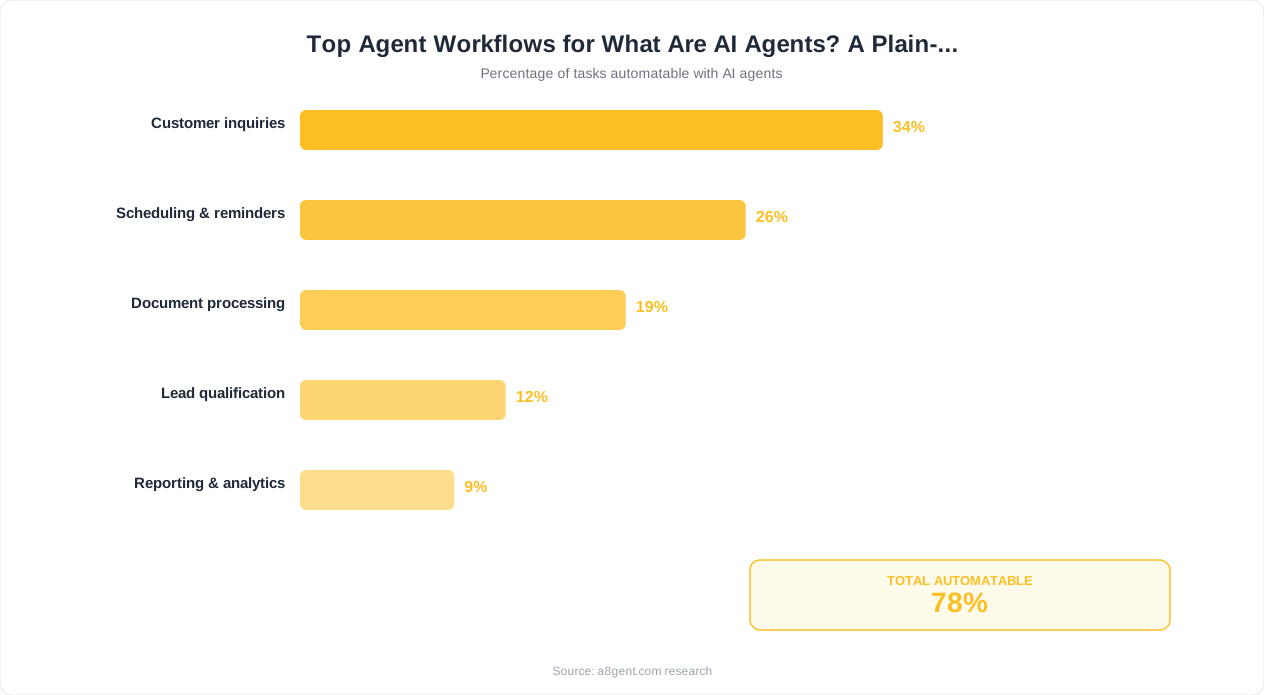
Let us get specific. Here are real examples of what business owners are automating with AI agents in 2026, organized by department. These are not theoretical - these are workflows running right now in businesses ranging from solo consultants to 500-person companies.
Marketing
- Writing and scheduling social media posts across all platforms, tailored to each platform's style
- Repurposing long-form content (blog posts, podcasts, videos) into dozens of short-form pieces
- Monitoring brand mentions and competitor activity, then summarizing what matters in a daily brief
- Generating SEO-optimized blog drafts based on keyword research and competitor analysis
- A/B testing email subject lines and automatically rolling out winners
Learn more about specific tools in our marketing agents guide.
Sales
- Researching leads before calls - pulling LinkedIn data, company info, recent news, and tech stack
- Writing personalized outreach emails at scale (not generic templates - actually personalized based on research)
- Following up with leads who have gone quiet, at exactly the right interval and with the right message
- Qualifying inbound leads based on your criteria and routing hot leads to the right salesperson immediately
- Updating your CRM automatically after every call, email, or meeting
Explore our sales agent recommendations for tools that handle these workflows.
Customer Support
- Answering common questions instantly across email, chat, and social media using your knowledge base
- Processing returns, exchanges, and refunds without human involvement
- Escalating complex issues to the right team member with full context already summarized
- Following up after resolution to check satisfaction and catch problems early
- Translating support conversations in real-time for international customers
See our support automation guide for platform recommendations.
Operations
- Processing invoices - extracting data from PDFs, matching to purchase orders, routing for approval
- Onboarding new employees - sending welcome emails, creating accounts, scheduling orientation
- Managing inventory alerts and automatically reordering when stock hits thresholds
- Scheduling meetings by coordinating multiple calendars and time zones
- Generating weekly reports by pulling data from multiple sources and highlighting what changed
Finance
- Categorizing expenses automatically and flagging anomalies for review
- Sending payment reminders at escalating intervals before and after due dates
- Reconciling bank transactions with invoices and highlighting discrepancies
- Generating cash flow forecasts based on historical patterns and upcoming obligations
The common thread across all of these? They are repetitive, rule-based tasks that currently eat up hours of human time. If you or your team spend more than 30 minutes a day on any one of these workflows, an AI agent can probably handle it. Use our agent finder tool to discover which platforms handle your specific workflow best.
Real AI Agent Tools You Can Use Today (2026)
Enough theory - let us talk about specific tools you can sign up for and start using this week. The AI agent market has matured significantly, and there are now platforms designed specifically for non-technical business owners. Here are the ones worth your attention.
Autonoly is built specifically for small and mid-size business owners who want AI agents without the complexity. You describe what you want your agent to do in plain English, connect your tools (CRM, email, calendar, etc.), and it builds the workflow for you. It is particularly strong for multi-agent setups where you need several agents coordinating together - like a sales team where one agent researches, another writes emails, and a third schedules meetings. Pricing is straightforward and it includes templates for common business workflows.
Lindy positions itself as your "AI employee" and it lives up to that promise. You can create agents (Lindy calls them "Lindies") for virtually any business task: email triage, meeting scheduling, lead research, content writing, customer support, and more. What makes Lindy stand out is its simplicity - the interface feels like giving instructions to a new hire rather than programming software. It also has excellent memory, so your agents learn your preferences over time. Great for solopreneurs and small teams who want an all-in-one solution.
11x.ai
If sales is your primary focus, 11x.ai deserves a close look. Their flagship agents - "Alice" for outbound sales development and "Mike" for phone calls - are purpose-built for revenue generation. Alice will research your ideal customers, find their contact info, write personalized outreach, send follow-ups, and book meetings on your calendar. Businesses report that Alice performs comparably to a full-time SDR at a fraction of the cost. Best for B2B companies that need to scale outbound prospecting.
n8n is the choice for business owners who want maximum flexibility and do not mind a slightly steeper learning curve. It is a workflow automation platform with a visual drag-and-drop builder that now includes powerful AI agent capabilities. You can build incredibly sophisticated automations by connecting hundreds of apps and adding AI decision-making at any point in the flow. It also has a self-hosted option, which matters if you handle sensitive data. Best for businesses with somewhat technical team members or those who want to own their automation infrastructure.
Clay is a data enrichment and outreach platform that has become indispensable for sales and marketing teams. It acts as a research agent - you give it a list of companies or people, and it enriches every record with dozens of data points from multiple sources: LinkedIn, company websites, job postings, tech stack data, funding announcements, and more. Then it can use that enriched data to write hyper-personalized outreach. If your business depends on outbound sales or account-based marketing, Clay is a force multiplier.
Not sure which platform fits your needs? Our agent finder tool matches you with the right platform based on your business type, budget, technical comfort level, and primary use case. Or take the full assessment for a comprehensive recommendation that includes implementation steps.
How to Get Started with AI Agents This Week
You have read about what agents are, how they work, and what they can do. Now let us talk about how you actually get started - this week, not "someday." The businesses that are winning with AI agents did not wait until the technology was perfect. They started with one small use case, proved the value, and expanded from there. Here is your action plan.
Step 1: Take an Assessment (10 minutes)
Before you sign up for any tool, you need clarity on where to start. Take our free AI agent assessment. It asks about your business type, team size, biggest pain points, current tools, and budget. In return, you get a personalized recommendation: which type of agent to start with, which specific platform to use, and which workflow to automate first. This prevents the most common mistake - picking a tool before understanding the problem.
Step 2: Identify Your "Painful Repetitive Task"
Look at your week. What task do you or your team dread? What takes too long? What falls through the cracks? The best first agent project has these characteristics:
- It happens frequently (daily or multiple times per week)
- It follows a predictable pattern with clear rules
- The cost of a mistake is low (you can review and catch errors)
- It currently takes 30+ minutes per day of human time
Common winners for a first agent: email triage and response, lead follow-up sequences, social media scheduling, invoice processing, and meeting scheduling.
Step 3: Pick One Tool and Commit to a 2-Week Trial
Based on your assessment results, sign up for one platform. Do not try three at once - that is a recipe for overwhelm. Most platforms offer free trials or free tiers that are generous enough to prove the concept. If your first use case is customer-facing conversations, try Lindy. If it is sales outreach, look at Clay or 11x.ai. If it is internal workflow automation, start with n8n or Autonoly.
Step 4: Deploy with Training Wheels
Never go from zero to fully autonomous in one step. Start with your agent in "review mode" - it does the work but you approve before anything goes out. Read its outputs for a few days. Correct mistakes by adjusting your instructions. Once you see it hitting 90%+ accuracy, gradually remove the training wheels. Most business owners reach confidence within 5-7 days.
Step 5: Measure and Expand
After two weeks, measure the results. How much time did you save? How was the quality? What would you change? Then decide: optimize this agent further, or deploy a second agent for a different task. The businesses seeing the biggest transformation typically run 3-5 agents handling different parts of their operations within 90 days of starting.
If you want structured guidance through this process, our AI agent courses walk you through each step with video tutorials, templates, and community support. But honestly, the most important thing is just to start. Pick one task, pick one tool, and deploy this week. You will learn more in one week of hands-on experience than in a month of research.
The Future of AI Agents: Where This Is Heading (2026 and Beyond)
We are still in the early innings of AI agents. What exists today in 2026 is genuinely impressive compared to even a year ago, but it is nothing compared to where things are heading. Here is what business owners should expect and prepare for over the next 12-24 months.
Agents Will Get Dramatically More Capable
The underlying AI models - the "brains" of agents - are improving at a staggering rate. Each generation brings better reasoning, fewer errors, longer memory, and the ability to handle more complex tasks. By late 2026 and into 2027, expect agents that can handle tasks requiring judgment calls that today still need a human. Think: negotiating with vendors based on parameters you set, making hiring shortlist decisions by evaluating portfolios, or managing entire marketing campaigns from strategy to execution with only your final approval needed.
Costs Will Continue to Drop
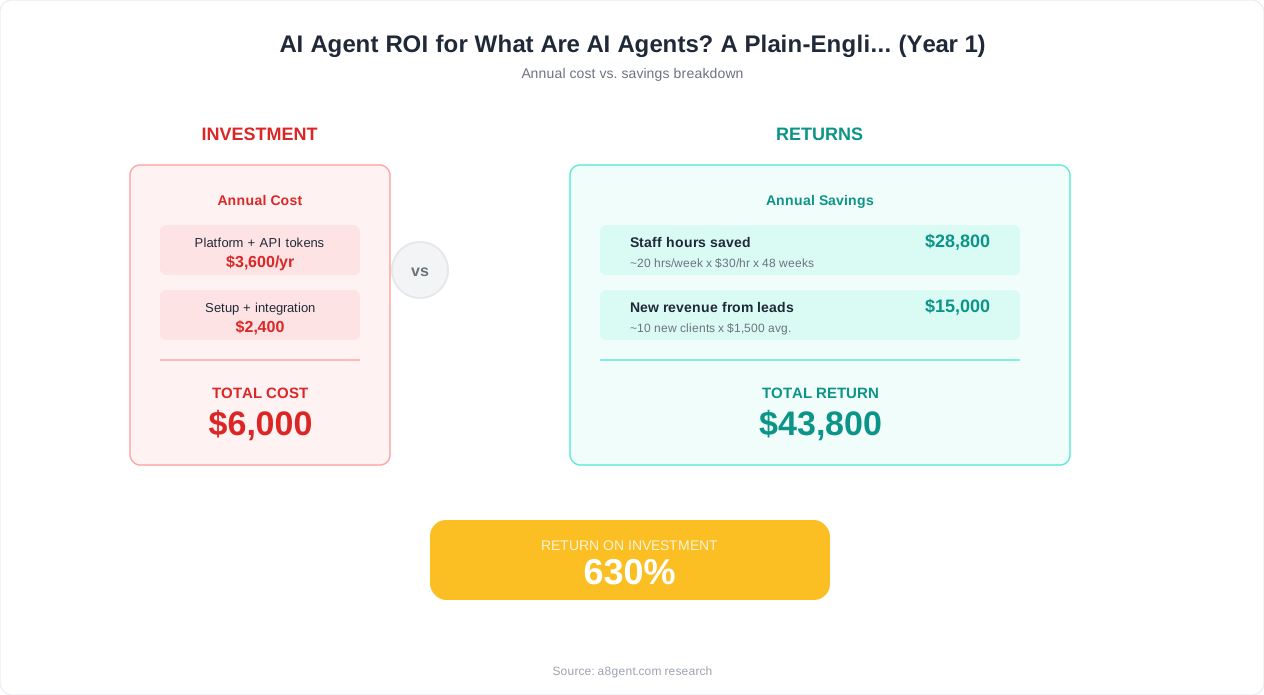
Running AI agents is getting cheaper every quarter. The computing costs are falling, competition between platforms is increasing, and efficiency improvements mean agents can do more with less. Tasks that cost $500/month in AI compute a year ago now cost $50. This means ROI will become even more obvious, and even micro-businesses and solopreneurs will be able to afford robust agent setups that today are only economical for larger companies.
Multi-Agent Teams Will Become Standard
Today, most businesses are deploying individual agents for individual tasks. The next wave is coordinated teams of agents that work together like a department. Imagine a "marketing department" of five agents: one monitors your industry and competitors, one generates content ideas based on trends, one writes the content, one handles distribution across channels, and one analyzes performance and feeds insights back to the others. Platforms like Autonoly are already building toward this future.
Voice and Video Agents Will Explode
Text-based agents are table stakes. The next frontier is agents that can handle phone calls, video meetings, and in-person interactions via screens. We are already seeing AI agents that make and receive phone calls indistinguishably from humans. For businesses in sales, customer service, and appointment-based industries, this will be transformative. Your receptionist, your first-line support, and your appointment confirmation calls will all be handled by agents within 18 months.
Regulation Will Arrive (Prepare Now)
Governments worldwide are developing AI regulations, and agents that interact with customers will face disclosure requirements, data handling rules, and accountability standards. Smart business owners are getting ahead of this by implementing agents transparently now - disclosing when customers are talking to AI and keeping humans in the loop for high-stakes decisions. This builds trust with your customers and prepares you for whatever regulatory framework emerges.
What Should You Do Today?
Start now. The businesses that will thrive in 2027 and beyond are the ones building their AI agent capabilities today. Every week you wait, your competitors get further ahead. You do not need to go all-in - start with one agent, prove the value, and build from there. The learning you accumulate by starting early is itself a competitive advantage that cannot be bought later. Take our assessment to find your starting point, or explore our courses for a guided path from beginner to advanced agent deployment.
FAQ
Do I need to know how to code to use AI agents?
No. The majority of AI agent platforms in 2026 are designed for non-technical users. Platforms like Lindy, Autonoly, and Clay use plain English instructions and visual interfaces. You describe what you want in normal language, connect your apps through simple authorization flows, and the platform handles all the technical complexity behind the scenes.
How much do AI agents cost for a small business?
Most platforms offer free tiers or trials. Paid plans typically range from $30 to $300 per month depending on usage volume and features. Compared to hiring a part-time employee at $2,000+ per month for the same tasks, agents deliver significant cost savings. Many business owners report breaking even within the first week of deployment.
Are AI agents safe to use with customer data?
Reputable platforms follow enterprise-grade security practices including data encryption, SOC 2 compliance, and strict access controls. However, you should always review a platform's privacy policy and data handling practices before connecting sensitive systems. Start with lower-risk workflows and expand as you build confidence in the platform's security.
What happens when an AI agent makes a mistake?
Every good agent setup includes guardrails. You can configure agents to ask for human approval before taking high-stakes actions, set boundaries on what they can and cannot do, and review their work before it reaches customers. Start in supervised mode, monitor outputs, and gradually increase autonomy as the agent proves reliable over days and weeks.
Can AI agents integrate with the software I already use?
Almost certainly yes. Major agent platforms offer hundreds of pre-built integrations with popular business tools: Gmail, Outlook, Slack, HubSpot, Salesforce, Shopify, QuickBooks, Google Sheets, Notion, Calendly, Stripe, and many more. If your tool has an API (most modern software does), an agent can connect to it.
How long does it take to set up an AI agent?
Simple agents can be running within 30 minutes - things like email auto-responses or meeting scheduling. More complex workflows with multiple steps and decision logic take 2-4 hours to set up properly. The initial setup is a one-time investment; once running, agents need only occasional tuning based on edge cases you discover over time.
Will AI agents replace my employees?
For most small and mid-size businesses, agents augment rather than replace your team. They handle the repetitive, time-consuming tasks so your people can focus on high-value work that requires creativity, relationship-building, and complex judgment. Many business owners find they can grow revenue without growing headcount by letting agents handle increased volume.
What is the difference between AI agents and workflow automation like Zapier?
Traditional automation tools like Zapier follow rigid if-then rules you define manually. AI agents can make decisions, handle exceptions, understand context, and adapt to situations they have not seen before. Think of Zapier as a train on fixed tracks and AI agents as a car with a GPS - both get you places, but the car can handle detours and unexpected roads.