N8n vs Make vs AI Agents: Which Automation Tool Is Worth It? (2026)
A head-to-head comparison of n8n, Make (formerly Integromat), and dedicated AI agent platforms. We break down pricing, capabilities, ease of use, and when each option makes sense for your business.
10+ years shipping production ML across TensorFlow, PyTorch, AWS, and GCP. Ships every A8gent agent before it becomes a lesson. GitHub
- N8n is best for technically comfortable business owners who want maximum flexibility, self-hosting options, and the ability to build complex custom workflows with AI capabilities built in.
- Make excels for visual thinkers who want a polished drag-and-drop interface with strong reliability and predictable pricing - ideal for straightforward multi-step automations.
- Dedicated AI agents like Autonoly outperform both for tasks requiring intelligence and judgment - they make decisions rather than just following predefined paths.
- Most businesses benefit from combining approaches: a workflow tool for predictable processes and an AI agent for tasks that require understanding context and adapting to variations.
- The cost difference between these tools is smaller than the cost of choosing the wrong one - a $50/month tool that saves 15 hours beats a free tool that saves 2 hours.
The Automation Tool Dilemma: Three Paths to Choose From
You have decided to automate your business processes. Smart move. But now you face a choice that has confused thousands of business owners: should you go with n8n, Make (formerly Integromat), or skip traditional workflow tools entirely and jump straight to AI agents? Each path has passionate advocates, and each has legitimate strengths. The problem is that most comparison articles are written by people trying to sell you one specific solution.
This guide is different. We have no stake in which tool you choose. Our goal is to help you understand the fundamental differences between these three approaches, see exactly where each one excels and struggles, and walk away with a clear answer for your specific business situation.
Here is the core tension: n8n and Make are workflow automation tools that execute predefined sequences of steps you design. AI agents are intelligent systems that can make decisions, handle exceptions, and adapt to situations they have never encountered before. These are fundamentally different capabilities, and confusing them leads to choosing the wrong tool and wasting months of effort.
Think of it this way. Make and n8n are like programming a robot on a factory floor - it does exactly what you tell it, in exactly the order you specify, with perfect consistency. An AI agent is like hiring a capable employee - you explain the goal, provide some guidelines, and they figure out how to handle each situation as it comes, including situations you never anticipated.
Both approaches have a place in a modern business. The question is which one you need right now, for the specific problems you are trying to solve. And the answer depends on three factors: the nature of your workflows, your technical comfort level, and your budget. Let us break down each tool and then compare them head to head so you can make a confident decision.
If you want to skip ahead to a personalized recommendation, use our comparison tool - it asks about your specific workflows and tells you exactly which approach (and which platform) will deliver the best results for your situation.
N8n: The Power User's Automation Platform
N8n (pronounced "n-eight-n") is an open-source workflow automation platform that has evolved significantly since its founding. In 2026, it is not just a workflow tool - it has added native AI capabilities that blur the line between traditional automation and intelligent agents. Here is what you need to know as a business owner evaluating it.
What N8n Does Well
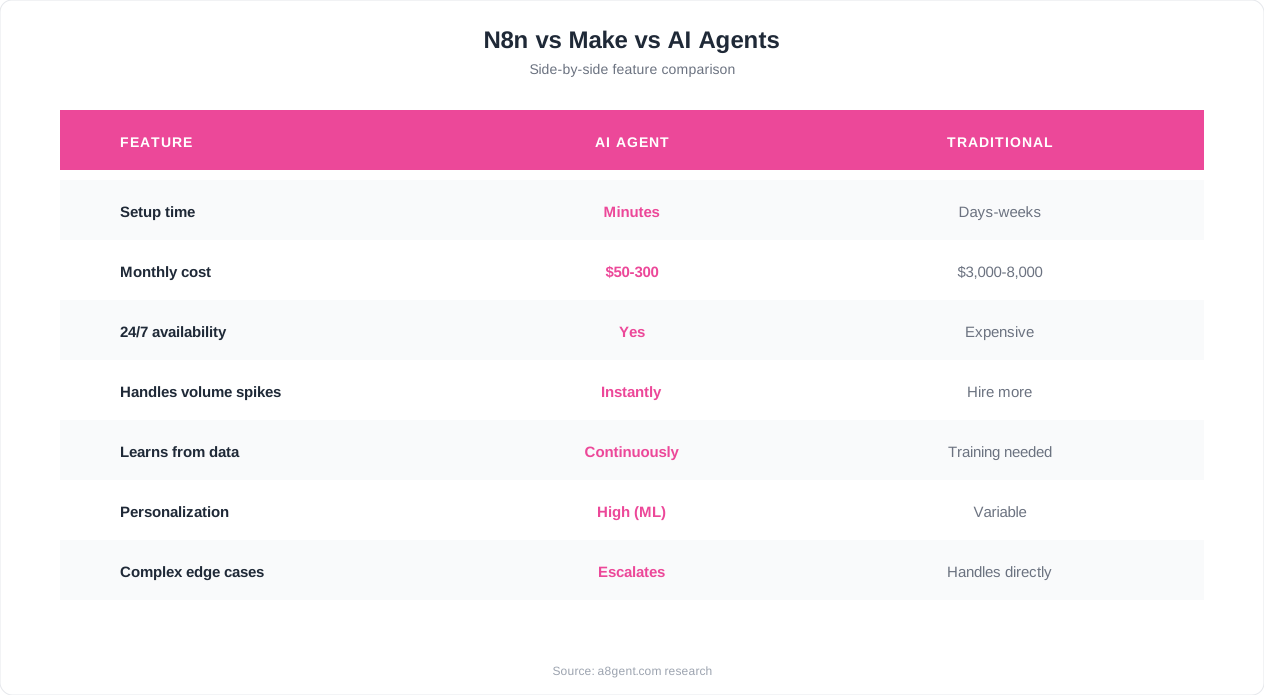
N8n gives you a visual canvas where you connect "nodes" - each node represents a trigger (something that starts the workflow), an action (something the workflow does), or a logic step (a decision point). You can build automations of virtually unlimited complexity by connecting these nodes together. Need to monitor your inbox for invoices, extract data with AI, check it against your accounting system, route it for approval if above a threshold, and file it automatically if below? N8n handles that entire chain with elegance.
The AI integration is where n8n has pulled ahead of older versions of itself and many competitors. You can add AI nodes that understand text, make decisions based on context, generate responses, classify inputs, and extract structured data from unstructured content. This means your workflows are not limited to rigid if-then logic - they can handle the messy reality of business data where things are not always formatted perfectly or categorized neatly.
Pricing and Hosting
N8n offers two paths: a cloud-hosted version with tiered pricing based on workflow executions, and a self-hosted version that is free and open source (you provide the server). The self-hosted option is remarkable value for businesses with technical capability - you pay only for your server costs, which can be as low as $5-20 per month for small-scale usage. The cloud version starts with a free tier and scales up based on usage volume, with enterprise features available at higher tiers.
Who N8n Is Best For
- Business owners or team members who are comfortable with slightly technical tools (similar complexity to building a spreadsheet formula)
- Companies that need highly customized workflows specific to their unique processes
- Businesses handling sensitive data that benefits from self-hosting
- Teams that want one platform for both traditional automation and AI-powered decision making
Where N8n Falls Short
The learning curve is real. While not requiring code, n8n's visual builder assumes you can think in terms of data flows and logic sequences. Non-technical business owners who just want something to "handle my emails" often find the initial setup frustrating. The community and documentation are excellent, but you should plan for 4-8 hours of learning before you are productive. Once past that hump, it becomes intuitive - but that hump is steeper than alternatives.
Make (Formerly Integromat): The Visual Automation Standard
Make - which older business owners might remember as Integromat before its rebrand - is the polished, user-friendly workflow automation platform that has become the default choice for non-technical teams. It occupies the middle ground between simple tools like Zapier and power tools like n8n. Here is the full picture.
What Make Does Well
Make's strength is its visual scenario builder. You create "scenarios" (their term for workflows) by dragging modules onto a canvas and connecting them. The interface is genuinely beautiful and intuitive - you can often understand what a scenario does just by looking at it, which matters when someone else on your team needs to modify or troubleshoot it later. The learning curve is gentler than n8n, and most business owners can build their first useful automation within an hour of signing up.
Reliability is another Make strength. Their infrastructure handles millions of scenario executions daily with high uptime and consistent performance. When you set up an automation in Make, you can trust that it will run when triggered, handle errors gracefully, and not silently break without notification. For business-critical workflows - like sending invoices, updating client records, or triggering communications - this reliability matters enormously.
Pricing Structure
Make uses an operations-based pricing model. Every action within a scenario counts as an operation, and your plan includes a monthly allocation. The free tier gives you enough operations for light usage (1,000 operations per month), and paid plans scale from there. The pricing is predictable once you understand your usage patterns, but it can surprise newcomers who build complex scenarios with many steps - each step consumes operations, so a 10-step workflow processing 100 items uses 1,000 operations. Always estimate your monthly operations before committing to a plan.
AI Capabilities
Make has added AI features, but they remain more limited than n8n's native AI integration. You can connect to OpenAI, Claude, and other AI providers through dedicated modules, which lets you add text generation, classification, and analysis to your workflows. However, Make's AI usage feels more like bolting AI onto a traditional workflow rather than having intelligence woven throughout the system. For simple AI tasks (summarize this email, classify this support ticket), it works fine. For complex decision-making that adapts to context, you may hit limitations.
Who Make Is Best For
- Business owners who want visual, intuitive automation without a steep learning curve
- Teams where multiple people need to understand and modify automations
- Companies with straightforward multi-step processes that follow predictable paths
- Businesses that value reliability and polish over raw flexibility
Where Make Falls Short
Make struggles with highly dynamic processes where the path forward depends on nuanced understanding of content. If your workflow needs to "read this email, understand what the customer actually needs, and decide which of seven possible responses is appropriate" - Make can technically do this with AI modules, but it feels clunky compared to purpose-built AI agents. Make is also not open source, so you cannot self-host it or customize it beyond what their interface allows.
AI Agents: The Intelligent Alternative
Dedicated AI agent platforms like Autonoly represent a fundamentally different approach to automation. Instead of designing workflows step by step, you describe what you want accomplished in plain language, and an intelligent agent figures out how to do it. This is not a marketing gimmick - it is a genuine architectural difference that matters for certain types of business problems.
What AI Agents Do Differently
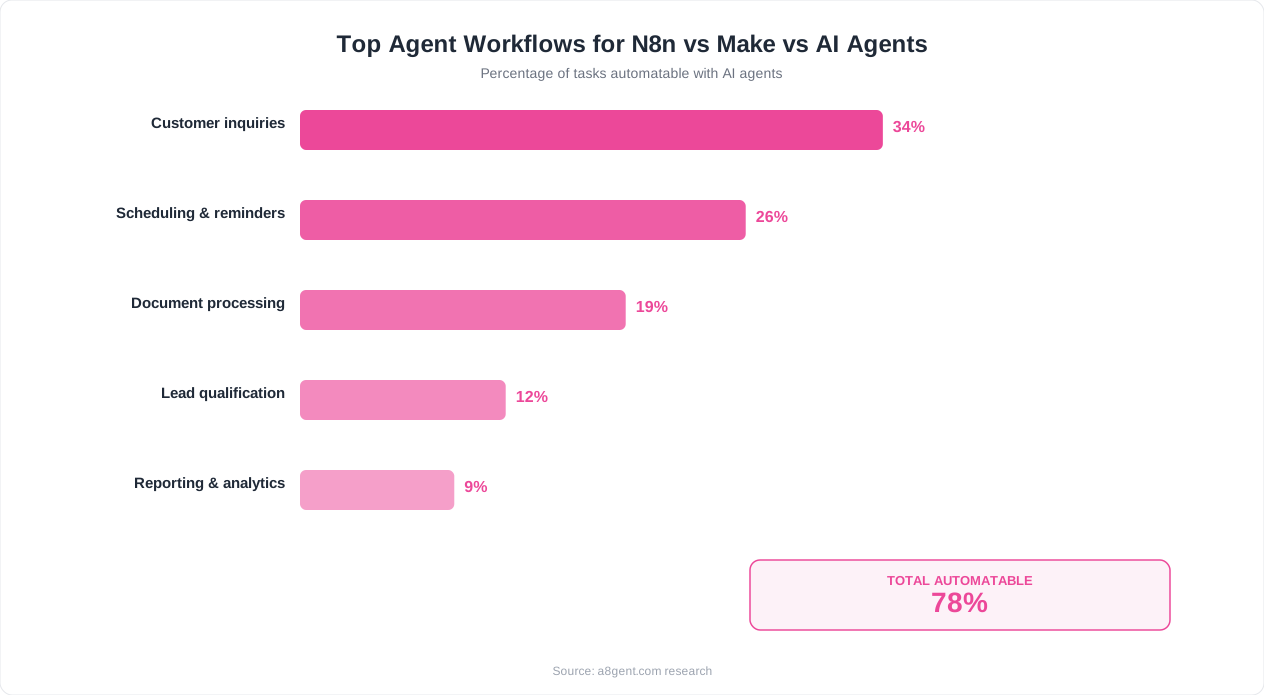
The core difference is decision-making under uncertainty. When a workflow tool encounters something unexpected - an email that does not fit its predefined categories, a customer request that spans multiple departments, a lead that does not clearly qualify or disqualify - it either fails, follows a generic fallback path, or stops and asks for human input. An AI agent reads the context, applies judgment, and takes appropriate action even for situations it has never encountered before.
Consider this real example: a customer emails asking about pricing for a service you offer, but also mentions they have a tight deadline and asks if you can expedite delivery. A workflow tool would need separate rules for pricing inquiries, deadline requests, and expedited service - and would likely miss the nuance of handling all three in a single, coherent response. An AI agent reads the whole email, understands the full context, and crafts a response that addresses the pricing question, acknowledges the deadline concern, and explains your expedite options - all in one natural message.
Platforms Worth Considering
Autonoly stands out for small and mid-size businesses because it combines AI agent intelligence with the workflow coordination capabilities that make n8n and Make useful. You get agents that can think and decide, but you can also orchestrate multiple agents working together on complex processes. The setup uses plain English - you describe what you want, and Autonoly configures the agent for you.
Pricing Reality
AI agent platforms typically cost more per month than basic workflow tools because they consume more compute resources - running large language models is more expensive than executing simple if-then logic. However, the value equation often favors agents because they handle tasks that workflow tools simply cannot, eliminating the need for human involvement in situations where traditional automation hits its limits. Use our cost comparison tool to see a detailed breakdown for your specific usage patterns.
Who AI Agents Are Best For
- Businesses where customer communication quality matters and cannot be templated
- Companies handling varied, unpredictable inputs that do not fit neat categories
- Owners who want to describe goals in plain English rather than design logic flows
- Teams that need automation to handle exceptions gracefully rather than failing on edge cases
Where AI Agents Fall Short
AI agents are less predictable than workflow tools. A workflow does exactly the same thing every time - which is a feature when consistency matters more than intelligence. Agents may handle the same input slightly differently each time, which can be unsettling for processes where exact reproducibility is critical (like financial calculations or compliance reporting). They also cost more for high-volume simple tasks where traditional automation is perfectly adequate.
Head-to-Head Comparison: N8n vs Make vs AI Agents
Let us put all three options side by side across the dimensions that actually matter for your decision. This is not about which tool is objectively "best" - it is about which tool is best for your specific situation, workflows, and capabilities.
Ease of Setup
- Make: Easiest to start. Beautiful interface, excellent onboarding tutorials, and you can build a useful automation within your first hour. Minimal learning curve for straightforward workflows.
- AI Agents (Autonoly): Second easiest. Describing what you want in plain English is natural, but understanding what agents can and cannot do takes some experimentation. First useful agent typically running within 1-2 hours.
- N8n: Steepest initial curve. The visual builder is logical once you understand it, but plan for 4-8 hours of learning before building anything complex. Rewards investment with maximum long-term flexibility.
Handling Complex Scenarios
- N8n: Excels at complex, multi-step processes with branching logic. If you can think through the logic, n8n can execute it. Combined with AI nodes, it handles both predictable and unpredictable paths.
- AI Agents: Best for complex scenarios involving judgment and adaptation. Thrives where the "right action" depends on understanding context that cannot be reduced to simple rules.
- Make: Handles moderate complexity well but can become unwieldy for scenarios with many conditional branches. Better suited to processes with clear, predictable paths.
Monthly Cost (Typical Small Business Usage)
- N8n (self-hosted): $5-20/month server costs only - unbeatable for budget-conscious businesses with technical capability
- N8n (cloud): $20-50/month for moderate usage
- Make: $9-30/month for moderate usage (watch operation consumption on complex scenarios)
- AI Agents: $50-200/month depending on volume and complexity of tasks handled
Best Use Cases
- N8n: Data processing pipelines, system integrations, custom internal tools, anything requiring self-hosting or maximum control
- Make: Marketing automation, CRM workflows, e-commerce order processing, team notifications, data syncing between apps
- AI Agents: Customer communication, sales outreach, content creation, lead qualification, anything requiring understanding natural language or making judgment calls
Still not sure which category fits your needs? Our comparison tool walks you through your specific workflows and recommends the right approach - whether that is a workflow tool, an AI agent, or a combination of both.
The Hybrid Approach: When to Use Multiple Tools Together
Here is something the "pick one tool" mentality misses: the most effective automation strategies in 2026 combine workflow tools and AI agents. They are not mutually exclusive - they are complementary. Understanding when to use each, and how to connect them, gives you a significant advantage over businesses locked into a single approach.
The Handoff Pattern
The most common hybrid setup uses a workflow tool for reliable triggering and routing, and hands off to AI agents when intelligence is needed. For example: n8n monitors your support inbox (reliable trigger), categorizes incoming emails by urgency (simple logic), and then routes complex inquiries to an AI agent that crafts personalized responses (intelligent action). The workflow handles the predictable plumbing; the agent handles the unpredictable thinking.
The Oversight Pattern
Another powerful combination uses AI agents to do the creative work and workflow tools to provide quality control. Your AI agent writes social media posts, generates email campaigns, or drafts client proposals. A workflow tool then routes these drafts for human approval, schedules them at optimal times, tracks performance metrics, and feeds results back to the agent for learning. The agent creates; the workflow orchestrates.
The Cost Optimization Pattern
AI compute costs money. Using an AI agent for a task that a simple if-then rule handles perfectly is like hiring a consultant to flip a light switch. Smart businesses use Make or n8n for the 70% of their automation needs that are simple and predictable (sync this data, send that notification, update this record), and reserve AI agents for the 30% that genuinely require intelligence (understand this customer's tone, decide the appropriate response, judge whether this lead is qualified). This keeps costs manageable while delivering maximum capability.
How to Connect Them
Most modern platforms are designed to work together through APIs and webhooks. N8n and Make can both trigger AI agents via HTTP requests and receive results back. Platforms like Autonoly offer native integrations with workflow tools specifically for this hybrid approach. You do not need to be a developer to set this up - it typically involves copying a webhook URL from one platform into another, which is no more complex than pasting a link.
A Real Example
Consider a marketing agency managing 10 client accounts. Their hybrid setup: Make handles scheduling and publishing across all client social accounts (predictable, reliable, high-volume). An AI agent handles content ideation and writing (creative, contextual, varies by client). N8n manages the internal workflow - routing drafted content for client approval, tracking deadlines, and alerting team members when reviews are overdue. Each tool does what it does best, and the whole system runs with minimal human supervision.
Use our cost comparison tool to model different combinations and see which hybrid approach delivers the best ROI for your specific mix of workflows.
5 Mistakes Business Owners Make When Choosing Automation Tools
After helping thousands of business owners navigate this decision, we see the same mistakes repeated. Avoid these and you will save months of wasted effort and hundreds of dollars in abandoned subscriptions.
Mistake 1: Choosing Based on Features Instead of Fit
The platform with the most features is rarely the best choice for your business. A tool with 500 integrations is useless if it cannot elegantly handle your three most important workflows. Business owners often spend weeks comparing feature matrices when they should be testing actual use cases. The right question is not "Which tool has the most capabilities?" but "Which tool handles my specific painful workflow most naturally?" Test with your real data and your real processes, not hypothetical scenarios.
Mistake 2: Over-Engineering the First Automation
Your first automation should not be your most complex workflow. It should be your most annoying repetitive task - even if it is simple. Business owners who try to automate their entire client onboarding process as a first project usually get frustrated and give up. Those who start by automating their inbox filtering or meeting scheduling build confidence and skills they apply to bigger projects later. Start embarrassingly simple.
Mistake 3: Ignoring the Maintenance Burden
Every automation requires some ongoing maintenance. Apps update their APIs. Business processes change. Edge cases emerge that you did not anticipate. The question is not "Does this tool require maintenance?" (they all do) but "How much time does maintenance take, and can my team handle it?" Simpler tools like Make tend to have lower maintenance overhead. Complex n8n workflows need more attention. AI agents need periodic instruction refinement. Factor this into your total cost calculation.
Mistake 4: Not Measuring Actual Time Savings
Many business owners deploy automation and assume it is working without measuring. Then they discover months later that their team developed workarounds because the automation was not handling edge cases. Track actual time saved per week in a simple spreadsheet for the first month. If the numbers are not compelling, either adjust the tool or switch to a better fit rather than running a failing automation indefinitely.
Mistake 5: Trying to Automate Human Judgment Too Early
Some tasks require human judgment. Not every process should be automated end-to-end. The best approach is automation with appropriate human checkpoints - let the tool handle the repetitive parts and present decisions to humans at the right moments. As AI agents improve and you build trust, you can gradually remove checkpoints. But starting fully autonomous on complex processes leads to mistakes that damage customer relationships and business reputation.
Want to avoid all five mistakes? Our comparison tool guides you through the decision with questions designed to match your actual situation - not theoretical best cases - and recommends the approach most likely to succeed for your specific business, team, and workflows.
The Final Verdict: Which Tool Should You Pick?
After breaking down each option in detail, here is the decision simplified to its essence. Read the scenario that most closely matches your situation, and follow that recommendation.
Choose N8n if:
- You or someone on your team is comfortable with technical tools (spreadsheet formulas, basic logic)
- You need maximum flexibility to build unique, custom workflows
- Data privacy matters and you want self-hosting as an option
- You want one platform that combines traditional automation with AI capabilities
- You are willing to invest time upfront in exchange for long-term power and low ongoing costs
Choose Make if:
- You want the fastest path from idea to working automation with minimal learning
- Your workflows are relatively straightforward - move data, trigger actions, send notifications
- Multiple team members need to understand and modify your automations
- You value visual clarity and a polished interface over raw power
- Your budget is tight and you want predictable costs at moderate usage levels
Choose AI Agents (Autonoly) if:
- Your most painful tasks involve understanding context, writing, or making judgment calls
- You want to describe goals in plain English rather than design logic flows
- Your business handles varied, unpredictable inputs (customer emails, diverse lead types, nuanced requests)
- You need automation that gets smarter over time rather than staying static
- Quality of customer-facing communication is a high priority
Choose a hybrid approach if:
- You have both simple predictable processes AND complex intelligent tasks to automate
- You want to optimize costs by using the right tool for each job
- You are building toward a comprehensive automation strategy that will grow over time
Your Immediate Next Step
Do not spend another week researching. Pick the option that matches your situation and start a free trial today. Every platform discussed here offers enough free usage to prove whether it works for your needs. The businesses winning with automation in 2026 are not the ones who made the perfect choice on day one - they are the ones who started, learned, and iterated quickly.
- Use our comparison tool for a personalized recommendation based on your workflows
- Calculate your potential savings with each approach before committing
- Start with one workflow, prove the value in two weeks, then expand
The right tool is the one that actually gets deployed and saves you time. Analysis paralysis is the only guaranteed losing strategy. Start today.
FAQ
Is n8n harder to use than Make for non-technical people?
Yes, n8n has a steeper initial learning curve. Make's interface is more intuitive for complete beginners and you can build useful automations within your first hour. N8n typically requires 4-8 hours of learning before you are productive. However, once past that initial curve, many users find n8n's flexibility worth the investment - especially for complex workflows.
Can Make do everything n8n does?
Not quite. Both handle common automation scenarios well, but n8n offers greater flexibility for custom logic, self-hosting for data privacy, stronger native AI integration, and the ability to run custom code within workflows. Make excels in visual clarity, ease of use, and reliability for standard business automations. They overlap about 70% in capabilities.
Are AI agents replacing workflow tools like n8n and Make?
No - they serve different purposes. Workflow tools excel at predictable, repeatable processes where consistency is paramount. AI agents excel at tasks requiring judgment, language understanding, and adaptation. Most businesses benefit from both. Think of workflow tools as reliable assembly lines and AI agents as intelligent decision-makers. They complement rather than replace each other.
Which option is cheapest for a small business?
N8n self-hosted is the cheapest at $5-20 per month for server costs. Make's free tier and low entry plans are cheapest for cloud-hosted workflow automation. AI agents cost more ($50-200/month) but often replace more expensive manual labor. Calculate ROI, not just subscription cost - a $150/month tool that saves 20 hours of work is far cheaper than a free tool saving 2 hours.
Can I switch from Make to n8n later without losing my work?
There is no direct migration tool, but the transition is manageable. Both platforms use similar concepts (triggers, actions, logic steps), so your automation logic transfers conceptually even though you rebuild it in the new interface. Many businesses run both simultaneously during transition, migrating one workflow at a time over several weeks rather than doing a risky all-at-once switch.
Do I need a developer to set up n8n?
For n8n cloud, no developer is needed - you sign up and start building. For self-hosted n8n, you need basic server setup knowledge (or a few hours following tutorials) for initial installation. Once running, building workflows in n8n does not require coding, though comfort with logical thinking and data structures helps significantly.
How do AI agents handle errors compared to workflow tools?
Workflow tools fail predictably - when something unexpected happens, they stop and notify you or follow a predefined error path. AI agents handle errors more gracefully by interpreting unexpected situations and adapting, but their responses are less predictable. For mission-critical processes where you need guaranteed behavior, workflow tools provide more control. For customer-facing tasks where adaptability matters, agents handle edge cases better.
Can I use all three tools together?
Absolutely. A common setup uses Make for simple, high-volume automations (data syncing, notifications), n8n for complex internal workflows requiring custom logic or self-hosting, and AI agents for customer-facing tasks requiring intelligence. They connect through webhooks and APIs. This hybrid approach optimizes both cost and capability, using each tool where it excels.