How to Build an AI Sales Follow-Up Sequence (No Code) (2026)
Step-by-step guide to building an automated AI sales follow-up sequence without writing a single line of code. Increase response rates by 40-60% and never let a lead slip through the cracks again.
10+ years shipping production ML across TensorFlow, PyTorch, AWS, and GCP. Ships every A8gent agent before it becomes a lesson. GitHub
- An AI-powered sales follow-up sequence responds to new leads within 30 seconds, follows up persistently across multiple channels, and personalizes every message based on lead behavior - all without requiring any code or technical skills to set up.
- Businesses using AI follow-up sequences see 40-60% higher response rates compared to manual follow-up, primarily because speed and consistency eliminate the two biggest reasons leads go cold: slow initial response and inconsistent nurturing.
- The ideal AI sales follow-up sequence includes 7-9 touchpoints over 14-21 days, alternating between email, SMS, and social channels, with each message adapting based on whether the lead has engaged with previous outreach.
- No-code AI platforms like Autonoly and 11x AI allow you to build complete multi-step follow-up sequences in 2-4 hours using drag-and-drop workflows, pre-built templates, and natural language instructions - no developers or technical skills needed.
- The biggest mistake in AI sales follow-up is making sequences too aggressive - best-performing sequences space messages 2-3 days apart, provide genuine value in each touchpoint, and include clear opt-out options that actually increase trust and long-term conversion rates.
Why Manual Sales Follow-Up Is Costing You Deals
Here is a truth that most business owners eventually learn the expensive way: your biggest sales problem is not generating leads. It is following up with the leads you already have. Studies consistently show that 80% of sales require at least five follow-up contacts, yet 44% of salespeople give up after just one attempt. The gap between what works and what actually happens is where deals go to die.
Think about your own business for a moment. A potential customer fills out your contact form on a Tuesday afternoon. Maybe you respond that day, maybe the next morning. You send a thoughtful email. They do not reply. You make a mental note to follow up. Three days later, you remember - or maybe you do not. If you do remember, you send one more message. Then life gets busy and that lead fades into your "I should get back to them" pile, where it quietly disappears forever.
Meanwhile, your competitor using AI-powered follow-up responded to that same type of lead in 30 seconds, sent a personalized follow-up two days later, another one four days after that, tried a different channel on day seven, and offered a time-sensitive incentive on day ten. They got the meeting. You got nothing.
This is not a willpower problem or a discipline problem. It is a capacity problem. Humans cannot consistently execute a perfect multi-step, multi-channel follow-up sequence for every lead when they also have meetings to run, clients to serve, and a business to operate. But AI agents can. That is exactly what they are built for - tireless, consistent, personalized outreach that runs in the background while you focus on closing deals that are already in motion.
The best part? You do not need to know how to code to build a sophisticated AI follow-up sequence. In 2026, no-code platforms make it possible to set up a complete system in a single afternoon. This guide walks you through the entire process - from choosing the right tool to configuring triggers, writing message templates, setting timing, and optimizing based on results.
If you are not sure which tool is right for your sales workflow, take our free assessment to get personalized recommendations based on your industry, team size, and sales volume. Otherwise, let us start building.
How AI Sales Follow-Up Sequences Actually Work
Before we get into the step-by-step setup, let us understand what an AI follow-up sequence actually does behind the scenes. This is not magic - it is a systematic process that an AI agent manages far more reliably than any human could.
The Trigger
Everything starts with a trigger event - something that tells the AI "a new lead just appeared." This could be a form submission on your website, a new contact added to your CRM, a social media message, a missed phone call, a webinar registration, or any other defined entry point. The AI monitors these triggers 24/7 and instantly begins the sequence when one fires. There is no delay for someone to notice, no queue to wait in, no business hours restriction.
Lead Enrichment
Before sending the first message, the AI gathers context about the lead. What page were they on when they filled out the form? What company do they work for? Have they visited your site before? What is their likely pain point based on the information they provided? This context feeds into message personalization so the lead receives outreach that feels relevant to their specific situation rather than generic mass communication.
The Sequence Logic
The AI follows a sequence you have defined - a series of touchpoints with specific timing, channels, and content. But unlike a static email drip campaign, an AI sequence adapts based on lead behavior. If someone opens your email but does not reply, the next touchpoint might take a different angle. If they click a link to your pricing page, the sequence might accelerate and emphasize booking a call. If they reply with a question, the AI can respond conversationally and adjust the remaining sequence accordingly.
Multi-Channel Orchestration
Modern AI follow-up is not limited to email. A well-designed sequence uses email, SMS, LinkedIn messages, and even voicemail drops - choosing the channel most likely to reach the specific lead based on their engagement patterns. If someone ignores emails but responds to texts, the AI learns this and prioritizes SMS for future touchpoints. This multi-channel approach increases total response rates by 25-45% compared to email-only sequences.
Personalization at Scale
Each message in the sequence is personalized using the context gathered during enrichment and updated based on ongoing behavior. The AI does not just insert a first name - it references their specific industry, mentions the problem they indicated on the form, adapts its tone based on their company size, and adjusts the value proposition based on what content they have engaged with. This level of personalization used to require a dedicated salesperson spending 10-15 minutes per lead. The AI does it instantly for every lead, regardless of volume.
Intelligent Exit Conditions
The sequence is not infinite. The AI knows when to stop - when a lead books a meeting (success), explicitly opts out (respect their choice), marks messages as spam (protect your reputation), or reaches the end of the defined sequence without engagement (move to long-term nurture). It also knows when to escalate to a human - when a lead asks a complex question, expresses urgency, or shows buying signals that suggest a personal call would be more effective than another automated message.
Platforms like Autonoly and 11x AI handle all of this through visual interfaces where you define the logic by connecting blocks, writing instructions in plain English, and selecting from pre-built templates. No code required at any point in the process.
To make this concrete, here is what a typical trigger payload looks like when a lead fills out your contact form, and how it flows into the sequence logic in a no-code tool:
// Example webhook payload from a website contact form
{
  "event": "form_submitted",
  "lead_id": "lead_71923",
  "form_name": "Contact Sales",
  "fields": {
    "name": "Jordan Lee",
    "email": "[email protected]",
    "company": "BrightPath Co",
    "message": "Interested in pricing for a 15-person team",
    "page_url": "https://example.com/pricing"
  },
  "submitted_at": "2026-07-09T16:04:00Z",
  "utm_source": "google_ads",
  "utm_campaign": "q3_demo_push"
}

// Field mapping (n8n/Zapier style):
// Trigger: "New Form Submission"
//   -> Step 1: Lead enrichment node
//        input:  fields.email, fields.company
//        output: company_size, industry, role (looked up)
//   -> Step 2: AI message generation node
//        input:  fields.name, fields.message, page_url,
//                 enrichment output
//        prompt: "Write Message 1 using the immediate-response
//                 template. Reference that they mentioned
//                 {{fields.message}} and came from
//                 {{fields.page_url}}."
//   -> Step 3: Send via email/SMS provider within 2 minutes
//   -> Step 4: Log to CRM with utm_source and utm_campaign for
//        attribution reporting
Step-by-Step: Building Your First AI Follow-Up Sequence
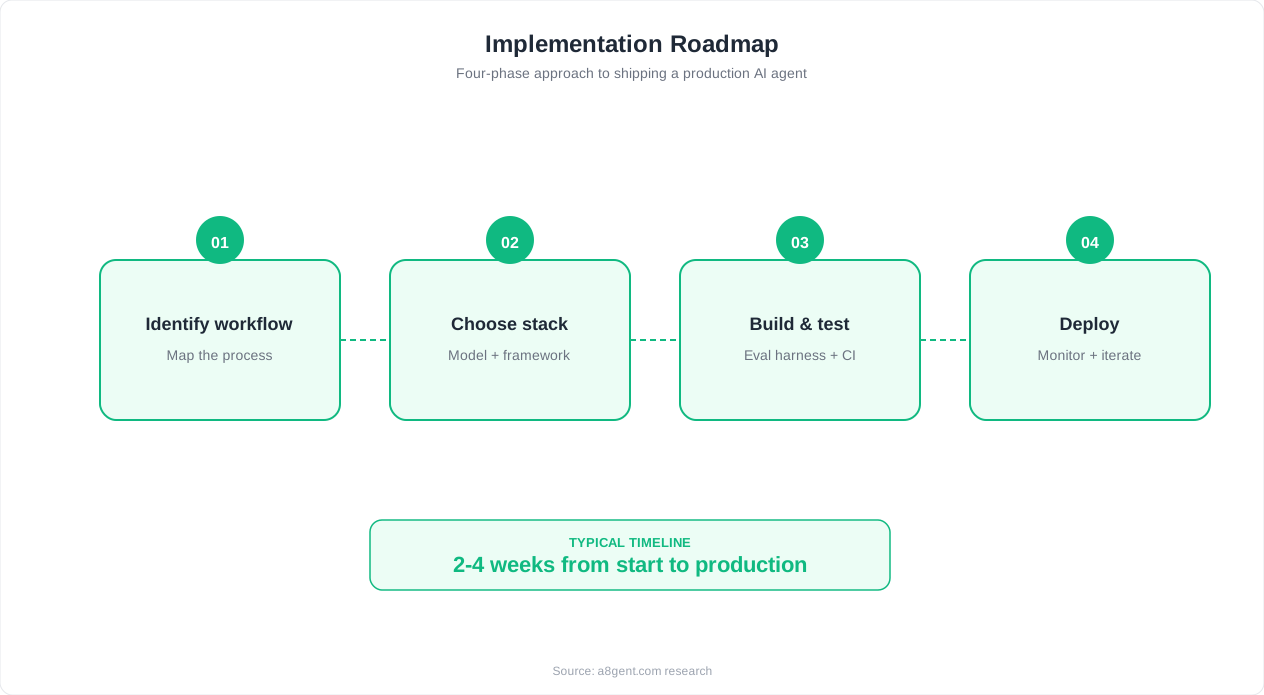
Let us build an actual AI follow-up sequence from scratch. These steps work on most no-code AI platforms, though specific interface elements will vary. Allow 2-4 hours for your first complete setup.
Step 1: Define Your Lead Source and Trigger
Choose one lead source to start with. Do not try to cover every entry point simultaneously - pick your highest-volume source. For most businesses, this is their website contact form, a landing page, or inbound inquiries through a specific channel. Connect this source to your AI platform. On most no-code tools, this involves either a direct integration (select your form provider from a list), a webhook URL (paste a link into your form settings), or a Zapier/Make connection. Test the trigger by submitting a test lead and confirming it appears in your AI platform.
Step 2: Configure Lead Enrichment
Set up what information the AI should gather about each new lead. At minimum, configure it to capture: the form fields they submitted, the page they came from (which indicates intent), and their company information if available. Most platforms can automatically look up company size, industry, and role from an email address. This context will make your messages significantly more relevant.
Step 3: Write Your Message Templates
Create the messages for each touchpoint in your sequence. You are writing templates with personalization variables, not fixed text. A good first message acknowledges what they asked about, demonstrates understanding of their situation, provides immediate value (a relevant resource, quick answer, or helpful insight), and includes one clear call to action (typically booking a brief call). Do not write sales pitches - write helpful messages that build trust. Here is a structure that works for most businesses: Message 1 (immediate): Acknowledge their inquiry, answer their question or provide requested information, offer to discuss further. Message 2 (day 2-3): Share a relevant resource or case study, connect it to their likely situation. Message 3 (day 5-6): Different channel (SMS or LinkedIn), brief and casual, reference your previous messages. Message 4 (day 8-9): New angle or additional value, address a common objection proactively. Message 5 (day 11-12): Social proof - share a result from a similar client. Message 6 (day 14): Direct and honest - ask if the timing is wrong and offer to reconnect later. Message 7 (day 18-21): Final value-add and soft close - last chance before moving to long-term nurture.
Step 4: Set Timing and Conditions
Define when each message sends and what conditions modify the sequence. Best practice timing: first message within 1-2 minutes of trigger (speed matters enormously for initial contact), subsequent messages spaced 2-4 days apart. Conditions to set: if lead replies, pause the automated sequence and notify you for personal response. If lead books a meeting, end the sequence with a confirmation message. If lead clicks a pricing link, consider sending the next message sooner with a meeting focus.
Step 5: Set Up Channel Rotation
If your platform supports multi-channel, configure which messages go to which channels. A common pattern: Messages 1, 2, 4, and 5 via email. Message 3 via SMS (short, casual). Message 6 via LinkedIn if you have their profile. Message 7 via email (final). This rotation prevents fatigue on any single channel and reaches leads where they are most likely to respond.
Step 6: Test the Complete Sequence
Before going live, run yourself through the entire sequence. Submit a test lead, receive each message, verify timing, check personalization, and confirm exit conditions work. Have a colleague or friend test it too and give feedback on tone, frequency, and whether they would reply. Fix anything that feels too aggressive, too generic, or too salesy. Real leads will be less forgiving than your test audience.
High-Converting Message Templates for Each Touchpoint
The words you use in each message make or break your sequence. Here are proven frameworks for each touchpoint that consistently produce 40-60% higher response rates than generic templates. Adapt these to your voice, industry, and offer - but keep the structural principles intact.
Message 1: The Immediate Response (Within 2 Minutes)
Purpose: Demonstrate speed, acknowledge their specific request, and provide immediate value. Structure: Open with their name and reference exactly what they asked about. Provide a quick, helpful answer or confirmation. Show you understand their situation by mentioning their industry or likely need. Offer one next step without pressure. Keep it under 150 words. The key principle here is reciprocity - give them something useful before asking for anything. If they asked about pricing, give them a range. If they requested information, provide it. If they booked a demo, confirm it with something extra (a relevant prep resource).
Message 2: The Value-Add (Day 2-3)
Purpose: Establish credibility and provide additional relevant value without repeating the call to action from message one. Structure: Reference your previous message briefly (do not guilt-trip about not replying). Share something genuinely useful - a relevant blog post, a short case study, a quick tip they can implement immediately, or an industry insight. Connect it to their specific situation. Close with a soft "happy to discuss how this applies to your situation" but do not push for a meeting. This message builds trust by demonstrating expertise without asking for anything in return.
Message 3: The Channel Switch (Day 5-6, via SMS or LinkedIn)
Purpose: Reach them in a different context and demonstrate persistence without being annoying. Structure: Keep it extremely brief - 2-3 sentences maximum. Use casual, conversational tone appropriate for the channel. Reference that you sent some info via email and want to make sure it reached them. Include one specific, valuable thing you could help with. SMS example: "Hi [Name], sent you some info on [topic] via email earlier this week. Wanted to make sure it did not end up in spam. Happy to answer any questions - just reply here or grab 15 min at [calendar link]."
Message 4: The Objection Buster (Day 8-9)
Purpose: Address the most likely reason they have not responded yet. Structure: Acknowledge that they are busy (validate without being passive-aggressive). Proactively address the most common objection for your type of service - timing, budget, uncertainty, or being unsure if it is the right fit. Provide evidence that neutralizes the objection (guarantee, trial, no-commitment option, or comparison data). This message works because most non-responses are not rejection - they are hesitation. Give them a reason to stop hesitating.
Message 5: The Social Proof (Day 11-12)
Purpose: Let someone else sell for you through results. Structure: Tell a brief story about a client in a similar situation - their challenge, what they did, and the specific outcome. Keep it under 100 words. Make it relatable to the lead's likely situation. Close with "would love to help you get similar results" and a meeting link. Social proof works because it shifts the conversation from "trust me" to "look at what happened for someone like you."
Message 6: The Honest Check-In (Day 14)
Purpose: Give them permission to say no and paradoxically increase yes responses. Structure: Be direct and human. Ask if the timing is wrong, if they went with someone else, or if they are just busy. Offer to reconnect at a better time. Make it easy to reply with a quick "not now" or "not interested." This message works because it removes pressure and shows respect - qualities that make people want to do business with you more, not less.
Message 7: The Graceful Close (Day 18-21)
Purpose: Final touchpoint that provides value regardless of whether they become a customer. Structure: Share one last resource or insight. Let them know you will not keep emailing but you are available whenever the time is right. Include a way to reactivate (a link they can bookmark, or instructions to simply reply whenever they are ready). This message generates surprising conversion rates - sometimes 5-10% - because people who have been thinking about it appreciate the no-pressure final nudge.
For more sales automation strategies specific to your business type, explore our sales use case library with industry-specific templates and proven sequences.
Here is a single copy-pasteable system prompt that encodes the entire 7-message cadence above - paste it into your AI agent's instruction field and it will generate every touchpoint on demand:
SYSTEM PROMPT: AI Sales Follow-Up Cadence Generator

You write follow-up messages for [COMPANY NAME]'s sales team.
You generate ONE message at a time based on which touchpoint
number is requested and the lead's context.

INPUTS:
- lead_name, lead_company, lead_industry
- original_inquiry (what they asked about)
- touchpoint_number (1-7)
- has_replied (true/false)
- has_visited_pricing_page (true/false)

TOUCHPOINT RULES:
1 (immediate, email): Acknowledge original_inquiry directly,
  answer it or confirm next step, one soft CTA. Max 150 words.
2 (day 2-3, email): Share one relevant resource tied to
  lead_industry. No repeated CTA. Max 120 words.
3 (day 5-6, SMS): Under 3 sentences. Mention the earlier email.
  One specific offer to help.
4 (day 8-9, email): Address the most likely objection for
  lead_industry. Provide one piece of evidence (guarantee,
  trial, comparison).
5 (day 11-12, email): One brief client story relevant to
  lead_industry. Under 100 words. End with meeting link.
6 (day 14, email): Direct, human tone. Ask if timing is wrong.
  Make it easy to say "not now."
7 (day 18-21, email): Final value-add. State you will stop
  emailing. Give a simple way to reconnect later.

GLOBAL RULES:
- If has_replied = true, do not generate the next scripted
  message - flag for human takeover instead.
- If has_visited_pricing_page = true and touchpoint_number < 4,
  compress the timeline: treat as touchpoint 4 (objection +
  meeting-focused) regardless of requested number.
- Never send more than one message per 48 hours.
- Ratio check: touchpoints 2, 3, 4, 5 must give value; only
  1, 6, 7 may include a direct meeting ask.

OUTPUT FORMAT (JSON):
{
  "touchpoint_number": number,
  "channel": "email | sms",
  "subject": "string or null for SMS",
  "body": "string"
}
Best No-Code Platforms for AI Sales Follow-Up in 2026
Not all platforms are equal for sales follow-up. Here is an honest comparison of the best no-code options available in 2026, with specific strengths and limitations for each.
Autonoly
Autonoly is purpose-built for small and mid-size businesses that want comprehensive AI automation without technical complexity. For sales follow-up specifically, its strengths include: natural language sequence building (describe what you want in plain English and it creates the workflow), built-in multi-channel support (email, SMS, and social), deep CRM integrations with major platforms, and adaptive sequencing that adjusts based on lead behavior. The platform handles lead enrichment natively, meaning you get company and contact data attached to leads automatically. Pricing starts at $99/month which includes the AI agent, messaging capacity, and integrations. Best for: businesses wanting an all-in-one platform that handles sales follow-up alongside other automation needs.
11x AI
11x AI focuses specifically on sales development - it is designed to function as a virtual sales development representative (SDR). Its AI agents research prospects, craft personalized outreach, and manage multi-step sequences autonomously. The platform excels at outbound prospecting in addition to inbound follow-up, with particularly strong LinkedIn integration and prospect research capabilities. It shines for B2B companies with defined ideal customer profiles where prospect research and personalization are critical differentiators. Its AI-generated messages tend to feel more natural and less templated because the system spends more computational effort on personalization. Best for: B2B companies focused heavily on outbound sales development and prospecting.
How to Choose Between Them
If your primary need is following up with inbound leads who contact you first, and you also want AI automation for other business processes (support, scheduling, operations), Autonoly is the more versatile choice. If your primary need is proactive outbound prospecting and you want an AI that functions like a dedicated SDR, 11x AI is purpose-built for that. Many businesses start with one and add the other as they scale - using 11x AI for new prospect outreach and Autonoly for post-inquiry nurturing and broader business automation.
Key Features to Evaluate
Regardless of which platform you choose, verify these capabilities before committing: Does it integrate directly with your CRM without middleware? Can it send through your existing email domain (critical for deliverability)? Does it support your preferred communication channels? Can you easily pause or modify sequences for individual leads without disrupting others? Does it provide clear analytics on sequence performance - open rates, reply rates, and conversion rates per step? Can it handle replies intelligently (continuing a conversation versus escalating to you)? And critically - can you set it up yourself in an afternoon, or will you need help?
What About General Automation Tools?
You might wonder whether tools like Zapier, Make, or n8n can handle sales follow-up. Technically yes - you can build follow-up sequences using these platforms connected to email services. However, they lack the AI intelligence layer: adaptive messaging, behavioral triggers, natural language personalization, and conversational handling of replies. They work as rigid "if this then that" automations. For simple reminder emails on a timer, they are sufficient. For intelligent, personalized follow-up that adapts to lead behavior, purpose-built AI sales tools deliver significantly better results. The conversion rate difference between rigid drip emails and adaptive AI sequences is typically 30-50% - which more than justifies the difference in platform cost.
Optimizing Your Sequence: What to Measure and How to Improve
Building the sequence is step one. Optimizing it based on real performance data is where the magic happens. Most businesses see their sequence improve by 25-40% within the first 60 days through simple data-driven adjustments.
Key Metrics to Track
Monitor these numbers weekly during your first month: Speed to first contact - the time between lead submission and first message delivered. Target: under 2 minutes. If your platform is slow, the lead's attention has moved elsewhere. Open rate per message - what percentage of leads open each message in the sequence. Industry benchmarks for follow-up sequences are 35-55%. If you are below 30%, your subject lines need work. Reply rate per message - what percentage respond at each step. Healthy sequences see 8-15% total reply rates across all touchpoints. Conversion rate - what percentage of leads who enter the sequence eventually book a meeting or take your desired action. Targets vary by industry but 10-25% is achievable for warm inbound leads. Drop-off point - where in the sequence do leads stop engaging? If everyone opens message 1 but nobody opens message 3, something is wrong between those touchpoints.
Subject Line Optimization
Subject lines determine whether messages get opened. Test these approaches: questions that reference their specific situation, short provocative statements (under 6 words perform best), personalization beyond just their name (mention their company or industry), and reply-style subjects that look like part of a conversation thread rather than a new marketing email. Run A/B tests where your platform splits leads between two subject line variants and shows you which performs better. Small improvements in open rates compound across the entire sequence.
Timing Adjustments
If your analytics show high open rates but low reply rates, your messages might be arriving at bad times. Test different send times for each touchpoint. Tuesday through Thursday mornings (8-10 AM local time) consistently perform best for business emails. SMS messages get higher response rates in the early evening. LinkedIn messages perform well during business hours. But your audience might differ - let your data tell you rather than following generic advice blindly.
Message Length and Tone
If open rates are high but reply rates are low, the message content is the issue. The most common problems: messages are too long (ideal: 75-150 words for follow-ups), too salesy (focus on value over pitch), too generic (add more personalization variables), or missing a clear single action (one call-to-action per message, not three). Review your lowest-performing messages and rewrite them shorter, more specific, and with a clearer reason to reply.
Sequence Length and Spacing
If your analytics show zero engagement after message 4, your sequence might be too long or too aggressive. Consider shortening it. If you see responses coming in at message 6 and 7, your sequence length is right but your earlier messages might not be strong enough. If leads are unsubscribing or marking you as spam, increase the spacing between messages - you are reaching out too frequently for your audience's comfort level. Respect varies by industry: B2B prospects tolerate closer spacing (every 2-3 days) while consumers prefer wider gaps (every 4-5 days).
The Monthly Optimization Ritual
Set a recurring 30-minute monthly appointment to review your sequence analytics. In each session: identify the weakest-performing message (lowest reply rate), rewrite it with a new approach, review overall conversion trends, check if new lead sources need different sequences, and verify that CRM data is flowing correctly. This systematic approach to improvement means your sequence gets measurably better every single month. By month six, you will have a highly refined machine that consistently converts leads into conversations.
Seven Fatal Mistakes in AI Sales Follow-Up Sequences
These mistakes are common, costly, and completely avoidable. If your sequence is not performing as expected, one or more of these is likely the culprit.
Mistake 1: Being Too Aggressive
The single most damaging mistake is messaging too frequently or with too much pressure. When leads feel hounded, they do not just ignore you - they develop negative feelings about your brand that prevent them from ever coming back, even when their need becomes urgent later. Best practice: never send more than one message in a 48-hour period. If your sequence has messages on consecutive days, space them out immediately. Patience in follow-up builds trust. Aggression destroys it permanently.
Mistake 2: All Selling, No Value
If every message in your sequence is "buy my thing" with different words, you are training leads to ignore you. Each touchpoint should give something: an insight, a resource, a useful piece of information, an honest answer to a common question, or perspective that helps them make a better decision (even if that decision is not choosing you). The sequence that gives, gives, gives, and then asks will outperform the sequence that asks, asks, asks every time. Aim for a 4:1 ratio - four value-oriented messages for every one that directly pushes for a meeting.
Mistake 3: Not Personalizing Beyond First Name
Inserting someone's first name does not count as personalization in 2026. Everyone does it. Real personalization references their specific industry, the particular problem they mentioned, their company size or stage, the page they were browsing when they reached out, or a recent event at their company. If your messages could be sent identically to any lead with only the name changed, they are not personalized enough. Use the enrichment data your AI platform provides and write templates that incorporate it meaningfully.
Mistake 4: Ignoring Channel Preferences
Some people live in their inbox. Others never check email but respond to every text message. Others are active on LinkedIn but ignore unknown senders via email. If you are only using one channel, you are invisible to leads who do not use that channel. And if you keep hammering the same channel that someone is clearly ignoring, you are wasting touchpoints. Use behavioral data - if a lead opens emails but never replies, try SMS. If they are active on LinkedIn, message them there. Let their behavior guide your channel strategy.
Mistake 5: No Clear Exit Conditions
Sequences that run forever damage your sender reputation and annoy leads into permanent distrust. Define clear endpoints: maximum number of messages (7-9 is a common sweet spot), explicit opt-out handling (immediate removal, not "we'll stop in 2-3 business days"), and behavioral exits (booking a meeting, replying with "not interested," or marking you as spam). Also define escalation conditions - when should the AI hand off to a human instead of sending the next automated message? If a lead asks a detailed question or expresses urgency, a human response is more appropriate and more effective.
Mistake 6: Not Segmenting by Lead Quality or Source
A lead who downloaded a whitepaper and a lead who requested a pricing quote have radically different intent levels. Treating them identically - same sequence, same timing, same messaging - wastes the high-intent lead's time and overwhelms the low-intent lead. Create at least two sequence variants: one for high-intent leads (move faster, be more direct about booking meetings) and one for low-intent leads (move slower, provide more education, build awareness gradually). The effort to create a second variant pays for itself many times over in improved conversion rates.
Mistake 7: Setting and Forgetting
Your sequence is not a crockpot. You cannot set it in the morning and expect a perfect result at dinner time with no involvement. Markets change. Your offer evolves. Customer language shifts. Competitor positioning moves. A sequence that crushed it three months ago might be stale today. Review performance monthly, refresh underperforming messages quarterly, and rebuild the entire sequence from scratch annually. The businesses with the best follow-up results treat their sequences as living systems that require regular attention - not as permanent fixtures that run indefinitely without oversight.
Advanced Strategies: Taking Your AI Follow-Up to the Next Level
Once your basic sequence is running and generating results, these advanced strategies can increase conversion rates by an additional 20-35% without increasing your workload.
Behavioral Branching
Instead of a linear sequence where every lead gets the same messages in the same order, create branching paths based on behavior. Lead clicks pricing link? Branch them into a sequence focused on ROI and booking a demo. Lead downloads a resource but ignores meeting invitations? Branch them into a longer nurture sequence with more educational content. Lead visits your site three times in a week without reaching out? Trigger an outreach sequence acknowledging their interest. Behavioral branching makes your AI feel less like a robot and more like an attentive salesperson who notices and responds to buying signals.
Intent Scoring
Assign point values to lead behaviors: form submission (10 points), email open (1 point), link click (3 points), pricing page visit (5 points), case study download (4 points), reply (15 points). When a lead crosses a threshold (say, 20 points), automatically escalate them to a human for personal outreach. This ensures your salespeople spend time on the leads most likely to close while the AI handles everyone else. Most no-code platforms support lead scoring natively or through simple configuration.
Here is that scoring model as a ready-to-paste config for your no-code platform's scoring node:
// Example intent scoring config (n8n/Zapier style)
{
  "scoring_rules": [
    { "event": "form_submission", "points": 10 },
    { "event": "email_open", "points": 1 },
    { "event": "link_click", "points": 3 },
    { "event": "pricing_page_visit", "points": 5 },
    { "event": "case_study_download", "points": 4 },
    { "event": "reply_received", "points": 15 }
  ],
  "escalation_threshold": 20,
  "on_threshold_crossed": {
    "action": "notify_human",
    "notify_channel": "slack",
    "notify_target": "#sales-hot-leads",
    "pause_automated_sequence": true,
    "include_context": [
      "full_message_history",
      "engaged_touchpoints",
      "score_breakdown"
    ]
  },
  "score_decay": {
    "enabled": true,
    "decay_after_days": 14,
    "decay_percent": 25
  }
}
Time-Zone Intelligence
Sending a follow-up email at 3 AM the recipient's local time guarantees it gets buried under morning emails. Configure your AI to detect or estimate each lead's time zone and schedule messages for optimal windows. Most platforms can infer time zone from area code, company headquarters location, or IP address. This simple adjustment can increase open rates by 15-25% - a significant improvement from a configuration that takes five minutes to set up.
Re-Engagement Sequences
What happens to leads who complete your sequence without converting? Do not abandon them permanently. Create a re-engagement sequence that activates 30-60 days after the primary sequence ends. Use a completely different angle - new value proposition, seasonal offer, company news, or a "things have changed since we last spoke" approach. Many businesses report that 10-15% of their total conversions come from re-engagement sequences targeting leads who initially went cold. These are essentially free opportunities because the lead acquisition cost was already paid.
Social Proof Automation
Configure your AI to automatically include relevant social proof based on the lead's industry or company size. When a lead from healthcare enters the sequence, they see healthcare case studies and testimonials. When a lead from a 10-person company enters, they see results from similar-sized businesses. This dynamic social proof is significantly more persuasive than generic testimonials because it directly addresses the lead's question of "does this work for businesses like mine?"
Warm Handoff Protocol
When the AI generates a meeting booking or a positive reply, the handoff to your human salesperson should be seamless. Configure your system to automatically brief the salesperson with: the lead's complete interaction history, which messages they engaged with, what resources they downloaded, how long they have been in the sequence, and any information they shared in replies. This means your salesperson walks into every meeting fully prepared without spending 15 minutes reviewing CRM notes - they look professional, informed, and ready to help, which dramatically improves first-meeting-to-deal conversion rates.
Competitive Intelligence Integration
If your AI detects that a lead is also evaluating competitors (visiting comparison pages, mentioning other solutions in replies), automatically branch them into a sequence that honestly addresses competitive differentiation. Do not bash competitors - instead, help the lead understand the specific differences and which type of business each solution serves best. This consultative approach builds trust and positions you as confident rather than threatened. Leads who feel informed make faster decisions and are less likely to experience buyer's remorse.
For more advanced sales automation strategies and to see how AI agents handle the complete sales pipeline, visit our sales use case hub with templates, benchmarks, and implementation guides for every sales stage.
FAQ
How long does it take to set up an AI sales follow-up sequence with no code?
Most businesses can build and launch their first AI follow-up sequence in 2-4 hours using a no-code platform. This includes connecting your lead source, writing message templates, configuring timing and triggers, and testing the complete flow. The initial setup is the longest part - subsequent sequences for different lead types typically take 1-2 hours each because you can reuse templates and settings from your first one.
What response rates can I expect from an AI follow-up sequence?
Well-configured AI follow-up sequences typically achieve 40-60% higher response rates compared to manual follow-up. In absolute terms, expect 8-15% total reply rates across all touchpoints for cold or warm inbound leads. For high-intent leads (pricing requests, demo bookings), response rates can reach 25-40%. The key factors that determine your specific rate are: speed of initial response, message personalization quality, value provided in each touchpoint, and appropriate spacing between messages.
Will leads know they are talking to an AI?
Modern AI follow-up messages are designed to feel like they come from a real person on your team - and they technically do, since you wrote the templates and the AI personalizes and sends them. Most leads cannot distinguish AI-managed sequences from manually sent emails. That said, if a lead asks a complex question or engages in a real conversation, the AI should be configured to hand off to a human naturally. Transparency is important: you should not claim a human wrote each message if directly asked, but the communication style should be professional and personal regardless.
How many messages should be in my follow-up sequence?
The optimal number is 7-9 messages spread over 14-21 days for most B2B and high-value B2C sales. Research shows that most conversions from follow-up sequences happen between touchpoints 4 and 7, meaning shorter sequences leave money on the table. However, more than 9 messages in a 3-week window risks being perceived as spam. After the primary sequence, a re-engagement sequence 30-60 days later with 3-4 messages can capture additional conversions from leads who needed more time.
Can AI follow-up sequences integrate with my existing CRM?
Yes - most no-code AI platforms integrate directly with major CRMs including HubSpot, Salesforce, Pipedrive, Zoho, and others. This means lead data flows automatically between systems: new CRM contacts trigger sequences, engagement data writes back to the CRM, and meeting bookings update deal stages without manual intervention. If your CRM is not directly supported, middleware tools like Zapier or Make can bridge the connection. Always verify CRM integration before choosing a platform.
What is the difference between an AI follow-up sequence and a regular email drip campaign?
Traditional drip campaigns send the same fixed messages on a schedule regardless of lead behavior. AI follow-up sequences adapt - they change messaging based on opens, clicks, and replies; they switch channels when one is not working; they personalize content using real-time data about the lead; and they can hold natural conversations when leads respond. The conversion rate difference is typically 30-50% in favor of AI sequences because they feel responsive and personal rather than robotic and one-size-fits-all.
How do I avoid my AI follow-up emails going to spam?
Several practices prevent spam filtering: send from your own domain (not the platform's domain), warm up new sending domains gradually (start with 20-30 emails/day and increase over 2 weeks), keep messages short and avoid spam trigger words (free, guarantee, limited time), include a clear unsubscribe option, maintain a healthy sender reputation by removing bounced addresses immediately, and space messages appropriately (never more than one per 48 hours). Most AI platforms handle technical deliverability (SPF, DKIM, DMARC) automatically.
Can I use AI follow-up for existing leads that have gone cold?
Absolutely - re-engaging cold leads is one of the highest-ROI applications of AI follow-up because the lead acquisition cost is already paid. Create a separate re-engagement sequence specifically for leads that went dark. Use a different angle than your original outreach: mention something new (product update, new case study, seasonal relevance), acknowledge the time gap honestly, and offer a fresh reason to reconnect. Businesses typically recover 10-15% of cold leads through well-designed re-engagement sequences.