AI Agents for Recruiting: Screen Resumes and Schedule Interviews (2026)
AI recruiting agents screen hundreds of resumes in minutes, schedule interviews automatically, and respond to candidates 24/7 - reducing time-to-hire by 50-70% while eliminating the busywork that buries hiring managers.
10+ years shipping production ML across TensorFlow, PyTorch, AWS, and GCP. Ships every A8gent agent before it becomes a lesson. GitHub
- AI recruiting agents reduce time-to-hire by 50-70% by screening resumes within seconds of submission, responding to candidates immediately, and scheduling interviews without back-and-forth email chains.
- Automated resume screening evaluates candidates against your specific criteria consistently - eliminating the unconscious bias and inconsistency that occurs when humans review hundreds of applications while tired or rushed.
- The biggest ROI comes from candidate communication: AI agents respond to applicants within minutes (not days), answer questions about the role 24/7, and keep candidates warm through the process - reducing drop-off by 40-60%.
- Platforms like Autonoly let you build custom recruiting workflows without any coding - connecting to your job boards, email, calendar, and ATS with simple point-and-click setup.
- AI does not replace human judgment in hiring decisions - it handles the administrative overhead (80% of recruiting time) so hiring managers can focus on evaluating the shortlisted candidates who actually fit.
Why Recruiting Is Broken (And How AI Agents Fix It)
Ask any hiring manager what they hate about recruiting, and you will hear the same complaints: hundreds of unqualified resumes to sift through, endless email chains trying to schedule interviews, qualified candidates who ghost because your process is too slow, and the constant feeling that great people are slipping through the cracks while you are buried in administrative tasks.
The numbers paint a clear picture. The average job posting receives 250 applications. A human recruiter spends 6-8 seconds per resume on initial screening. Scheduling a single interview involves an average of 4.7 emails back and forth. And here is the killer statistic: the best candidates are off the market within 10 days. If your process takes 3-4 weeks from application to offer, you are systematically losing your top candidates to faster competitors.
AI recruiting agents solve this by compressing the timeline and eliminating the busywork. They screen every resume against your criteria within seconds of submission - not days. They respond to candidates immediately with personalized communication. They schedule interviews by checking calendar availability in real-time. And they keep every candidate informed throughout the process, eliminating the "black hole" experience that damages your employer brand.
The result: time-to-hire drops by 50-70%, candidate experience improves dramatically, and hiring managers get their evenings back.
This is not about replacing human judgment in hiring decisions. The final call on who to hire absolutely requires human evaluation of culture fit, potential, and nuanced qualifications. What AI replaces is the administrative overhead that consumes 80% of recruiting time - screening, scheduling, communicating, and coordinating. Let humans do what humans do best (evaluate people), and let AI do what AI does best (process information and coordinate logistics at scale).
In this guide, we will cover exactly how AI recruiting agents work, what they can automate today, which tools to use, how to set them up without technical skills, and how to avoid the pitfalls that trip up early adopters. If you hire more than 5 people per year, this will change how you think about recruiting. Take our free assessment to see which recruiting workflows are ready for automation in your organization.
AI Resume Screening: How It Works and Why It Is Better
Resume screening is the single largest time sink in recruiting - and the area where AI delivers the most dramatic improvement. Here is exactly how AI resume screening works and why it outperforms manual screening in most scenarios.
The Problem with Manual Screening
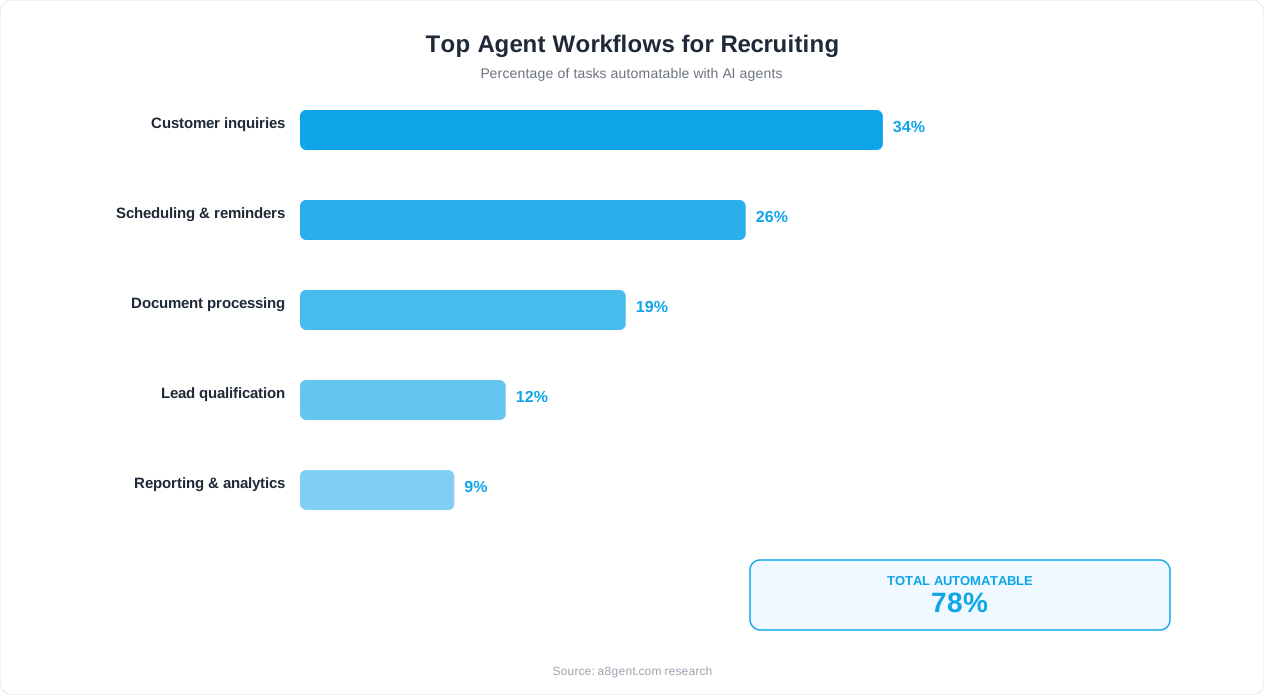
When a human reviews 250 resumes for a single role, quality inevitably suffers. Studies show that recruiters spend an average of 6-8 seconds per resume on initial review. In those 6 seconds, they are making snap judgments based on formatting, job titles, and company names - not deeply evaluating qualifications. Worse, screening quality degrades throughout the day. The 200th resume gets less attention than the 20th. Unconscious biases (school names, gaps in employment, formatting quality) influence decisions in ways that are impossible to control consistently.
How AI Screening Works
You define your criteria: required skills, experience level, education, industry background, specific certifications, location requirements, or any other factors that matter for the role. The AI agent evaluates every single resume against these criteria with equal attention - the 250th application gets the same thorough analysis as the 1st. For each candidate, the AI produces: a match score (how well they fit your criteria), a summary of relevant qualifications, flags for any standout elements (uncommon skills, career trajectory, notable achievements), and flags for potential concerns (gaps, job-hopping patterns, missing requirements).
What the AI Evaluates
Modern AI screening goes far beyond keyword matching. It understands: equivalent job titles (a "Customer Success Manager" and "Account Manager" may have similar experience), transferable skills (someone from a different industry who has the core competencies), career progression (is this person growing, stagnant, or declining in responsibility?), contextual relevance (5 years at a startup vs 5 years at a Fortune 500 carry different implications depending on your role), and overall fit beyond just checking boxes.
The Output: A Prioritized Shortlist
Instead of wading through 250 resumes, you review a ranked shortlist of 15-30 candidates who genuinely match your criteria. Each comes with a clear summary of why they scored well and any flags to consider. Your human evaluation time goes from 5-10 hours to 45-90 minutes - focused entirely on candidates who are actually qualified. This is not just faster; it is higher quality decision-making because you bring full attention to the candidates who deserve it.
Accuracy and Fairness
AI screening is not perfect, but it is more consistent than human screening. When properly configured, it evaluates based on qualifications and experience - not name, age, or school prestige. Most platforms allow you to audit the AI's decisions, review why candidates were ranked high or low, and adjust criteria based on what you learn. This accountability is often better than the unchecked, unauditable snap judgments humans make during manual screening.
Set up AI resume screening on Autonoly by defining your role criteria, connecting your job board or application inbox, and letting the agent process incoming applications in real-time. Most businesses have screening automated within 1-2 hours of setup.
Automated Candidate Communication: Never Leave an Applicant Hanging
The single biggest complaint candidates have about the hiring process is silence. They apply and hear nothing for weeks. They interview and get no feedback. They ask questions and wait days for responses. This "black hole" experience damages your employer brand and causes top candidates to accept other offers. AI agents eliminate this problem entirely.
Immediate Application Acknowledgment
The moment someone applies, your AI agent sends a personalized confirmation. Not a generic "we received your application" template - a message that references the specific role, acknowledges something from their background, sets clear expectations for timeline, and feels human. This immediate response sets you apart from 90% of companies that send nothing or send a robotic auto-reply days later.
Status Updates at Every Stage
As candidates move through your pipeline (or do not), the AI keeps them informed. Screened out? They get a respectful, timely decline message - not silence. Moving forward? They get a congratulatory message with clear next steps. In a holding pattern? They get a proactive update that their application is still active. This communication happens automatically based on pipeline triggers without any recruiter involvement.
24/7 Question Answering
Candidates always have questions: about benefits, work culture, team size, remote policy, interview format, or timeline. Your AI agent answers these questions instantly - at any hour of the day. It draws from information you provide about the role and company, giving consistent, accurate answers without a recruiter spending time on repetitive Q&A. Questions it cannot confidently answer get routed to a human for response.
Personalized Follow-Up Sequences
For candidates you want to keep warm (top prospects who are in later stages), the AI runs personalized nurture sequences. It might share a company blog post relevant to their interests, send a message from the hiring manager expressing enthusiasm, or provide additional information about the team they would join. These touchpoints keep candidates engaged and reduce the drop-off that occurs during long processes.
The Impact on Candidate Experience
Companies using AI-powered candidate communication report: 40-60% reduction in candidate drop-off during the process. 85%+ candidate satisfaction ratings (even from rejected candidates). 3x increase in referral likelihood (candidates who had a good experience recommend you to others). Significant improvement in Glassdoor and employer brand ratings. These metrics matter because in a competitive hiring market, your candidate experience IS your recruiting advantage.
Handling the Human Touch
AI handles volume communication brilliantly. But for high-value interactions - the call to tell someone they got the job, the conversation with a hesitant candidate about why they should join, or the feedback after a final-round rejection - keep humans in the loop. Configure your AI on Autonoly to handle all routine communication automatically while flagging moments that deserve personal human attention. The combination is more powerful than either approach alone.
Automated Interview Scheduling: End the Email Ping-Pong
Interview scheduling is a deceptively expensive recruiting task. It seems simple - just find a time that works for everyone. But when you factor in multiple interviewer calendars, candidate availability, time zones, room bookings, interview panels, and the inevitable reschedules, it quickly becomes a coordination nightmare. AI agents solve this completely.
How AI Interview Scheduling Works
Once a candidate is approved for an interview, the AI agent takes over scheduling. It checks the interviewer's calendar availability (accessing Google Calendar, Outlook, or your scheduling tool). It sends the candidate available time slots. The candidate picks a time (or provides their availability if no slots work). The AI confirms, sends calendar invitations to all parties, includes relevant details (video link, office address, preparation materials), and handles any subsequent changes. The entire process - which typically involves 4-7 emails and takes 2-5 days - is compressed into a single interaction taking minutes.
Multi-Interviewer Coordination
The real complexity in scheduling appears when multiple interviewers are involved. A typical later-stage interview might require availability overlap between 3-4 people - a hiring manager, team member, and department head. Finding a time that works for all of them manually is like solving a puzzle. The AI agent checks all calendars simultaneously, identifies overlap windows, and presents only times that work for everyone. No more "let me check with Sarah and get back to you" delays.
Panel Interview Scheduling
For panel interviews where multiple interviewers need to be present simultaneously, the agent handles it the same way - but with additional logic for room/video-room booking, ensuring adequate buffer time between back-to-back interviews, and respecting each interviewer's preferences (no early mornings, no Friday afternoons, etc.). These preferences are configured once and applied automatically to every scheduling decision.
Time Zone Intelligence
For remote roles with candidates across time zones, the AI automatically converts availability and presents times in the candidate's local time zone. It also respects business hour boundaries - never suggesting a 6 AM interview because it is convenient for the other time zone. This small detail dramatically reduces scheduling friction for distributed teams.
Handling Reschedules and Cancellations
Reschedules are inevitable. When a candidate or interviewer needs to change, the AI handles it without anyone manually coordinating. The cancellation is processed, affected parties are notified, and new time options are immediately offered. No recruiter needs to play telephone between parties. This alone saves 1-2 hours per week for active recruiting teams.
Integration with Your ATS
The scheduling agent updates your Applicant Tracking System automatically. When an interview is booked, the ATS pipeline status updates. When it is completed, the status advances. Interview feedback requests are sent to interviewers. Everything stays synchronized without manual updates. Platforms like Autonoly integrate with common ATS platforms (Greenhouse, Lever, BambooHR, Workable) to maintain this synchronization.
The Numbers
Businesses using AI interview scheduling report: average time to schedule drops from 3-5 days to under 4 hours. Scheduling-related emails reduced by 85%. Interview no-show rate drops 30-40% (because reminders are automatic and rescheduling is frictionless). Recruiter time spent on scheduling drops from 5-8 hours/week to under 30 minutes/week. For our operations automation guide, scheduling automation is consistently one of the highest-ROI starting points.
The Complete AI Recruiting Workflow (End to End)
Individual automations are powerful, but the real transformation happens when you connect them into a complete end-to-end recruiting workflow. Here is what a fully AI-augmented hiring process looks like from job posting to offer acceptance.
Stage 1: Job Posting and Distribution
You write the job description (or have AI help draft it based on your requirements and past successful postings). Your AI agent distributes it to relevant job boards, your career page, LinkedIn, and any other channels you specify. It formats appropriately for each platform and ensures all required fields are completed. Time: minutes instead of hours of manual posting across multiple platforms.
Stage 2: Application Processing
Applications arrive from multiple sources. The AI agent centralizes them: pulling from Indeed, LinkedIn, your career page, and email submissions into one pipeline. Each application is immediately acknowledged with a personalized message. Resumes are parsed and structured data is extracted (name, experience, skills, education, contact info) without manual data entry.
Stage 3: Automated Screening
Within minutes of application, the AI scores each candidate against your defined criteria. Top candidates (score above your threshold) move to the shortlist. Marginal candidates are held for review. Clearly unqualified candidates receive a respectful, timely decline message. Your shortlist of 15-30 qualified candidates is ready for human review - instead of you wading through 250 raw applications.
Stage 4: Initial Outreach and Pre-Screen
For shortlisted candidates, the AI sends a personalized outreach: expressing interest, sharing more about the role and team, and either scheduling a brief phone screen or sending pre-screen questions. If you use knockout questions (must-have requirements that were not clear from the resume), the AI collects these answers and further filters the pipeline. Candidates who pass move to interviews.
Stage 5: Interview Scheduling and Coordination
The AI handles all scheduling logistics for every interview round - first screens, technical assessments, panel interviews, and final rounds. It coordinates between candidates and interviewers, sends preparation materials, confirms attendance, and handles reschedules. The hiring team focuses entirely on evaluating candidates during interviews - not on the logistics around them.
Stage 6: Post-Interview Follow-Up
After each interview, the AI sends thank-you acknowledgments to candidates. It prompts interviewers to submit feedback (with gentle reminders if they delay). It collects and summarizes feedback for decision-makers. Candidates advancing get immediate notification and next-step scheduling. Those not advancing get timely, respectful communication - not weeks of silence.
Stage 7: Offer and Onboarding Prep
Once a hiring decision is made (by humans), the AI can coordinate offer logistics: generating offer letters from templates, scheduling offer calls, collecting signed documents, initiating background checks, and beginning pre-onboarding communication. By the time the new hire starts, they have already received welcome materials, system access setup instructions, and their first-week schedule - all coordinated by the AI agent.
This complete workflow runs on platforms like Autonoly with each stage configured as a connected automation. The hiring manager's involvement is reduced to: reviewing shortlists, conducting interviews, making decisions, and approving offers. Everything else is automated.
Setting Up AI Recruiting Agents (Step-by-Step, No Code)
Here is the practical setup guide for deploying AI recruiting agents in your organization. No development team required - just a few hours of configuration using modern no-code platforms.
Step 1: Choose Your Platform (15 minutes)
Autonoly is the recommended choice for most small-to-mid businesses due to its recruiting templates and non-technical interface. It handles resume screening, candidate communication, and scheduling in one platform starting at $79/month. For larger organizations with an existing ATS, check that the platform integrates with your specific system (Autonoly connects to Greenhouse, Lever, BambooHR, Workable, and others).
Step 2: Define Your Screening Criteria (30 minutes)
For each open role, define what matters: required skills (must-have vs nice-to-have), experience level (years and type), education requirements (if any), location requirements, industry background preferences, and any knockout criteria (non-negotiable requirements). Be specific - "3+ years of B2B sales experience in SaaS" is better than "sales experience." The more precise your criteria, the more accurate the AI's screening becomes.
Step 3: Connect Your Application Sources (20 minutes)
Connect the places where applications arrive: your career page (via form or email), job boards (Indeed, LinkedIn, etc. - often via email forwarding), your general inbox (for speculative applications), and your ATS if you have one. The goal is to ensure every application reaches the AI agent regardless of which channel it came through.
Step 4: Set Up Communication Templates (45 minutes)
Create the messages your AI will send at each stage: application acknowledgment, screening decline, advancement notification, interview scheduling outreach, interview confirmation, post-interview follow-up, and general Q&A context (information about your company, role, benefits, and process). Write these in your brand voice - the AI will personalize them for each candidate while maintaining your tone. Take time here; these messages represent your employer brand.
Step 5: Connect Calendars and Configure Scheduling (15 minutes)
Connect the calendars of everyone who conducts interviews. Set their availability preferences: what days and times they are available for interviews, how much buffer time between interviews, maximum interviews per day, and any blocked periods. Configure interview types: phone screen (15-30 min), technical interview (60 min), panel interview (45 min with specific participants), and final round (60 min with specific decision-makers).
Step 6: Test with Historical Applications (30 minutes)
Take 20-30 past applications (a mix of people you hired, rejected, and were unsure about) and run them through the AI screening. Compare its rankings to your actual decisions. This calibrates your criteria - if the AI is ranking differently than you would, adjust your criteria definitions. Most businesses need 1-2 rounds of calibration to get screening aligned with their preferences.
Step 7: Go Live with Next Role (ongoing)
Deploy for your next open position. Monitor the first batch of applications closely - reviewing the AI's screening decisions, checking communication quality, and verifying scheduling works smoothly. After 1-2 successful hires using the system, you will have confidence to let it run with lighter oversight. Each subsequent role takes less setup time because your templates, criteria patterns, and integrations are already configured.
Common Pitfalls and How to Avoid Them
AI recruiting automation is powerful, but it can backfire if deployed carelessly. Here are the most common mistakes businesses make and how to avoid them.
Pitfall 1: Over-Filtering Good Candidates
The most damaging mistake is setting screening criteria too tightly, causing the AI to reject qualified candidates who do not perfectly match a rigid checklist. A developer with 2.5 years of experience might be better than one with 3 years - but a strict "3+ years required" filter eliminates them. Solution: use ranges instead of hard cutoffs. Distinguish between true requirements and preferences. Review your reject pile periodically (sample 10-20 rejected candidates monthly) to ensure good people are not being filtered out. Most businesses start too strict and need to loosen criteria after seeing results.
Pitfall 2: Impersonal Communication
If your automated messages feel robotic or templated, candidates notice immediately. Generic "Dear Applicant" messages or obviously AI-generated text that does not match your brand voice damages your employer reputation. Solution: invest real time in writing your communication templates in an authentic, warm voice. Use personalization variables (candidate name, specific role, something from their background). Have someone outside your team read the messages and give honest feedback on whether they feel human.
Pitfall 3: Bias Amplification
AI screening can perpetuate existing biases if not carefully configured. If your criteria inadvertently favor certain demographics (specific university names, continuous employment history that penalizes caregivers, "culture fit" proxies that correlate with demographics), the AI will execute those biases at scale. Solution: audit your criteria for potential bias. Remove university and company name preferences. Use skills-based rather than pedigree-based screening. Regularly analyze your pipeline demographics to detect patterns. Most platforms offer bias-detection tools - use them.
Pitfall 4: Removing All Human Touch
Candidates want to feel valued, especially top performers who have options. If your entire process is automated from start to finish with zero human interaction until the final interview, candidates may feel like they are just a number. Solution: insert strategic human touchpoints. Have the hiring manager send a brief personal message to top candidates. Include a "meet the team" video call early in the process. Make the final interview feel special. Use AI for logistics and humans for connection.
Pitfall 5: Ignoring Legal Compliance
AI in hiring comes with legal considerations: EEOC compliance, state-specific AI disclosure requirements (New York City Local Law 144, Illinois AI Video Interview Act, etc.), GDPR for international candidates, and industry-specific regulations. Solution: research the regulations that apply in your jurisdiction. Many require disclosing when AI is used in hiring decisions. Some require bias audits. Consult an employment attorney if you hire in regulated jurisdictions. Most AI platforms are aware of these requirements and can help with compliance.
Pitfall 6: Set-It-and-Forget-It Mentality
Your hiring needs evolve. The criteria that worked for your last marketing hire may not work for your next one. The job market changes and what constitutes a "strong" candidate shifts. Solution: review and adjust your screening criteria for each new role. Analyze outcomes: are candidates who scored high actually performing well after hiring? Update your templates and communication cadence based on candidate feedback. Treat your recruiting AI like a team member who needs occasional direction updates.
If you want to ensure your recruiting automation avoids these pitfalls from the start, take our assessment. It includes a compliance and best-practices check based on your location and industry.
Expected Results and ROI for AI Recruiting
Let us quantify what AI recruiting automation actually delivers. These metrics are based on real results from businesses that have deployed AI agents for hiring in 2025-2026.
Time Savings
Resume screening: from 5-10 hours per role to 30-60 minutes (review shortlist only). Interview scheduling: from 4-8 hours per role to near-zero (fully automated). Candidate communication: from 3-5 hours per role to 15 minutes (monitoring and exceptions). Administrative tasks (ATS updates, pipeline management): from 2-4 hours per role to near-zero. Total per role: 14-27 hours saved. For a company hiring 20 people per year, that is 280-540 hours annually - equivalent to 7-13 weeks of full-time work.
Speed Improvements
Time from application to first response: from 2-5 days to under 5 minutes. Time from application to screening decision: from 1-2 weeks to same day. Time from "approved for interview" to interview scheduled: from 3-7 days to under 24 hours. Overall time-to-hire: reduced 50-70% (from 30-45 days to 10-18 days for most roles). This speed improvement directly impacts quality of hire - you reach and secure top candidates before competitors do.
Quality Improvements
Candidate experience satisfaction: improves 40-60% (measured via candidate surveys). Offer acceptance rate: increases 15-25% (candidates stay engaged through a faster, more communicative process). Quality of shortlist: hiring managers report spending less time on clearly unqualified candidates and more time evaluating genuinely strong options. Consistency: every candidate gets the same thorough evaluation regardless of volume or recruiter workload.
Cost Savings
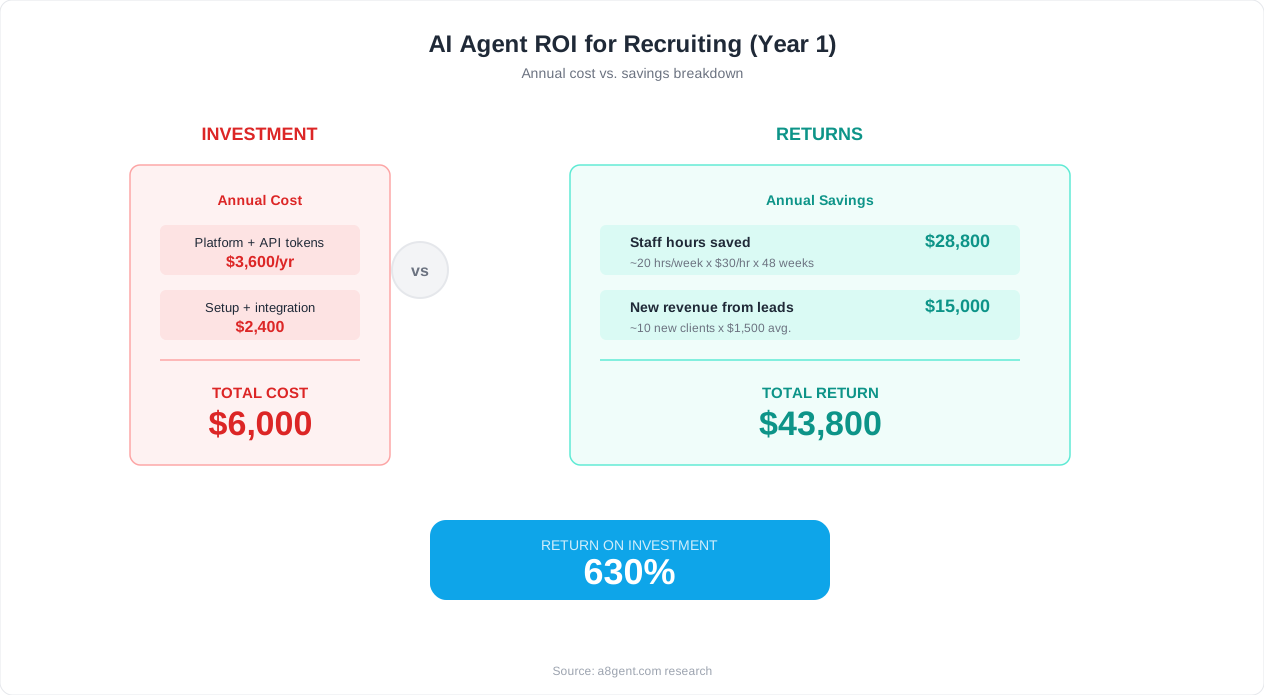
Direct platform cost: $79-$249/month for Autonoly or similar platforms. Labor savings: at $50/hour recruiter cost, saving 14-27 hours per role = $700-$1,350 per hire. For 20 hires/year: $14,000-$27,000 in annual labor savings vs $948-$2,988 in platform costs. Net ROI: 800-2,700% annually. Additional savings: reduced cost-per-hire from job board spending (faster fills mean less time paying for active postings), reduced turnover from better candidate matching, and eliminated agency fees for roles you can now fill faster internally.
What Success Looks Like After 90 Days
Within 90 days of deploying AI recruiting agents, most businesses report: recruiter/hiring manager time freed by 60-80% per role, candidate NPS scores above 70 (most companies score below 30 without automation), time-to-fill reduced to under 20 days for standard roles, and zero candidate applications lost or forgotten in the process. The recruiting function transforms from a time-intensive administrative burden into a streamlined, candidate-friendly operation that enhances your employer brand.
Ready to see these results in your organization? Take our assessment to identify which parts of your recruiting workflow will benefit most from AI automation, or explore our operations automation guide to see how recruiting fits into your broader automation strategy.
FAQ
Will AI screening miss great candidates who do not fit a traditional profile?
Only if you configure it poorly. Unlike keyword-matching tools, modern AI screening understands transferable skills, equivalent experience, and non-traditional backgrounds. The key is setting criteria that focus on capabilities rather than specific credentials. Use 'required skills' over 'required job titles' and include language like 'or equivalent experience.' Review your reject pile monthly to catch any systematic blind spots.
Is it legal to use AI in hiring decisions?
Yes, in most jurisdictions, with some requirements. New York City requires bias audits and candidate disclosure. Illinois requires consent for AI video analysis. The EU's AI Act has specific rules for high-risk AI in employment. Generally: disclose when AI is used, ensure your criteria are job-related and non-discriminatory, maintain human oversight for final decisions, and keep records. Consult an employment attorney for your specific jurisdiction.
How do candidates feel about being screened by AI?
Research shows candidates prefer AI screening when it means faster responses and a more transparent process. The biggest complaint candidates have is silence - not how their resume was evaluated. AI that responds within minutes, keeps candidates informed, and provides clear timelines gets dramatically better satisfaction scores than slow human processes. The key is to not make it feel robotic - personalize communications and maintain human touchpoints at key moments.
Can AI agents handle sourcing and outreach to passive candidates?
Yes. AI agents can research potential candidates on LinkedIn and other platforms, evaluate their fit against your criteria, and send personalized outreach messages. Platforms like Autonoly support outbound recruiting workflows where the agent identifies prospects matching your ideal candidate profile and initiates contact with customized messages based on their background. Response rates to AI-personalized outreach are comparable to human recruiter messages.
How long does it take to set up AI recruiting automation?
Basic setup takes 2-4 hours: connecting application sources, defining screening criteria, writing communication templates, and connecting calendars. Add another 1-2 hours for testing with historical applications and calibrating screening accuracy. Most businesses have their first AI-assisted role posted within a single day of starting setup. Subsequent roles take 15-30 minutes to configure since templates and integrations are already in place.
What if my company only hires 5-10 people per year? Is this worth it?
Even at 5-10 hires/year, AI automation saves 70-270 hours annually and dramatically improves candidate experience. At the $79/month starter tier, you are paying $948/year to save $3,500-$13,500 in recruiter time and fill roles 50% faster. For small companies without dedicated recruiters, the time savings are even more valuable since hiring often falls on already-overloaded managers. The ROI is positive from your very first hire.
Does AI recruiting work for technical roles where evaluation is complex?
Yes, with appropriate configuration. For technical roles, set up specific skill assessments that the AI administers as part of the screening process (coding challenges, portfolio reviews, technical questionnaires). The AI handles logistics and initial skill validation while human experts evaluate the nuanced aspects of technical capability during interviews. Many companies report that AI is actually better at consistently evaluating technical prerequisites than humans who may be inconsistent in their screening depth.
How do I prevent AI bias in my recruiting process?
Use skills-based criteria rather than pedigree-based (do not screen for specific universities or prestigious company names). Remove demographic signals from screening criteria. Regularly audit your pipeline demographics at each stage. Use the bias-detection features most platforms offer. Ensure your criteria are genuinely job-related with documented business justification. Consider having diverse team members review and validate your screening criteria before deployment.