How Much Does AI Automation Cost for a Small Business? (2026)
AI automation for small businesses ranges from $0 to $500/month depending on complexity. This guide breaks down real pricing, hidden costs, ROI timelines, and the most cost-effective platforms for businesses with 1-50 employees.
10+ years shipping production ML across TensorFlow, PyTorch, AWS, and GCP. Ships every A8gent agent before it becomes a lesson. GitHub
- Most small businesses spend $79-$299/month on AI agent platforms, which typically replaces $2,000-$8,000/month in manual labor costs - delivering ROI within the first week.
- The real cost of AI automation is not just the subscription - factor in 4-8 hours of initial setup time, potential integration costs, and a learning curve period of 1-2 weeks.
- Free tiers and trials exist on almost every platform, so you can prove the concept before committing any budget - start with one workflow and expand based on measured results.
- The most expensive mistake is NOT automating - small businesses that delay automation lose an average of 15-20 hours per week to tasks an AI agent could handle for under $200/month.
- Platforms like Autonoly and n8n offer the best price-to-value ratio for small businesses, with templates that eliminate expensive custom development.
The Real Cost of AI Automation in 2026 (No Hype, Just Numbers)
If you run a small business and you have been researching AI automation, you have probably seen wildly different numbers thrown around. Some articles claim you can automate everything for free. Others suggest you need a $50,000 budget for "enterprise AI solutions." The truth, as usual, is somewhere in the middle - and it is probably more affordable than you think.
Here is the bottom line up front: a small business with 1-50 employees can deploy meaningful AI automation for $79-$299 per month. That is the range where most businesses find the sweet spot between capability and cost. You will not get everything automated at the lowest tier, but you will absolutely get enough to save 10-20 hours per week of manual work.
But the subscription price is only part of the picture. To make a smart investment decision, you need to understand the total cost: platform subscriptions, your time investment for setup, potential integration costs, and ongoing maintenance. You also need to understand what you are getting in return - because the ROI on AI automation is often so dramatic that the "cost" reframes itself as "investment with a one-week payback period."
In this guide, we will break down every cost component, show you real pricing from the most popular platforms, share actual ROI calculations from small businesses like yours, and give you a framework for deciding how much to invest. We will also show you where to get started for free so you can prove the concept before spending a dollar.
If you want to skip straight to a personalized cost estimate based on your specific business, use our cost comparison tool. It calculates your expected costs and ROI based on your industry, team size, and the workflows you want to automate. Otherwise, read on for the complete picture.
One important note before we dive in: the cost of AI automation has dropped by approximately 60% since 2024. Tools that required expensive custom development two years ago now offer plug-and-play solutions at SaaS pricing. If you looked at automation costs a year or two ago and decided it was too expensive, it is time to look again. The economics have fundamentally changed.
Platform-by-Platform Pricing Breakdown (2026)
Let us look at what the most popular AI automation platforms actually charge small businesses. These are real prices as of May 2026 - not enterprise quotes or inflated list prices.
Autonoly - $79-$249/month
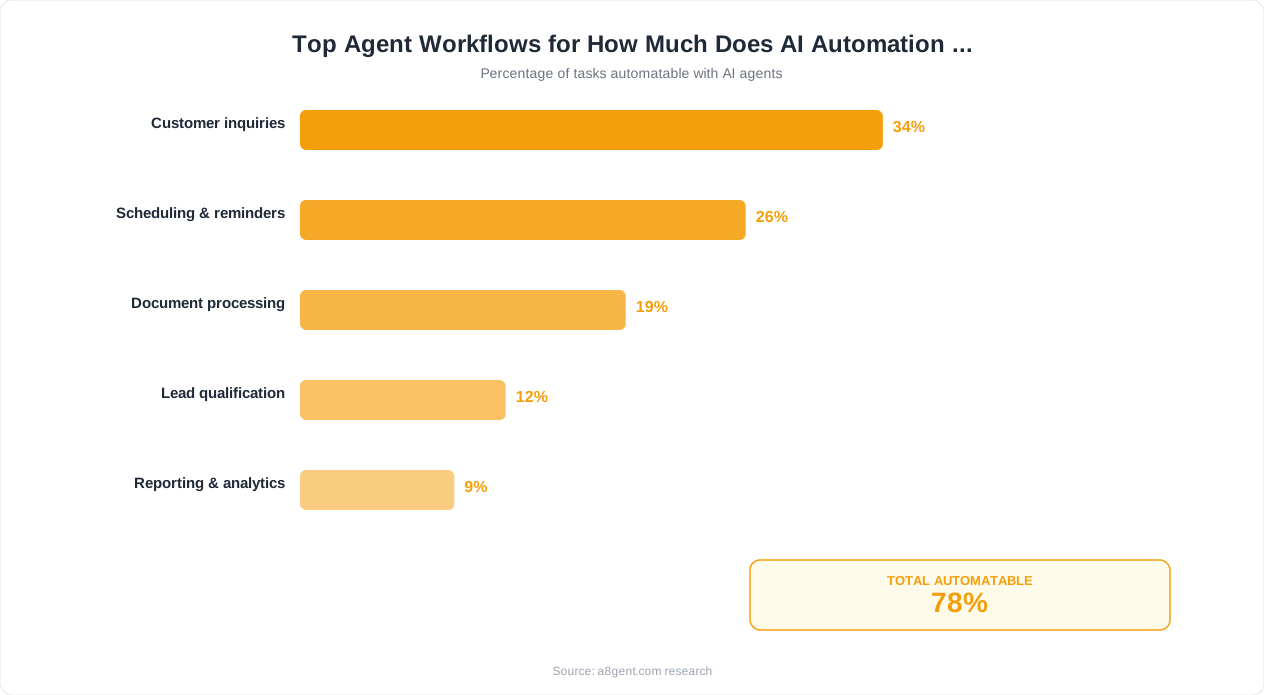
Autonoly is designed specifically for small businesses that want AI agents without complexity. Their Starter plan at $79/month gives you 3 AI agents with up to 1,000 automated actions per month. The Growth plan at Free-$149/month expands to 10 agents and 5,000 actions. The Business plan at $249/month offers unlimited agents and 20,000 actions. For most small businesses with under 20 employees, the Growth plan at Free-$149/month covers everything they need. Autonoly includes pre-built templates for common workflows, so you avoid expensive custom setup.
n8n - $0-$50/month (self-hosted) or $20-$120/month (cloud)
n8n is open-source, which means you can run it for free on your own server if you have the technical ability (or a tech-savvy team member). Their cloud-hosted version starts at $20/month for basic workflows and scales to $120/month for advanced AI agent features. n8n is the budget champion - it offers more flexibility than almost any platform at its price point. The trade-off is a steeper learning curve. If you or someone on your team is somewhat technical, n8n offers extraordinary value.
Lindy - $49-$299/month
Lindy offers individual AI agents (they call them "Lindies") starting at Free-Free-$49/month per agent. For a small business running 3-5 agents, expect $147-$245/month total. Lindy excels at simplicity - the setup experience is like giving instructions to a new employee in plain English. It is particularly strong for solopreneurs and businesses under 10 employees who want quick deployment without technical overhead.
Make (formerly Integromat) - $9-$99/month
Make is a workflow automation platform with AI capabilities. It is not a pure AI agent platform, but for simpler automations (if-then logic with AI enhancement), it offers excellent value. The $9/month plan handles basic automations, while $99/month covers most small business needs. Best for businesses that need straightforward automated workflows with occasional AI decision-making rather than fully autonomous agents.
Zapier with AI - $20-$100/month
Zapier has added AI capabilities to their popular automation platform. Basic Zaps with AI steps start at $20/month. More complex multi-step workflows with AI decision-making run $69-$100/month. Zapier's strength is its massive library of 6,000+ app integrations. If you already use Zapier, adding AI capabilities to existing workflows is the lowest-friction path to automation.
Use our cost comparison tool to see which platform offers the best value for your specific use case and volume requirements.
Real ROI Calculations From Small Businesses
Numbers do not lie. Here are real return-on-investment calculations from small businesses that deployed AI automation in 2025-2026. These are not cherry-picked success stories - they represent typical outcomes for businesses that follow best practices.
Case 1: E-commerce Store (8 employees)
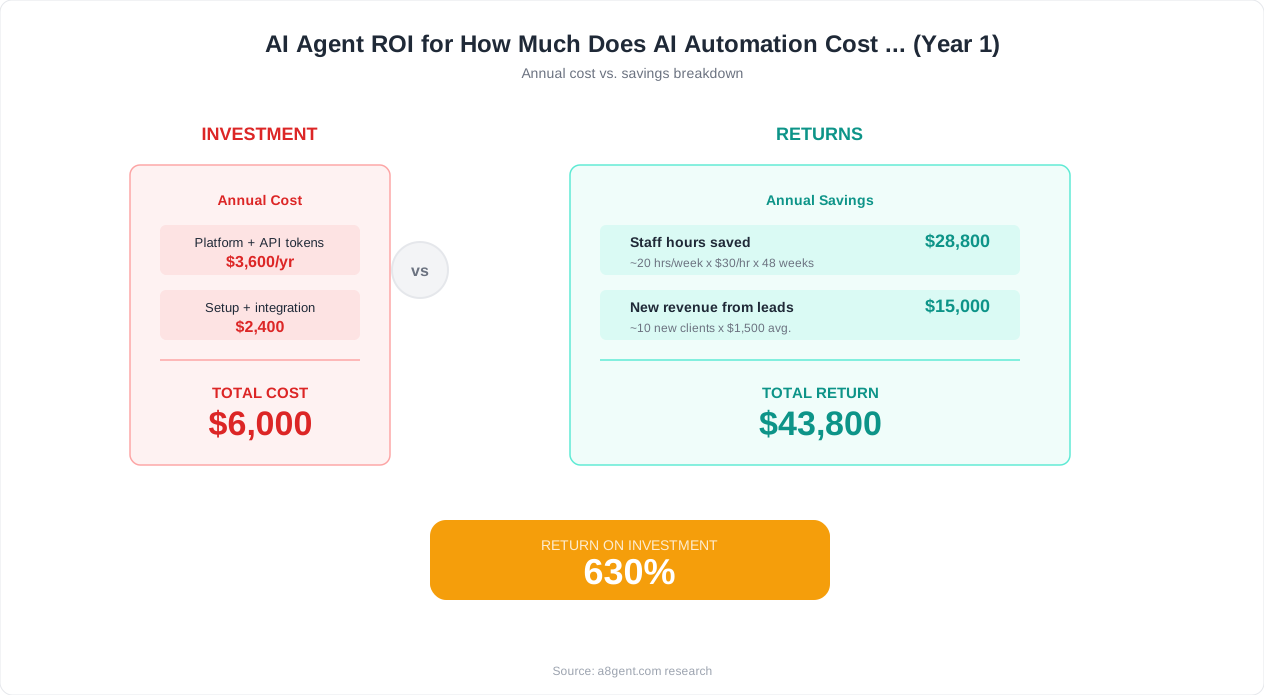
Monthly cost: Free-$149/month (Autonoly Growth plan). Workflows automated: customer support email responses, order status inquiries, return processing, and review request follow-ups. Time saved: 25 hours/week previously done by a part-time support person at $18/hour. Monthly savings: $1,800 in labor. They did not eliminate the support role - they redirected that person to handle complex cases and VIP customers, which increased their customer satisfaction score by 23%. Net ROI: $1,651/month or 1,108% annual return.
Case 2: Marketing Agency (4 employees)
Monthly cost: $249/month (premium AI agent plan) + $20/month (additional tools). Workflows automated: client report generation, social media scheduling, lead qualification, and proposal first drafts. Time saved: 30 hours/week across the team. At an average billable rate of $125/hour, those 30 hours could be redirected to client work generating $3,750/week in additional revenue. Monthly impact: $15,000 in recoverable billable time vs $269 in AI costs. ROI: 5,476%.
Case 3: Consulting Firm (solo owner)
Monthly cost: $79/month (starter plan). Workflows automated: lead follow-up sequences, meeting scheduling, and post-meeting summary emails. Time saved: 8 hours/week. As a solo consultant billing $200/hour, those 8 hours represent $1,600/week in potential revenue. Monthly impact: $6,400 in recoverable time vs $79 in AI costs. ROI: 8,001%. This consultant used the freed time to take on two additional clients, generating $12,000/month in new revenue.
Case 4: Local Service Business (12 employees)
Monthly cost: Free-$149/month. Workflows automated: appointment reminders, follow-up for no-shows, review solicitation after service, and lead response within 5 minutes. Time saved: 15 hours/week from the office manager. Additional revenue from faster lead response: $3,200/month (converting leads that previously went to competitors due to slow follow-up). Monthly impact: $3,200 new revenue + $1,125 labor savings vs $149 cost. ROI: 2,903%.
The Pattern
Across hundreds of small businesses, the typical ROI ranges from 500% to 5,000% annually. The variation depends on your hourly rate, task volume, and how much of the saved time converts to revenue. Even the most conservative scenarios show payback within the first 2-4 weeks. Use our ROI calculator to estimate your specific returns based on your business metrics.
Free and Low-Cost Ways to Start (Under $50/Month)
If your budget is tight or you want to prove the concept before investing, there are legitimate ways to get started with AI automation for free or nearly free. Here is how to build your first automated workflows without breaking the bank.
Free Tier Options
n8n self-hosted is completely free. If you or someone you know can set up a basic cloud server (Digital Ocean at $5/month or even a Raspberry Pi), you get the full power of n8n's workflow automation with AI capabilities at zero subscription cost. The community edition includes all core features including AI agent nodes. This is the most powerful free option available.
Zapier's free tier gives you 100 tasks per month with basic automation. That is enough to automate one simple workflow (like auto-responding to form submissions or forwarding leads to your CRM). It is limited, but it proves the concept and shows you how automation works before you invest more.
Make (Integromat) offers a free tier with 1,000 operations per month. For light automation like daily report emails, simple data syncing, or basic notification workflows, this is generous enough to run indefinitely.
Under $50/Month Options
n8n Cloud at $20/month gives you hosted workflow automation with AI capabilities. You do not need any technical infrastructure - just sign up and start building. For solopreneurs or micro-businesses, this covers most basic automation needs including email workflows, CRM updates, and simple AI-powered responses.
Make at $9/month gives you 10,000 operations - enough for a small business running 3-5 automated workflows at moderate volume. Combined with their AI-enhanced steps, you can build surprisingly sophisticated automations at coffee-money pricing.
The Free Trial Strategy
Almost every AI agent platform offers a free trial (typically 7-14 days). Here is the smart approach: identify your highest-value automation opportunity first (use our cost comparison tool for this). Then sign up for the free trial of the best-fit platform. Spend the trial period deploying that one workflow and measuring results. By the end of the trial, you will have concrete data on how much time and money the automation saves - making the investment decision obvious.
The "One Agent" Budget Approach
If you can only afford $79-$100/month, deploy a single agent on your highest-ROI workflow. For most small businesses, this is either lead follow-up (which directly generates revenue) or customer support automation (which directly saves labor). A single well-configured agent handling one workflow can easily save 5-10 hours per week - more than justifying its cost. Once it proves value, reinvest the savings into expanding your automation.
What NOT to Do on a Budget
Do not try to build custom AI solutions from scratch - this is exponentially more expensive and risky. Do not hire a developer to build you a custom agent when a platform subscription would work. Do not buy annual plans before proving value with a monthly subscription. And do not choose the cheapest option without checking if it actually handles your specific use case - paying slightly more for the right tool beats paying less for one that cannot do what you need.
Cost Breakdown by Business Use Case
Different automation use cases have different cost profiles. Here is what to expect based on what you are trying to automate, with specific platform recommendations for each budget level.
Customer Support Automation
Budget range: $79-$199/month. What you get: AI agent that reads customer emails and chats, looks up relevant information in your systems, writes personalized responses, handles common requests (order status, returns, FAQs) autonomously, and escalates complex issues to your team with context summaries. Best platforms at this price: Autonoly ($79-Free-$149/month with support templates), Intercom with AI ($74/month), or Freshdesk with Freddy AI ($79/month). Expected savings: 15-30 hours/week of support labor at a typical volume of 50-200 inquiries/day.
Lead Follow-Up and Sales Automation
Budget range: $99-$249/month. What you get: AI agent that responds to new leads within minutes, researches the prospect, writes personalized outreach, sends follow-up sequences, qualifies based on your criteria, and books meetings automatically. Best platforms: Autonoly (Free-$149/month with sales templates), Clay + email tool ($149-$249/month combined), or 11x.ai (starting at $249/month for dedicated SDR agent). Expected impact: 30-50% increase in lead-to-meeting conversion rate due to speed and consistency.
Invoice and Expense Processing
Budget range: $49-Free-$149/month. What you get: AI agent that reads invoices from email, extracts key data (vendor, amount, line items, due date), matches to purchase orders, categorizes expenses, routes for approval, and updates your accounting system. Best platforms: n8n ($20-$50/month with accounting integrations), Autonoly ($79/month), or Nanonets (Free-Free-$49/month for document processing). Expected savings: 5-15 hours/week depending on invoice volume.
Content and Social Media
Budget range: $49-Free-$149/month. What you get: AI agent that repurposes your content across platforms, schedules posts at optimal times, monitors engagement, responds to comments, and generates content ideas based on performance data. Best platforms: Buffer + AI tools (Free-Free-$49/month total), Autonoly with content templates ($79/month), or dedicated AI content tools like Jasper (Free-Free-$49/month). Expected savings: 8-12 hours/week of content management time.
Meeting Scheduling and Admin
Budget range: $30-$99/month. What you get: AI agent that handles inbound scheduling requests, coordinates across time zones, sends reminders, takes meeting notes, and distributes follow-up action items. Best platforms: Calendly AI ($12/month) + n8n for follow-ups ($20/month), or Reclaim.ai ($12-$18/month) + automation tool. Expected savings: 3-5 hours/week plus significant reduction in no-shows.
For a personalized cost estimate based on your specific combination of use cases, use our cost comparison calculator. It shows you the optimal platform combination for your budget and needs.
How to Budget for AI Automation (The 5% Rule)
Business owners often ask "how much should I spend on AI automation?" The answer depends on your revenue, your team's time costs, and your growth goals. Here is a practical framework for deciding your automation budget.
The 5% Rule
A useful starting benchmark: invest up to 5% of the labor cost you want to replace. If you currently spend $5,000/month on tasks that could be automated (even partially), an automation budget of $250/month is appropriate. This gives you a built-in 20x ROI target - conservative enough to almost guarantee positive returns, ambitious enough to drive meaningful change.
Calculating Your Automation-Eligible Labor Cost
Look at your team's time across a typical week. For each person, estimate what percentage of their time goes to repetitive, rule-based tasks vs creative, strategic, or relationship work. The repetitive portion is your automation-eligible labor cost. For most small businesses, 30-50% of total labor is automation-eligible. A 10-person team spending $15,000/month total salary might have $5,000-$7,500/month in automation-eligible labor. Using the 5% rule, that suggests a $250-$375/month automation budget.
The Phased Investment Approach
Do not spend your full budget on day one. Phase your investment: Month 1-2: Start with one platform at the starter tier ($79-Free-$149/month). Deploy your first 1-2 agents and measure results. Month 3-4: Based on proven ROI, expand to 3-5 agents. Potentially upgrade your plan tier. Month 5-6: Evaluate whether adding a second platform for different use cases makes sense. Month 7-12: Optimize, expand, and reinvest savings into additional automation.
When to Increase Your Budget
Increase your automation spend when: your current agents are maxing out their action limits (you need a higher tier), you have identified additional high-ROI workflows waiting to be automated, your business is growing and manual processes are becoming bottlenecks, or the time savings from current agents have created capacity for revenue-generating work that exceeds the additional automation cost.
When to Decrease or Pause
Reduce your spend if: you are not actively monitoring and optimizing your agents (money wasted), your business needs have changed and certain workflows no longer need automation, or you have over-subscribed to platforms and are not using their full capacity. It is better to run 3 agents well than 10 agents poorly.
The Reinvestment Loop
The smartest small businesses create a virtuous cycle: automation saves time, saved time generates revenue (through more clients, better service, or new offerings), new revenue funds more automation, more automation saves more time. After 6-12 months, your automation practically pays for itself and then some. Use our ROI calculator to model this loop for your specific business and see where you land after 12 months.
Your Action Plan: Start Automating This Week Without Overspending
You now understand the costs, the ROI, and the budgeting framework. Here is your step-by-step action plan to start automating your small business this week - without overspending or overcommitting.
Today (15 minutes): Identify Your Most Expensive Repetitive Task
Look at your week and answer this question: what task eats up the most time, happens nearly every day, and follows a predictable pattern? Common answers: responding to customer inquiries, following up with leads, processing invoices, scheduling meetings, or creating reports. Write it down. This is your first automation target.
Today (10 minutes): Calculate the Current Cost
How many hours per week does this task consume? Multiply by your hourly rate (or the hourly rate of the person doing it). That is your current monthly cost for this one workflow. Example: 8 hours/week x $50/hour x 4.3 weeks = $1,720/month. That number is your benchmark - any automation that handles this task for less is a win.
Tomorrow (5 minutes): Get a Personalized Recommendation
Use our cost comparison tool to input your specific workflow, budget, and requirements. It will recommend the best-fit platform at the right price point for your situation. Alternatively, take our ROI calculator for a detailed financial projection.
This Week (2-4 hours): Deploy Your First Agent
Sign up for the recommended platform's free trial or starter plan. Follow their onboarding flow to build your first automated workflow. Connect the relevant tools (your email, CRM, or whatever the workflow touches). Set the agent to "review mode" so you approve outputs before they go live. Run it for 3-5 days and measure quality.
Next Week: Measure and Decide
After one week, answer these questions: How many hours did the agent save? What was the quality of its outputs? What adjustments would improve it? Based on this data, decide: continue with the paid plan, try a different platform, or adjust the workflow scope.
Budget Guidelines for Your First Month
If your revenue is under $10,000/month: Start with free tiers or n8n self-hosted ($0-$20/month). If your revenue is $10,000-$50,000/month: Start with a $79-Free-$149/month platform like Autonoly. If your revenue is $50,000-$200,000/month: Start with a $149-$249/month plan and plan to scale within 90 days. If your revenue exceeds $200,000/month: Start with $249-$499/month and deploy 3-5 agents simultaneously.
The most important thing is to start. Every week you delay, you are paying the full manual cost for work that a $79-$249/month tool could handle. The businesses that thrive in 2026 and beyond are not the ones with the biggest budgets - they are the ones that automate their repetitive work and invest their human time where it matters most. Take the first step today.
FAQ
What is the minimum budget needed for AI automation?
You can start for free using n8n's self-hosted version or the free tiers of Zapier and Make. For a meaningful AI agent that handles a full workflow autonomously, expect to spend $79-Free-$149/month. This covers one platform with 3-5 agents handling common business tasks like lead follow-up, customer support, or invoice processing.
How quickly will I see ROI from AI automation?
Most small businesses see positive ROI within the first 1-2 weeks. If your agent saves just 1 hour per day of manual work at $50/hour, that is $1,075/month in savings - easily covering a $79-$249/month subscription. The fastest ROI comes from automating lead follow-up (revenue generating) or customer support (direct labor savings).
Are there hidden costs I should watch out for?
The main hidden costs are: setup time (4-8 hours for your first agent), potential token/usage overages if you exceed plan limits, and integration costs if you use niche software without native connections. Most platforms include standard integrations and AI processing in their subscription. Always check if pricing is per-agent, per-action, or all-inclusive.
Is it cheaper to hire a virtual assistant or use AI automation?
AI automation is typically 80-95% cheaper than a virtual assistant for repetitive tasks. A VA costs $1,500-$4,000/month for 20-40 hours/week. An AI agent handles the same volume 24/7 for $79-$249/month. However, VAs are still better for tasks requiring human judgment, creativity, or relationship building. Many businesses use both - agents for repetitive work, VAs for complex tasks.
Do I need to pay for multiple platforms?
Most small businesses only need one AI agent platform. Platforms like Autonoly handle multiple use cases (support, sales, operations) within a single subscription. You might add a specialized tool for specific needs (like a scheduling tool or email verification service), but the core automation platform should be one consolidated investment.
What if the AI agent does not work for my business?
Start with free trials to test before committing. If a platform does not fit, try another - the market has options for every business type and budget. Most failures are not about the technology but about choosing the wrong first workflow. Start with simple, high-frequency tasks and expand from there. Our cost comparison tool helps match you with the right platform upfront.
How much does it cost to scale from 1 agent to 5 agents?
Scaling within the same platform typically means upgrading one tier - usually a $50-$100/month increase. Going from a $79/month starter plan to a $149-$249/month growth plan typically gives you 5-10 agents with higher action limits. The per-agent cost decreases at higher tiers, making scale-up more economical.
Should I pay monthly or annually for AI platforms?
Start monthly. Annual plans offer 15-25% discounts but lock you in. Use monthly billing for the first 2-3 months to confirm the platform works for your needs. Once you are confident in the value, switch to annual billing to save $200-$600/year. Never pay annually for a platform you have not tested with real workflows.