How to Automate Customer Onboarding with AI Agents (2026)
Manual onboarding is slow, inconsistent, and expensive. Here's a step-by-step guide to automating your entire customer onboarding flow with AI agents - from welcome emails to setup completion.
10+ years shipping production ML across TensorFlow, PyTorch, AWS, and GCP. Ships every A8gent agent before it becomes a lesson. GitHub
- Companies that automate onboarding with AI agents reduce time-to-value by 60% and cut 90-day churn by 35%, because customers reach their first success moment faster and with less friction.
- AI-powered welcome sequences that adapt based on customer behavior (rather than fixed drip schedules) achieve 3x higher completion rates than traditional email sequences.
- Automated document collection using AI agents eliminates the back-and-forth that delays onboarding, with smart validation catching errors before they create downstream problems.
- Progress tracking agents that proactively reach out to stalled customers recover 40-50% of accounts that would otherwise churn during the onboarding window.
- Most businesses can implement a basic AI onboarding flow in under a week using no-code tools, with full automation (including CRM sync and progress tracking) achievable within 30 days.
Why Onboarding Is the Most Important Customer Experience You Deliver
Here's a number that should make every business leader uncomfortable: 63% of customers say the onboarding experience directly influences their decision to stay or churn within the first 90 days. That means nearly two-thirds of your customer relationships are won or lost before they ever reach "steady state" usage of your product or service.
Despite this, most companies still treat onboarding as an afterthought. A welcome email, maybe a PDF guide, perhaps a kickoff call if the deal was large enough. Then radio silence until the customer reaches out with questions - or worse, until they quietly cancel.
The economics are stark. Acquiring a new customer costs 5-7x more than retaining an existing one. If poor onboarding drives even 10% more churn, you're burning thousands of dollars per lost customer. For a SaaS company with a $200/month average contract, losing 50 customers per year to bad onboarding represents $120,000 in lost annual revenue - not counting the referrals and expansions those customers would have generated.
This is where AI agents transform the equation. An AI-powered onboarding system doesn't forget steps, doesn't have "busy days" where customers fall through the cracks, doesn't get overwhelmed during high-volume signup periods, and doesn't deliver inconsistent experiences based on which team member happens to be available. It delivers personalized, responsive, always-on onboarding guidance to every customer simultaneously - whether you're onboarding 5 customers this week or 500.
In this guide, we'll walk through exactly how to design and implement an AI-powered onboarding flow. We'll cover the specific tools (with pricing), the workflow architecture, and the step-by-step implementation process. Whether you're a startup founder doing onboarding yourself or a customer success leader managing a team, these approaches work at any scale. Start by using our assessment tool to identify your current onboarding bottlenecks, then follow the implementation steps below.
The Manual Onboarding Problem: Where Things Break Down
Before automating, you need to understand where manual onboarding fails. In our research across 200+ businesses, we identified five consistent failure points that AI agents can address directly.
Failure Point 1: Inconsistency. When onboarding depends on human team members, quality varies wildly. Your best CSM delivers a perfect experience. Your newest hire misses steps. Someone on vacation means their customers wait three days for their next touchpoint. This inconsistency isn't a people problem - it's a systems problem. No human can deliver identical, thorough onboarding to 30 customers simultaneously while also handling support tickets and renewal conversations.
Failure Point 2: Timing gaps. Manual onboarding creates dead zones. A customer signs up on Friday afternoon - nothing happens until Monday. A customer completes Step 2 at 10pm - they wait until business hours for Step 3. These gaps kill momentum. Research shows that customer engagement drops 50% for every 24 hours of silence during onboarding. By the time you reach out on Monday, Friday's excited new customer has moved on to other priorities.
Failure Point 3: One-size-fits-all sequences. Most manual onboarding follows a fixed playbook regardless of customer context. An enterprise customer with a complex integration need gets the same email sequence as a solo user who needs basic setup. A technical buyer gets the same hand-holding as a non-technical one. This wastes time for advanced users (who disengage) and overwhelms beginners (who churn).
Failure Point 4: Document and information collection. Getting customers to submit required information (contracts, configuration details, access credentials, compliance documents) is painful. Emails get lost. Forms get half-completed. Follow-ups feel nagging. On average, manual document collection adds 5-8 days to onboarding timelines - days where the customer isn't getting value from your product.
Failure Point 5: No visibility into stalled accounts. Without automated tracking, customers who quietly disengage during onboarding become invisible until it's too late. They stop opening emails. They don't complete setup steps. Nobody notices until the monthly churn report reveals they cancelled. By then, recovery is nearly impossible - the window of initial enthusiasm has closed.
AI agents address every one of these failure points. They're perfectly consistent, available 24/7, adaptive to individual customer context, persistent but not annoying about document collection, and constantly monitoring for disengagement signals. Let's look at how to build this system.
Designing Your Automated Onboarding Flow
A successful AI-powered onboarding flow has four layers: triggers, decision logic, actions, and escalation paths. Here's how to architect each one before choosing tools.
Layer 1: Triggers. What events initiate or advance the onboarding sequence? Common triggers include: new account created, payment confirmed, welcome email opened, first login detected, setup step completed, document uploaded, integration connected, feature first used, support ticket submitted during onboarding, and inactivity for X hours. Map every trigger point in your current onboarding journey - most businesses have 8-15 meaningful trigger events.
Layer 2: Decision Logic. This is where AI agents differ from basic automation. At each trigger point, the agent decides what to do based on context. Did the customer complete the previous step quickly (indicating technical competence) or slowly (indicating they might need help)? Is this a high-value enterprise account (deserving concierge treatment) or a self-serve user (who prefers documentation over calls)? Has the customer already contacted support about an issue (meaning the next step should acknowledge that)? Use your AI stack builder to map which decisions require AI intelligence versus simple if/then rules.
Layer 3: Actions. What does the agent do at each decision point? Actions include: send personalized email, trigger in-app message, create a task for human team member, schedule a call, send a document request, deliver a tutorial, update CRM record, assign a customer success manager, send a progress report to the customer, or notify internal stakeholders. Each action should advance the customer toward their first "success moment" - the point where they experience real value from your product.
Layer 4: Escalation Paths. Not every situation can be handled by AI. Define clear escalation criteria: customer expresses frustration, customer requests human contact, high-value customer stalls for more than 24 hours, technical error prevents progress, or custom integration requirement identified. Escalation should be seamless - the human who receives the handoff should have full context of everything the AI has already handled.
Mapping your first flow: Start with your most common customer persona. Document their ideal onboarding journey from signup to first value moment. Identify the 3-5 most common points where they currently get stuck or drop off. Design your AI agent's logic around those specific friction points. You don't need to automate everything on day one - automate the highest-impact touchpoints first and expand from there. Most companies find that automating just the first 48 hours of onboarding (welcome, initial setup, first-value guidance) captures 60% of the total improvement.
AI-Powered Welcome Sequences That Actually Get Completed
The welcome sequence is your first impression - and AI agents make it dramatically more effective than static email drips. Here's how to build one that adapts in real time.
The adaptive welcome email: Instead of one generic welcome email, AI agents generate personalized welcomes based on available data. If the customer signed up from a specific landing page, the welcome references that context. If they selected a use case during signup, the welcome highlights relevant features. If they're in a specific industry, examples and language match that industry. Intercom Fin excels here - it generates welcome messages that reference the customer's company, industry, and stated goals, making the first touch feel personal rather than mass-produced.
Behavior-triggered progression: Traditional sequences send Email 2 exactly 24 hours after Email 1 regardless of what the customer did. AI-powered sequences watch for behavior and adapt. Customer completed their profile within an hour of signing up? They get the next step immediately - they're clearly engaged and ready. Customer hasn't opened the welcome email after 24 hours? They get a different follow-up via a different channel (in-app notification, SMS, or a reformatted email with a different subject line). This responsiveness is impossible to maintain manually at scale.
Channel optimization: AI agents learn which channels each customer prefers and shifts communication accordingly. Some customers respond to email. Others engage only with in-app messages. Some prefer SMS for quick actions. The agent tests different channels in the first 48 hours and then defaults to the customer's preferred channel for subsequent touchpoints. This alone can improve sequence completion rates by 25-40%.
Dynamic content based on progress: Each message in the sequence should reflect the customer's actual state. If they've already completed a step mentioned in the next scheduled email, the agent skips that content and moves to what's genuinely next. If they attempted a step but failed (started an integration but encountered an error), the next message addresses that specific blocker rather than generically moving forward. This prevents the frustrating experience of receiving instructions for something you've already done - or haven't been able to do.
Practical example: A SaaS project management tool might have this adaptive welcome sequence: Message 1 (immediate): personalized welcome + single CTA to create first project. If completed within 4 hours: Message 2 (invite teammates). If not completed within 24 hours: Message 2-alt (simplified getting-started guide + offer of live walkthrough). If teammates invited: Message 3 (suggest a template based on their industry). If teammates not invited within 48 hours: Message 3-alt (show value of solo use first, remove social pressure). Each path leads to the same destination - first value moment - but routes around individual obstacles.
Here is a copy-pasteable system prompt you can drop into your AI agent or email tool to generate this entire adaptive sequence:
SYSTEM PROMPT: Adaptive Onboarding Welcome Sequence

You are the onboarding assistant for [COMPANY NAME], a [ONE-LINE
PRODUCT DESCRIPTION]. Your job is to write and send welcome
sequence messages that adapt to each customer's behavior.

INPUTS you will receive for each customer:
- first_name, company_name, industry, use_case (from signup form)
- signup_source (landing page or campaign they came from)
- steps_completed (list of onboarding steps finished so far)
- hours_since_signup
- hours_since_last_message

RULES:
1. Always reference the customer's stated use_case and industry in
   the first line - never send a generic greeting.
2. One clear call-to-action per message. Never ask for two things
   at once.
3. Tone: warm, concise, human. No corporate jargon. Max 120 words.
4. If steps_completed includes the step this message would ask for,
   skip it and move to the next incomplete step instead.
5. If hours_since_last_message > 24 and no reply, switch channel
   (email to in-app notification, or in-app to SMS if available)
   and shorten the message by half.
6. Never send more than one message per 24 hours.
7. If the customer replies with a question, do not send the next
   scripted message - draft a direct answer instead and flag for
   human review if confidence is below 80%.

OUTPUT FORMAT (JSON):
{
  "channel": "email | in_app | sms",
  "subject": "string (email only)",
  "body": "string",
  "cta_label": "string",
  "cta_url": "string"
}

EXAMPLE TASK:
"Generate Message 2 for Priya at Northwind Logistics, use_case =
'team task tracking', steps_completed = ['account_created',
'first_project_created'], hours_since_signup = 6."
Automated Document Collection: Eliminating the Back-and-Forth
For many businesses - especially in finance, healthcare, legal, and B2B services - onboarding requires collecting documents, credentials, or configuration information from customers. This step typically adds 5-15 days to onboarding timelines due to endless back-and-forth. AI agents compress this to 1-3 days.
How AI document collection works: Instead of sending a checklist email and hoping customers respond completely, AI agents break requests into individual, sequential micro-asks. Rather than "Please send us your business license, W-9, insurance certificate, and signed contract" (which overwhelms and stalls), the agent sends one request at a time. As each document is received, the next request goes out immediately - maintaining momentum and reducing cognitive load on the customer.
Smart validation: When a customer uploads a document, the AI agent validates it in real time. Is the business license expired? The agent immediately asks for a current version and explains why, rather than having a human discover the issue 3 days later during manual review. Is the W-9 missing a signature? Instant notification with exactly what needs to be corrected. Is a form filled out incorrectly? The agent highlights the specific field that needs attention. This eliminates the "submit, wait 48 hours, get rejection, resubmit" cycle that kills onboarding momentum.
Persistent but respectful follow-up: Customers forget. Documents sit in their "I'll do it later" pile. AI agents send context-aware reminders that reference the specific missing item, explain why it's needed, and quantify what's blocked until it's received ("Your team's access will be activated within 2 hours of receiving this document"). Reminders escalate in urgency over time but never feel aggressive - the agent varies messaging, channel, and framing to avoid the "nag" feeling that makes customers disengage.
Pre-filling and reducing effort: The best AI agents reduce what customers need to provide by pre-filling information from available sources. Company name, address, and basic details can be auto-populated from public records. Industry codes and compliance requirements can be inferred from the customer's sector. Integration credentials can be collected via OAuth flows rather than manual credential sharing. Every field you pre-fill or eliminate is friction removed from the onboarding path.
Tools for automated document collection: Autonoly offers built-in document collection workflows with AI validation (Free-$149/month includes this in their onboarding module). For lighter needs, Typeform paired with an AI agent (via Lindy or Zapier) can validate submissions and trigger follow-ups. DocuSign's CLM platform handles contract-specific document flows with AI-powered routing. For healthcare and financial services requiring compliance-grade security, dedicated solutions like Onfido (identity verification) and Plaid (financial data) integrate with most AI agent platforms via API.
When a customer uploads a document, most no-code platforms send a webhook payload like this to your AI validation step - useful to know so you can map the fields correctly when you set up the automation:
// Example webhook payload from a document upload form
{
  "event": "document_uploaded",
  "customer_id": "cus_8841",
  "customer_email": "[email protected]",
  "onboarding_step": "compliance_documents",
  "document": {
    "type": "business_license",
    "file_url": "https://uploads.example.com/f/9c2a1e.pdf",
    "file_name": "business_license_2026.pdf",
    "uploaded_at": "2026-07-09T14:32:00Z"
  },
  "required_documents_remaining": [
    "w9_form",
    "insurance_certificate"
  ]
}

// Field mapping in your no-code tool (Zapier/n8n style):
// Trigger: "New file uploaded" (Typeform / your upload form)
//   -> Step 1: AI validation node
//        input:  document.file_url, document.type
//        prompt: "Confirm this file is a valid, unexpired
//                 {{document.type}}. Reply VALID or INVALID
//                 plus one-line reason."
//   -> Step 2 (if INVALID): Send email using customer_email,
//        include the one-line reason from Step 1
//   -> Step 3 (if VALID): Update CRM field
//        {{customer_id}}.documents.{{document.type}} = "received"
//        then check required_documents_remaining - if empty,
//        trigger "onboarding_documents_complete" event
Training and Setup Automation: Getting Customers to Their First Win
The fastest path to customer retention is getting them to their "aha moment" - the point where they experience real value from your product. AI agents dramatically accelerate this by providing personalized, adaptive guidance through setup and initial training.
Adaptive learning paths: Instead of a one-size-fits-all tutorial, AI agents create personalized learning paths based on the customer's role, technical skill level, stated goals, and real-time behavior. A marketing manager gets guided toward campaign features first. A developer gets API documentation and integration guides. A CEO gets dashboards and reporting. Intercom Fin handles this particularly well - it monitors what features a customer explores and proactively offers contextual guidance at the moment of need, rather than front-loading all training upfront.
Interactive setup assistants: Rather than static documentation, AI agents provide conversational setup help. "I see you've connected your Stripe account but haven't set up your first product. Would you like me to walk you through it?" This just-in-time guidance prevents the overwhelm that causes customers to abandon setup halfway. The agent detects confusion (repeated clicks on the same element, backtracking through steps, long pauses) and intervenes with targeted help before the customer gets frustrated enough to leave.
Configuration recommendations: For products with complex settings, AI agents recommend optimal configurations based on the customer's use case. "Based on your team size of 12 and your focus on sprint planning, I'd recommend enabling these specific settings and disabling these ones. Would you like me to apply this configuration?" This eliminates the analysis paralysis of dozens of settings screens and gets customers to a working state faster. Teams using AI-recommended configurations show 45% faster time-to-value compared to self-configured accounts.
Milestone celebrations and momentum building: AI agents track progress toward the first value moment and celebrate milestones along the way. "Great - you've imported your first 100 contacts! You're 70% through setup. Next step: create your first email campaign (takes about 5 minutes)." These micro-celebrations maintain motivation during what can feel like a tedious setup process. They also create natural check-in points where the agent can ask if the customer needs help.
Video and resource delivery: AI agents can deliver targeted training resources (videos, articles, templates) based on where the customer is in their journey and what they're struggling with. Rather than pointing customers to a massive knowledge base and hoping they find what they need, the agent delivers the exact resource at the exact moment it's relevant. "I noticed you tried to set up the Salesforce integration - here's a 3-minute video walkthrough for that specific step." This contextual resource delivery reduces support ticket volume by 30-50% during the onboarding window.
Progress Tracking and Stall Recovery: Never Lose an Onboarding Customer Again
The silent killer of onboarding is disengagement. A customer signs up enthusiastically, completes the first two steps, gets distracted by other priorities, and never comes back. Without active monitoring, you don't know they've stalled until they cancel. AI agents solve this with continuous progress tracking and proactive re-engagement.
Real-time progress dashboards: For your internal team, AI agents maintain live dashboards showing every customer's onboarding state: which step they're on, when they last engaged, current velocity (ahead of schedule, on track, or stalling), and predicted completion date. This visibility lets customer success teams focus their human attention on accounts that need it most rather than checking on everyone equally.
Stall detection and automatic intervention: The agent defines "stall" based on your typical customer behavior. If most customers complete Step 3 within 48 hours and a specific customer hasn't engaged in 72 hours, the agent flags it and initiates recovery. The recovery sequence is different from the standard sequence - it acknowledges the pause, offers help with potential blockers, and often provides a simplified path or alternative approach. "I noticed you haven't had a chance to complete your integration setup. Would it help if we scheduled a 15-minute screen share, or I can send you the simplified setup option that doesn't require API access?"
Escalation to human touchpoints: AI agents know their limits. When a customer stalls multiple times, expresses frustration, or explicitly requests human help, the agent escalates immediately. The handoff includes full context: what the customer has completed, where they're stuck, what the agent has already tried, and any relevant conversation history. The human CSM picks up exactly where the AI left off - no "Can you tell me what you've already done?" frustration for the customer.
Health scoring: Advanced onboarding agents maintain a "health score" for each account that predicts completion likelihood. Factors include: login frequency, step completion velocity, support ticket sentiment, email engagement, and feature adoption breadth. Accounts with declining health scores get prioritized attention (automated or human) before they reach the point of no return. Autonoly provides health scoring out of the box, while Intercom Fin integrates with customer health platforms like Gainsight or ChurnZero.
Win-back sequences for stalled accounts: For customers who've been inactive 7+ days during onboarding, AI agents trigger specialized win-back sequences. These differ from standard re-engagement by addressing the most common reasons for abandonment: "too complex" (simplified restart path), "not the right time" (pause and resume option), "missing a feature" (feature education or workaround), or "chose a competitor" (differentiation message with migration help). Recovery rates of 40-50% are achievable when win-back is triggered within 10 days of stalling - after 30 days, recovery drops below 10%.
Here is a system prompt template for the stall-recovery message itself - built to feel like a helpful nudge, not a nag:
SYSTEM PROMPT: Stall Recovery Outreach

You write one short, low-pressure message to a customer who has
stalled during onboarding. Your goal is to remove friction and
make it effortless for them to continue - never to guilt them.

INPUTS:
- first_name
- last_completed_step (the last thing they finished)
- next_step (what they still need to do)
- days_since_last_activity
- likely_blocker (optional - e.g. "integration_error",
  "no_time", "unclear_value", or null if unknown)

RULES:
1. Open by naming the specific last_completed_step, not a generic
   "we noticed you've been away."
2. Offer exactly one easy next action: a simplified path, a
   15-minute call, or a direct answer to a likely blocker.
3. If likely_blocker is known, address it directly in the first
   sentence of the offer.
4. Never use guilt language ("you haven't," "you still need to").
   Frame everything as an offer, not a reminder.
5. End with a single low-friction reply option (e.g. "Reply YES
   and I'll send the simplified version" or "Reply CALL to grab
   15 minutes").
6. Max 80 words.

OUTPUT: plain text message body, ready to send.

EXAMPLE INPUT:
first_name: "Marcus", last_completed_step: "account_created",
next_step: "connect_calendar_integration",
days_since_last_activity: 3, likely_blocker: "integration_error"

EXAMPLE OUTPUT:
"Hi Marcus - I saw you got your account set up but hit a snag
connecting your calendar. That integration step trips up a lot
of people on the first try. Want me to send the simplified setup
that skips API access entirely, or would a quick 15-minute screen
share be easier? Just reply SIMPLE or CALL and I'll get it moving."
Completion certification: When a customer completes onboarding, the agent shouldn't just stop communicating. Deliver a "completion" message that confirms they're set up, summarizes what they've accomplished, introduces their ongoing support resources, and transitions them to steady-state success management. This clean handoff prevents the "onboarding cliff" where engagement drops sharply post-setup.
Tools and Implementation: Building Your AI Onboarding System
Here's the practical toolkit for implementing AI-powered onboarding, organized by budget and complexity level.
Option 1: Full-suite solution - Autonoly (Free-$149/month)
Autonoly offers a purpose-built onboarding automation module that includes: adaptive welcome sequences, document collection with AI validation, progress tracking with health scores, stall detection and recovery, CRM synchronization, and internal team dashboards. It's the most comprehensive single-tool option. Setup takes 2-3 days for a basic flow and 1-2 weeks for a fully customized multi-path system. Best for: companies onboarding 20+ customers/month who want one platform handling the entire flow.
Option 2: Customer communication + AI - Intercom Fin ($74/month + $0.99/resolution)
Intercom Fin is an AI agent that lives in your existing Intercom installation. It handles conversational onboarding: answering setup questions, providing step-by-step guidance, detecting confusion, and escalating to human agents when needed. It's less structured than Autonoly (no built-in sequence builder) but more conversational and responsive to customer-initiated questions. Pair it with Intercom's native product tours for a structured + responsive combination. Best for: companies already using Intercom who want to add AI intelligence to their existing onboarding flows.
Option 3: No-code stack - Zapier + Customer.io + AI ($100-$200/month combined)
For teams that prefer assembling tools: use Customer.io ($100/month) for behavior-triggered email and in-app sequences, Zapier ($20-$70/month) for connecting triggers across platforms, and an AI layer (via OpenAI API or Lindy) for generating personalized content and handling validation logic. This approach offers maximum flexibility but requires more setup and maintenance. Use our AI stack builder to design the right combination for your specific needs.
Option 4: Budget starter - Intercom Fin + Manual ($74/month)
If you're early stage and can't invest in full automation yet, deploy Intercom Fin as your first line of onboarding support. It handles common questions 24/7, provides instant setup guidance, and only escalates to your team for complex issues. Combine with a simple email sequence from your existing tool (Mailchimp, ConvertKit, or even Gmail templates). This covers 60-70% of the automation value at minimal cost.
Implementation timeline:
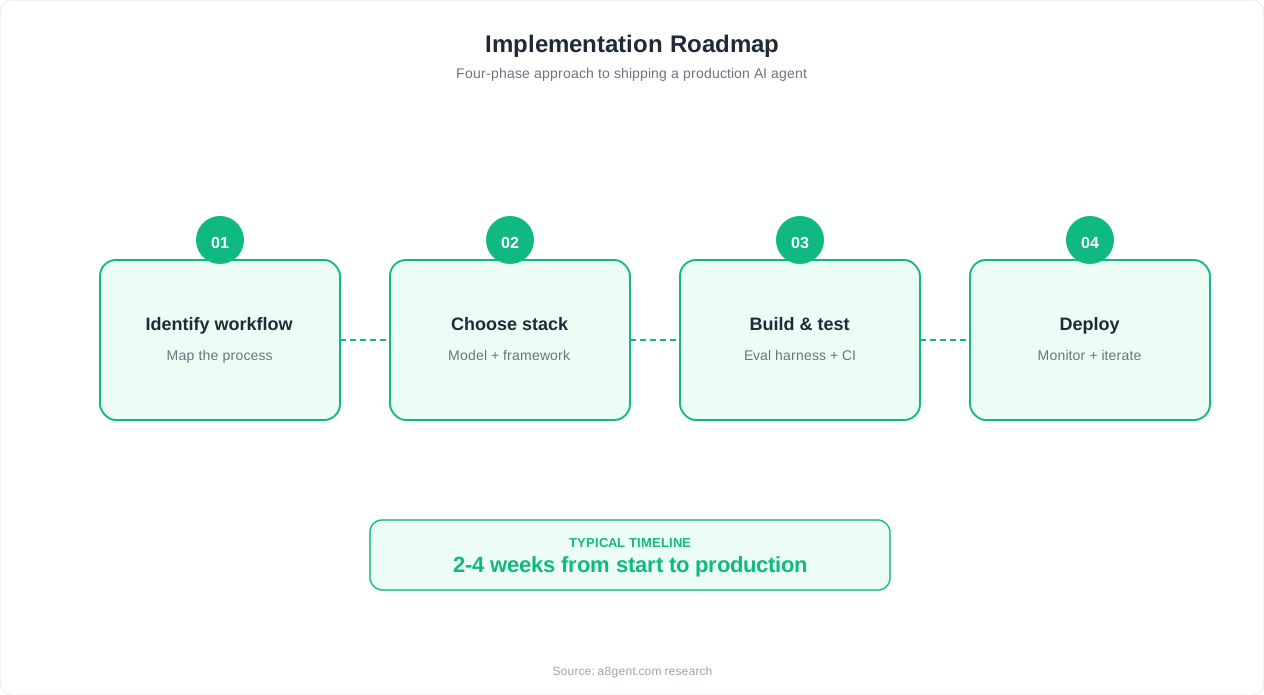
Week 1: Map your current onboarding flow. Identify the 3-5 biggest friction points. Choose your tool(s). Week 2: Build your first automated sequence covering signup through first-value-moment. Configure triggers and basic decision logic. Week 3: Launch in "shadow mode" - the AI runs alongside your manual process so you can compare outputs. Fix any logic errors. Week 4: Go live. Monitor completion rates, stall rates, and time-to-value metrics. Iterate on messaging and timing based on data.
Key metrics to track: Time-to-first-value (how long from signup to first meaningful use), onboarding completion rate (what percentage finish all steps), stall rate by step (where do people get stuck), 90-day retention (the ultimate measure), and support ticket volume during onboarding (should decrease as AI handles more questions). Explore our courses for detailed training on setting up measurement frameworks.
Integration checklist: Connect your onboarding agent to: your CRM (for deal-stage updates and contact enrichment), your product analytics (for behavior trigger data), your support platform (for escalation routing), your billing system (for activation confirmation), and your team communication tool like Slack (for internal alerts on VIP accounts or escalations). This connected ecosystem ensures nothing falls between cracks and every customer interaction is captured.
FAQ
How long does it take to set up an AI-powered onboarding system?
A basic automated welcome sequence takes 1-2 days to configure. A full onboarding flow with adaptive paths, document collection, and progress tracking takes 2-4 weeks to build properly. Most businesses start with the welcome sequence, prove results, then expand. The ongoing maintenance is minimal - perhaps 2-3 hours per month adjusting messaging and reviewing stall patterns.
Will automated onboarding feel impersonal to customers?
When done well, AI-powered onboarding actually feels more personal than manual processes because it responds to individual behavior in real time. Customers get help exactly when they need it, content matches their specific situation, and nothing falls through the cracks. The key is using personalization (name, company, use case, behavior) in every touchpoint and maintaining a conversational, helpful tone rather than robotic templates.
What onboarding completion rates should I expect?
Industry benchmarks show manual onboarding typically achieves 40-60% completion rates. AI-powered onboarding pushes this to 70-85% by eliminating timing gaps, adapting to individual needs, and proactively recovering stalled accounts. The biggest improvement is usually in the 'started but didn't finish' segment - AI agents are excellent at re-engaging these customers with targeted help.
Can AI onboarding handle complex enterprise implementations?
AI agents excel at managing the coordination and communication layer of enterprise onboarding - tracking requirements, sending reminders, validating deliverables, and maintaining timelines. The actual technical implementation (custom integrations, data migrations) still requires human expertise in most cases. The best approach is AI handling project management and communication while humans handle technical complexity, with clear escalation paths between them.
How do I handle customers who prefer human interaction during onboarding?
Always offer an easy escape hatch to human help. Most AI onboarding tools let you set rules like 'if customer requests human help at any point, route immediately to CSM with full context.' Typically 15-20% of customers prefer human interaction - the AI agent handles the other 80%, freeing your human team to deliver exceptional service to those who want it.
What's the ROI of automating onboarding?
The primary ROI comes from three sources: reduced churn (35% improvement in 90-day retention is typical, translating directly to retained revenue), reduced CSM workload (each CSM can handle 3-4x more accounts when AI covers routine touchpoints), and faster time-to-value (customers reach productive use 60% sooner, accelerating upsell opportunities). Most businesses achieve positive ROI within 60 days of deployment.
How do I measure if my AI onboarding is working?
Track these five metrics weekly: onboarding completion rate (target: 75%+), time-to-first-value (should decrease 40-60% from baseline), support tickets during onboarding (should decrease 30-50%), 90-day retention rate (the ultimate success metric), and NPS/satisfaction during onboarding. Compare each metric to your pre-automation baseline. If any metric stagnates, focus on the specific step where customers stall.
Can I use AI onboarding for a free trial to paid conversion flow?
Absolutely - this is one of the highest-impact applications. AI agents guide trial users to their 'aha moment' faster (increasing conversion probability), identify buying signals and route to sales at the right moment, and nurture users who aren't ready to buy with education rather than pressure. Companies using AI-guided trial experiences report 20-35% improvement in trial-to-paid conversion rates compared to unguided trials.