The Complete Guide to AI Agent Implementation for Business (2026)
A comprehensive, step-by-step guide to implementing AI agents in your business - from initial assessment and tool selection through deployment, optimization, and scaling. Covers strategy, architecture, change management, security, and ROI measurement for businesses of all sizes.
10+ years shipping production ML across TensorFlow, PyTorch, AWS, and GCP. Ships every A8gent agent before it becomes a lesson. GitHub
- Successful AI agent implementation follows a four-phase framework: Assessment (identify high-ROI workflows), Selection (choose the right platform and architecture), Deployment (configure, test, and launch with guardrails), and Optimization (measure, iterate, and scale across the organization).
- The biggest implementation failures come from skipping the assessment phase - businesses that deploy agents without clearly defining the problem, success metrics, and human-AI handoff points waste 60-70% of their initial investment on rework.
- Platform selection should be driven by your technical capacity, integration requirements, and scaling ambitions - not marketing hype. A no-code platform that ships in 2 days beats a custom solution that ships in 2 months for most businesses.
- Change management is the hidden make-or-break factor: teams that involve affected employees early, demonstrate personal benefits, and maintain human oversight during rollout achieve 3x higher adoption rates than top-down mandates.
- ROI measurement must go beyond time savings to include error reduction, speed improvements, employee satisfaction, customer experience scores, and revenue impact - businesses tracking all five dimensions report 40% higher executive buy-in for expansion.
Why Most AI Agent Implementations Fail (And How Yours Will Not)
The promise of AI agents is transformative: autonomous digital workers handling your repetitive tasks, making intelligent decisions, and scaling your operations without proportional headcount growth. The reality for many businesses has been less inspiring. Industry data from 2025-2026 shows that approximately 40% of AI agent implementations fail to deliver expected ROI, 25% are abandoned within 90 days, and most of the remainder underperform initial projections by 30-50%.
But here is what is encouraging: the businesses that succeed with AI agents do not have bigger budgets, better technology, or more technical teams. They have better implementation processes. They follow a structured approach that addresses the common failure points before they become expensive problems. This guide gives you that approach.
The five reasons AI agent implementations fail:
- Wrong problem selection: Businesses automate tasks that are too complex, too rare, or too low-value to justify the investment. They pick "impressive" use cases instead of "impactful" ones.
- Platform mismatch: They choose tools based on marketing materials or feature lists rather than fit with their specific requirements, technical capacity, and scaling path.
- Insufficient guardrails: Agents are deployed with too much autonomy too quickly, produce errors that damage customer relationships or internal trust, and get shut down entirely.
- Ignored change management: Teams feel threatened or bypassed, refuse to adopt the tools, or actively undermine them. The best technology fails without human buy-in.
- No measurement framework: Without clear metrics and baselines, businesses cannot tell whether the implementation is working, cannot identify what to improve, and cannot justify expansion.
This guide addresses each of these failure modes with specific frameworks, decision criteria, and action steps. Whether you are implementing your first agent or scaling from 3 to 30, you will find your current stage addressed here. The framework applies regardless of your industry, team size, or technical sophistication.
If you want a quick diagnostic of where to start before diving into this comprehensive guide, take our free assessment. It identifies your highest-ROI automation opportunities and recommends specific tools and approaches in 2 minutes. Then return here for the detailed implementation playbook.
Let us build your implementation strategy from the ground up, starting with the most critical phase that most businesses rush through: assessment.
Phase 1: Assessment - Identifying the Right Workflows to Automate
The assessment phase determines whether your implementation succeeds or fails. Spend one to two weeks here - it will save months of rework later. The goal is to identify workflows that are simultaneously high-value (significant time or cost savings), high-feasibility (current AI agents can handle them reliably), and low-risk (errors are catchable and reversible). Workflows that score high on all three dimensions are your starting candidates.
Step 1: Workflow inventory (2-3 days)
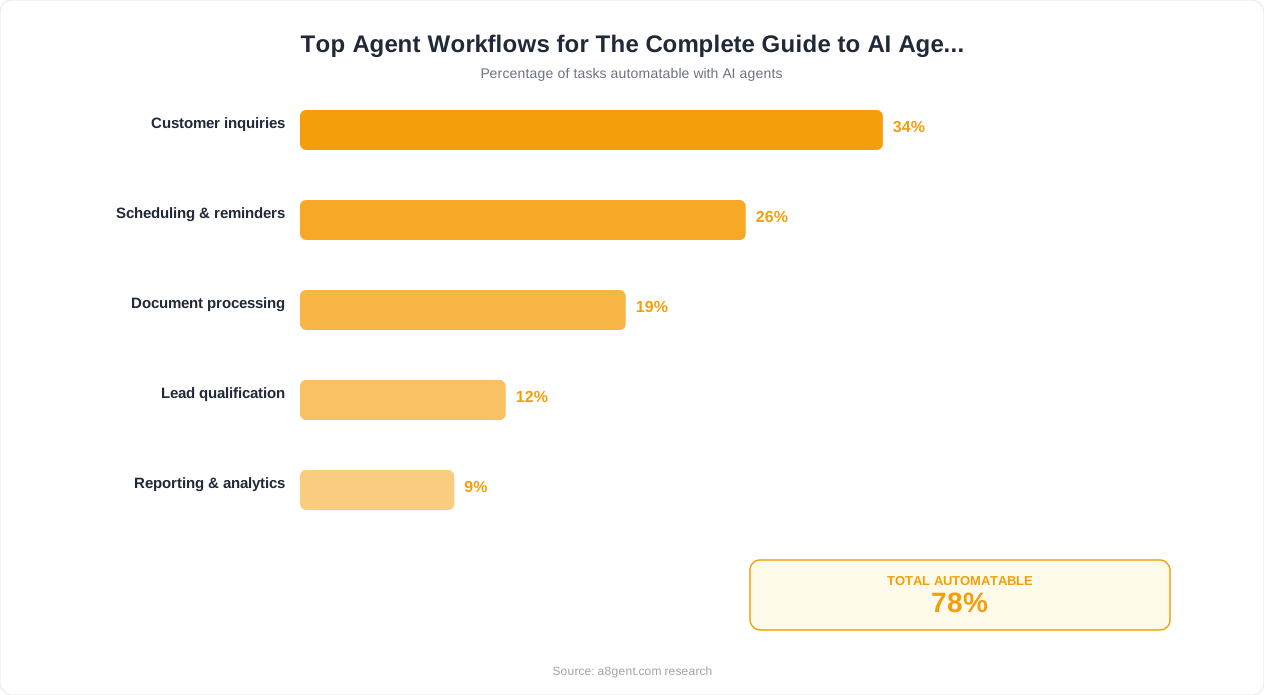
Map every repetitive workflow in your business. Do not filter yet - capture everything. For each workflow, document: who does it, how often it occurs, how long it takes per occurrence, what tools are involved, what decisions are required, and what happens when it goes wrong. Use our workflow mapper tool to analyze which steps within each workflow are automatable and which require human judgment.
Typical high-value workflows include: lead qualification and routing, customer inquiry triage and response, invoice processing, report generation, data entry between systems, appointment scheduling, follow-up sequences, content distribution, order processing, and employee onboarding tasks. But the specific winners depend on your business - a workflow that takes 20 minutes but happens 40 times per day (13+ hours/day) is more valuable than one that takes 3 hours but happens once per week.
Step 2: Feasibility scoring (1-2 days)
For each workflow in your inventory, evaluate against these feasibility criteria:
- Pattern consistency: Does the workflow follow a predictable pattern, or does every instance require unique judgment? High consistency = high feasibility.
- Data availability: Is the information needed to complete the workflow available digitally and accessible via API? If it is locked in PDFs, handwritten notes, or tribal knowledge, feasibility decreases.
- Tool integration: Do the systems involved (CRM, email, project management, accounting) have APIs or pre-built integrations with agent platforms? Check our AI stack builder to verify integration compatibility.
- Error tolerance: What is the cost of a mistake? Sending a slightly imperfect follow-up email (low cost) versus processing a wrong financial transaction (high cost). Start with error-tolerant workflows.
- Volume and frequency: Workflows that happen dozens of times daily deliver faster ROI than weekly or monthly tasks, even if the per-instance savings is smaller.
Step 3: ROI estimation (1 day)
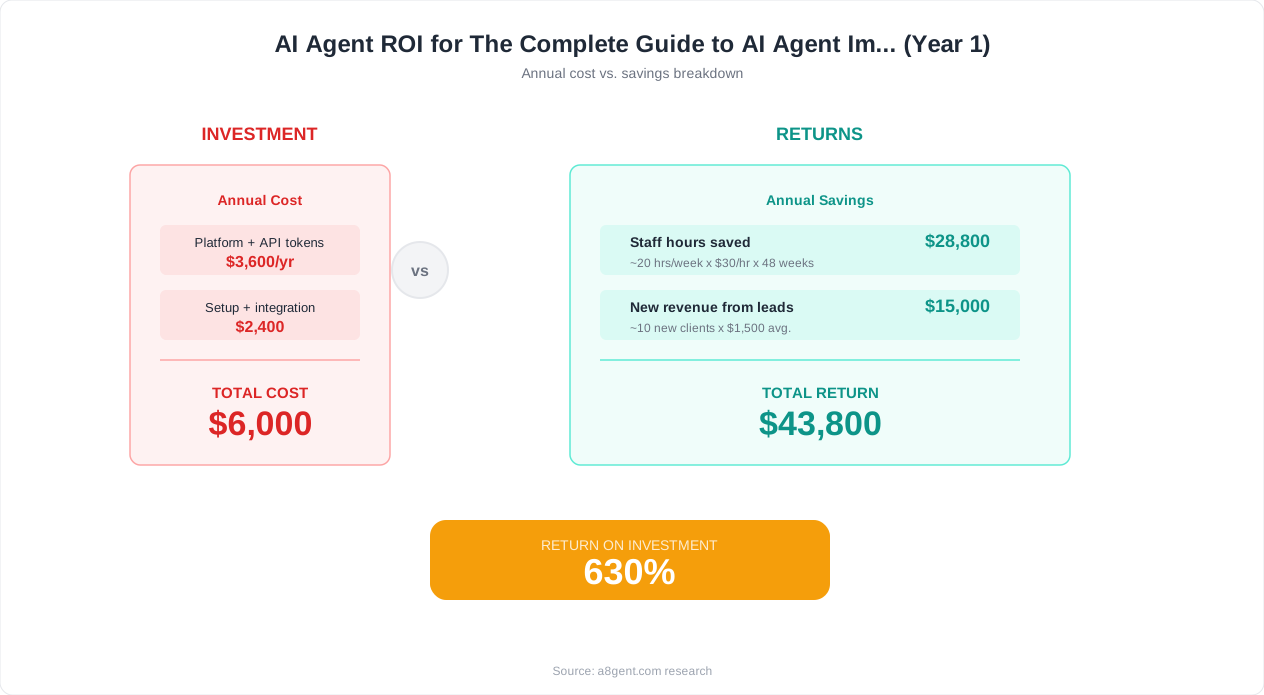
For your top 5-10 candidate workflows, calculate expected ROI using this framework: (Hours saved per week x Hourly cost of current handler x 52 weeks) + (Error reduction value) + (Speed improvement value) - (Platform cost x 12 months) - (Implementation time cost). Use our ROI calculator to model specific scenarios. Workflows delivering 5x+ projected ROI in year one are strong candidates. Workflows delivering 10x+ are no-brainers.
Step 4: Prioritization matrix (half day)
Plot your candidate workflows on a 2x2 matrix: Value (high/low) versus Implementation Complexity (high/low). Start with the high-value, low-complexity quadrant. These are your quick wins that build momentum, demonstrate ROI, and create organizational buy-in for expanding to more complex automations. Resist the temptation to start with the most impressive or complex use case - that is a recipe for a stalled 6-month project that never ships.
By the end of this phase, you should have 2-3 prioritized workflows ready for implementation, each with clear success metrics, estimated ROI, and identified risks. This is your implementation backlog. Let us move to selecting the right platform.
Phase 2: Platform Selection - Choosing the Right AI Agent Architecture
Platform selection is where many businesses make expensive mistakes driven by hype, feature comparison charts, or whoever has the best sales team. The right platform for your business depends on factors that no generic comparison can address: your team's technical capacity, your integration requirements, your security constraints, your scaling ambitions, and your budget reality. Here is how to make this decision systematically.
Architecture decision: Build vs. buy vs. hybrid
Before comparing specific platforms, decide your architecture approach:
- Buy (no-code platforms): You use a pre-built platform with visual interfaces, templates, and managed infrastructure. Best for: teams without developers, businesses wanting to deploy within days, use cases well-served by existing templates. Platforms: Lindy, Autonoly. Time to first agent: 1-3 days.
- Hybrid (low-code platforms): You use a platform that provides the infrastructure and integration layer but allows custom logic, code snippets, and advanced configurations. Best for: businesses with some technical resources who need flexibility beyond templates. Platforms: n8n, Make (with AI modules). Time to first agent: 1-2 weeks.
- Build (custom development): Your engineering team builds agents using AI APIs (GPT-4, Claude, open-source models) and custom orchestration. Best for: businesses with unique requirements not served by any platform, companies with sensitive data that cannot leave their infrastructure, or those building AI as a core product capability. Time to first agent: 4-12 weeks.
For 80% of businesses reading this guide, the "buy" approach delivers the best outcome. You get to production faster, maintenance is handled by the platform, and the cost is predictable. Only choose "build" if you have tried existing platforms and they genuinely cannot handle your requirements - not because building feels more impressive or gives more control.
Platform evaluation criteria:
Once you know your architecture approach, evaluate specific platforms against these weighted criteria:
- Integration coverage (weight: 30%): Does the platform natively connect to the tools your priority workflows require? Check for your CRM, email, project management, accounting, and industry-specific tools. Native integrations are worth 5x more than "you could build a custom integration via their API" promises.
- Reliability and uptime (weight: 25%): What is the platform's uptime history? What happens when the AI makes an error? Are there automatic retries, error notifications, and audit logs? For business-critical workflows, you need 99.9%+ reliability.
- Ease of use for your team (weight: 20%): Can the people who will manage these agents actually use the platform? Request a trial, build a simple workflow, and have the actual intended user (not just the decision-maker) evaluate the experience.
- Pricing at your scale (weight: 15%): Model costs at your current volume AND at 3-5x growth. Some platforms are cheap for small volumes but become expensive at scale. Others have high minimums but better unit economics. Match pricing structure to your growth trajectory.
- Security and compliance (weight: 10%): SOC 2 certification, data residency options, encryption at rest and in transit, role-based access controls, and audit logging. For regulated industries (healthcare, finance), this weight increases to 25%.
The trial process:
Never commit to an annual plan without a 2-week trial building your actual priority workflow (not a demo workflow). During the trial, evaluate: how long did setup actually take? How accurate is the agent on your real data? How does the platform handle edge cases? How responsive is their support team? These practical answers matter more than any feature comparison document. Use our AI stack builder to map your requirements to platform capabilities, or take our assessment for specific platform recommendations based on your business profile.
Phase 3: Deployment - Building, Testing, and Launching Your First Agent
You have identified your priority workflow and selected your platform. Now it is time to build, test, and launch. This phase typically takes 1-3 weeks for a first agent deployment, with subsequent agents deploying faster as you develop expertise and reusable patterns.
Week 1: Build and configure
Start by defining your agent's instructions with extreme specificity. Vague instructions produce vague results. Instead of "respond to customer emails," specify: "When a customer email arrives about order status, look up their order in Shopify using their email address, check the fulfillment status, and respond with the current status, expected delivery date, and tracking link. If the order is delayed more than 2 days, apologize and offer a 10% discount code. If the order cannot be found, ask the customer for their order number. Always use their first name, keep the tone friendly but professional, and sign off as the Support Team."
This level of specificity is what separates agents that work from agents that disappoint. Document every decision point, every exception, and every boundary. When should the agent escalate to a human? What should it never do? What information should it never share? Define the guardrails before the agent goes live.
Configure your integrations:
Connect each tool the agent needs to access. Test each connection individually before building the full workflow. Verify that the agent can read and write the correct data in each system. Common integration issues to watch for: permission scoping (give the agent minimum necessary access, not admin), field mapping (make sure data flows to the right fields), and rate limiting (some APIs throttle requests that could affect performance at scale).
Week 2: Testing
Run your agent through three levels of testing:
- Synthetic testing: Create 20-30 test cases covering common scenarios, edge cases, and potential failure modes. Run each through the agent and verify the outputs. This catches obvious configuration errors and missing handling for common situations.
- Shadow testing: Run the agent on real incoming work, but do not send its outputs anywhere. Instead, compare its proposed actions to what your team actually did. Track accuracy: what percentage of the time does the agent produce the correct action? Target 90%+ before proceeding.
- Supervised live testing: The agent handles real work, but a human reviews and approves every action before it executes. This is your safety net during the transition. Run supervised mode for 5-10 business days minimum, longer for high-stakes workflows.
Week 3: Launch and monitor
Graduate the agent to autonomous operation for the scenarios where it has proven reliable. Keep supervised mode for edge cases and new scenarios it has not encountered. Establish your monitoring cadence: daily reviews for the first week, then twice weekly, then weekly. Track your key metrics from day one so you have clean data for ROI reporting.
Critical launch checklist:
- Escalation path defined and tested (what happens when the agent cannot handle something)
- Error notifications configured (you are alerted immediately when something fails)
- Rollback plan documented (how to revert to manual handling if needed)
- Team trained on how to monitor, correct, and improve the agent
- Customer communication ready (if the agent is customer-facing, prepare for questions about AI)
- Metrics baseline recorded (before-automation numbers for comparison)
The first agent deployment is always the slowest because you are learning the platform, developing your configuration practices, and building organizational confidence. Agents two through five deploy 3-5x faster as you reuse patterns and your team gains confidence. Document everything you learn during this first deployment - it becomes your internal playbook for scaling.
Change Management: Getting Your Team to Embrace AI Agents
Here is an uncomfortable truth that technology vendors never tell you: the most common reason AI agent implementations fail is not technical. It is human. Teams resist, managers feel threatened, employees worry about job loss, and the beautifully configured agent sits unused because the people it was supposed to help refuse to adopt it. Change management is not optional. It is the difference between a successful implementation and an expensive shelfware purchase.
Why teams resist AI agents:
Understanding resistance helps you address it preemptively. The core fears are: "This will replace my job" (existential), "This will make my expertise irrelevant" (identity), "This will create more work for me to fix its mistakes" (practical), and "Leadership is implementing this without asking what I need" (respect). Each requires a different response.
The involvement framework:
Teams that are involved in the implementation process from the beginning adopt AI agents at 3x the rate of teams that have agents imposed on them. Here is how to involve them:
- Discovery participation: Ask team members which tasks they find most tedious, repetitive, or frustrating. When the agent is deployed to handle tasks they hate doing, adoption is natural. "We built this to handle the part of your job you've been complaining about" is a very different message than "We built this to replace part of your job."
- Configuration input: Have team members help define the agent's rules and responses. They know the edge cases, the customer preferences, and the unwritten rules that no documentation captures. Their expertise makes the agent better AND gives them ownership.
- Testing partnership: Make team members the evaluators during testing. They judge whether the agent's outputs meet their quality standards. This positions them as the authority (the agent must meet their standard) rather than the displaced (the agent is taking their work).
- Expansion voice: After the first agent succeeds, ask the team what they want automated next. Give them agency over the expansion roadmap. This shifts the dynamic from "automation happening to them" to "automation happening for them."
Communicating the right narrative:
Frame AI agents as "handling the busywork so you can do the interesting work." Never frame them as "efficiency improvements" or "headcount optimization" - even if that is part of the financial case internally. The narrative to teams should be: "You were hired for your judgment, creativity, and expertise. Right now, 40% of your time is spent on repetitive tasks that do not use those abilities. We are deploying agents to handle that 40% so you can spend 100% of your time on work that actually requires a skilled human." This is true and it is motivating.
The transition period:
During the first 30 days of any agent deployment, expect productivity to temporarily dip as people adjust workflows, learn to supervise the agent, and build trust. This is normal. Do not panic. Do not declare failure at day 14. Set expectations with leadership that the first month is investment, the second month is parity, and the third month is when gains compound. Businesses that maintain patience through the adjustment period are 4x more likely to succeed long-term than those that expect immediate results.
Ongoing engagement:
Schedule monthly "automation reviews" where the team discusses what is working, what is not, and what they want to improve or expand. This keeps the implementation alive and evolving rather than stagnating after initial deployment. Teams that conduct regular reviews improve their agents' performance by 15-25% over 6 months through continuous refinement.
Security, Privacy, and Governance for AI Agent Deployments
AI agents handle sensitive business data: customer information, financial records, internal communications, and strategic documents. Security is not an afterthought - it is a deployment prerequisite. This section covers the governance framework you need regardless of your business size or industry, with additional guidance for regulated sectors.
Data access principles:
Apply the principle of least privilege: each agent should have access to the minimum data and permissions required to perform its specific task. An email response agent needs read access to incoming emails and write access to outgoing ones - it does not need access to your financial systems, HR records, or strategic documents. Map each agent's required permissions explicitly and deny everything else.
Data classification framework:
- Public data: Information already publicly available (published content, product descriptions, pricing). Safe for any agent to access and use without restriction.
- Internal data: Business information that is not public but not highly sensitive (internal processes, general policies, non-confidential reports). Agents can access with standard controls.
- Confidential data: Sensitive business information (financials, strategy, unreleased plans, employee data). Agents access only when essential to their function, with logging and review.
- Restricted data: Highly sensitive information (customer PII, payment details, health records, legal matters). Agents access only with explicit approval, full audit logging, and enhanced security controls. Consider whether AI handling is appropriate at all.
Platform security requirements:
Before deploying any agent platform in production, verify these security fundamentals:
- SOC 2 Type II certification (or equivalent security audit)
- Data encryption at rest and in transit (AES-256, TLS 1.3)
- Role-based access control (RBAC) for team members managing agents
- Comprehensive audit logging of all agent actions and data access
- Data residency options if you operate in jurisdictions with data localization requirements
- Regular penetration testing and vulnerability assessments
- Clear data retention and deletion policies
- Incident response procedures and notification commitments
AI-specific governance policies:
Beyond standard information security, AI agents require additional governance:
- Output review cadence: Define how often human reviewers sample agent outputs for quality and appropriateness. More frequently for customer-facing agents, less for internal process agents.
- Bias monitoring: If agents make decisions about customers or employees (prioritization, qualification, routing), monitor for demographic biases in outcomes.
- Model update policy: When the underlying AI model updates, re-test your agents. Model improvements can sometimes change behavior in unexpected ways.
- Disclosure requirements: Determine when customers, employees, or partners must be informed they are interacting with an AI agent. Regulatory requirements vary by jurisdiction.
- Kill switch procedures: Document exactly how to immediately disable any agent in an emergency, who has authority to trigger it, and what manual fallback activates.
For regulated industries:
Healthcare (HIPAA), finance (SOX, PCI-DSS), and legal businesses need additional controls: Business Associate Agreements with AI platforms, enhanced audit trails that meet regulatory evidence requirements, data processing agreements that specify exactly how customer data is used, and documentation that AI decision-making does not violate industry-specific regulations. Consult your compliance team or legal counsel before deploying agents that handle regulated data. These requirements add implementation time but do not prevent implementation - platforms like Autonoly offer compliance-ready configurations for regulated industries.
Phase 4: Optimization and Scaling - From One Agent to an AI-Powered Operation
Your first agent is deployed and delivering value. Now the question becomes: how do you optimize it further, and how do you scale from one successful agent to a comprehensive AI-powered operation? This is where the compound returns begin - each additional agent becomes easier to deploy, and agents working together deliver more value than the sum of their parts.
Optimizing your existing agents:
After the first 30 days of operation, you have enough data to optimize. Pull your agent's performance metrics and look for:
- Escalation patterns: What situations consistently trigger human escalation? Can you add instructions or integrations to handle more of them autonomously?
- Error clusters: Where does the agent most frequently make mistakes? These usually indicate unclear instructions, missing context, or scenarios you did not anticipate during configuration.
- Speed bottlenecks: Which steps in the agent's workflow take the longest? Often this points to slow API responses or unnecessary sequential steps that could run in parallel.
- User satisfaction signals: If the agent is customer-facing, monitor satisfaction scores, repeat contact rates, and resolution rates. Compare to your pre-automation baseline.
Schedule a 30-day optimization review for every agent. Make 3-5 specific improvements based on the data. Then schedule the next review for 60 days. This continuous improvement cycle is what separates "good enough" automation from "genuinely transformative" automation.
Scaling strategy: The automation expansion map
Scale methodically, not randomly. Use this priority order:
- Adjacent workflows: Automate workflows that connect to your first agent. If you automated lead response, next automate lead scoring and routing. If you automated invoice sending, next automate payment follow-up and reconciliation. Connected workflows create multiplier effects.
- High-volume workflows: After adjacent expansion, target your next-highest-volume manual processes regardless of department. Follow the same assessment framework from Phase 1.
- Cross-department expansion: Once 2-3 departments have successful agents, the organizational knowledge and confidence exists to expand to remaining departments. This is usually months 3-6.
- Multi-agent orchestration: Once you have 5+ individual agents running well, begin connecting them into coordinated workflows where one agent's output triggers another agent's action. This is where exponential value emerges.
Multi-agent architecture patterns:
As you scale, you will encounter scenarios where agents need to work together. Common patterns include:
- Sequential handoff: Agent A completes its task and passes results to Agent B. Example: Research agent gathers data, then writing agent creates the report.
- Parallel processing: Multiple agents work on different aspects simultaneously, with results merged. Example: Different agents enrich a lead's data from LinkedIn, company website, and tech stack databases, then a synthesis agent combines findings.
- Supervisor-worker: A coordinating agent delegates tasks to specialized agents and compiles their outputs. Example: A project manager agent assigns research, drafting, and formatting tasks to specialized agents.
Platforms like Autonoly provide built-in multi-agent orchestration that handles the coordination complexity. For businesses building custom, frameworks like LangGraph and CrewAI provide the infrastructure for multi-agent systems.
Scaling timeline expectations:
Month 1: First agent deployed and optimized. Month 2-3: 2-4 additional agents covering adjacent workflows. Month 4-6: Department-wide automation with 5-10 agents. Month 7-12: Cross-department expansion with multi-agent coordination. This timeline assumes one person spending 3-5 hours per week on automation management. Dedicated automation roles can compress this by 2-3x.
Measuring ROI: The Complete Framework for AI Agent Performance
You cannot improve what you do not measure, and you cannot justify expansion without demonstrating returns. Yet most businesses measure AI agent ROI too narrowly (time saved) or too vaguely (it seems to be working). This section provides a comprehensive measurement framework that captures full value and communicates it effectively to stakeholders.
The five dimensions of AI agent ROI:
1. Time and cost savings (the obvious dimension)
Measure hours saved per week multiplied by the loaded cost per hour of the people previously doing the work. Be specific: track before and after metrics for the exact workflow automated. If your team spent 20 hours/week on email triage and now spends 4 hours/week (with the agent handling the rest), the saving is 16 hours x loaded cost. Do not forget to subtract platform costs and the time spent managing the agent. Net savings is what matters.
2. Error reduction and quality improvement
Many manual processes have significant error rates that people accept as normal. Track error rates before and after automation: data entry mistakes, missed follow-ups, incorrect responses, processing delays, and compliance violations. Assign a cost to each error type (correction time, customer impact, regulatory risk). An agent that reduces errors from 5% to 0.5% may deliver more value through error prevention than through time savings alone.
3. Speed and throughput improvements
How much faster are things getting done? Track cycle times: time from customer inquiry to first response, time from invoice receipt to payment, time from lead capture to first outreach. Speed improvements often translate directly to revenue: faster lead response increases conversion, faster customer support increases satisfaction and retention, faster invoice processing improves cash flow. Calculate the revenue impact of speed improvements, not just the efficiency gain.
4. Employee experience and capacity
Measure what your team does with recovered time. Are they handling higher-value work? Taking on projects that were backlogged? Reducing overtime? Improving work quality on remaining tasks? Survey employee satisfaction before and after - people who are freed from tedious tasks typically report 20-30% higher job satisfaction, which reduces turnover (itself a major cost savings). Track capacity metrics: can your team now handle 30% more volume without additional hires?
5. Revenue and customer impact
The highest-value dimension but the hardest to measure. Track revenue metrics that your agents influence: conversion rates (if agents handle lead qualification or sales support), customer retention rates (if agents handle support or engagement), average order value (if agents handle upselling or recommendations), and net new revenue from capacity unlocked by automation (your sales team can work more deals because admin is automated).
Building your measurement dashboard:
For each deployed agent, maintain a scorecard with these metrics updated monthly: (1) Volume handled (tasks completed by agent), (2) Quality score (accuracy of agent outputs, sampled weekly), (3) Time saved (hours per week vs. baseline), (4) Cost (platform fees + management time), (5) Net ROI ((Total value delivered - Total cost) / Total cost). Share this dashboard with leadership quarterly to maintain support and justify expansion budget.
Common measurement mistakes:
- Measuring only time saved while ignoring quality, speed, and revenue impact (undervalues the investment)
- Failing to establish baselines before deployment (makes improvement impossible to quantify)
- Attributing all improvement to the agent when other factors changed simultaneously
- Measuring too early (agents improve over time - measure at 30, 60, and 90 days for accurate picture)
- Not accounting for implementation costs in ROI calculations (makes early numbers look worse, later numbers look better)
Use our ROI calculator to build projections before implementation, then validate against actual results monthly. Businesses that rigorously measure and communicate ROI achieve 40% higher budget allocation for expansion compared to those that rely on anecdotal evidence.
Advanced Implementation Strategies: Multi-Agent Systems and AI-Native Operations
Once you have mastered individual agent deployment and established measurement practices, you are ready for advanced strategies that deliver transformational rather than incremental value. This section covers the frontier of business AI agent implementation in 2026 - where early adopters are seeing 10-50x returns on their automation investments.
Building an AI-native operating model:
The most advanced businesses are not just "adding AI" to existing processes - they are redesigning processes around AI capabilities. An AI-native process does not mimic the manual version with automation bolted on. It is fundamentally redesigned to leverage what AI agents do well (continuous operation, parallel processing, perfect memory, instant data access) while routing to humans only what requires human strengths (judgment, creativity, empathy, relationship building).
Example: A traditional sales process has a human doing research, writing emails, scheduling meetings, qualifying leads, updating CRM, and closing deals. An AI-native sales process has agents handling research, email writing, scheduling, CRM updates, and initial qualification continuously - while the human salesperson focuses exclusively on high-value conversations, relationship building, and closing. The human goes from doing 8 tasks (3 well) to doing 2 tasks (excellently). Pipeline velocity increases 4-5x.
Multi-agent team design patterns:
At scale, you are not deploying individual agents - you are designing agent teams with defined roles, handoff protocols, and coordination logic. Successful patterns include:
- The research-insight-action pipeline: Research agents gather and synthesize information. Insight agents analyze and identify opportunities or risks. Action agents execute on the insights. Example: competitor monitoring (research) -> strategic recommendation (insight) -> content creation responding to competitor moves (action).
- The triage-specialist-quality model: A triage agent categorizes and routes incoming work to specialized agents optimized for each category. A quality agent reviews outputs before delivery. Example: customer support where triage identifies the issue type, specialized agents handle billing/shipping/technical/general, and quality reviews responses for accuracy and tone.
- The continuous improvement loop: Operational agents handle daily work while analytical agents monitor performance metrics, identify degradation patterns, and suggest configuration improvements. This creates self-optimizing systems that improve without manual intervention.
Knowledge management for AI agents:
As your agent fleet grows, knowledge management becomes critical. Agents need access to current, accurate information about your business: products, policies, pricing, processes, team members, and customer context. Establish a single source of truth that all agents reference, with clear ownership for keeping it current. When a product price changes or a policy updates, it should propagate to all relevant agents automatically. Stale knowledge in agents creates errors and customer confusion.
The automation flywheel:
The most powerful advanced strategy is the automation flywheel: successful agents free human time -> freed time is invested in deploying more agents -> more agents free more time -> cycle accelerates. Businesses that recognize and intentionally cultivate this flywheel reach operational maturity (AI handling 60-70% of routine operations) within 12-18 months. Those that treat each agent as a standalone project take 3-5 years to reach the same level.
To begin building your multi-agent operation, start with Autonoly's pre-built coordination templates, or explore our comprehensive AI agent courses for guided learning paths from single-agent deployment through multi-agent orchestration. The AI stack builder tool can also help you map the optimal architecture for your scaling ambitions.
The businesses implementing AI agents today are not just saving time - they are building operational capabilities that will be nearly impossible for late adopters to replicate quickly. Every month of experience compounds into organizational knowledge, optimized configurations, and cultural readiness that money alone cannot buy. Start now, start small, measure rigorously, and scale systematically. The guide above gives you the complete playbook. Your next step is to take the assessment and identify where your first (or next) agent should be deployed.
FAQ
How long does a typical AI agent implementation take from start to finish?
For a single agent on a no-code platform: 1-3 weeks from assessment to autonomous operation. For a custom-built agent: 6-12 weeks. For a multi-agent system: 2-4 months. The first agent always takes longest because you are learning the platform and building organizational processes. Subsequent agents deploy 3-5x faster. Most businesses have their first agent running autonomously within 2-3 weeks.
What budget should I allocate for AI agent implementation?
Platform costs range from $50-$500/month per use case depending on volume and platform choice. Implementation time costs (staff time for setup, testing, and training) typically run 20-40 hours for a first agent. Total first-year cost for a small business: $2,000-$8,000 including platform and time. Expected first-year ROI for well-chosen use cases: 5-15x the investment. Start small and reinvest savings into expansion.
Do I need a technical team to implement AI agents?
Not for no-code platforms like Lindy or Autonoly - these are designed for non-technical users and require no programming. You need someone who understands your business processes deeply and can write clear instructions. For hybrid or custom implementations, you need developers. For most businesses under 200 employees, the no-code path delivers better results faster because it eliminates the engineering bottleneck.
What is the biggest risk of AI agent implementation?
The biggest risk is deploying an agent without adequate guardrails and having it take an incorrect action that damages a customer relationship or creates a compliance issue. Mitigate this by always starting in supervised mode, defining clear boundaries on what the agent can and cannot do, setting up error notifications, and gradually expanding autonomy only after proven reliability. Technical failures are far less common than configuration failures.
How do I handle employee resistance to AI agent deployment?
Involve affected employees from the assessment phase onward. Let them identify which tasks they want automated (usually the ones they hate). Position agents as handling tedious work so employees can focus on interesting work. Never surprise teams with automation - communicate early, demonstrate benefits personally, and maintain human oversight throughout. Teams involved early adopt at 3x the rate of teams surprised with changes.
Can AI agents integrate with legacy systems that do not have modern APIs?
Yes, though it requires workarounds. Options include: email-based integration (agent sends/receives emails to interact with the system), screen recording and RPA hybrid (agent controls the legacy interface programmatically), file-based integration (agent reads/writes files the legacy system produces), or building a thin API wrapper around the legacy system. The right approach depends on the specific system and interaction pattern.
How do I measure whether my AI agent implementation is successful?
Track five dimensions: (1) Time saved per week versus baseline, (2) Error rate reduction, (3) Speed/throughput improvement (cycle time reduction), (4) Employee satisfaction with new workflow, (5) Revenue or customer satisfaction impact. Establish baselines before deployment, measure at 30, 60, and 90 days, and calculate net ROI including all platform and management costs. A successful implementation shows positive ROI by day 60.
Should I implement AI agents one at a time or deploy multiple simultaneously?
Start with one agent, get it working well, then expand. Deploying multiple agents simultaneously creates too many variables - when something goes wrong, you cannot tell which agent or interaction caused it. After your first successful agent (typically 3-4 weeks), you can deploy a second. By your fourth or fifth agent, you will have enough expertise to run 2-3 implementations in parallel if you have the team capacity to manage them.