Relevance AI Review 2026: Pricing, Features and Alternatives
An honest, business-owner-focused review of Relevance AI in 2026. We break down pricing tiers, core features, real-world performance, and the best alternatives if Relevance AI is not the right fit for your business.
10+ years shipping production ML across TensorFlow, PyTorch, AWS, and GCP. Ships every A8gent agent before it becomes a lesson. GitHub
- Relevance AI excels at building multi-step AI agent workflows with a visual no-code builder, but the learning curve is steeper than simpler automation tools and requires patience during the first week of setup.
- Pricing starts affordable but scales aggressively with usage - business owners processing more than a few hundred tasks monthly should carefully model costs before committing to avoid surprise bills.
- The platform is strongest for teams that need AI agents handling research, data enrichment, and content generation workflows - it is less suited for simple app-to-app automation that tools like Zapier handle better.
- Alternatives like Autonoly offer more guided setup experiences for non-technical owners, while n8n provides better value for high-volume usage when you have basic technical comfort.
- For business owners unsure whether Relevance AI fits their needs, starting with the free tier and running one real workflow for two weeks gives you enough data to decide without financial risk.
Relevance AI in 2026: What Business Owners Need to Know
Relevance AI has positioned itself as one of the leading AI agent platforms for businesses that want to go beyond simple automation into genuine AI-powered workflows. Since its launch, the platform has evolved significantly - adding multi-agent orchestration, expanded integrations, and increasingly sophisticated AI capabilities. But does it actually deliver value for small and mid-sized business owners who need practical results, not impressive demos?
That is the question this review answers. We spent six weeks testing Relevance AI through the lens of a business owner: How long does it take to set up useful automation? How much does it actually cost when running real workflows at real volume? Where does it genuinely excel, and where do alternatives serve you better? We tested it across common business use cases - lead research, content generation, customer data enrichment, email workflows, and reporting automation.
The AI agent platform market has exploded in 2026, with dozens of competitors offering overlapping capabilities at varying price points. Relevance AI sits in a specific niche: it is more powerful than basic automation tools like Zapier or Make, but more accessible than building custom AI solutions with code. This middle ground is attractive on paper, but it also means the platform must satisfy users who want both power and simplicity - a difficult balance to strike.
What we found is a platform with genuine strengths that serves certain business profiles exceptionally well, while being a poor fit for others. The difference between success and frustration with Relevance AI often comes down to whether your specific use cases align with what the platform was designed to do. A business owner automating research-heavy workflows will love it. A business owner wanting simple appointment reminders will find it unnecessarily complex for their needs.
In this review, we cover everything you need to make an informed decision: current pricing tiers with realistic cost projections, feature-by-feature evaluation, honest pros and cons, performance benchmarks, and a clear comparison against the top alternatives. We also identify the specific business profiles that benefit most from Relevance AI - and those that should look elsewhere. Use our agent comparison tool to see how Relevance AI stacks up against other platforms for your specific requirements.
Whether you are actively evaluating Relevance AI, already using it and wondering if you should switch, or simply researching the AI agent landscape to understand your options, this review gives you the unbiased analysis you need to make a confident decision for your business.
Relevance AI Pricing in 2026: What You Actually Pay
Understanding Relevance AI pricing requires looking beyond the advertised tier prices. The platform uses a credit-based system where different actions consume different amounts of credits, and your actual monthly cost depends heavily on what you are automating and how frequently workflows run. Let us break down what real-world usage actually costs.
Free Tier: Good for Testing, Limited for Production
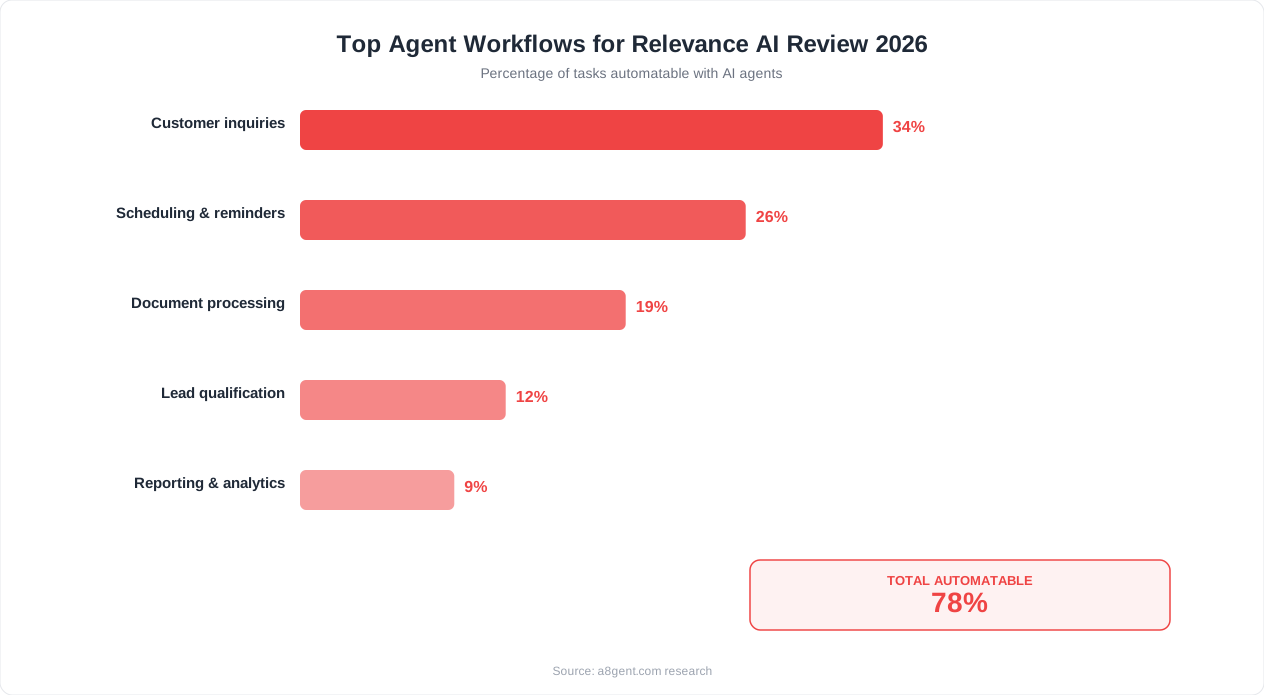
Relevance AI offers a free tier that includes a limited number of credits per month. This is sufficient for building and testing 2-3 workflows and running them at low volume - perhaps processing 20-50 items per month. The free tier gives you full access to the workflow builder and most integrations, which is generous for evaluation purposes. You can genuinely assess whether the platform works for your use case before spending anything. However, the credit allocation is too low for any production business use. Consider it an extended trial rather than a permanent free option.
Starter Tier: Entry-Level Business Use
The starter plan provides enough credits for small businesses running 2-4 workflows at moderate volume. At this tier, you can typically process 200-500 items monthly depending on workflow complexity. Simple workflows (single AI call plus one action) consume fewer credits than complex multi-step agents. The cost is competitive with other AI agent platforms at similar scale. This tier works for businesses automating one or two specific workflows - such as lead research for 100-200 new contacts monthly, or generating social content for daily posting.
Pro and Business Tiers: Where Costs Escalate
Higher tiers unlock more credits, team features, and advanced capabilities like multi-agent orchestration. This is where pricing gets expensive relative to alternatives. If your business needs to process thousands of items monthly or run complex multi-step agents at scale, the monthly cost can reach several hundred dollars. At this volume, self-hosted alternatives like n8n with custom AI integrations often deliver equivalent results at a fraction of the cost - though with significantly more setup effort.
Hidden Cost Factors
Three factors inflate your actual cost beyond the base subscription. First, AI model costs: workflows using advanced models (GPT-4 class) consume more credits per execution than those using lighter models. Second, multi-step complexity: each step in a workflow consumes credits independently, so a 5-step agent costs roughly 5x a single-step workflow per execution. Third, retry and error handling: failed steps still consume credits, and workflows that process unreliable data (web scraping, for example) may retry frequently. Business owners consistently report that real costs run 30-50% higher than initial estimates once workflows are in production.
Cost Comparison with Alternatives
For equivalent capability, Autonoly typically costs 20-40% less at moderate volume due to more predictable pricing that does not penalize multi-step workflows as aggressively. Make and n8n cost significantly less for simple automation but lack the AI sophistication. Our comparison tool generates personalized cost estimates based on your specific workflow volume and complexity.
Core Features: What Relevance AI Does Well
Relevance AI has several genuinely strong features that differentiate it from simpler automation platforms. Understanding where it excels helps you determine whether those strengths align with your business needs.
Visual AI Agent Builder
The drag-and-drop workflow builder lets you construct multi-step AI agents without writing code. You chain together actions - AI analysis, data lookups, conditional logic, API calls, and output formatting - in a visual canvas. Each step can use AI to process, analyze, or generate content based on inputs from previous steps. The builder is more intuitive than coding but less simple than tools like Zapier. Expect 2-4 hours to build your first useful workflow from scratch, or 30-60 minutes using one of their templates. The visual approach means you can understand complex workflows at a glance and modify them without re-reading code, which is valuable for business owners managing their own automation.
Multi-Agent Coordination
The platform supports multiple agents working together on related tasks - a research agent feeds data to an analysis agent, which feeds conclusions to a writing agent. This coordination is where Relevance AI genuinely shines compared to simpler tools. For workflows like "research a company, analyze their needs, draft a personalized outreach email," the multi-agent approach produces noticeably better results than single-step automations because each agent can focus on doing one thing well with full context from prior steps.
Data Enrichment and Research Capabilities
Relevance AI excels at workflows that involve gathering information from multiple sources, synthesizing it, and producing structured outputs. Lead enrichment (starting with a name and email, ending with a complete company profile), competitive research (monitoring competitor pricing, features, and content), and market analysis (aggregating data from multiple sources into summary reports) are all strong use cases. The AI layer adds genuine intelligence - not just data retrieval but actual analysis and insight generation that would take a human researcher significant time.
Template Library and Community
The platform offers pre-built workflow templates for common use cases: sales research, content generation, data processing, email automation, and reporting. These templates accelerate setup significantly - instead of building from scratch, you modify an existing template to fit your specific tools and requirements. The community also shares custom templates, so you can often find workflows built by others in your industry. Templates typically need 30-60 minutes of customization to work with your specific data sources and output preferences.
Integration Ecosystem
Relevance AI connects to major business tools including CRMs (HubSpot, Salesforce), communication platforms (Slack, email), productivity tools (Google Workspace, Notion), and data sources (spreadsheets, databases, APIs). The integration count is lower than Zapier's 6,000+ but covers the tools that most small businesses actually use. Custom API connections are available for tools not in their native integration list, though these require more technical configuration.
For business owners whose primary automation needs involve AI-powered research, analysis, and content generation, these features deliver genuine value that simpler tools cannot match. The question is whether your specific use cases require this level of AI sophistication or whether simpler tools would serve you adequately at lower cost. Take our assessment to identify which platform tier matches your actual needs.
Weaknesses and Limitations: Where Relevance AI Falls Short
No platform is perfect, and Relevance AI has real limitations that affect specific business owner profiles. Being aware of these before committing saves you from expensive disappointment.
Steeper Learning Curve Than Advertised
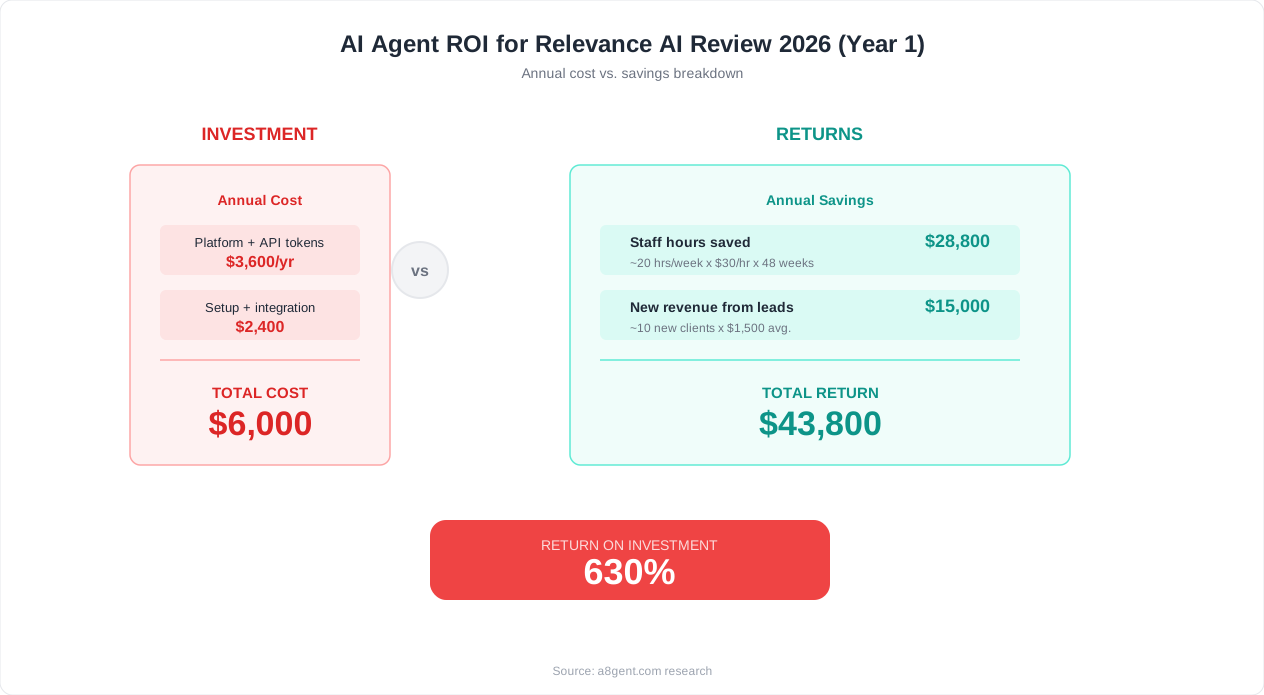
Relevance AI markets itself as no-code and accessible, but the reality is more nuanced. While you do not write traditional code, building effective AI agent workflows requires understanding concepts like prompt engineering, data transformation, conditional logic, and error handling. Business owners with no technical background consistently report 1-2 weeks of learning before feeling comfortable building workflows independently. This is significantly more than the "build your first agent in 5 minutes" experience that marketing materials suggest. If you need immediate results from day one, simpler tools like Zapier or Make deliver faster time-to-value even if their ceiling is lower.
Inconsistent AI Output Quality
Because workflows depend heavily on AI language model outputs, results can be inconsistent across runs. The same workflow processing similar inputs may produce slightly different outputs each time. For tasks where consistency matters (legal documents, financial reports, client-facing communications), this variability requires human review layers that reduce the time savings. Relevance AI provides tools to tune prompts and reduce variability, but achieving reliable consistency requires iterative refinement over weeks, not days. Business owners expecting "set and forget" automation are often disappointed by the ongoing prompt optimization needed.
Debugging Complex Workflows Is Difficult
When multi-step agents fail or produce unexpected results, identifying which step caused the problem can be frustrating. The platform provides execution logs, but interpreting why an AI made a particular decision at step 3 of a 7-step workflow requires patience and experimentation. For business owners managing their own automation without technical support, debugging becomes a significant time investment. Simpler platforms with deterministic logic (if X then Y) are much easier to troubleshoot because each step either works or fails clearly.
Limited Real-Time and Event-Driven Capability
Relevance AI is primarily designed for batch processing and scheduled workflows rather than real-time event response. If your business needs instant reactions - responding to customer messages within seconds, processing transactions in real-time, or triggering actions immediately when events occur - the platform is less suitable than dedicated tools built for real-time operation. Workflows typically run on schedules (every hour, every day) or are triggered manually, with some webhook support for event-driven use but without the instantaneous response that platforms like n8n provide.
Support Quality Varies by Tier
Free and starter tier users primarily receive community support through forums and documentation. While the documentation is comprehensive, getting help with specific workflow issues can be slow. Higher-paying customers receive priority support with faster response times, but the cost of those tiers may be difficult to justify for small businesses that mainly need occasional troubleshooting help. This creates a frustrating gap: the users who most need guidance (beginners on lower tiers) receive the least direct support.
Vendor Lock-In Concerns
Workflows built on Relevance AI cannot be easily exported or migrated to other platforms. If you build 10-15 complex agents and later decide to switch platforms, you rebuild from scratch. This lock-in is not unique to Relevance AI - most cloud platforms share this limitation - but it is worth considering when investing significant time building workflows on any single platform. Open-source alternatives like n8n allow you to own your workflow definitions and move them independently of any vendor.
Who Should Use Relevance AI: Ideal Business Profiles
Relevance AI is not universally the best choice, but for specific business profiles and use cases, it delivers exceptional value. Here is where the platform genuinely excels and where you should look elsewhere.
Ideal Profile 1: Sales Teams Doing Outbound Research
If your business development process involves researching prospects, enriching lead data, and crafting personalized outreach, Relevance AI handles this workflow brilliantly. An agent that takes a list of company names, researches each one across multiple sources, identifies relevant pain points, and drafts tailored email copy delivers genuine time savings of 3-5 hours per day for active sales teams. The AI sophistication matters here - generic templates convert poorly, but AI-researched personalization converts well. This is Relevance AI's strongest use case and where its multi-agent architecture shows clear advantages over simpler tools.
Ideal Profile 2: Content-Heavy Businesses Needing Research Support
Marketing agencies, content creators, and businesses publishing regular content benefit from Relevance AI's research and synthesis capabilities. Workflows that gather information from multiple sources, organize it into structured briefs, and even generate draft content save significant research time. A content team publishing 5-10 articles monthly might save 15-20 hours in research and first-draft creation. The key is that these businesses need AI intelligence - not just scheduling or publishing automation - which is where Relevance AI's depth pays off.
Ideal Profile 3: Data-Intensive Operations Needing Classification or Enrichment
Businesses processing large volumes of unstructured data - support tickets needing categorization, survey responses needing analysis, product reviews needing sentiment scoring, or documents needing data extraction - find strong value in Relevance AI's classification and enrichment workflows. The platform handles "read this, understand it, categorize it, and route it appropriately" type workflows better than rule-based automation that cannot handle natural language variability.
Who Should NOT Use Relevance AI
Simple app-to-app automation: If your needs are "when X happens in Tool A, do Y in Tool B" without requiring AI understanding, Zapier or Make serve you better at lower cost and complexity. Real-time customer support: Dedicated support platforms with AI chatbots (Intercom, Tidio) are purpose-built for this and outperform general-purpose agent builders. Single-step automations: If your workflows are straightforward and do not require multi-step AI reasoning, Relevance AI adds unnecessary complexity. Budget-critical businesses: If your monthly automation budget is under $50, the platform's effective cost at useful volume likely exceeds your budget - consider n8n self-hosted or simpler tools instead.
The Deciding Question
Ask yourself: "Do my automation needs require the AI to understand, reason, or generate - or just to move data between systems?" If the answer is understand, reason, or generate, Relevance AI is worth evaluating seriously. If the answer is just move data, simpler and cheaper tools will serve you better. Take our quick assessment to get a personalized recommendation based on your specific business profile and automation needs.
Best Relevance AI Alternatives for Business Owners
If Relevance AI is not the right fit - or if you want to compare before committing - here are the strongest alternatives for business owners, each excelling in different scenarios.
Autonoly - Best Alternative for Guided AI Agent Experiences
Autonoly offers similar AI agent capabilities but with a more guided setup experience designed specifically for non-technical business owners. Where Relevance AI gives you a blank canvas and expects you to build from scratch, Autonoly walks you through agent configuration with clear prompts, industry-specific templates, and built-in best practices. The learning curve is noticeably shorter - most users have productive agents running within their first day rather than their first week. Pricing is also more predictable, with flat-rate plans that do not penalize multi-step complexity. Choose Autonoly if you want AI agent power with less setup friction and more predictable costs.
n8n - Best Alternative for Technical Business Owners on a Budget
If you have basic technical comfort and want maximum power at minimum cost, n8n (self-hosted) gives you unlimited workflow capability for just server costs ($5-7/month). n8n supports AI nodes that connect to the same language models Relevance AI uses, meaning you can build equivalent multi-step AI agents. The trade-off is setup complexity - n8n requires more technical configuration and does not provide the same polished visual AI agent builder. For businesses with a technically capable team member, n8n delivers equivalent results at 90% lower cost.
Make (formerly Integromat) - Best Alternative for Visual Workflow Automation
Make offers a beautiful visual workflow builder with strong integration coverage at competitive pricing. While its AI capabilities are less sophisticated than Relevance AI, it handles conditional logic, data transformation, and multi-step workflows excellently. For businesses whose automation needs are more about connecting apps and routing data than about AI intelligence, Make is simpler, cheaper, and faster to set up. Choose Make if your workflows are logic-heavy but not AI-heavy.
Zapier - Best Alternative for Maximum Integration Breadth
Zapier connects to 6,000+ apps - far more than any competitor. If your automation needs primarily involve connecting many different tools and your workflows are relatively straightforward, Zapier's breadth is unmatched. AI capabilities exist but are basic compared to Relevance AI. Choose Zapier if integration coverage matters more than AI sophistication, or if you use niche tools that only Zapier supports.
Lindy AI - Best Alternative for Personal AI Assistants
Lindy takes a different approach, offering AI assistants that operate more like virtual employees than workflow tools. You interact with Lindy through natural language, delegating tasks conversationally rather than building structured workflows. For business owners who prefer telling an AI what to do rather than building automation systems, Lindy's approach feels more natural. The trade-off is less precision and control over exactly how tasks are executed.
How to Choose Between Alternatives
The right choice depends on three factors: your technical comfort level, your budget sensitivity, and whether your workflows require genuine AI intelligence or just reliable data movement. Our agent comparison tool evaluates all these factors against your specific requirements and recommends the optimal platform - or combination of platforms - for your business profile.
Real-World Performance: Speed, Reliability, and Output Quality
Marketing pages make every platform look fast and flawless. Real-world performance tells a different story. Here is what we observed running production workflows on Relevance AI over six weeks of testing.
Execution Speed
Simple single-step workflows (one AI call plus one output action) execute in 5-15 seconds. Multi-step agents with 4-7 steps typically take 30-90 seconds per execution, depending on the AI model used and whether external data fetching is involved. For batch processing (running the same agent on 50 items), expect 20-40 minutes for completion depending on workflow complexity. This speed is adequate for background automation that runs on schedules but inappropriate for anything requiring real-time response. If you need agents that respond to customer actions within seconds, the platform's processing times will disappoint.
Reliability and Uptime
During our testing period, we experienced two brief platform outages (each lasting under 30 minutes) and occasional individual workflow failures due to external API timeouts. Overall reliability was solid - approximately 97-98% success rate for executions. Scheduled workflows ran on time consistently. The platform handles transient failures reasonably well, with automatic retries for common error types. However, if an external service (like a website being scraped or an API being called) is unavailable, the entire workflow fails without partial completion - you either get full results or nothing, not partial progress.
AI Output Quality
Output quality varies significantly by use case. For structured tasks (data extraction, classification, summarization), quality is consistently high - 85-90% of outputs are production-ready without human editing. For creative tasks (writing outreach emails, generating content ideas, drafting reports), quality is good but inconsistent - roughly 60-70% of outputs are usable directly, while 30-40% need human refinement. The key to high-quality outputs is investing time in prompt optimization during setup. Workflows with well-engineered prompts and clear instructions consistently outperform hastily configured ones by a significant margin.
Scalability
The platform handles volume well within plan limits. Processing 500-1,000 items daily showed no degradation in speed or quality. However, scaling beyond plan limits triggers either throttling (slower execution) or overage charges (higher cost), depending on your tier configuration. Business owners planning significant growth should model their 6-month volume trajectory against plan limits to avoid unexpected scaling costs.
Comparison to Manual Work
For the workflows we tested, Relevance AI delivered results that were 70-85% as good as a skilled human doing the same work, at roughly 1/10th the time cost. This ratio - slightly lower quality but dramatically faster - is the right trade-off for most business workflows where "good enough quickly" beats "perfect slowly." Tasks that demand perfection (legal documents, financial calculations, medical information) still require human oversight and should not be fully automated on any AI platform.
For an honest assessment of whether Relevance AI's performance characteristics match your quality and speed requirements, take our platform assessment which evaluates your specific use cases against each platform's real-world capabilities.
Final Verdict: Should You Choose Relevance AI in 2026?
After six weeks of hands-on testing, our verdict on Relevance AI is clear: it is a genuinely powerful platform that earns its place in the market - for the right users. The question is not whether Relevance AI is good (it is), but whether it is good for your specific business profile and needs.
Choose Relevance AI If:
- Your primary automation needs involve AI understanding, reasoning, or generating content - not just moving data between apps
- You are comfortable investing 1-2 weeks in learning the platform before seeing full value
- Your monthly automation budget accommodates $75-200 per month depending on volume
- You need multi-step AI agents that handle complex workflows like research, analysis, and personalized content creation
- You have the patience to iterate on prompt engineering and workflow optimization over time
Look Elsewhere If:
- You need immediate results from day one without a learning investment
- Your automation needs are primarily simple data movement between apps (use Zapier or Make instead)
- Your budget is under $50 per month for automation tools (use n8n self-hosted or free tiers instead)
- You need real-time response to customer actions within seconds
- You want a completely hands-off solution that never needs optimization or maintenance
Our Rating
Features: 8.5/10 - Comprehensive AI agent capabilities with strong multi-step orchestration. Ease of Use: 6.5/10 - Powerful but steeper learning curve than marketed, especially for non-technical users. Value for Money: 7/10 - Fair pricing at moderate volume, but costs escalate quickly at higher usage. Reliability: 8/10 - Solid uptime with consistent scheduled execution. Support: 6/10 - Good documentation, but direct support is limited for lower-tier users. Overall: 7.5/10 - A strong platform for AI-intensive business workflows, best suited for technically comfortable business owners with moderate to high budgets.
The Bottom Line
Relevance AI occupies a meaningful middle ground between simple automation tools and custom AI development. For business owners who need AI agents that genuinely think and reason through complex tasks, it delivers capability that was previously only available through expensive custom development. But it demands investment - in time learning the platform, in money for adequate volume, and in patience while you optimize workflows to produce consistent quality.
If that investment profile matches your situation, Relevance AI will serve you well. If you need faster time-to-value, lower costs, or simpler operation, strong alternatives exist. Autonoly delivers similar AI capability with less friction. N8n delivers maximum flexibility at minimum cost for technical users. And for simple automation, Zapier remains the fastest path to results. Compare all options side-by-side using our tool to make the decision that is right for your business.
FAQ
Is Relevance AI worth the price for a small business?
It depends on your use case. For businesses automating AI-intensive workflows like lead research, content generation, or data enrichment that process 200+ items monthly, Relevance AI delivers strong ROI. For businesses needing simple automations like appointment reminders or app-to-app data transfers, cheaper tools like Zapier or Make provide better value. Calculate whether the time saved by AI-powered workflows exceeds the monthly cost at your expected volume.
How does Relevance AI compare to Autonoly?
Both offer AI agent capabilities, but they differ in approach. Relevance AI provides a blank-canvas builder with maximum flexibility, suited for users comfortable with a 1-2 week learning curve. Autonoly offers a more guided experience with industry-specific templates and faster time-to-value for non-technical owners. Autonoly pricing is generally more predictable, while Relevance AI can be cheaper or more expensive depending on workflow complexity and volume.
Can I use Relevance AI without any technical knowledge?
You can use it without coding knowledge, but you will need to learn concepts like prompt engineering, data flow between steps, and basic conditional logic. Expect 1-2 weeks of active learning before feeling comfortable building workflows independently. Non-technical users who prefer completely guided experiences may find platforms like Autonoly or simpler tools like Zapier more immediately accessible.
What are the biggest limitations of Relevance AI in 2026?
The main limitations are: steeper learning curve than marketed, inconsistent AI output quality requiring ongoing prompt refinement, credit-based pricing that escalates with complex workflows, limited real-time event response capability, vendor lock-in with no workflow export option, and basic support for lower-tier subscribers. These are manageable for the right use cases but problematic for businesses needing immediate simplicity or tight budget control.
Does Relevance AI offer a free trial or free tier?
Yes, Relevance AI offers a free tier with limited monthly credits. This is sufficient to build and test 2-3 workflows at low volume (20-50 items monthly), allowing you to evaluate whether the platform works for your use case before paying. The free tier includes full access to the workflow builder and most integrations. For genuine production use, you will need a paid plan.
How long does it take to set up a useful workflow on Relevance AI?
Your first workflow from scratch takes 2-4 hours including learning the interface. Using a pre-built template reduces this to 30-60 minutes of customization. After the initial learning period (1-2 weeks), building new workflows takes 1-2 hours each. Factor this setup time into your ROI calculation - the platform delivers strong returns only after the initial learning investment.
Is Relevance AI better than building custom AI with code?
For most small business owners, yes. Custom AI development costs $5,000-50,000 in developer time and months of work. Relevance AI delivers 70-85% of custom capability at a fraction of the cost and timeline. However, if you need extremely specific behavior, perfect reliability, or full data control, custom development eventually outperforms any no-code platform. The right choice depends on your budget, timeline, and precision requirements.
What happens to my workflows if Relevance AI shuts down or I want to leave?
This is a genuine concern. Relevance AI workflows cannot be exported to other platforms - if you leave, you rebuild from scratch elsewhere. To mitigate this risk, document your workflow logic externally (screenshots and written descriptions), avoid building business-critical single-point-of-failure processes on any one platform, and consider open-source alternatives like n8n for workflows where portability matters most.