Cheapest AI Automation Tools That Actually Work (2026)
You do not need a big budget to automate your business with AI. We found 10 affordable AI automation tools under $100/month that deliver real results - ranked by value per dollar for small business owners on tight budgets.
10+ years shipping production ML across TensorFlow, PyTorch, AWS, and GCP. Ships every A8gent agent before it becomes a lesson. GitHub
- Several powerful AI automation tools offer genuinely useful free tiers - you can start automating your business without spending a single dollar to prove the concept works.
- The cheapest option is not always the best value - a $50/month tool that saves 15 hours of work delivers better ROI than a free tool that saves 2 hours with constant limitations.
- Self-hosted options like n8n eliminate subscription costs entirely if you have basic technical ability, reducing your ongoing expense to $5-20/month for server hosting.
- Most affordable AI tools work best when focused on one specific workflow rather than trying to automate everything at once - start narrow and expand as budget allows.
- Combining two to three budget tools often delivers better results than one expensive premium platform - use each tool where it excels rather than forcing one tool to do everything.
Why Cheap AI Tools Are Better Than Ever in 2026
Here is a truth that the premium AI platforms do not want you to know: the gap between expensive and affordable AI automation tools has narrowed dramatically in 2026. The underlying AI models that power these tools have gotten simultaneously more powerful and cheaper to run. Competition has driven prices down across the market. And open-source alternatives have matured to the point where free tools genuinely rival paid enterprise platforms for many common business workflows.
This is excellent news if you are a small business owner watching your budget carefully. You no longer need to spend $300 to $500 per month to get real AI automation. In fact, you can build a powerful automation setup for under $100 per month - or even start completely free to prove the concept before investing anything.
But "cheap" means nothing if the tool does not actually work. The internet is full of free AI tools that promise the world and deliver frustration - tools that are too limited to be useful, too unreliable to trust, or too complicated to set up without a developer. We spent four weeks testing budget AI automation tools through one lens: does this actually save a real business owner meaningful time at a price that makes sense?
The result is this curated list of 10 tools that deliver genuine automation value without breaking your budget. Every tool on this list costs under $100 per month for typical small business usage, and five of them offer functional free tiers. We ranked them by value per dollar - not just how cheap they are, but how much time and money they save relative to what they cost.
Whether you are bootstrapping a startup, running a side business, or simply believe in spending wisely even when you could afford more, this guide will show you exactly how to automate your business on a tight budget. Use our cost comparison tool to see personalized pricing estimates based on your specific usage patterns, or read on for our complete rankings.
One important note before we begin: "cheapest" does not mean "settle for less." Several tools on this list outperform expensive alternatives for specific use cases. Being budget-friendly is a design choice, not a limitation. Let us show you why.
Best Free AI Automation Tools (Zero Cost to Start)
These tools offer genuinely functional free tiers - not 7-day trials or crippled versions, but ongoing free access that lets you automate real workflows indefinitely. Start here if you want to prove the value of AI automation before spending anything.
1. n8n (Self-Hosted) - Best Free Option Overall
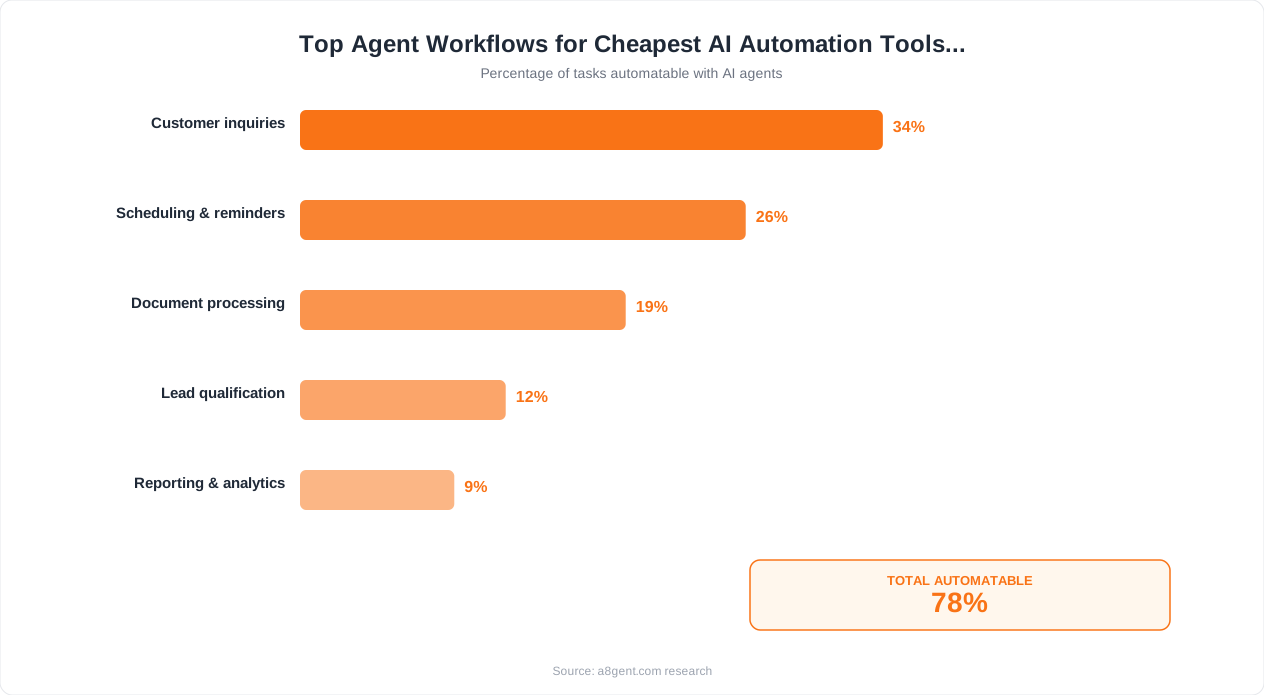
N8n is open-source and completely free to self-host. You pay only for server costs, which start at $5-7 per month through providers like DigitalOcean or Hetzner. For that minimal cost, you get unlimited workflows, unlimited executions, and full access to every feature including AI nodes. The trade-off is that you need basic technical comfort to set it up (following a tutorial takes 1-2 hours). Once running, n8n handles everything from email automation to CRM workflows to AI-powered content generation with zero usage limits. For technically capable business owners, this is the single best value proposition in the automation space. You get enterprise-grade automation capability for the cost of a coffee per month.
2. n8n Cloud (Free Tier) - Best Free Option for Non-Technical Users
If self-hosting sounds intimidating, n8n's cloud version offers a free tier with enough capacity for small-scale automation. You get a limited number of workflow executions per month, which is sufficient for testing and for low-volume workflows (processing 10-50 items daily). The interface is identical to the self-hosted version - same power, same flexibility - just with usage caps. Many business owners start on the free cloud tier, prove the value, and then either upgrade to a paid cloud plan or switch to self-hosted when they are ready to scale.
3. Zapier (Free Tier) - Best for Simple Automations
Zapier's free plan includes a small number of tasks per month with basic automation features. While limited, it is enough to automate one or two simple workflows: "When I get an email with an attachment, save it to Google Drive" or "When a form is submitted, add the contact to my spreadsheet." The real value of Zapier's free tier is its simplicity - you can set up your first automation in 5 minutes with zero learning curve. It works as a proof of concept before you invest in more capable tools, or as a permanent solution for businesses with only one or two simple automation needs.
4. Google Apps Script - Best Free Option for Google Workspace Users
If your business runs on Google Workspace (Gmail, Sheets, Docs, Calendar), Google Apps Script is a hidden gem. It is completely free, requires only basic scripting (which AI assistants can write for you), and directly accesses all Google services without API configuration. Common automations: auto-sorting and labeling emails, generating reports from Google Sheets data, managing calendar events, and sending scheduled communications. The limitation is that it only works within the Google ecosystem - but for businesses living in Google, it handles dozens of workflows at zero cost.
These free options let you automate immediately with no financial risk. Use our agent finder to identify which free tool best matches your specific workflow needs.
Best AI Automation Tools Under $50/Month
This price bracket is the sweet spot for most small businesses. Under $50 per month, you can access tools that deliver professional-grade automation with enough capacity to handle real business volume. These tools prove that powerful does not have to mean expensive.
5. Autonoly (Starter Plan) - Best Value AI Agent Platform
Autonoly's entry-level plan puts genuine AI agent capability within reach of budget-conscious businesses. You get access to AI agents that understand natural language instructions, connect to your business tools, and handle multi-step workflows autonomously. The starter plan limits the number of active agents and monthly tasks, but the limits are designed to accommodate a small business automating 2-3 workflows. What makes Autonoly stand out at this price point is that you get actual AI intelligence - agents that can read context, make decisions, and handle variations - not just rigid if-then automation. For a business automating lead follow-up, email management, or content scheduling, the starter plan delivers remarkable capability per dollar.
6. Make (Formerly Integromat) - Best Budget Workflow Automation
Make's paid plans start low and offer generous operation allocations for the price. At the entry tier, you get enough operations for moderate automation volume - typically sufficient for a business running 5-10 active scenarios processing dozens of items daily. Make excels at multi-step workflows that connect different apps: new order triggers inventory update triggers shipping notification triggers CRM update. The visual builder is polished and intuitive, making it accessible to complete beginners. For businesses whose automation needs are more about connecting apps than making AI decisions, Make delivers outstanding value under $50 per month.
7. Tidio (Starter) - Best Budget Customer Support Agent
If customer support is your biggest time drain, Tidio offers AI-powered chatbot capabilities starting at a remarkably low price. The entry plan includes AI chatbot conversations, live chat, and multi-channel support across your website and Messenger. The AI understands customer questions and provides relevant answers from your FAQ or knowledge base without manual scripting for every possible question. For e-commerce stores, service businesses, and any company handling 50-200 customer inquiries per month, Tidio eliminates hours of repetitive question-answering at a price that pays for itself within the first week.
What You Give Up at This Price Point
Honesty matters: tools under $50/month have real limitations compared to premium alternatives. You will typically encounter lower usage caps (fewer monthly executions or conversations), fewer integrations (50-200 versus 500+), limited AI sophistication (good for straightforward tasks, less reliable for complex judgment), and basic support (community forums rather than dedicated account managers). These limitations are manageable for most small businesses - you simply prioritize your highest-value workflows and stay within the allocated capacity. As your business grows and automation proves its value, upgrading becomes an easy decision.
Use our cost comparison tool to see exactly how many operations or tasks your specific workflows will consume and which plan fits your volume.
Best AI Automation Tools Under $100/Month
At the $50-$100 per month range, you unlock tools with meaningfully higher capacity, more sophisticated AI capabilities, and broader integration ecosystems. This is the budget level where automation stops feeling limited and starts feeling like a genuine competitive advantage.
8. Autonoly (Growth Plan) - Best Overall Value Under $100
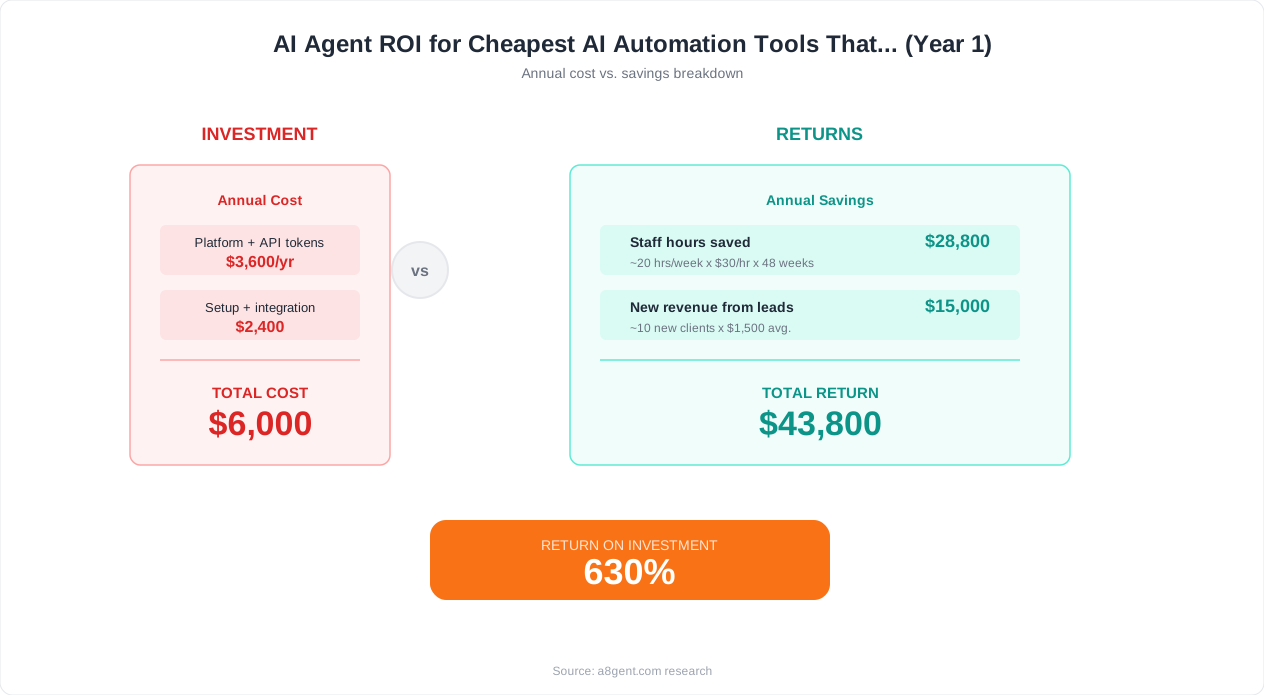
Autonoly's growth tier unlocks multi-agent coordination - the ability to have several AI agents working together on related tasks. One agent handles incoming leads, another researches them, a third crafts personalized follow-up messages, and a fourth schedules meetings. This coordinated approach delivers significantly better results than isolated single-task automations because the agents share context and build on each other's work. At this price point, you also get higher task limits, more integrations, and priority support. For businesses ready to go beyond basic automation into true AI-powered workflows, this represents exceptional value.
9. Zapier (Professional Plan) - Best for Integration Volume
Zapier's professional tier under $100 gives you access to their full library of 6,000+ integrations with generous task allocations. While Zapier's AI capabilities are less sophisticated than dedicated AI agent platforms, its integration breadth is unmatched. If your automation needs primarily involve connecting many different tools (CRM to email to spreadsheet to project management to accounting), Zapier handles this with less friction than any alternative. The multi-step Zap capability at this tier means you can build workflows with conditional logic, filters, and multiple actions from a single trigger. Best for businesses that use many different software tools and need them all talking to each other reliably.
10. Buffer (Team Plan) - Best Budget Social Media Automation
For businesses where social media is a primary marketing channel, Buffer's team plan under $100 per month offers AI-powered content creation, optimal timing suggestions, multi-platform scheduling, and analytics across all major social networks. The AI generates post ideas, writes platform-specific copy, and helps you maintain a consistent posting schedule even during busy periods. Compared to hiring a social media manager ($2,000-4,000/month) or spending 10+ hours weekly managing social yourself, Buffer at this price point delivers extraordinary ROI for businesses that need an active social presence.
The Budget Stack: Combining Tools Strategically
You do not have to pick just one tool. Many budget-conscious businesses build a powerful automation stack by combining two or three affordable options that each excel in different areas. A common effective combination under $100 total:
- N8n self-hosted ($5-7/month) for custom workflows and data processing
- Tidio starter ($20-30/month) for customer support automation
- Buffer or a basic social tool ($15-30/month) for marketing automation
This gives you comprehensive automation across operations, support, and marketing for under $70 total - less than one hour of most consultants' billing rate, yet saving 20+ hours per month in automated work.
How to Maximize Value from Budget AI Tools
Affordable tools deliver the same results as expensive ones - when you use them strategically. Here are the tactics that budget-conscious business owners use to extract maximum value from their AI automation investment.
Focus on Your Single Highest-Impact Workflow First
When budget is limited, you cannot afford to spread your automation thin across ten workflows that each save a few minutes. Instead, identify the one workflow that consumes the most time or causes the most frustration, and automate it completely and well. A single automation that saves you 30 minutes daily (2.5 hours per week, 10 hours per month) delivers more value than five partial automations each saving 5 minutes. Common highest-impact choices: email management, lead follow-up, client reporting, social media posting, or invoice processing. Pick one, nail it, and expand later.
Use Free Tiers for Low-Volume Tasks
Stack free tiers across multiple platforms for tasks that do not need high volume. Google Apps Script for internal Google Workspace automation (free). A free CRM tier for basic contact management. Free social scheduling for personal brand posting. Reserve your paid budget for the high-volume or AI-intensive automation that actually requires a paid plan. This stacking approach lets you automate 5-7 different workflows while only paying for the one or two that demand it.
Self-Host When Possible
If you or someone on your team can follow a tutorial, self-hosting n8n on a $5-7/month cloud server gives you unlimited automation capability that would cost $50-200/month on cloud platforms. The initial setup takes 1-2 hours. After that, you have the same tool with zero usage limits. For businesses running 10+ automations with moderate volume, self-hosting saves $500-2,000 annually compared to equivalent cloud subscriptions.
Optimize Your Task Consumption
Most platforms charge based on operations, tasks, or executions. Smart configuration reduces consumption dramatically. Instead of running a workflow every 5 minutes (checking for new data), use webhooks that trigger only when something actually happens. Instead of separate automations for similar tasks, combine them into one workflow with conditional routing. Instead of processing items one at a time, batch them where possible. These optimizations can reduce your task consumption by 50-70% without changing what gets automated.
Leverage AI for Setup, Not Just Execution
Use ChatGPT or Claude (free tiers available) to help you design and configure your automations. Describe your workflow in plain English and ask the AI to suggest the optimal automation architecture, write Google Apps Script code, or generate n8n workflow JSON. This eliminates the need for expensive consultants or courses - you get personalized guidance for the price of a conversation with an AI assistant.
Calculate your specific savings potential with our ROI calculator - enter your current time spent on manual tasks and see exactly how much each automated hour is worth to your business.
Your Budget Automation Action Plan: Start Free Today
You now have a clear picture of what is possible on a budget. Here is your step-by-step action plan to start automating your business today - starting with zero cost and scaling your investment only as proven results justify it.
Today (30 Minutes, $0 Cost)
Identify your single most time-consuming repetitive task. Write down exactly what it involves: what triggers it, what steps you take, what tools you use, and how long it takes each occurrence. This becomes your automation target. Then use our cost comparison tool to see which budget-friendly platforms handle that specific workflow best.
This Week: Deploy a Free Automation ($0)
Choose one free option from our list that fits your identified task. If it involves Google Workspace, try Google Apps Script. If it involves connecting multiple apps, try Zapier's free tier or n8n cloud free tier. If it involves customer conversations, try Tidio's free plan. Set up one automation, let it run for a week, and track how much time it saves. Do not overthink it - the goal is to experience the value of automation firsthand, not to build a perfect system on day one.
Week 2-3: Measure and Decide ($0-50)
After a week of your free automation running, calculate your ROI. Time saved multiplied by the value of your hour. If the free tier is delivering strong results and you are hitting its limits, now is the time to consider a paid plan - you have proof that the investment is justified. If the free tier handles your needs adequately, stay free and identify a second workflow to automate using another free tool.
Month 2: Build Your Budget Stack ($30-100)
Based on first-month results, assemble your final tool combination. The budget-optimal stack for most small businesses looks like:
- One workflow tool for operational automation (n8n self-hosted or Make starter)
- One AI-powered tool for your highest-value intelligent automation (Autonoly starter)
- One specialized tool for your specific industry need (Tidio for support, Buffer for social, etc.)
Ongoing: Optimize and Expand
Each month, look for one more workflow to automate. Measure the cumulative time savings. Reinvest some of that saved time into building the next automation. Within 90 days, most businesses have 4-6 automations running that collectively save 15-25 hours per month - all for under $100/month in total tool costs.
Quick Links
- Compare pricing across all budget platforms for your specific needs
- Calculate your ROI to see how quickly tools pay for themselves
- Find the right tool based on your workflow, budget, and technical level
The most important insight from this entire guide: starting free today beats planning a perfect paid setup "someday." Automation skills compound - the learning you accumulate from your first free automation makes every subsequent one faster and more effective. There is no risk in starting with free tools. There is only the cost of waiting while your competitors build their automation advantage week by week. Open one of the tools above right now, and automate one thing today.
FAQ
What is the best completely free AI automation tool?
N8n self-hosted is the most capable free option - unlimited workflows, unlimited executions, and full AI capabilities for just $5-7 per month in server costs. For non-technical users, n8n cloud free tier and Zapier free tier offer limited but genuinely useful automation at zero cost. Google Apps Script is completely free for businesses running on Google Workspace.
Can cheap AI tools handle business-critical workflows?
Yes, but with appropriate safeguards. Budget tools like n8n and Make run business-critical automations for thousands of companies reliably. The key is building in error handling, notifications for failures, and backup procedures for when any tool has downtime. Do not rely on a single automation without monitoring - add alerts that notify you if a critical workflow stops running.
How much can I really save with a $50/month automation tool?
Most business owners save 10-20 hours per month with their first $50/month tool, translating to $500-2,000 in labor value (depending on what that time is worth). Common results: email automation saves 5 hours weekly, reporting automation saves 3 hours weekly, and social media scheduling saves 4 hours weekly. The math consistently shows 10-40x return on a $50 monthly investment.
Is self-hosting n8n difficult for non-technical people?
The initial setup requires following a tutorial for 1-2 hours and basic comfort with web interfaces. You do not need to write code, but you need to be able to create a cloud server account, copy-paste commands from a guide, and configure basic settings. Once running, the day-to-day usage is entirely visual and non-technical. Many non-technical owners have someone set it up once and then manage it themselves afterward.
Do budget AI tools integrate with popular business software?
Yes. Make offers 1,000+ integrations, Zapier offers 6,000+, and n8n offers 400+ in their free plan. All include common tools: Gmail, Slack, HubSpot, Shopify, QuickBooks, Google Sheets, Notion, Calendly, and Stripe. Less popular or industry-specific tools may require custom API connections, which n8n handles through HTTP request nodes at any plan level.
What are the most common limitations of free and cheap AI tools?
Typical limitations include monthly execution caps (forcing you to prioritize which workflows run), fewer active automations allowed simultaneously, limited AI calls per month, basic support (community forums instead of dedicated help), and fewer advanced features like conditional logic or multi-branch workflows. These limitations are manageable for small businesses but become constraining as volume grows.
Should I start with one tool or build a stack from day one?
Start with one tool. Prove the value with a single automation, understand that tool's strengths and limitations, and then add complementary tools as needed. Building a multi-tool stack from day one creates complexity that overwhelms beginners and often results in abandoned automations. The exception: if your needs are clearly split (support automation plus operational automation), choosing specialized tools for each is reasonable from the start.
How do I know when I have outgrown a budget tool?
Three clear signals: you regularly hit plan limits and pay overage charges that exceed the next tier's price, you spend hours monthly working around limitations that a paid tool would eliminate, or your business growth is being capped because automation cannot handle increased volume. When the cost of staying on a budget plan exceeds the cost of upgrading (including your time), it is time to move up.