ROI of AI Agents: How to Calculate Time and Money Saved (2026)
Learn how to calculate the real return on investment from AI agents in your business. Includes formulas, benchmarks, and real-world examples of time and money saved through automation in 2026.
10+ years shipping production ML across TensorFlow, PyTorch, AWS, and GCP. Ships every A8gent agent before it becomes a lesson. GitHub
- Most businesses see a 3-10x return on AI agent investments within the first 90 days, with the average payback period being just 2-4 weeks for routine task automation.
- The true ROI of AI agents goes beyond direct labor savings - you must also account for error reduction, faster turnaround times, improved customer satisfaction, and the opportunity cost of employees doing repetitive work instead of strategic tasks.
- A simple ROI formula for AI agents is: (Hours Saved x Hourly Cost + Error Costs Eliminated + Revenue from Faster Response) minus (Monthly Agent Cost + Setup Time Investment) - most businesses find this calculation surprisingly favorable.
- Small businesses spending $99-$299/month on AI agents typically save 40-80 hours of labor per month, which translates to $2,000-$6,000 in equivalent labor value - a 7-20x return on the subscription cost.
- The biggest ROI mistake businesses make is only measuring direct time savings while ignoring compounding benefits like faster lead response (which increases conversion rates by 30-50%) and 24/7 availability (which captures opportunities that would otherwise be lost).
Why Most Businesses Underestimate Their AI Agent ROI
Every business owner asks the same question before investing in AI agents: "Will this actually save me money?" It is a fair question. But here is what most people get wrong - they dramatically underestimate the return because they only measure the most obvious savings and ignore everything else.
When you hire an AI agent to handle your customer inquiries, schedule your appointments, or follow up with leads, the immediate benefit is clear: fewer hours spent on repetitive tasks. But that is only the surface. Beneath it, there are dozens of hidden savings that compound over time - fewer errors that cost you money to fix, faster responses that prevent customers from going to competitors, consistent follow-up that closes deals you would have otherwise lost, and the mental energy your team recovers when they stop doing work that drains them.
In 2026, the average small business deploying AI agents sees a full return on their investment within 2-4 weeks. Not months. Not quarters. Weeks. And after that payback period, every dollar the AI saves is pure profit. That is a fundamentally different economics model than hiring employees, purchasing software licenses, or most other business investments.
But you cannot manage what you cannot measure. If you want to make a confident decision about adopting AI agents - or if you want to justify the investment to a partner, board, or your own skeptical voice - you need a framework for calculating ROI that captures the full picture.
This guide gives you that framework. We will walk through exactly how to calculate the return on AI agent investments, including formulas you can use immediately, benchmarks from real businesses, common mistakes that lead to bad calculations, and a step-by-step process for projecting your specific ROI before you spend a dollar.
If you want a personalized estimate right now, use our free ROI calculator. It takes about 2 minutes and gives you projected savings based on your specific business size, industry, and current workflows. Otherwise, let us build your understanding from the ground up.
The Complete ROI Formula for AI Agents
Let us start with the math. A complete ROI calculation for AI agents needs to capture four categories of value and two categories of cost. Most people only look at one value category (time saved) and one cost category (subscription price), which is why their calculations are incomplete.
The Four Value Categories
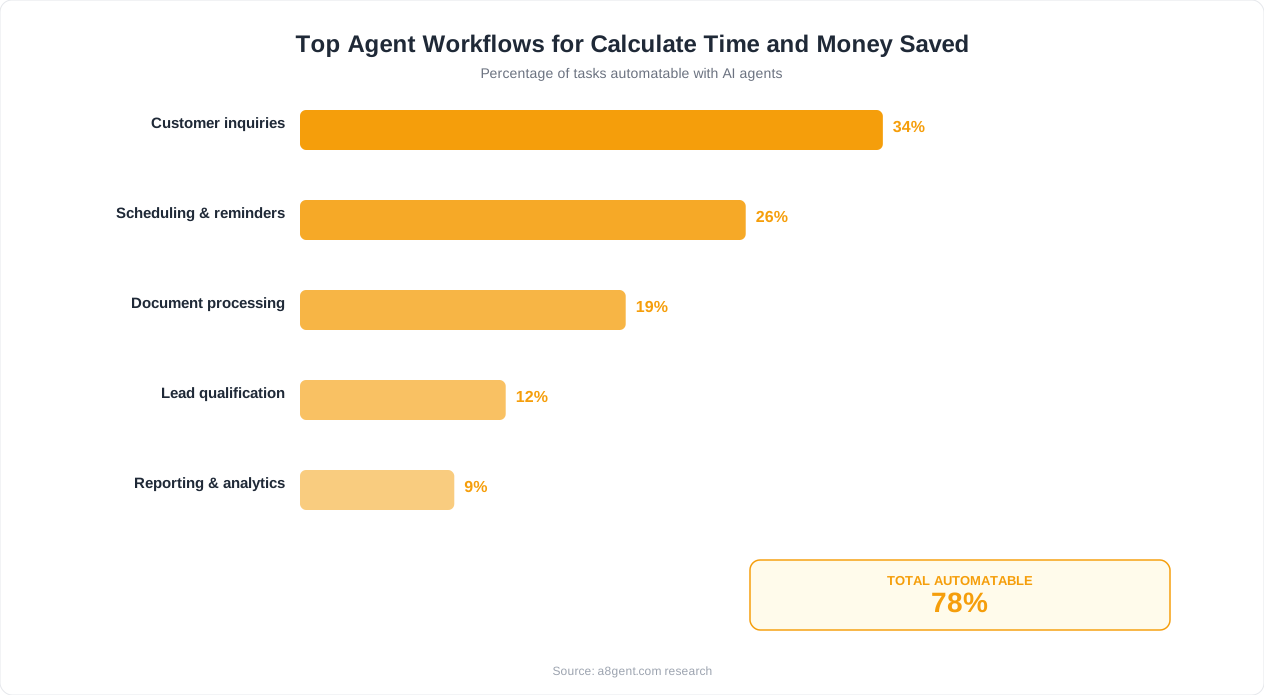
1. Direct Labor Savings - This is the most straightforward: hours saved multiplied by the cost of those hours. If an AI agent handles 200 customer inquiries per month that each took your team 5 minutes, that is roughly 16 hours saved. At $25/hour fully loaded cost, that is $400/month in direct savings. Simple enough, but it is just the beginning.
2. Error and Rework Reduction - Humans make mistakes, especially on repetitive tasks. A data entry error might take 30 minutes to find and fix. A missed follow-up might lose a sale worth $500. A scheduling conflict might cost you a client relationship. AI agents do not get tired, distracted, or forgetful. Calculate your current error rate, the average cost per error, and how much that drops with automation. For most businesses, this is worth $200-$1,000/month in prevented losses.
3. Speed and Responsiveness Value - When a lead fills out your contact form at 9 PM and gets a response in 30 seconds instead of 14 hours, your conversion rate increases by 30-50%. When a customer with a billing question gets an immediate answer instead of waiting in a queue, their satisfaction score jumps significantly. When an appointment request gets confirmed instantly instead of the next business day, fewer people book with your competitor instead. Speed has direct revenue implications that most ROI calculations ignore entirely.
4. Opportunity Cost Recovery - Every hour your team spends on repetitive work is an hour they are not spending on growth activities. When you free up a salesperson from administrative follow-ups, they can spend that time on high-value prospect calls. When you free a manager from report compilation, they can focus on strategy. The value of reallocated time often exceeds the value of the automated task itself by 2-3x.
The Two Cost Categories
1. Ongoing Costs - Monthly subscription fees, per-transaction costs if applicable, and any additional tools needed to support the agent. For most small businesses, this is $99-$499/month depending on complexity and volume.
2. One-Time Setup Costs - Time spent configuring the agent, training it on your processes, integrating it with existing tools, and the initial learning curve. For no-code platforms, this typically represents 4-12 hours of one-time effort. At your loaded cost rate, that is usually $200-$600 in setup investment.
The Complete Formula
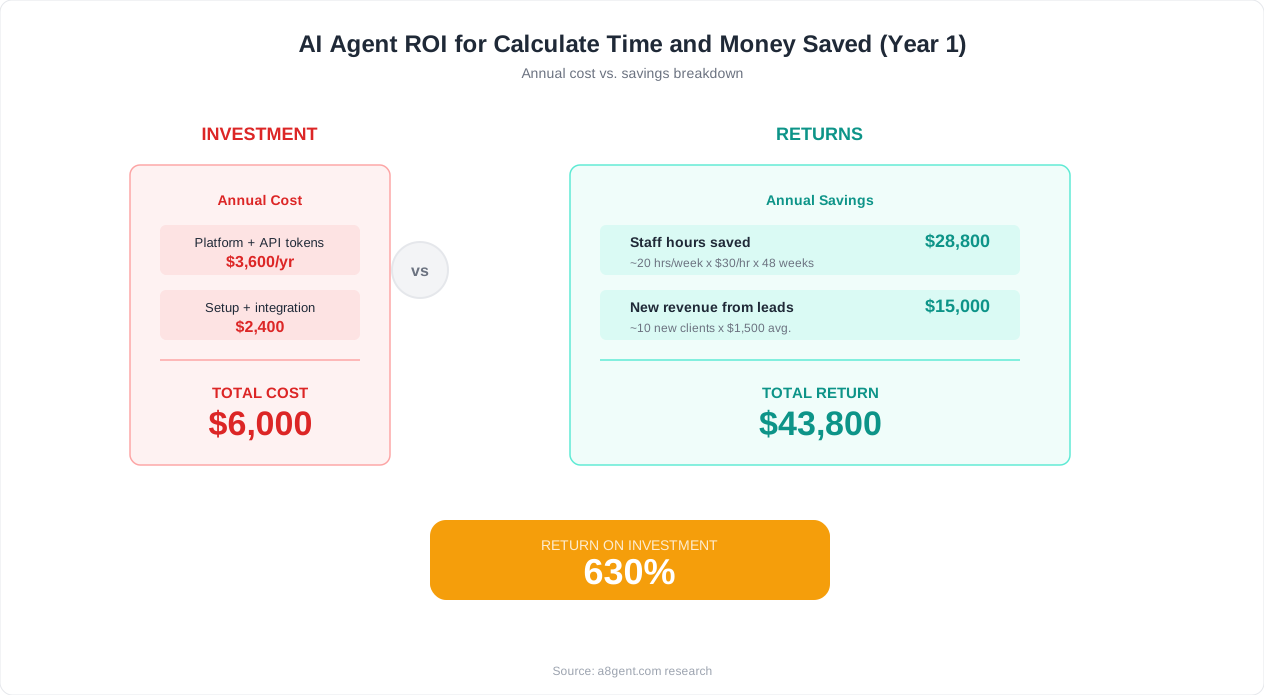
Monthly ROI = [(Labor Savings + Error Reduction + Speed Value + Opportunity Recovery) - (Monthly Subscription + Amortized Setup Cost)] / Total Monthly Cost x 100
When businesses use our ROI calculator and fill in all four value categories honestly, the typical result is a 500-1,500% monthly return. Even conservative estimates that only count direct labor savings usually show 200-400% returns.
Real ROI Benchmarks by Business Type and Use Case
Formulas are useful, but what do actual results look like? Here are benchmarks based on published data and aggregated user reports from 2025-2026. These represent median results - meaning half of businesses do better than these numbers.
Customer Support Automation
Businesses that deploy AI agents for front-line customer support typically see 50-70% of inquiries resolved without human intervention. For a business receiving 500 support tickets per month where each ticket takes 8 minutes of agent time, that translates to roughly 33-46 hours saved monthly. At a support agent cost of $20-$30/hour, monthly savings range from $660-$1,380. With AI agent costs of $99-$249/month, the ROI ranges from 450-1,290%. Average payback period: 8-12 days.
Lead Follow-Up and Sales Support
AI agents handling lead qualification and follow-up sequences show particularly strong ROI because they combine time savings with revenue generation. Businesses report 25-40% increases in lead-to-meeting conversion rates from instant follow-up alone. For a business with 100 monthly leads and a $2,000 average deal value, even a 10% improvement in conversion means two additional deals per month - $4,000 in new revenue. Against a $199/month agent cost, that is a 1,900% return on the revenue side alone, not counting the 15-20 hours of manual follow-up eliminated.
Appointment Scheduling and Management
Service businesses that automate scheduling see the most consistent (if sometimes modest) ROI. A typical dental office, salon, or consulting firm handles 200-400 scheduling interactions per month - bookings, confirmations, reminders, and reschedules. Automating this saves 20-35 hours monthly and reduces no-show rates by 30-50%. The combined value of labor savings plus recovered revenue from fewer no-shows typically runs $1,500-$3,000/month. With agent costs of $99-$199/month, ROI is 650-2,900%. Payback period: 3-7 days.
Data Entry and Administrative Processing
Businesses with high volumes of repetitive data processing - invoice entry, order processing, form handling - see reliable 400-800% returns. The key metric here is volume: an AI agent processing 50 invoices per month saves less dramatically than one processing 500. Typical savings are $15-$30 per document processed when you account for labor, error correction, and processing speed. At 200 documents monthly, that is $3,000-$6,000 in value against $149-$299 in monthly agent cost.
Marketing and Social Media
AI agents handling social media responses, content scheduling, and campaign management typically save 15-30 hours per month for a single-person marketing team. The ROI calculation here includes both time savings and engagement improvements - businesses report 20-40% increases in response rates and engagement when AI ensures every comment, mention, and message gets a timely reply. Monthly value: $800-$2,500. Monthly cost: $99-$249. Typical ROI: 300-900%.
These benchmarks assume businesses are already using the agents regularly. The most common reason for lower-than-expected ROI is not a problem with the technology - it is that businesses set up agents and then do not fully integrate them into their daily workflows. A tool that handles 50% of what it could because nobody finished configuring it will show 50% of the potential ROI.
Want to see projected benchmarks specific to your industry and business size? Take our free business assessment - it compares your situation against these benchmarks and identifies your highest-ROI automation opportunities.
Step-by-Step: Calculating Your Time Savings
Time savings are the foundation of AI agent ROI. Here is a practical, step-by-step method for calculating exactly how much time AI agents will save in your specific business. You can do this exercise in about 30 minutes with a pen and paper.
Step 1: List Your Repetitive Tasks
Write down every task in your business that happens repeatedly - daily, weekly, or monthly. Do not filter yet. Include everything: answering common questions, sending follow-up emails, scheduling meetings, entering data, generating reports, posting to social media, processing invoices, confirming appointments, routing inquiries, updating spreadsheets. Most businesses identify 15-30 repetitive tasks when they really think about it.
Step 2: Estimate Frequency and Duration
For each task, write two numbers: how many times it happens per month, and how many minutes each occurrence takes. Be honest - include the time spent switching contexts, looking up information, and recovering from interruptions. A "5-minute task" that interrupts deep work actually costs 15-20 minutes when you count the disruption. For a typical business, the total often reaches 60-120 hours per month of repetitive work across all team members combined.
Step 3: Rate Automation Potential
For each task, assign a score from 1 to 5 based on how automatable it is. Score 5 for tasks that follow clear rules, have consistent inputs, and require no subjective judgment (data entry, appointment confirmations, standard responses). Score 1 for tasks requiring creativity, complex decision-making, or deep relationship context (negotiating contracts, counseling upset clients, strategic planning). Most repetitive tasks fall in the 3-5 range.
Step 4: Calculate Automatable Hours
For tasks scored 4-5: assume the AI agent can handle 80-95% of occurrences without human intervention. For tasks scored 3: assume 50-70% automation. For tasks scored 1-2: exclude them from your calculation. Multiply the monthly hours for each task by the appropriate automation percentage. Sum the results. This is your projected monthly time savings.
Step 5: Convert to Dollar Value
Multiply your time savings by the fully loaded cost of the person currently doing that work. "Fully loaded" means salary plus benefits plus overhead - typically 1.3-1.5x the base hourly rate. If a $50,000/year employee saves 30 hours/month, that is 30 x $32 (loaded rate) = $960/month in direct labor value. If it is your own time as a business owner, use your effective rate - what you could earn or produce with that time redirected to growth activities. Most owners value their time at $75-$200/hour when being honest.
Step 6: Add the Multiplier Effects
Direct time savings undercount the real value. Add 20-40% for reduced context switching (fewer interruptions mean higher productivity on remaining tasks). Add the value of extended availability if the AI handles tasks outside business hours - that is time you could never have spent anyway, so it is pure additive value. Add error prevention savings based on your current mistake rate.
A Real Example
A property management company tracked these tasks: responding to maintenance requests (80/month, 6 min each = 8 hours), scheduling showings (40/month, 10 min each = 6.7 hours), sending rent reminders (120/month, 3 min each = 6 hours), answering FAQ inquiries (150/month, 5 min each = 12.5 hours), and processing applications (25/month, 15 min each = 6.25 hours). Total repetitive time: 39.4 hours/month. With 75% average automation rate, projected savings were 29.5 hours/month. At their loaded rate of $28/hour, that equaled $826/month in time value - against a $199/month agent cost. Actual results after 60 days were even better: 34 hours saved because the AI worked evenings and weekends when they could not.
Strategies for Maximizing Your AI Agent ROI
Deploying an AI agent is step one. Maximizing the return from that deployment is an ongoing process. These strategies help you squeeze the most value from your AI investment without spending more money.
Start With Your Highest-Volume, Lowest-Complexity Tasks
The fastest path to strong ROI is automating tasks that happen frequently and follow predictable patterns. Answering the same 10 questions that make up 60% of your support inquiries. Sending the same follow-up sequence to every new lead. Confirming every appointment 24 hours in advance. These tasks require minimal AI sophistication, have high volume, and show immediate measurable results. Save complex automations for phase two, after you have proven value and built confidence.
Measure Before and After
You cannot prove ROI without baseline measurements. Before launching your AI agent, document current metrics: average response time, tasks completed per day, error rates, customer satisfaction scores, and lead conversion rates. Then track the same metrics after deployment. Without this comparison, you are left with subjective impressions rather than hard numbers - and subjective impressions do not justify expanding your AI investment to stakeholders or partners.
Expand Gradually, Not All at Once
Businesses that try to automate everything simultaneously often get mediocre results everywhere instead of excellent results somewhere. Deploy one agent for one workflow. Get it working smoothly. Measure the ROI. Then add the next workflow. This approach gives each automation the attention it needs during setup, lets you learn from early deployments, and creates a clear track record that builds confidence for bigger investments.
Feed Your Agent Better Data
AI agents get smarter over time, but only if they have good data to learn from. Keep your knowledge bases current. Update response templates when you get new products or policy changes. Review and correct the agent's mistakes so it learns from them. The difference between a well-maintained AI agent and a neglected one can be 30-40% in performance - which translates directly to 30-40% more ROI from the same subscription cost.
Automate the Full Workflow, Not Just One Step
Partial automation creates handoff friction. If your AI qualifies a lead but then someone has to manually enter it into your CRM and manually schedule a call, you have saved some time but created a bottleneck. Wherever possible, connect the full workflow: AI receives inquiry, qualifies the lead, updates the CRM, schedules the meeting, and sends confirmation - all without human touch. Full-workflow automation typically delivers 2-3x more ROI than partial automation because it eliminates all the gaps where things fall through cracks or get delayed.
Use Off-Hours as a Competitive Advantage
One of the most undervalued aspects of AI agents is 24/7 availability. Your competitors' leads go unanswered at 10 PM. Their customer questions pile up over weekends. Scheduling requests wait until Monday. Every off-hours interaction your AI agent handles is pure value creation - work that simply could not happen before without hiring night staff. Track your off-hours activity separately. Many businesses find that 30-40% of their AI agent's value comes from times when no human would have been working anyway.
Review and Optimize Monthly
Set a monthly 30-minute review to check your AI agent's performance metrics. Look for: tasks where the AI's success rate is below 80% (these need training or workflow adjustment), tasks where volume has grown (you may need to upgrade your plan), and new repetitive tasks that have emerged since your last review (candidates for the next automation). Businesses that do monthly optimization reviews see 15-25% higher ROI than those that set up their agents and never revisit them.
ROI Calculation Mistakes That Lead to Bad Decisions
Bad math leads to bad decisions. Here are the most common mistakes businesses make when calculating AI agent ROI - and how to avoid each one.
Mistake 1: Only Counting Direct Labor Hours
This is by far the most common error. A business owner calculates that the AI will save 10 hours/month at $25/hour = $250/month, compares it to a $199/month subscription, and concludes the ROI is marginal. But they have ignored error reduction ($150/month), speed-to-response revenue impact ($400/month), and opportunity cost of redirected time ($300/month). The actual ROI is 4x higher than their incomplete calculation suggested. Always include all four value categories we discussed earlier.
Mistake 2: Using Gross Salary Instead of Fully Loaded Cost
When you pay an employee $20/hour, the true cost to your business is $26-$30/hour after you add payroll taxes, benefits, workspace, equipment, and management overhead. Using the gross salary number instead of the fully loaded cost understates your savings by 30-50%. For your own time as a business owner, the number is even more dramatic - your opportunity cost per hour is whatever revenue-generating activity you could be doing instead.
Mistake 3: Ignoring the Compound Effect of Consistency
AI agents do not have bad days. They do not forget to follow up. They do not get sick on your busiest day. They do not quit with two weeks notice during your peak season. The value of perfect consistency is enormous but hard to quantify in a spreadsheet. Try this: think of the last time a dropped ball - a forgotten follow-up, a missed deadline, a lost lead - cost your business money. Now multiply that by 12 months. That is the annual consistency dividend of AI agents, and most businesses never include it in their ROI calculations.
Mistake 4: Comparing to the Wrong Baseline
Some businesses compare AI agent cost to hiring a full-time employee and conclude the employee is better value because they can do more varied work. But that is the wrong comparison. The right comparison is: what happens if you do nothing? If the alternative is that these tasks continue consuming your team's time, creating errors, and losing opportunities, then the comparison is current cost of doing tasks manually versus the cost of AI doing them. The employee comparison only applies if you were actually going to hire someone specifically for these tasks - and even then, AI agents are typically 70-85% cheaper than equivalent labor.
Mistake 5: Expecting Instant Full Performance
Some businesses calculate ROI based on month one and get disappointed. Month one includes setup time, learning curve, and the agent operating at 60-70% efficiency while it learns your patterns. This is like judging a new employee's value based on their first week. Proper ROI measurement starts after the onboarding period - typically week 3-4. Measure months 2-3 for your real performance baseline, then project annually from those numbers.
Mistake 6: Not Accounting for Scale
As your business grows, repetitive task volume grows proportionally (or faster). An AI agent that handles 200 interactions today will handle 400 next year without any additional cost. A human doing those tasks would need double the hours. The ROI of AI agents improves with growth because the cost stays relatively fixed while the value delivered scales linearly with volume. Include growth projections in your long-term ROI calculation - businesses that think in annual terms rather than monthly terms make significantly better investment decisions.
Mistake 7: Failing to Compare Platforms
Not all AI agent platforms deliver the same ROI for the same price. Some are better for customer support, others for sales, others for operations. Choosing the wrong platform for your primary use case means paying the same price for inferior results. Before committing, compare at least 2-3 options against your specific workflow needs. Our cost comparison tool evaluates platforms against your use case to help you find the best ROI match.
Building the Business Case: Presenting ROI to Decision-Makers
If you need to convince a partner, board member, manager, or even your own cautious side to approve an AI agent investment, you need more than a gut feeling. Here is how to build a compelling business case that makes the decision obvious.
Start With the Problem, Not the Solution
Decision-makers respond to problems they already feel. Before talking about AI agents, document the current pain: "Our team spends 35 hours per month on manual follow-ups. Our average lead response time is 4.5 hours, and research shows we lose 30% of leads to competitors who respond within 30 minutes. Last quarter, we estimate we lost approximately $12,000 in revenue from slow follow-up alone." This establishes urgency and quantifies the cost of inaction - which is often the strongest motivator.
Present Conservative Numbers
When building your business case, use the bottom of your projected range rather than the top. If your ROI calculation shows 500-1,200% returns, present the 500% number. If time savings project 30-50 hours/month, present 30 hours. Conservative estimates build credibility. When actual results exceed projections (which they usually do with conservative inputs), you look smart and build trust for the next investment request. Overpromising and underdelivering destroys credibility permanently.
Show the Payback Timeline
Most stakeholders care less about percentage returns and more about "when do we get our money back?" Present the payback period clearly: "Based on conservative estimates, the $199/month investment will pay for itself within 18 days. From day 19 forward, every dollar saved is net positive." For one-time setup costs, show cumulative savings month by month until they cross the total investment line. Simple breakeven charts are more persuasive than complex ROI percentages.
Include a Low-Risk Pilot Plan
Remove the perceived risk by proposing a limited pilot. "I recommend we start with one use case - automating appointment confirmations - for 30 days at a cost of $99. If it saves the projected 12 hours and reduces no-shows by at least 20%, we expand to lead follow-up. If it doesn't meet benchmarks, we cancel with no long-term commitment." This approach makes saying yes easy because the downside is tiny ($99 and 30 days) while the upside is clearly defined.
Address Objections Preemptively
Every decision-maker has objections. Address them before they are raised: "This will not replace any team members - it will free them to focus on [specific higher-value work]. Setup requires approximately 6 hours of initial configuration, which I will handle during [specific timeframe]. If it does not perform as expected, we can cancel monthly with no contract or penalty. Customer-facing responses will be reviewed for the first two weeks before we allow fully autonomous operation." Each preemptive answer removes a reason to say no.
Provide Social Proof
Numbers are persuasive, but examples are more persuasive. Reference specific businesses in your industry that have adopted AI agents and their published results. Mention market trends: "73% of businesses our size plan to deploy AI agents in 2026 according to industry surveys." Frame the decision not as risky innovation but as keeping pace with a market shift that is already well underway.
Define Success Metrics in Advance
End your business case by proposing exactly how success will be measured: "After 30 days, we will evaluate against three metrics: hours saved (target: 12+), response time reduction (target: under 5 minutes average), and team satisfaction (brief survey). If two of three metrics hit target, we proceed to phase two. If not, we reevaluate." Clear success criteria make the approval decision feel safe because there is a defined exit if things do not work out. Use our business assessment tool to generate specific benchmarks for your situation that you can include in your business case.
The Long-Term ROI: How AI Agent Value Compounds Over Time
Short-term ROI gets the investment approved. Long-term ROI is where the real wealth creation happens. AI agents are one of the rare business investments that actually get more valuable over time without proportionally increasing in cost. Understanding this compounding effect changes how you think about the decision entirely.
The Learning Effect
AI agents improve with use. An agent handling customer inquiries in month one might resolve 60% of questions without human help. By month six, after learning from corrections and encountering more scenarios, that rate typically reaches 80-90%. Your cost stays the same. Your return increases by 30-50% simply from accumulated learning. This is the opposite of most business investments, which depreciate over time. AI agents appreciate - they become more capable and more valuable the longer you use them.
The Volume Effect
As your business grows, your repetitive task volume grows with it. More customers mean more support inquiries. More leads mean more follow-ups needed. More appointments mean more scheduling interactions. Without AI agents, you need to hire proportionally to growth - your costs scale linearly with revenue. With AI agents, your automation costs stay relatively flat while handling 2x, 5x, or 10x the volume. This creates expanding margins as you grow, which is the holy grail of business economics.
The Capability Expansion Effect
AI technology improves rapidly. The agent you deploy today will be significantly more capable 12 months from now through platform updates - usually at the same price. Features that require premium plans today become standard features tomorrow. Tasks that need human oversight today become fully autonomous tomorrow. You get continuous upgrades to your ROI without continuous increases in spending.
The Competitive Moat Effect
Here is the ROI factor nobody talks about: what happens to businesses that do not adopt AI agents while their competitors do. If your competitor responds to leads in 30 seconds while you take 4 hours, they will win more deals. If their customer support operates 24/7 while yours is 9-to-5, they will earn more loyalty. If they process orders in minutes while you take days, they will grow faster. The cost of not adopting AI agents is not zero - it is the growing gap between your performance and your automated competitors' performance. Every month you delay, that gap widens.
The Team Development Effect
When you remove repetitive work from your team's plate, something interesting happens over 6-12 months. People develop new skills. They take on more strategic projects. They become more valuable to your business because they are spending time on challenging work instead of rote tasks. This makes your team more capable, more engaged, and less likely to leave for a competitor offering more interesting work. The retention value alone - avoiding the $15,000-$30,000 cost of replacing a trained employee - can justify AI agent subscriptions for an entire year.
Five-Year Perspective
Consider a business that spends $199/month on AI agents starting today. Over five years, that is approximately $12,000 in total cost. Conservative projected value over five years, assuming modest 15% annual growth in volume and 10% annual improvement in AI capability: $180,000-$350,000 in combined labor savings, error prevention, revenue from faster response, and competitive positioning. That is a 15-29x return on a relatively small investment. The businesses that invest early compound these advantages longest - which is why adoption rates are accelerating rapidly in 2026.
The question is not whether AI agents deliver ROI. Every objective measurement confirms they do, overwhelmingly. The real question is how long you are willing to leave that ROI on the table while doing things the expensive, slow, error-prone way. Calculate your specific projected returns here and see what waiting is actually costing you.
FAQ
What is the average ROI of AI agents for small businesses?
Most small businesses see a 300-1,500% monthly ROI from AI agents, depending on the use case and volume of tasks automated. The average payback period is 2-4 weeks, meaning the investment pays for itself within the first month. Businesses automating high-volume tasks like customer support or lead follow-up tend to see the highest returns, while those automating lower-volume administrative tasks still typically see 200-400% returns.
How do I calculate the ROI of an AI agent before purchasing?
Start by listing your repetitive tasks with their frequency and time per occurrence. Multiply total monthly hours saved by your fully loaded hourly cost (salary plus 30-50% for benefits and overhead). Then add estimated value from error reduction, faster response times, and opportunity cost recovery. Subtract the monthly subscription cost and amortized setup time. Most businesses find the calculation shows a clear positive return even using conservative estimates. Our free ROI calculator can do this math for you in about 2 minutes.
What hidden costs should I watch for with AI agents?
The main hidden costs are: initial setup and configuration time (typically 4-12 hours), ongoing monitoring during the first month (2-3 hours/week), potential integration tools like Zapier if direct connections are not available ($20-$99/month), and the learning curve for your team. These are all temporary or one-time costs that decrease over time. After the first 30 days, most businesses spend less than 1 hour per week on AI agent maintenance.
How long does it take for AI agents to pay for themselves?
The average payback period for AI agents is 2-4 weeks for most small businesses. Customer support automation typically pays back in 8-12 days. Lead follow-up automation can pay back in as little as 3-5 days if it helps close even one additional deal. Appointment scheduling automation usually breaks even within the first week due to high volume and clear per-interaction savings. The key variable is task volume - higher volume means faster payback.
Is AI agent ROI different for different industries?
Yes, though the variation is in degree rather than direction - nearly all industries see positive ROI. Service businesses (dental, legal, consulting, fitness) tend to see the fastest payback because of high appointment scheduling volume. E-commerce businesses see strong ROI from automated customer support and order processing. Professional services firms benefit most from proposal automation and client communication. The common thread is that any business with repetitive, rules-based tasks will see meaningful returns.
Should I measure AI agent ROI weekly or monthly?
Monthly measurement is ideal for most businesses. Weekly can be misleading because volume fluctuates week to week, and the AI agent may still be learning in early weeks. Measure your baseline metrics before deployment, then do your first formal ROI assessment at the 30-day mark. After that, monthly reviews are sufficient to track performance trends and identify optimization opportunities. Set calendar reminders so this review actually happens.
What if my AI agent ROI is lower than expected after the first month?
First, check whether you are measuring all four value categories (labor savings, error reduction, speed value, and opportunity cost recovery) - most underperformance is actually under-measurement. If ROI is genuinely low, the most common causes are: the agent is not configured for enough task types, team members are still doing tasks manually out of habit, or the agent needs more training data. Try expanding the agent's scope, reinforcing team adoption, and feeding it more examples before concluding the technology does not work for your situation.
How do AI agent costs compare to hiring a virtual assistant?
AI agents typically cost $99-$499/month compared to $1,500-$4,000/month for a part-time virtual assistant handling similar tasks. However, AI agents work 24/7, handle unlimited concurrent conversations, never call in sick, and maintain perfect consistency. Virtual assistants offer more flexibility for novel situations and complex judgment calls. For repetitive, rules-based tasks, AI agents deliver 3-8x more value per dollar. Many businesses use both - AI for volume and consistency, humans for complexity and relationship-building.