AI Agents for Small Business: A Practical Getting Started Guide
Small businesses with 5-50 employees can now leverage AI agents without enterprise budgets. This practical guide covers budget-friendly tools, the best first use cases, realistic ROI expectations, and a step-by-step setup process to get your first AI agent running this week.
10+ years shipping production ML across TensorFlow, PyTorch, AWS, and GCP. Ships every A8gent agent before it becomes a lesson. GitHub
- Small businesses can start with AI agents for under $200/month by targeting high-impact, repetitive tasks like email triage, appointment scheduling, and basic customer support.
- The best first AI agent use case for most small businesses is customer inquiry handling - it delivers measurable ROI within 2-4 weeks and requires minimal technical setup.
- Realistic ROI for small business AI agents is 10-25 hours saved per week per agent, translating to $2,000-$6,000 in monthly labor cost savings depending on the task.
- The biggest mistake small businesses make is trying to automate complex decision-making processes first instead of starting with simple, repetitive workflows that have clear rules.
- You do not need a technical background to deploy AI agents - modern no-code platforms let you build and launch agents with drag-and-drop interfaces in under a day.
Why Small Businesses Need AI Agents in 2026
If you run a small business with 5 to 50 employees, you have probably noticed something frustrating: your team spends a massive portion of their day on tasks that feel like they should be automated. Answering the same customer questions over and over. Scheduling and rescheduling appointments. Sorting through emails to find the ones that actually matter. Updating spreadsheets with data that lives in three different tools. These repetitive tasks eat up 20 to 40 percent of your team's productive hours every single week.
AI agents are not the same as traditional automation tools like Zapier or simple chatbots. A traditional automation follows rigid if-then rules: if this email contains the word "invoice," move it to this folder. An AI agent, by contrast, can understand context, make decisions, and take actions across multiple steps. It can read an incoming customer email, determine whether it is a support question, a sales inquiry, or a billing issue, draft an appropriate response, and either send it directly or route it to the right team member - all without human intervention.
The reason 2026 is the inflection point for small businesses is cost. Enterprise companies have been using AI agents for two years, but the tools were expensive, complex, and required dedicated technical teams. That has changed dramatically. Platforms like Relevance AI, n8n, and Make now offer small-business-friendly pricing tiers starting at $50 to $150 per month. Open-source frameworks like CrewAI and AutoGen let you build agents for just the cost of API calls, which can be as low as $20 to $50 per month for a small business workload.
The numbers are compelling. According to a McKinsey study on generative AI's economic potential, small and medium businesses that adopt AI automation see productivity gains of 15 to 40 percent in the functions they automate. For a 20-person company, that is equivalent to adding 3 to 8 full-time employees worth of output without a single new hire.
But here is the important caveat: you need to start with the right use cases. The businesses that fail with AI agents almost always make the same mistake - they try to automate something complex and judgment-heavy before they have automated the simple, repetitive tasks where AI agents excel. This guide will walk you through exactly how to identify, prioritize, and deploy your first AI agent in a way that delivers measurable results within weeks, not months.
Before diving into specific tools and strategies, take our AI Agent Readiness Quiz to understand where your business stands and which use cases will deliver the fastest returns for your specific situation.
The 5 Best First Use Cases for Small Business AI Agents
Not all AI agent use cases are created equal. Some deliver ROI in days while others take months of fine-tuning. Based on working with hundreds of small businesses, here are the five use cases ranked by ease of implementation and speed to ROI.
1. Email Triage and Response Drafting
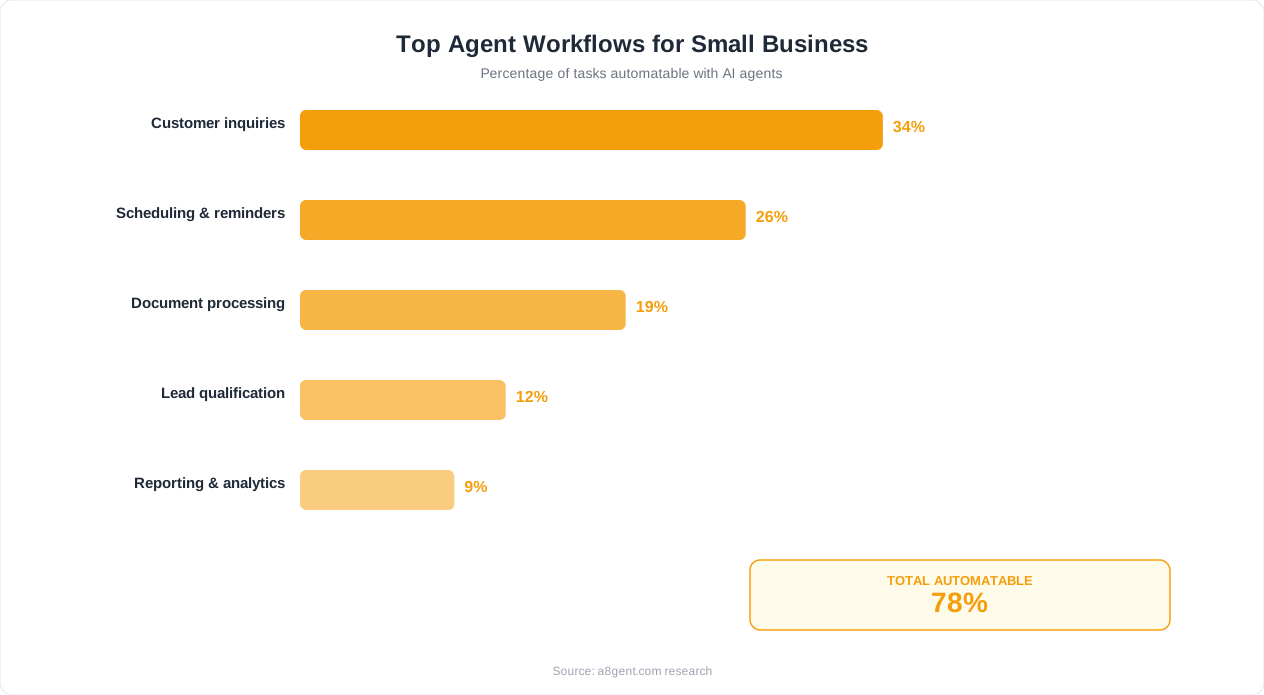
This is the single best starting point for most small businesses. An AI agent monitors your shared inbox (info@, support@, or sales@ addresses), categorizes incoming emails by type and urgency, drafts appropriate responses, and either sends them automatically or queues them for human review. A typical 20-person company receives 100 to 300 emails per day across shared inboxes. An AI agent can handle 60 to 80 percent of these without human intervention, saving your team 2 to 4 hours daily. Setup time is typically 2 to 4 hours, and you will see measurable results within the first week.
2. Appointment Scheduling and Management
If your business involves appointments - whether you are a dental practice, consulting firm, salon, or repair service - an AI scheduling agent eliminates the back-and-forth that wastes everyone's time. The agent handles booking requests via email, website chat, or even SMS. It checks calendar availability, sends confirmations, manages reschedules, and sends reminders. Businesses using AI scheduling agents report a 30 to 50 percent reduction in no-shows because the agent sends personalized reminders and makes rescheduling frictionless. Tools like Calendly already do basic scheduling, but an AI agent adds the intelligence layer - it can understand natural language requests like "Can I come in sometime next Tuesday afternoon?" and handle the entire conversation.
3. Customer Support First Response
An AI support agent handles the first layer of customer inquiries: order status checks, return policy questions, hours and location info, basic troubleshooting, and FAQ responses. The key is setting it up to escalate gracefully - when it encounters a question it cannot answer confidently, it routes to a human with full context so the customer never has to repeat themselves. Small businesses typically find that 50 to 70 percent of support inquiries are repetitive questions that an AI agent can handle perfectly. That frees your team to focus on the complex, high-value interactions that actually require human judgment.
4. Lead Qualification and Follow-Up
When a lead comes in through your website, social media, or referral, response time matters enormously. Research from Harvard Business Review shows that companies responding to leads within 5 minutes are 100 times more likely to connect than those responding within 30 minutes. An AI agent can respond to every lead instantly, 24/7. It asks qualifying questions, gauges interest level and budget, provides relevant information, and schedules calls with your sales team for qualified prospects. For small businesses where the owner or a single salesperson handles all leads, this is transformative.
5. Data Entry and Report Generation
Every small business has data that lives in multiple places - invoices in email, sales in a CRM, inventory in a spreadsheet, expenses in a bank feed. An AI agent can monitor these sources, extract relevant data, update your systems, and generate daily or weekly summary reports. This is not the flashiest use case, but it often delivers the most consistent ROI because data entry errors are expensive and the time savings compound every single day.
Use our ROI Calculator to estimate the specific dollar savings each of these use cases would deliver for your business based on your team size, hourly rates, and current time spent on these tasks.
Budget-Friendly AI Agent Tools for Small Business
You do not need enterprise software budgets to deploy effective AI agents. Here is a practical breakdown of tools organized by budget tier, so you can find the right fit regardless of where you are starting.
Tier 1: Under $100/Month (Starter)
- ChatGPT Plus + Zapier: At $20/month for ChatGPT Plus and $20 to $70/month for Zapier, this combination handles simple automation workflows. ChatGPT processes and generates text while Zapier connects your tools. Best for email drafting, basic data processing, and simple chatbots.
- n8n Cloud Starter: Starting at $24/month, n8n provides a visual workflow builder with built-in AI nodes. You can connect to OpenAI, Anthropic, or open-source models. The free self-hosted version is available if you have someone technical on your team.
- Tidio AI: Starting at $29/month, Tidio offers an AI chatbot specifically designed for small business websites. It handles customer inquiries, product recommendations, and lead capture with minimal setup.
Tier 2: $100-$300/Month (Growth)
- Relevance AI: Starting at around $99/month, Relevance AI is purpose-built for creating AI agents without code. It includes pre-built templates for sales, support, and operations agents. The visual builder makes it accessible for non-technical users while being powerful enough for complex multi-step workflows.
- Make.com + AI Modules: Make's Teams plan at $99/month combined with AI API costs gives you a robust automation platform with AI capabilities. Make excels at complex, multi-step workflows that involve many different tools and services.
- Intercom Fin: At $99/month plus usage, Intercom's AI agent handles customer support conversations with impressive accuracy. It learns from your help docs and previous conversations, making it increasingly effective over time.
Tier 3: $300-$500/Month (Scale)
- HubSpot + AI Features: HubSpot's Starter CRM at $20/month plus their AI add-ons provides AI-powered lead scoring, email personalization, and chatbot capabilities integrated directly into your CRM. This works best if you are already using HubSpot or considering a CRM migration.
- Custom Agent Stack: For businesses with some technical capability, building a custom stack with CrewAI or LangGraph as the orchestration layer, a cloud LLM API (OpenAI or Anthropic), and a vector database like Pinecone gives you maximum flexibility. API costs for a small business workload typically run $50 to $200/month, and you get agents tailored exactly to your workflows.
What to Avoid
Be cautious of platforms charging $500 or more per month that primarily offer chatbot functionality you can get for a fraction of the cost. Also avoid tools that lock you into annual contracts before you have validated the use case. Most reputable platforms offer monthly billing and free trials. Take advantage of these to test before committing.
The most important factor is not the tool itself but how well it integrates with the systems you already use. An AI agent that cannot connect to your email, CRM, calendar, or project management tool creates more work, not less. Before choosing any platform, list the five to ten tools your team uses daily and verify that the AI agent platform integrates with all of them, either natively or through an integration layer like Zapier or Make.
For a detailed cost comparison including hidden costs like API usage, training time, and ongoing maintenance, check out our guide on AI automation costs for small businesses.
Step-by-Step: Setting Up Your First AI Agent
This is a concrete, week-by-week setup plan for deploying your first AI agent. We will use the most common first use case - customer inquiry handling - as the example, but the process applies to any use case.
Week 1: Audit and Preparation (2-3 Hours)
Start by collecting data on the task you want to automate. For customer inquiries, export the last 30 days of emails or chat messages from your shared inbox. Categorize them into groups: questions you answer the same way every time (FAQ), questions that need specific account information, questions that require human judgment, and spam or irrelevant messages. Most businesses find that 50 to 70 percent fall into the first category - these are your quick wins. Write out your ideal response for each FAQ category. These become your agent's training data.
Week 2: Platform Selection and Initial Build (3-4 Hours)
Based on your budget tier from the previous section, sign up for a platform and build your first agent. Here is the process using Relevance AI as an example, though the steps are similar across platforms:
- Create a new agent and give it a clear role description: "You are a customer support agent for [Business Name]. You help customers with [list of topics]."
- Upload your FAQ responses as the agent's knowledge base.
- Set escalation rules: if the customer mentions billing disputes, refund requests over a certain amount, or complaints, route to a human.
- Configure the agent's tone to match your brand - professional but friendly, formal, casual, whatever fits.
- Connect it to your email or chat platform using the built-in integrations.
Week 3: Testing and Refinement (2-3 Hours)
Do not go live immediately. Run the agent in shadow mode for one week: it processes every incoming inquiry and drafts a response, but a human reviews and approves each one before it is sent. Track three metrics during this phase:
- Accuracy rate: What percentage of drafted responses are good enough to send as-is? Target: 70% or higher before going live.
- Escalation rate: What percentage does the agent correctly identify as needing human help? This should be 20 to 40 percent initially.
- Tone consistency: Do the responses sound like your brand? Adjust the system prompt if they feel off.
During this week, you will identify gaps - questions the agent handles poorly, edge cases it misses, and responses that need adjustment. Update the knowledge base and prompts accordingly. Each round of corrections makes the agent significantly better.
Week 4: Gradual Go-Live (1-2 Hours)
Once your accuracy rate hits 70 percent or higher, transition to live mode in stages. Start by letting the agent handle only the easiest category of inquiries automatically - pure FAQ questions with straightforward answers. Keep human review for everything else. Over the next two to four weeks, gradually expand the categories the agent handles independently as you confirm its accuracy in each area.
Week 5 and Beyond: Optimization (30 Minutes/Week)
Set a weekly 30-minute review session. Check the agent's performance metrics, review any customer complaints related to automated responses, and update the knowledge base with new questions that have come up. Most agents reach 80 to 90 percent autonomous handling within 4 to 6 weeks of going live, with ongoing improvements from there.
For businesses wanting structured guidance through this process, our AI Agent Course for Business Owners includes video walkthroughs of each step, pre-built templates for common small business use cases, and direct support during your first deployment.
Realistic ROI Expectations and How to Measure Them
Let us cut through the hype and talk about what AI agents actually deliver for small businesses in measurable terms. The marketing around AI tools often promises 10x productivity. The reality is more nuanced but still genuinely compelling when you measure correctly.
Direct Time Savings
The most straightforward metric is hours saved per week. Here are realistic ranges based on common use cases for a business with 10 to 30 employees:
- Email triage and response: 8 to 15 hours per week across the team. At an average loaded cost of $30/hour, that is $960 to $1,800 per month.
- Appointment scheduling: 5 to 10 hours per week if you are a service business. Savings of $600 to $1,200 per month.
- Customer support first response: 10 to 20 hours per week depending on inquiry volume. Savings of $1,200 to $2,400 per month.
- Lead qualification: 4 to 8 hours per week. But the indirect value - faster response times leading to higher conversion rates - often exceeds the direct time savings by 2 to 3x.
- Data entry and reporting: 5 to 12 hours per week. Savings of $600 to $1,440 per month, plus reduced error costs.
Indirect Value
Beyond direct time savings, AI agents deliver value that is harder to quantify but equally important:
- 24/7 availability: Your business responds to leads and customer inquiries at 2 AM and on weekends. For businesses competing against larger companies, this levels the playing field.
- Consistency: Every customer gets the same quality of response regardless of which team member is having a bad day. This improves customer satisfaction scores by 10 to 20 percent on average.
- Employee satisfaction: Your team focuses on meaningful, challenging work instead of repetitive tasks. This reduces turnover, which is one of the most expensive hidden costs for small businesses - replacing an employee costs 50 to 200 percent of their annual salary.
- Scalability: An AI agent handles 10 inquiries or 1,000 inquiries at essentially the same cost. During seasonal spikes or growth periods, you do not need to scramble to hire temporary staff.
Realistic Payback Period
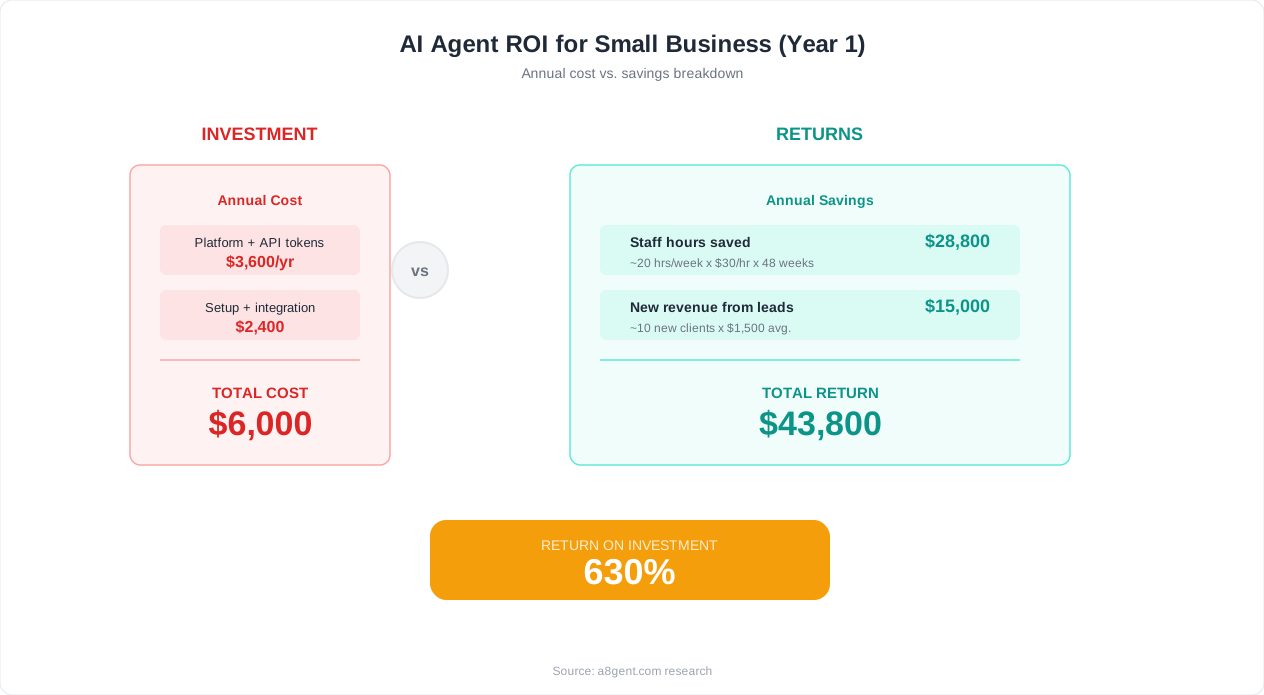
For a small business spending $100 to $300 per month on AI agent tools, the payback period is typically 2 to 4 weeks if you target the right use case. Here is a concrete example: a 15-person accounting firm spending $150/month on an AI email triage agent saves their team 12 hours per week. At a blended cost of $35/hour, that is $1,680/month in savings - an 11x return on the tool cost. Even accounting for the 8 to 10 hours spent on initial setup and training, the agent pays for itself within the first month.
How to Track ROI
Set up a simple tracking system before you deploy your agent. Measure these four numbers weekly:
- Volume handled: How many tasks or inquiries did the agent process?
- Autonomous resolution rate: What percentage were handled without human intervention?
- Time saved: Multiply volume handled autonomously by the average time a human would spend on each task.
- Quality score: Sample 10 to 20 agent interactions per week and rate them on a 1 to 5 scale. Track this over time to ensure quality stays high as you expand the agent's responsibilities.
Use our ROI Calculator to model the expected returns for your specific business size, industry, and target use cases before you invest.
7 Common Mistakes Small Businesses Make with AI Agents
After seeing hundreds of small businesses adopt AI agents, clear patterns emerge around what goes wrong. Avoiding these mistakes will save you weeks of frustration and thousands of dollars in wasted effort.
Mistake 1: Starting with the Most Complex Process
The owner of a 30-person logistics company wanted his first AI agent to handle freight quote negotiations - a process involving multiple variables, exception handling, and relationship nuances. After two months and $4,000 spent on a custom build, the agent was still making too many errors to use. He should have started with automated shipment status updates, a straightforward use case that would have been live in a week. Start simple, build confidence, then tackle complexity.
Mistake 2: No Human Oversight During Launch
Turning an AI agent loose without a review period is the fastest way to damage customer relationships. One retail business let their AI support agent go live without shadow mode testing. Within three days, the agent had incorrectly promised free replacements to 23 customers due to a misinterpretation of the return policy. Always run shadow mode for at least one week, and keep human review on sensitive decisions permanently.
Mistake 3: Expecting Perfection Instead of Progress
Some business owners test an AI agent, see that it makes mistakes on 20 percent of tasks, and conclude it is not ready. But consider: your human employees also make mistakes - you just do not measure them as carefully. An AI agent that handles 80 percent of tasks correctly from day one and improves to 90 percent within a month is delivering enormous value. The goal is not perfection; it is being significantly better than the alternative, which is either no response at all during busy periods or an overworked employee rushing through tasks.
Mistake 4: Ignoring Your Existing Data
The single biggest factor in AI agent performance is the quality of the knowledge base you give it. Businesses that dump a generic FAQ page into their agent and expect great results are disappointed. Businesses that curate their best 50 to 100 email responses, refine them, and use those as training examples get dramatically better results. Spend the upfront time to prepare quality training data - it makes a 3 to 5x difference in agent accuracy.
Mistake 5: Choosing Tools Based on Features Instead of Integration
A marketing agency chose an expensive AI platform because it had the most impressive feature list. But it did not integrate natively with their project management tool (ClickUp) or their CRM (Pipedrive). They ended up spending more time building custom integrations than they saved with the AI. Before evaluating features, make a list of every tool your business uses daily and verify native integration support.
Mistake 6: Not Setting Clear Boundaries
Every AI agent needs explicit rules about what it can and cannot do. Can it offer discounts? Approve refunds? Make promises about delivery dates? Share pricing that is not publicly listed? Without clear boundaries, agents will occasionally make commitments your business cannot keep. Write these boundaries into the agent's system prompt as hard rules, not suggestions.
Mistake 7: Treating Deployment as a One-Time Event
An AI agent is not a set-it-and-forget-it tool. It needs regular updates as your products change, policies evolve, and new question patterns emerge. The businesses that get the best long-term results dedicate 30 minutes per week to reviewing agent performance and updating its knowledge base. Those that deploy and never revisit see performance degrade within 2 to 3 months as their business evolves but the agent does not.
For a structured approach to avoiding these pitfalls, our complete AI agent implementation guide provides detailed checklists and templates for each phase of deployment.
Next Steps: Scaling from One Agent to an AI-Powered Business
Once your first AI agent is running successfully - typically 4 to 6 weeks after deployment - you are ready to think about scaling. The businesses that get the most value from AI agents do not stop at one; they build an interconnected system of agents that work together across their operations.
The Expansion Roadmap
Follow this sequence for maximum impact with minimum disruption:
- Month 1-2: Deploy your first agent on the highest-impact use case (typically customer support or email management). Focus on getting it to 80%+ autonomous handling.
- Month 3-4: Add a second agent for a different function. If your first agent handles support, add scheduling or lead qualification. The key is choosing a use case that does not overlap with your first agent to avoid confusion about which agent handles what.
- Month 5-6: Connect your agents so they share information. Your support agent should know when a customer has an upcoming appointment (from the scheduling agent) and your lead qualification agent should know a prospect's support history (from the support agent). This integration is where the real power emerges.
- Month 7-12: Expand into more complex use cases - proposal generation, reporting automation, inventory management - using the foundation and expertise you have built. By this point, your team is comfortable working alongside AI agents and can provide meaningful feedback to improve performance.
Building Internal Expertise
The biggest long-term advantage is not the agents themselves but the expertise your team develops in working with AI. Designate one team member as your "AI champion" - someone who owns the agent relationships, monitors performance, and stays current with new capabilities. This does not need to be a full-time role; 2 to 4 hours per week is sufficient for a business running 2 to 3 agents. This person becomes invaluable as AI capabilities continue to expand.
When to Consider Professional Help
You can and should deploy your first 1 to 2 agents yourself using the platforms and processes described in this guide. However, there are situations where working with an AI automation agency makes sense:
- You need agents that integrate deeply with custom or legacy software systems.
- You want to build complex multi-agent workflows where several agents coordinate on a single process.
- You are in a regulated industry (healthcare, finance, legal) where AI compliance requirements add complexity.
- Your team has tried self-service tools and hit a ceiling on what they can build.
A good AI automation agency will charge $2,000 to $8,000 for a typical small business implementation and deliver in 2 to 4 weeks. Before hiring one, read our guide on working with AI automation agencies to understand what to look for and what to avoid.
The Bottom Line
AI agents are no longer a luxury reserved for large enterprises. Small businesses that start now - even with a single, simple agent - are building a competitive advantage that compounds over time. The businesses that wait another year will find themselves competing against rivals who have 6 to 12 months of AI optimization under their belts. The best time to start was six months ago. The second best time is this week.
Ready to find out exactly where to start? Take our AI Agent Readiness Quiz for a personalized recommendation based on your business type, team size, and current pain points. And explore our AI Agent Course for Business Owners for hands-on guidance through your first deployment.
We also keep industry-specific playbooks for education and tutoring, fitness studios, insurance agencies, and inventory-heavy businesses.
FAQ
How much does it cost to get started with AI agents for a small business?
You can start for as little as $50-$150 per month using platforms like n8n Cloud, Tidio AI, or ChatGPT Plus combined with Zapier. More capable platforms like Relevance AI or Make.com with AI modules run $100-$300/month. The key is starting with one focused use case rather than trying to automate everything at once. Most small businesses see a positive ROI within 2-4 weeks of deploying their first agent.
Do I need technical skills to set up AI agents?
No. Modern no-code AI agent platforms like Relevance AI, Tidio, and Make.com use visual drag-and-drop builders that require no coding knowledge. You will need to invest 3-6 hours in initial setup and training, but the process is similar in complexity to setting up a new email marketing tool or CRM. If you can use tools like Mailchimp or HubSpot, you can set up an AI agent.
What is the best first AI agent use case for a small business?
Customer inquiry handling (email or chat) is the best starting point for most small businesses. It delivers fast, measurable ROI because it addresses a high-volume, repetitive task with relatively predictable patterns. Most businesses see 50-70% of customer inquiries handled autonomously within the first month. The second-best option is appointment scheduling if you run a service-based business.
Will AI agents replace my employees?
For small businesses, AI agents almost never replace employees - they augment them. Instead of hiring a new person to handle growing email volume or customer inquiries, an AI agent handles the routine 60-80% while your existing team focuses on complex, high-value work. Most small business owners report that AI agents make their current team more effective and satisfied rather than reducing headcount.
How long does it take to see results from an AI agent?
With proper setup, you can have an AI agent operational within 1-2 weeks. Shadow mode testing takes about a week, and most businesses see measurable time savings within the first week of going live. Full optimization - where the agent handles 80-90% of target tasks autonomously - typically takes 4-6 weeks as you refine the knowledge base and expand the agent's capabilities incrementally.