AI Agents for Bookkeeping: Categorize, Reconcile and Report (2026)
AI bookkeeping agents now handle transaction categorization, bank reconciliation, and financial reporting automatically. This guide covers the best tools, implementation steps, and how to maintain accuracy while saving 15-25 hours per month.
10+ years shipping production ML across TensorFlow, PyTorch, AWS, and GCP. Ships every A8gent agent before it becomes a lesson. GitHub
- AI bookkeeping agents categorize transactions with 95-98% accuracy after a 2-3 week learning period, handling the repetitive work that consumes 60-70% of a bookkeeper's time - freeing humans for advisory work and exception handling.
- Bank reconciliation that takes 6-12 hours monthly by hand is compressed to 30-60 minutes of exception review - the AI matches 85-95% of transactions automatically and surfaces only the items genuinely needing human judgment.
- Automated financial reporting generates profit and loss statements, balance sheets, and cash flow reports on schedule without manual compilation - reducing month-end close from 5-7 days to 1-2 days for most small businesses.
- No-code platforms like Autonoly and n8n let you deploy bookkeeping agents without programming knowledge - connecting to QuickBooks, Xero, or FreshBooks through pre-built integrations that take 2-4 hours to configure.
- Small businesses typically save $800-$2,500/month by automating bookkeeping tasks, with platform costs of $79-$249/month - delivering full ROI within the first 2-4 weeks of deployment.
The Bookkeeping Revolution: What AI Agents Can Do in 2026
Bookkeeping is the backbone of every business - but it has always been tedious. Recording transactions, categorizing expenses, reconciling bank statements, and generating reports are essential tasks that nobody actually enjoys doing. They are repetitive, rule-based, and time-consuming. Those exact characteristics make bookkeeping one of the most successfully automated business functions in 2026.
AI bookkeeping agents now handle 70-85% of routine bookkeeping tasks autonomously - including transaction categorization, bank reconciliation, expense matching, receipt processing, and standard financial reporting. This is not theoretical or experimental. Thousands of small businesses and accounting firms are running AI-powered bookkeeping today, saving 15-25 hours per month while maintaining accuracy that equals or exceeds manual work.
The transformation is straightforward: tasks that require pattern recognition, rule application, and data comparison are precisely what AI does best. A bank transaction that says "AMZN MKTP US" needs to be categorized as office supplies (or whatever it is for your business). A human has to remember or look up the correct category every time. An AI learns it once and applies it consistently forever - across hundreds or thousands of transactions per month without fatigue or mistakes.
What makes 2026 different from earlier automation attempts is accessibility. You no longer need custom software, expensive consultants, or technical skills to deploy AI bookkeeping. No-code platforms connect to your existing accounting software, learn your categorization preferences, and start processing transactions within days. The barrier to entry has dropped from tens of thousands of dollars to under $200 per month.
In this guide, we will cover the three core bookkeeping functions AI agents handle - categorization, reconciliation, and reporting - with practical implementation details for each. We will also cover accuracy safeguards, platform selection, and a step-by-step deployment plan. If you want a quick assessment of which bookkeeping tasks in your business are ready for automation, take our free assessment - it evaluates your transaction volume, current tools, and workflow to recommend specific automation opportunities.
Whether you are a business owner doing your own books, a bookkeeper looking to serve more clients, or an accountant wanting to eliminate the low-value work from your practice, AI bookkeeping agents change the economics of financial record-keeping fundamentally.
Automated Transaction Categorization: How AI Learns Your Books
Transaction categorization is the most time-consuming daily bookkeeping task - and the one where AI agents deliver the fastest, most reliable results. Every transaction flowing through your business needs to be tagged with the correct expense category, department, project, or cost center. AI makes this automatic.
How AI Categorization Works
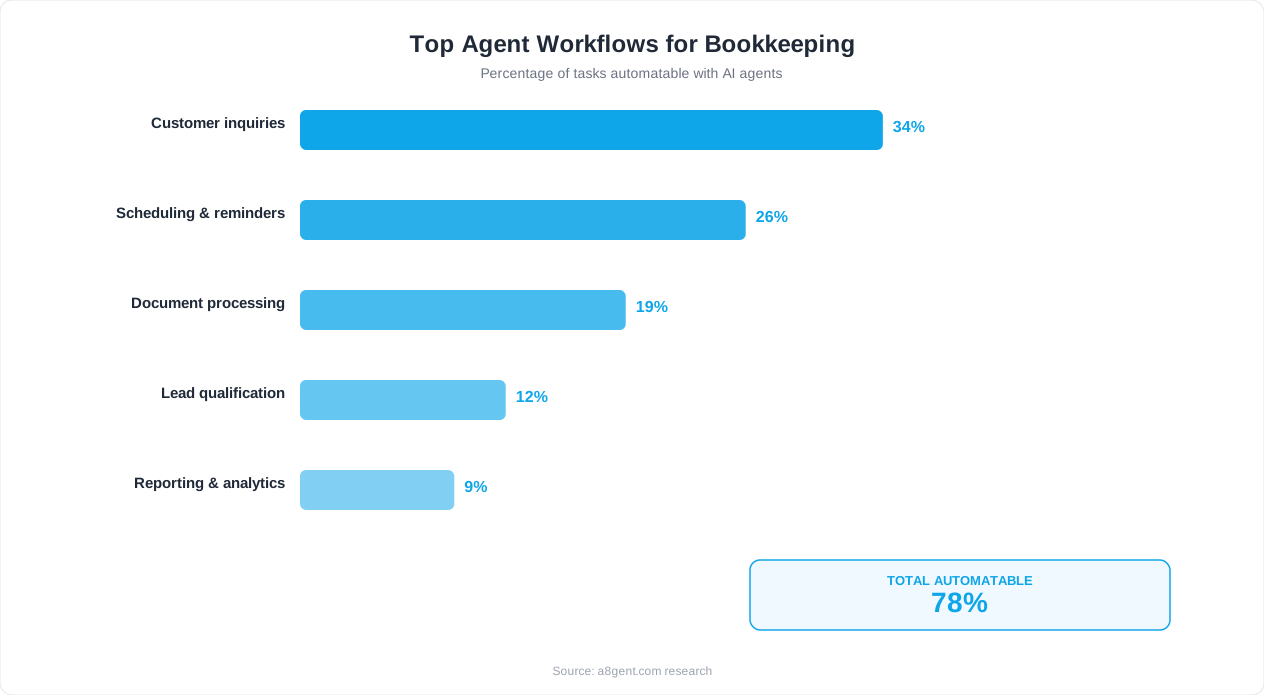
When a transaction appears in your bank feed, the AI agent analyzes multiple data points: the merchant name and description, the transaction amount, the date and time, the bank account it occurred in, and your historical categorization patterns for similar transactions. Using these signals, it assigns the transaction to the appropriate category in your chart of accounts. Initial accuracy starts at 80-85% for a new setup and reaches 95-98% within 2-3 weeks as the AI learns your specific preferences.
The Learning Process
Your AI bookkeeping agent learns from every correction you make. When you recategorize a transaction - moving "Uber" from "Travel" to "Client Entertainment" for example - the agent remembers and asks: should all Uber transactions be Client Entertainment, or just this one? You can set rules (all Uber = Travel, except amounts over $50 = Client Entertainment) or let the AI learn contextually from patterns. After 100-200 corrections across your first month, the agent handles 95%+ of new transactions without any input. By month three, interventions drop to 1-3% of transactions.
Handling Complex Categorization Scenarios
Real bookkeeping involves more than simple merchant-to-category mapping. AI agents in 2026 handle: split transactions (a Costco purchase that is partly office supplies and partly team lunch), recurring vs one-time classification, multi-entity routing (assigning transactions to the correct business entity based on which bank account they appeared in), project-based tagging (construction, consulting, and agency businesses need transactions tied to specific clients or projects), and tax-relevant flagging (identifying transactions that affect specific tax categories like meals at 50% vs 100% deductibility).
Integration with Your Chart of Accounts
The AI agent works within your existing chart of accounts - it does not impose a new structure. Whether you have 20 categories or 200, whether you use standard categories or highly customized ones, the agent adapts to your system. If you add new categories, the AI incorporates them immediately. If you restructure your chart of accounts (merging categories or splitting them), the AI updates its behavior accordingly. This means zero disruption to your accounting structure - just faster, more consistent data entry.
Platforms That Excel at Categorization
Autonoly offers pre-trained categorization models that start accurate from day one for common business types (e-commerce, professional services, construction, restaurants) and then customize to your specifics. n8n provides a more flexible automation framework where you can build custom categorization logic using AI nodes combined with rule-based conditions - ideal for businesses with highly unique categorization needs. Both integrate with QuickBooks, Xero, and FreshBooks for seamless data flow.
Accuracy Benchmarks
After the 2-3 week learning period, expect these accuracy rates: simple merchant categorization (Starbucks = Meals) achieves 99%+ accuracy. Amount-dependent categorization (transactions under $50 = Office Supplies, over $50 = Equipment) achieves 97-99%. Context-dependent categorization (same merchant, different purposes) achieves 93-96%. New merchants not previously seen achieve 88-92% based on pattern matching to similar merchants. Overall blended accuracy: 95-98% for established accounts.
AI Bank Reconciliation: From 12 Hours to 30 Minutes Monthly
Bank reconciliation - matching your accounting records to your actual bank statements - is the task most bookkeepers dread. It is essential for accurate books but painfully tedious. In 2026, AI agents have reduced bank reconciliation from a multi-day ordeal to a brief exception review.
The Traditional Reconciliation Problem
Every month, you need to confirm that every transaction in your bank account has a corresponding entry in your accounting system, and vice versa. Discrepancies come from timing differences (you recorded a payment on Friday, it cleared on Monday), amount differences (bank fees applied, partial payments received), description mismatches (your accounting system says "Adobe Creative Cloud" but the bank says "ADOBE *CRTV CLD"), and missing entries (transactions in the bank that never got recorded in your books). For a business with 300-500 monthly transactions, manual reconciliation takes 6-12 hours.
How AI Reconciliation Works
The AI agent simultaneously pulls data from your bank accounts and your accounting software. It then applies progressive matching strategies: First pass - exact matches (same amount, same date, same or similar description): typically matches 60-70% of transactions automatically. Second pass - fuzzy matches (same amount within a 3-5 day window, partial description match): matches another 15-25% of transactions. Third pass - combination matches (one bank transaction equaling the sum of multiple accounting entries, or vice versa): matches another 5-10%. After all passes, 85-95% of transactions are matched automatically. The remaining 5-15% go into an exception report for human review.
What Your Exception Review Looks Like
Instead of reviewing 400 transactions, you review 20-60 exceptions - the items the AI could not match with confidence. These fall into clear categories: genuinely missing entries (a transaction in the bank with no corresponding record - you need to create one), duplicate entries (the same transaction recorded twice in your accounting system), timing issues the AI flagged for confirmation (a large payment that cleared 7+ days after recording), and amount discrepancies that exceed the tolerance threshold (partial payments, unexpected fees, or errors). This focused review takes 30-60 minutes instead of 6-12 hours.
Multi-Account Reconciliation
Businesses with multiple bank accounts, credit cards, payment processors, and investment accounts multiply the reconciliation burden. AI agents handle all accounts simultaneously - reconciling your checking account, savings account, three credit cards, Stripe account, and PayPal balance in one automated pass. Cross-account transfers are identified and matched (your transfer from checking to savings appears in both accounts and needs to be matched to avoid double-counting). This multi-account capability is where AI saves the most time for businesses with complex financial infrastructure.
Continuous vs Monthly Reconciliation
Traditional bookkeeping reconciles monthly. AI agents enable continuous reconciliation - matching transactions as they appear throughout the month. This means you never face a month-end reconciliation backlog. When you reach month-end close, your books are already 95%+ reconciled. The "month-end close" becomes a 15-minute final exception review rather than a multi-day catch-up exercise. For businesses that need real-time financial visibility, this is transformative.
Real Results
Businesses deploying AI reconciliation through Autonoly report: reconciliation time reduced by 85-95%, month-end close accelerated by 3-5 days, unresolved discrepancies eliminated within 60 days of deployment, and bookkeeper time redirected to advisory and analysis work. For your specific transaction volume and current reconciliation time, use our assessment tool to estimate your time savings.
Automated Financial Reporting: Always-Current, Always Accurate
Financial reports are the output that makes bookkeeping valuable - they transform raw transaction data into business intelligence. AI agents now generate these reports automatically, on schedule, and with accuracy that reflects real-time data rather than month-old snapshots.
What Reports AI Generates Automatically
Standard financial reports that AI bookkeeping agents produce include: Profit and Loss (Income Statement) - revenue, expenses, and net income for any time period with comparisons to prior periods and budget. Balance Sheet - assets, liabilities, and equity as of any date with period-over-period changes highlighted. Cash Flow Statement - operating, investing, and financing cash flows with projections based on current trends. Accounts Receivable Aging - who owes you money, how long it has been outstanding, and which invoices are at risk of non-payment. Accounts Payable Summary - what you owe, when it is due, and cash requirements for upcoming payment cycles. Department/Project Profitability - revenue and costs broken down by team, project, or business unit.
Scheduled and On-Demand Delivery
Configure your AI agent to deliver reports on whatever schedule your business needs: daily cash position summaries every morning at 7 AM, weekly P&L snapshots every Monday, monthly full financial packages on the first of each month, and quarterly board-ready reports with variance analysis. Reports are generated automatically and delivered via email, uploaded to shared drives, or posted to Slack channels - whatever your team's workflow requires. You can also pull any report on demand through a simple request to the agent.
Variance Analysis and Anomaly Detection
AI-generated reports do not just show numbers - they highlight what matters. The agent automatically flags: expenses that exceed budget by more than 10%, revenue categories growing or declining faster than trend, unusual transactions that may indicate errors or fraud, cash flow projections that suggest upcoming shortfalls, and AR aging that indicates potential collection problems. This intelligence layer transforms financial reports from passive documents into active business tools that surface decisions requiring attention.
Custom Report Templates
Every business has unique reporting needs beyond standard financial statements. AI bookkeeping agents let you define custom report templates: a restaurant might want daily food cost percentages, weekly labor ratios, and monthly per-location profitability. A consulting firm might want project-level margins, utilization rates, and revenue-per-consultant metrics. An e-commerce business might want product-level profitability, customer acquisition cost tracking, and inventory turnover reports. Define the template once, and the AI generates it on schedule indefinitely.
Real-Time vs Period Reporting
Because AI agents process transactions continuously (not in batches), your financial data is always current. This enables real-time dashboards showing live revenue, expenses, and cash position - not last month's numbers but today's reality. For businesses making daily decisions based on financial data (restaurants managing food costs, e-commerce adjusting ad spend, service businesses tracking project profitability), real-time reporting changes the speed and quality of decisions fundamentally.
Report Accuracy Safeguards
AI-generated reports are only as accurate as the underlying data. Safeguards include: automated consistency checks (does the balance sheet actually balance? do income statement categories sum correctly?), period-over-period reasonableness tests (did any category change by more than 50% without explanation?), and reconciliation status validation (reports flag if underlying data has unreconciled items that may affect accuracy). These checks run automatically before every report is delivered, ensuring you never make decisions based on incomplete or inconsistent data.
Best AI Bookkeeping Tools and Platforms (2026 Comparison)
The market for AI bookkeeping tools has matured significantly in 2026. Here are the best options based on your business type, volume, and technical comfort level - from fully managed solutions to flexible DIY automation.
Autonoly - Best All-in-One for Small Businesses ($79-$249/month)
Autonoly offers dedicated bookkeeping automation covering transaction categorization, bank reconciliation, receipt processing, and financial reporting. The no-code interface makes it accessible for business owners without accounting or technical backgrounds. Pre-built connectors for QuickBooks, Xero, and FreshBooks mean setup takes 2-4 hours. Autonoly excels at: categorization accuracy (pre-trained models for common business types), continuous reconciliation (not just month-end), and automated reporting with variance analysis. Best for: business owners doing their own books or small teams wanting comprehensive automation without complexity.
n8n - Best for Custom Workflows ($20-$50/month self-hosted)
n8n is an open-source workflow automation platform that lets you build custom bookkeeping automations using AI nodes combined with rule-based logic. It requires more setup than Autonoly but offers unlimited flexibility - you can create workflows that match your exact process rather than adapting to a platform's structure. n8n excels at: connecting unusual data sources, building multi-step workflows with conditional logic, and integrating bookkeeping automation with other business processes (like triggering follow-ups when invoices are overdue). Best for: technically comfortable users who want maximum customization or businesses with unique workflows that pre-built platforms do not support.
Dext (formerly Receipt Bank) - Best for Document Processing ($24-$60/month)
Dext specializes in extracting data from receipts, invoices, and financial documents. It reads paper and digital documents, extracts key information (amount, date, vendor, line items), and pushes the data into your accounting software. While not a full AI bookkeeping agent, it solves the specific pain point of manual document data entry. Combine with your accounting software's built-in automation rules for a budget-friendly solution. Best for: businesses whose primary bookkeeping pain is manual receipt and invoice entry.
Bench (AI + Human) - Best Managed Service ($299-$499/month)
Bench combines AI processing with human bookkeepers for a fully managed service. The AI handles routine transactions while human bookkeepers review exceptions, ensure accuracy, and provide month-end reporting. You get clean books delivered monthly without doing any work yourself. Best for: business owners who want to completely outsource bookkeeping without managing automation themselves.
How to Choose the Right Platform
Doing your own books, under 200 transactions/month: Autonoly starter plan ($79/month) or Dext + accounting software rules. Doing your own books, 200-1,000 transactions/month: Autonoly growth plan ($149-$249/month) for comprehensive automation. Bookkeeper serving multiple clients: n8n for custom multi-client workflows or Autonoly with multi-entity support. Want fully hands-off bookkeeping: Bench managed service. Complex or unusual workflows: n8n for maximum flexibility with AI nodes.
Not sure which category you fall into? Our assessment tool evaluates your transaction volume, business type, current tools, and technical comfort level to recommend the best platform match for your specific situation.
Maintaining Accuracy: Safeguards for AI-Managed Books
Accuracy in bookkeeping is non-negotiable. Errors lead to tax problems, audit failures, bad business decisions, and regulatory issues. Here is how to deploy AI bookkeeping agents while maintaining the precision your business demands.
The Accuracy Reality Check
AI bookkeeping agents in 2026 achieve 95-98% categorization accuracy after learning your patterns for 2-3 weeks. For context, human bookkeepers achieve 96-98% accuracy when fresh and focused - but accuracy degrades with fatigue, rushing, and volume. The AI maintains consistent accuracy regardless of volume or time of day. However, that 2-5% error rate across 500 monthly transactions means 10-25 transactions per month may be miscategorized. This is manageable with proper safeguards.
Layer 1: Confidence Thresholds
Configure your AI agent to only auto-process transactions where confidence exceeds 90%. Transactions below this threshold go into a review queue for human decision. This means: routine, clearly categorizable transactions (90%+ of them) flow through automatically. Unusual, ambiguous, or first-time transactions get flagged for your input. You only spend time on decisions that actually need your judgment. Adjust the threshold based on your accuracy tolerance - higher confidence requirements mean fewer auto-processed transactions but lower error rates.
Layer 2: Rule-Based Validation
Beyond AI categorization, apply rule-based validation as a safety net: amount reasonableness checks (a $50,000 office supplies transaction should trigger a flag), category-vendor consistency (if a known payroll provider is suddenly categorized as "Marketing," something is wrong), duplicate detection (same amount, same vendor, within 48 hours - likely a duplicate entry), and budget threshold alerts (any single expense exceeding 20% of monthly category budget triggers review). These rules catch systematic errors the AI might miss.
Layer 3: Periodic Human Review
Even with AI handling 95%+ of transactions correctly, maintain a regular review cadence: spot-check 10-20% of auto-processed transactions weekly (randomized selection), review all transactions in high-sensitivity categories (payroll, tax payments, large vendor payments) monthly, and conduct a comprehensive review during month-end close before finalizing books. This is not about re-doing the AI's work - it is about catching systematic errors early before they compound across months.
Layer 4: Reconciliation as Final Verification
Bank reconciliation serves as the ultimate accuracy check. If your books reconcile with your bank statements, your categorization is functionally correct (the money went where it should). Unreconciled items surface potential categorization errors, missing entries, or duplicate records. Continuous AI reconciliation means errors are caught within days rather than discovered during month-end close when they are harder to trace.
Audit Trail and Documentation
Every AI-processed transaction should maintain a complete audit trail: what data the AI saw, why it made the categorization decision, what confidence level it had, and whether a human confirmed or overrode the decision. This documentation makes your books more auditable with AI than without it - because every categorization decision has a documented rationale. When your CPA or auditor asks why a transaction was categorized a certain way, you have a clear answer.
Error Correction and Learning
When you do find errors, correct them and confirm the AI learns from the correction. Good platforms ask: "Should this correction apply to all similar future transactions, or just this one?" This feedback loop means the same error never happens twice. Over time, your error rate decreases continuously as the AI accumulates corrections - most businesses reach 99%+ accuracy on previously-seen transaction patterns within 3 months.
Getting Started: Deploy AI Bookkeeping in One Week
You do not need an accounting degree or technical skills to deploy AI bookkeeping. Here is a practical one-week implementation plan that gets your first automated bookkeeping workflows running.
Day 1-2: Setup and Data Connection
Choose your platform based on the comparison above (Autonoly for most small businesses, n8n for custom needs). Sign up and connect your data sources: bank accounts (via direct bank feed or Plaid connection), accounting software (QuickBooks, Xero, or FreshBooks), credit cards and payment processors (Stripe, Square, PayPal), and receipt/document sources (email forwarding address for receipts). Most platforms complete data sync within 24 hours. While waiting, export your last 3 months of categorized transactions - this becomes the AI's training data.
Day 3: Training and Configuration
Upload or sync your historical transaction data so the AI can learn your categorization patterns. Configure your chart of accounts mapping, set confidence thresholds (start at 85-90%), define any hard rules (vendor X always = category Y), and set up your review queue notifications. If using Autonoly, select the business type template closest to yours - this gives the AI a head start with pre-trained categorization for your industry.
Day 4-5: Supervised Learning Period
Run the AI in supervised mode - it categorizes every new transaction but waits for your confirmation before committing. Review each categorization: confirm correct ones (one click), correct wrong ones (select the right category). This is the most time-intensive phase but only lasts 2-3 days. Each correction teaches the AI, and accuracy improves noticeably day over day. By day 5, you should see 85-90% of categorizations being correct without any input.
Day 6: Semi-Autonomous Mode
Switch to semi-autonomous mode: the AI auto-commits high-confidence categorizations (above your threshold) and queues low-confidence ones for review. You now only review 10-20% of transactions instead of all of them. Monitor the auto-committed ones through spot-checks to verify accuracy. If accuracy is below 90%, continue supervised mode for another 2-3 days before trying semi-autonomous again.
Day 7: Full Automation and Reporting
Enable full automation: auto-categorization, continuous reconciliation, and scheduled reporting. Set up your report delivery schedule (daily cash summary, weekly P&L, monthly full package). Configure alert thresholds for anomalies. Document your review cadence (weekly spot-checks, monthly comprehensive review). You are now running AI-powered bookkeeping.
Week 2-4: Optimization
Over the next few weeks, the AI continues learning and accuracy improves to 95-98%. Use this time to: refine confidence thresholds based on observed accuracy, add custom rules for edge cases the AI struggles with, set up additional workflows (automated invoice processing, payment reminders, expense approvals), and build custom report templates for metrics specific to your business. By week 4, your bookkeeping should require less than 2 hours per week of human attention - down from 10-20+ hours.
For a personalized recommendation on which bookkeeping tasks to automate first based on your specific transaction volume and workflow, use our assessment tool. It identifies your highest-impact automation opportunities and provides a customized implementation sequence.
Cost Analysis: What AI Bookkeeping Saves Your Business
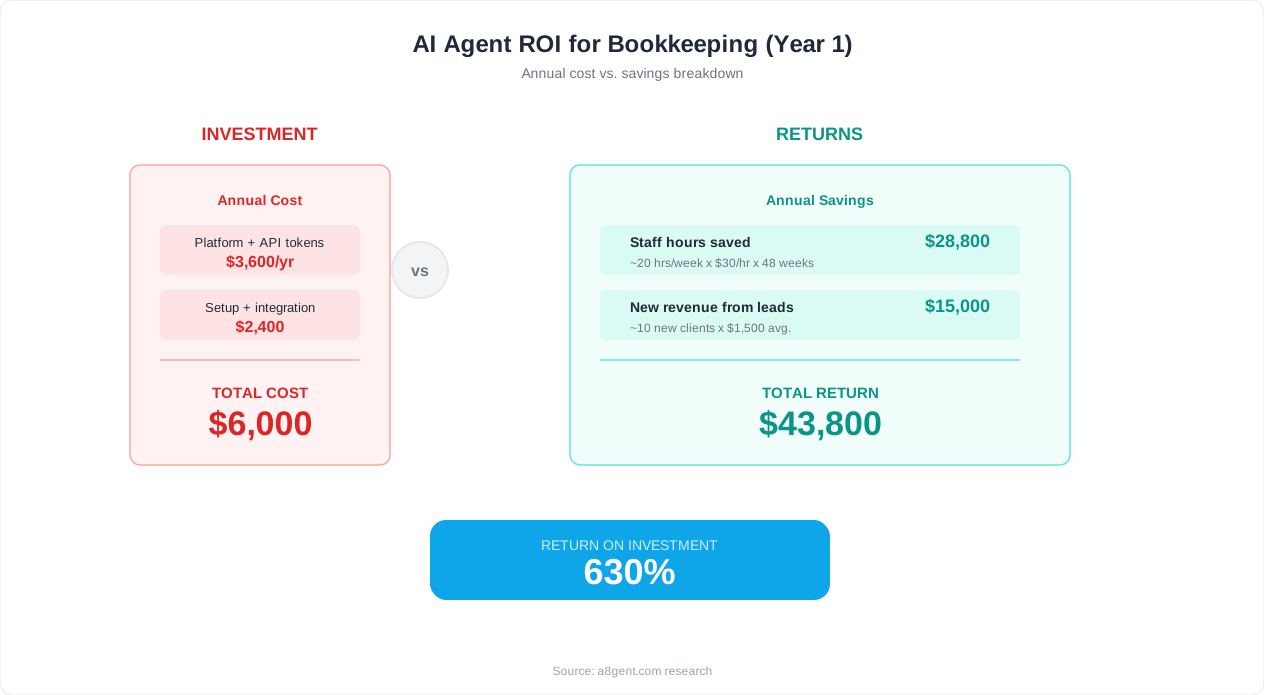
AI bookkeeping is one of the clearest ROI cases in business automation. The math is straightforward: hours saved multiplied by labor cost, minus platform subscription. Here are real numbers across different business sizes and scenarios.
Small Business (Under 300 Transactions/Month)
Current state: Business owner or part-time bookkeeper spending 10-15 hours/month on bookkeeping. At $50/hour opportunity cost (owner's time) or $35/hour bookkeeper rate, that is $350-$750/month in labor. With AI automation: 2-3 hours/month of review and exception handling. Platform cost: $79-Free-$149/month. Net savings: $200-$600/month. ROI timeline: immediate (month one savings exceed platform cost). Additional benefits: real-time financial visibility, fewer errors, faster month-end close, and the owner's time redirected to revenue-generating activities.
Growing Business (300-1,000 Transactions/Month)
Current state: Dedicated bookkeeper spending 25-35 hours/month, or outsourced bookkeeping at $500-$1,500/month. With AI automation: 5-8 hours/month of human review and exception handling. Platform cost: $149-$249/month. Net savings: $800-$2,500/month compared to a full-time bookkeeper, or $250-$1,250/month compared to outsourced bookkeeping. Additional value: the bookkeeper shifts from data entry to financial analysis, vendor negotiation, and cash flow optimization - work that directly impacts profitability.
Multi-Entity or Multi-Location (1,000+ Transactions/Month)
Current state: Multiple bookkeeping staff or expensive outsourced firm, spending $3,000-$8,000/month. With AI automation: One bookkeeper reviewing exceptions across all entities, 15-20 hours/month. Platform cost: $249-$499/month. Net savings: $2,500-$7,500/month. Additional value: consolidated reporting across entities, consistent categorization standards, and real-time visibility into each entity's financial position without waiting for manual compilation.
Hidden Savings Beyond Labor
Direct labor savings are the obvious benefit, but AI bookkeeping also eliminates: error correction costs (fixing miscategorized transactions, amended tax returns - average $500-$2,000/year for small businesses), late payment penalties (automated AP tracking prevents missed payments - average $200-$800/year), missed deductions (consistent categorization ensures every deductible expense is properly tracked - average $1,000-$5,000/year in missed deductions for businesses doing manual bookkeeping), and audit preparation costs (clean, documented books reduce CPA time during tax season by 30-50%).
Comparison: AI Agent vs Hiring vs Outsourcing
Hiring a full-time bookkeeper: $40,000-$65,000/year salary plus benefits, management overhead, and coverage for vacations and sick days. Outsourcing to a bookkeeping firm: $500-$2,000/month with variable quality and limited availability. AI bookkeeping agent: $79-$249/month with 24/7 availability, consistent accuracy, and scalability (handles volume increases without cost increases). The AI option costs 85-95% less than hiring and 50-85% less than outsourcing while delivering faster turnaround and more consistent results.
When AI Bookkeeping Does NOT Make Sense
Transparency matters: AI bookkeeping is not the right fit for every situation. Businesses with fewer than 30 transactions/month may not save enough to justify even a basic subscription. Businesses with highly unusual transactions that defy categorization patterns (certain investment funds, complex international operations) may need specialized human judgment for most entries. And businesses in highly regulated industries with specific documentation requirements may need human review of every transaction regardless. For everyone else - which is the vast majority of small and mid-size businesses - the ROI is clear and immediate. Calculate your specific savings with our operations automation guide or take the assessment for personalized recommendations.
FAQ
How accurate is AI bookkeeping compared to a human bookkeeper?
After a 2-3 week learning period, AI bookkeeping agents achieve 95-98% categorization accuracy - comparable to or slightly better than human bookkeepers who average 96-98% when focused. The key difference is consistency: humans experience accuracy degradation from fatigue, rushing, and volume, while AI maintains the same accuracy whether processing 10 or 1,000 transactions. For bank reconciliation, AI matching accuracy exceeds 99% for exact-amount matches.
Will AI bookkeeping work with my existing accounting software?
Yes. All major AI bookkeeping platforms integrate with QuickBooks (Online and Desktop), Xero, FreshBooks, Wave, and Sage. The AI works within your existing software - categorizing transactions, performing reconciliation, and generating reports through your current platform. Your chart of accounts, vendor lists, and existing data remain unchanged. The AI simply automates the data entry and matching work you currently do manually.
How long does it take to set up AI bookkeeping?
Most businesses can have AI bookkeeping running within one week. Day 1-2: platform setup and data connection. Day 3: configuration and training data upload. Day 4-5: supervised learning period where you confirm or correct categorizations. Day 6-7: transition to autonomous operation. The AI reaches full accuracy (95-98%) within 2-3 weeks as it accumulates corrections and learns your specific preferences.
Can AI handle my industry-specific bookkeeping needs?
AI bookkeeping platforms come pre-trained for common industries (e-commerce, professional services, construction, restaurants, healthcare, real estate) and then customize to your specifics. Unusual categorization rules, industry-specific accounts, and complex chart of accounts structures are all supported. If your bookkeeping follows patterns - even complex ones - AI can learn them. The only scenarios where AI struggles are transactions requiring external context the system cannot observe.
Is AI bookkeeping secure? Who has access to my financial data?
Reputable AI bookkeeping platforms maintain bank-level security: 256-bit encryption in transit and at rest, SOC 2 Type II compliance, read-only bank connections (cannot move money), multi-factor authentication, and strict data isolation between customers. Your financial data is used only for your bookkeeping - not shared with other customers or used for any other purpose. Always verify SOC 2 compliance and data handling policies before selecting a platform.
Do I still need a CPA or accountant if I use AI bookkeeping?
Yes, for tax strategy, compliance decisions, and financial advisory - but not for data entry. AI handles the bookkeeping (recording and categorizing transactions, reconciliation, basic reporting). Your CPA handles tax planning, filing, audit representation, and strategic financial advice. Clean AI-managed books actually make your CPA more effective - they spend time on valuable advice rather than cleaning up messy records, which often reduces your CPA bill by 20-40%.
What happens if the AI makes a categorization mistake?
You correct it with one click, and the AI learns from the correction permanently. Good platforms ask whether the correction applies to all similar future transactions or just this one. Systematic errors (wrong category for all transactions from a vendor) get fixed retroactively across all affected entries. With proper safeguards - confidence thresholds, rule-based validation, and periodic review - errors are caught quickly and never compound across months.
Can AI bookkeeping handle multiple business entities or locations?
Yes. Multi-entity support is a core capability of platforms like Autonoly. The AI routes transactions to the correct entity based on bank account, applies entity-specific categorization rules, handles inter-company transactions, and generates consolidated or entity-specific reports. For businesses with 2-10 entities, this eliminates one of the most time-consuming aspects of multi-entity bookkeeping - maintaining consistent categorization across all entities while respecting each entity's unique chart of accounts.