AI Agents for Accounting: Bookkeeping and Invoice Reconciliation (2026)
AI agents can now handle routine bookkeeping, invoice reconciliation, expense categorization, and financial reporting - saving accounting teams 20-30 hours per week. This guide explains what is possible, which tools to use, and how to get started.
10+ years shipping production ML across TensorFlow, PyTorch, AWS, and GCP. Ships every A8gent agent before it becomes a lesson. GitHub
- AI agents now handle 70-85% of routine accounting tasks autonomously - including transaction categorization, bank reconciliation, invoice matching, and basic financial reporting - with accuracy rates exceeding 97%.
- The biggest time savings come from automated bank reconciliation (saves 8-12 hours/month), expense categorization (saves 5-10 hours/month), and invoice matching (saves 4-8 hours/month).
- Platforms like Autonoly integrate with QuickBooks, Xero, and other accounting software to process financial data without replacing your existing tools - they work alongside what you already use.
- AI agents do not replace accountants - they eliminate the tedious manual data work so accountants can focus on advisory services, tax strategy, and financial analysis that actually grows the business.
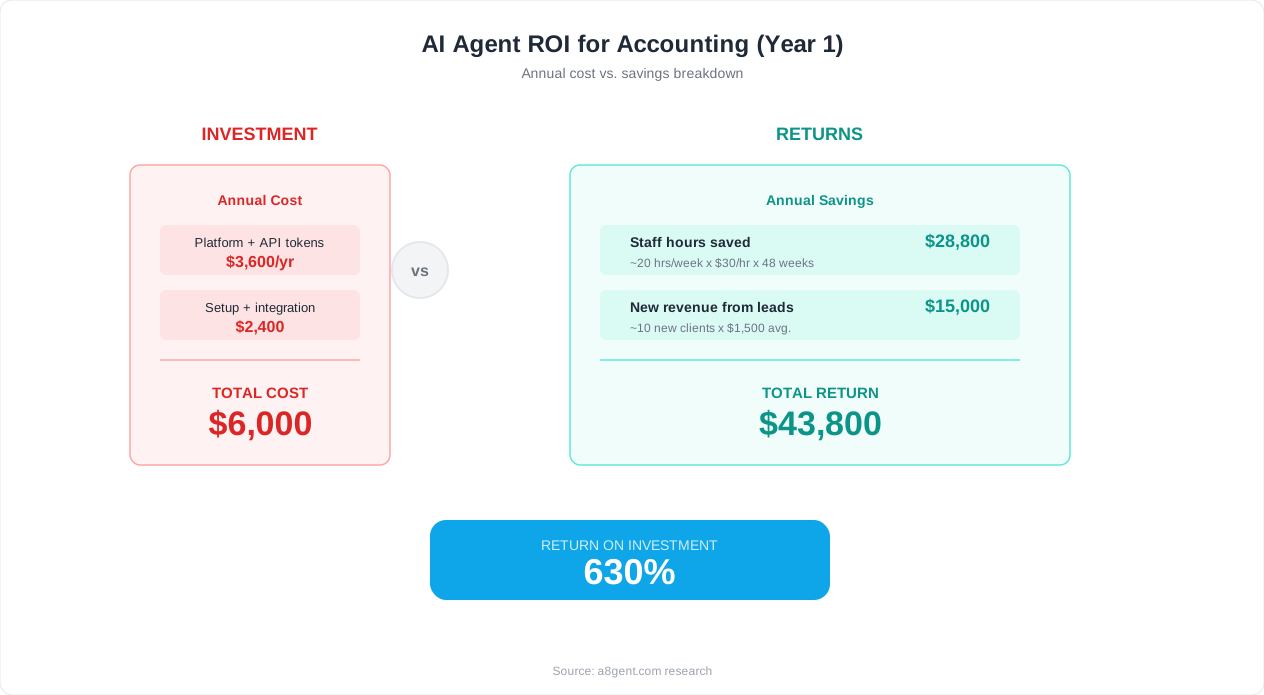
- Small businesses can deploy accounting AI agents for $79-$249/month and typically see full ROI within 2 weeks through labor savings and error reduction.
The State of AI in Accounting (2026): What Is Actually Possible
Accounting has always been a profession built on precision, rules, and repetition. Those same characteristics make it one of the industries most transformed by AI agents. In 2026, AI is not replacing accountants - but it is fundamentally changing what accountants spend their time doing.
Here is the reality: 70-85% of time spent on routine accounting tasks - data entry, categorization, reconciliation, and basic reporting - can now be handled by AI agents. This is not a prediction for the future. It is happening right now in accounting firms and business finance departments across the country.
The tasks that used to consume entire days - manually matching hundreds of bank transactions to invoices, categorizing each expense into the correct GL account, chasing down missing receipts, and compiling monthly reports - are being compressed into minutes. Not because the work disappears, but because AI agents do it faster, more accurately, and without getting tired.
For business owners who handle their own books, this means you can finally stop spending Sunday evenings catching up on bookkeeping. For small accounting firms, this means you can serve 3-5x more clients without adding staff. For in-house accountants, this means you can shift from data processor to strategic advisor - doing the work that actually impacts business decisions.
In this guide, we will cover exactly what AI agents can automate in accounting workflows today, which specific tools to use, how to set them up without any programming, and how to maintain the accuracy and compliance standards that accounting demands. We will focus on practical, deployable solutions - not theoretical possibilities.
If you want to know exactly which accounting tasks in your business are ready for AI automation, take our free assessment. It evaluates your current workflow, tools, and volume to recommend specific automation opportunities. Otherwise, let us start with what AI agents actually do in an accounting context.
What AI Agents Can Automate in Accounting Today
Let us be specific about what AI accounting agents can handle in 2026. Not everything in accounting is ready for automation - but more than you might think is.
Bank Transaction Categorization
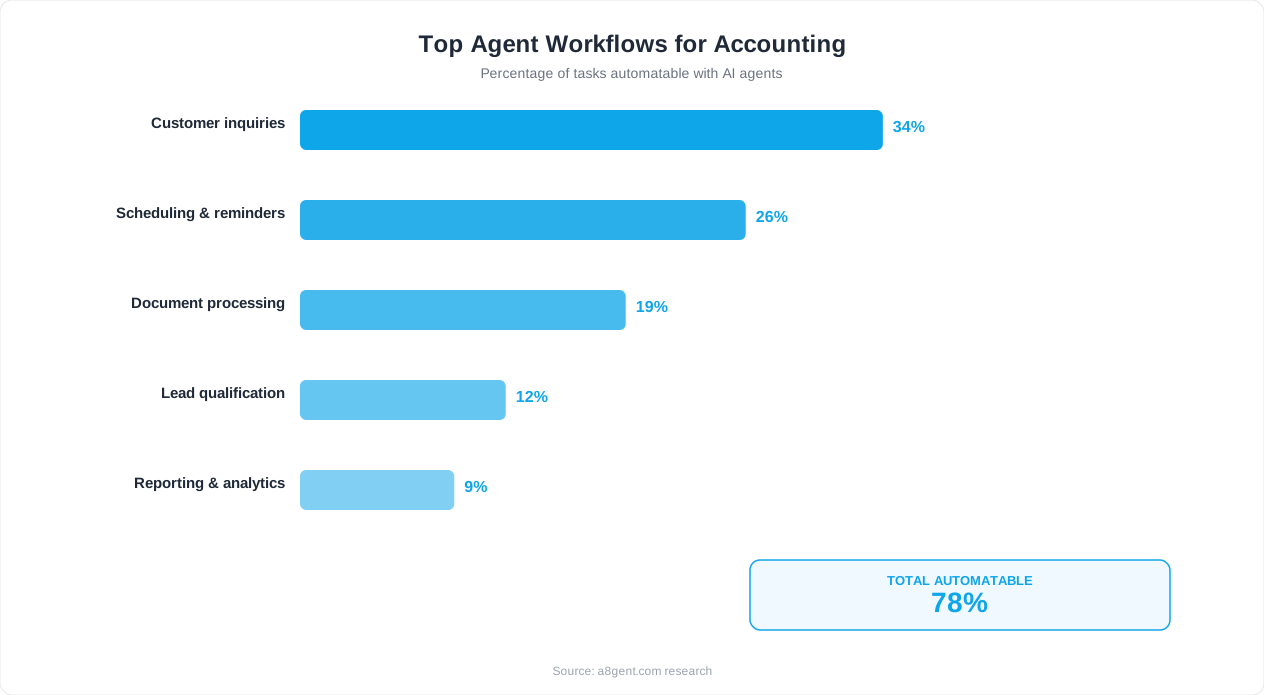
Every month, hundreds or thousands of bank transactions need to be categorized into the correct expense accounts. AI agents analyze each transaction's merchant name, amount, date, and description - then assign it to the correct category based on your chart of accounts and historical patterns. After an initial learning period of 2-3 weeks, accuracy typically reaches 95-98%. The agent handles routine transactions automatically and flags unusual ones for human review. This alone saves 5-12 hours/month for a typical small business.
Invoice-to-Payment Reconciliation
Matching bank debits to outstanding invoices is tedious but critical. AI agents pull your accounts payable records, compare them to bank transactions by amount, date, and vendor, and match them automatically. They handle partial payments, multiple invoices paid in one transaction, and cross-reference payment timing. Unmatched items get flagged for investigation rather than left dangling. This process that takes 4-8 hours monthly by hand takes an AI agent minutes.
Accounts Receivable Matching
The same reconciliation works on the receivable side. When payments come in, the AI matches them to outstanding invoices, identifies partial payments, handles early payment discounts, and flags overpayments or underpayments. This gives you real-time visibility into your AR status without anyone manually updating spreadsheets.
Expense Report Processing
Employees submit receipts and expense claims. The AI reads each receipt (even photographed paper ones), extracts merchant, date, amount, and line items, categorizes the expense against your policies, checks for policy violations (over-limit spending, non-approved categories), and routes for approval. Processed expenses flow directly into your accounting system without manual data entry.
Month-End Reconciliation
At month-end, all accounts need to balance. AI agents run through your accounts, identify discrepancies between bank statements and your books, flag unreconciled items, and generate a reconciliation report highlighting exceptions that need attention. What used to be a stressful multi-day process becomes a 30-minute exception review.
Financial Report Generation
Standard reports - profit and loss, balance sheet, cash flow statements, department spending breakdowns - can be generated automatically on schedule. The AI pulls from your accounting system, formats the data, calculates variances from prior periods, and highlights significant changes. You get a polished report without building it manually from scratch each time.
Sales Tax Calculation and Filing Prep
For businesses collecting sales tax across multiple jurisdictions, AI agents track which transactions are taxable, at what rate, in which jurisdiction. They prepare the data needed for tax filing, identify potential issues (nexus changes, rate updates), and flag transactions where taxability is uncertain. This removes one of the most error-prone manual processes in small business accounting.
For the full picture of how these connect to your operations workflow, see our operations automation guide.
Automating Daily Bookkeeping: A Practical Walkthrough
Daily bookkeeping - the ongoing task of recording, categorizing, and organizing financial transactions - is where AI agents deliver the most immediate impact. Here is how automated bookkeeping actually works in practice.
The Traditional Daily Bookkeeping Workflow
Without automation, daily bookkeeping involves: checking bank feeds for new transactions, categorizing each one, recording any cash transactions from POS systems, entering invoices received, recording payments made, matching receipts to transactions, and reconciling at the end of each day or week. For a business with 20-50 transactions per day, this takes 45-90 minutes daily.
The AI-Automated Version
With an AI agent running on Autonoly, here is what happens automatically: Bank transactions sync continuously throughout the day. As each transaction appears, the AI immediately categorizes it based on merchant name, amount pattern, and your historical preferences. Invoices arriving by email are extracted, validated, and entered as accounts payable. Receipts forwarded to a dedicated email address are matched to transactions. POS data syncs and is reconciled against bank deposits. End-of-day summaries are generated and sent to you or your bookkeeper.
What You Actually Do Each Day
Instead of 45-90 minutes of manual work, your daily bookkeeping involvement becomes: review the AI's end-of-day summary (5 minutes), check any flagged items that need human judgment (5-10 minutes), approve or adjust the 3-5% of transactions the AI was uncertain about (5 minutes). Total: 15-20 minutes instead of 45-90 minutes. That is a 70-80% time reduction while maintaining accuracy above 97%.
How the AI Learns Your Preferences
When you first deploy an accounting AI agent, it starts with general rules (matching common merchant names to standard categories). Over the first 2-3 weeks, it learns your specific preferences: that "AMZN" transactions are office supplies (not personal), that payments to "Smith Consulting" go under "Professional Services" not "Contractors," that your subscription to HubSpot is "Marketing Software" not "General Software." Each correction you make teaches the AI, and it remembers permanently. After a month, corrections become rare.
Handling Multi-Entity or Multi-Department Bookkeeping
For businesses with multiple entities, departments, or cost centers, AI agents can route transactions to the correct entity or department based on the bank account, merchant, or amount patterns. A construction company with 5 project accounts gets each transaction tagged to the right project automatically. A multi-location business gets expenses allocated to the correct location. This departmental routing - which is extremely tedious manually - is trivial for an AI that processes rules consistently every time.
Integration with Your Existing Stack
The AI bookkeeping agent connects to your existing accounting software (QuickBooks, Xero, FreshBooks) and works within it - not as a replacement. Your chart of accounts, vendor list, and existing records stay exactly where they are. The agent simply does the data entry work faster and more accurately than manual input. You keep full control and visibility in your accounting platform of choice.
Invoice Reconciliation with AI: End Unmatched Transactions
Bank reconciliation and invoice matching are among the most time-consuming accounting tasks - and among the most impactful to automate. Here is how AI agents tackle reconciliation and why it works so well.
Why Reconciliation Is Hard for Humans
Reconciliation requires comparing two data sources (typically bank statements vs accounting records) and matching transactions. The difficulty comes from: timing differences (payments clear on different days than they are recorded), amount mismatches (partial payments, bank fees deducted, currency conversion), naming inconsistencies (the vendor's name in your system does not match what appears on the bank statement), and volume (matching 500+ transactions per month is mind-numbing and error-prone). These are exactly the problems AI agents excel at solving.
How AI Reconciliation Works
The AI agent pulls transactions from both sources: your bank statements and your accounting records. It then applies multiple matching strategies simultaneously. Exact match: same amount, same date, same or similar description - auto-matched immediately. Fuzzy match: same amount within a few days, slightly different description (like "ADOBE INC" vs "Adobe Systems") - matched with high confidence. Partial match: a bank transaction that equals the sum of multiple invoices (batch payment) - the AI identifies the combination and matches all related records. Reverse match: credits, refunds, and returns are matched to their original transactions.
Handling Common Reconciliation Challenges
Bank fees and charges: The AI recognizes fee patterns (monthly service charges, per-transaction fees, wire transfer fees) and auto-categorizes them without needing a matching invoice. Timing differences: When an invoice is dated the 30th but clears the bank on the 2nd of the next month, the AI looks across a configurable date window to find matches. Batch deposits: When a payment processor (like Stripe or Square) batches multiple customer payments into one bank deposit, the AI can decompose the deposit into individual payments and match each one. Foreign currency: Amount discrepancies from exchange rate differences are handled by flagging the variance and auto-categorizing it as currency gain/loss.
The Exception Report
After the AI matches everything it confidently can, it generates an exception report: the short list of transactions that could not be matched. These are the items that genuinely need human investigation - missing invoices, unexpected payments, potential errors, or unusual transactions. Instead of reviewing 500 transactions to find the 15 that need attention, you only see the 15. This is the real power of AI reconciliation: it is not just faster at matching - it is a filter that surfaces only what actually needs your brain.
Real-World Results
Businesses using AI reconciliation on platforms like Autonoly report: 85-95% of transactions auto-matched with zero human involvement. Reconciliation time reduced from 6-12 hours/month to 1-2 hours/month. Unmatched transaction backlogs eliminated within the first month. Month-end close accelerated by 2-4 days. Finance teams redirecting freed time to analysis and advisory work.
For a detailed ROI projection specific to your reconciliation volume, use our ROI calculator. Input your monthly transaction count and current time spent on reconciliation for a personalized savings estimate.
Best AI Tools for Accounting Automation (2026)
The market for AI accounting tools has matured significantly. Here are the best options depending on your role, volume, and technical comfort level.
Autonoly - Best All-in-One for Business Owners ($79-$249/month)
Autonoly offers dedicated accounting automation templates covering invoice processing, expense categorization, bank reconciliation, and payment reminders. The non-technical interface makes it ideal for business owners who handle their own books or have a small accounting team. It connects to all major accounting platforms (QuickBooks, Xero, FreshBooks) and offers pre-configured workflows you can deploy in under 2 hours. Best for: businesses wanting comprehensive accounting automation without hiring a developer or learning complex software.
Vic.ai - Best for High-Volume AP Automation ($500-$2,000/month)
Vic.ai is purpose-built for accounts payable automation with AI at its core. It processes invoices, learns your GL coding patterns, handles approval routing, and integrates with enterprise ERPs. Their AI achieves 99%+ accuracy after a short training period because it is specifically designed for financial documents. Best for: mid-size businesses processing 500+ invoices/month or accounting firms managing multiple clients' AP.
Botkeeper - Best for Accounting Firms ($500-$1,500/month per client)
Botkeeper combines AI with human bookkeepers to deliver a managed bookkeeping service. The AI handles routine transactions while human bookkeepers review exceptions and complex items. It is designed specifically for accounting firms that want to scale their bookkeeping practice without proportionally scaling headcount. Best for: accounting firms serving multiple small business clients who want to increase capacity.
Dext + Accounting Software - Best Budget Option ($24-$60/month)
Dext (formerly Receipt Bank) handles receipt and invoice data extraction, then syncs directly with QuickBooks or Xero. While it is not a full AI agent platform, it automates the most painful part of bookkeeping - manual data entry from documents. Combined with your accounting software's built-in rules, it covers basic automation at a very accessible price point. Best for: solopreneurs and micro-businesses with simple books who want document automation without a large platform investment.
How to Choose
Processing under 100 invoices/month with simple books: Dext or Autonoly starter plan. Processing 100-500 invoices/month and wanting comprehensive automation: Autonoly Growth plan. Accounting firm managing multiple clients: Botkeeper or Autonoly with multi-entity features. Enterprise with 500+ invoices/month and complex GL coding: Vic.ai. Take our assessment for a personalized platform recommendation based on your specific accounting workflow and volume.
Maintaining Accuracy and Compliance with AI Accounting
Accounting requires precision. Errors have real consequences - from tax penalties to audit failures to bad business decisions based on inaccurate data. Here is how to deploy AI agents while maintaining the accuracy and compliance standards your business requires.
The Accuracy Reality
AI accounting agents in 2026 achieve 95-99% accuracy on transaction categorization after a 2-3 week learning period. For invoice data extraction, accuracy is 97-99% on standard digital documents. For reconciliation matching, accuracy exceeds 99% for exact-amount matches and 95-97% for fuzzy matches. In context: this is equal to or better than typical human accuracy on repetitive data entry tasks (humans average 96-97% accuracy on manual categorization and 98% on data entry when fresh - but accuracy degrades over time and with fatigue).
Building in Safeguards
Even at 97-99% accuracy, you need safeguards for the 1-3% that is wrong. Here is the multi-layer approach that accounting professionals recommend: Layer 1 - Confidence thresholds: the AI only auto-processes transactions where it is 90%+ confident in the categorization. Anything below goes to human review. Layer 2 - Rule-based validation: amounts must match expected ranges, categories must be valid for the vendor type, and obvious errors (negative amounts where positives are expected) get caught automatically. Layer 3 - Periodic human review: spot-check 10-20% of auto-processed transactions weekly. This catches systematic errors that might affect multiple transactions. Layer 4 - Month-end reconciliation review: even with daily automation, maintain a human sign-off on the monthly reconciliation before closing the books.
Audit Trail and Documentation
Proper AI accounting setup maintains a complete audit trail: every automated action is logged with timestamp, the original data source, the AI's reasoning (why it categorized this way), and any human overrides. This means your books are more auditable with AI, not less - because every decision has a documented rationale. When tax season or an audit comes, you have better documentation than most businesses doing everything manually.
Tax Compliance Considerations
AI agents do not file your taxes or make tax elections - those decisions require qualified human judgment. What they do is keep your underlying data clean, categorized, and ready for tax preparation. When your CPA or tax preparer needs your annual data, it is already organized correctly - reducing preparation time and the chance of errors that trigger IRS scrutiny. For sales tax, AI agents track nexus obligations and flag when your obligations may have changed based on transaction patterns.
Industry Regulations
If your business is in a regulated industry (healthcare, financial services, government contracting), confirm that your chosen AI platform meets your compliance requirements. Key questions: Where is data stored? Is it SOC 2 compliant? Does it meet HIPAA requirements if applicable? Can it handle GAAP-specific categorization rules? Can you restrict which data the AI accesses? Most enterprise-ready platforms address these requirements - but ask specifically before deploying.
For a compliance-focused setup recommendation, include your industry and regulatory requirements in our assessment tool. It will flag any platform compatibility issues and recommend tools that meet your specific compliance needs.
Getting Started: Deploy Your First Accounting Agent This Week
Ready to bring AI into your accounting workflow? Here is the fastest path from reading this article to having your first accounting agent running and saving you time.
Day 1: Identify Your Biggest Time Sink (15 minutes)
Which accounting task consumes the most hours relative to its value? For most businesses, the answer is one of: bank transaction categorization (daily tedium), invoice processing and data entry (repetitive and error-prone), bank reconciliation (monthly headache), or expense report processing (chasing receipts and approvals). Pick the one that causes you the most pain. That is your first automation target.
Day 1: Choose Your Platform (15 minutes)
Based on your volume and technical comfort: under 100 invoices/month and want simplicity, choose Autonoly. Want maximum flexibility at lowest cost, choose a self-hosted n8n setup. Want a proven document extraction tool at low cost, start with Dext. Not sure? Take our assessment for a personalized recommendation.
Day 2: Connect Your Systems (30 minutes)
Sign up for your chosen platform and connect your accounting software (QuickBooks, Xero, etc.) and your bank feeds. Most connections are simple OAuth flows - click, log in, authorize. Also connect your email if you are automating invoice processing. Verify the connections are live by checking that recent transactions appear in the platform.
Day 2-3: Configure Your First Workflow (1-2 hours)
If you chose transaction categorization: import your chart of accounts, set up category rules for your top 20 vendors (the 80/20 principle - 20% of vendors likely account for 80% of transactions), and enable the auto-categorization agent. If you chose invoice processing: set up email detection rules, connect your accounting software for bill creation, and configure approval routing. If you chose reconciliation: connect both your bank feed and accounting data, configure matching rules and tolerance levels.
Day 3-7: Monitor and Train (15 min/day)
For the first week, review the AI's work daily. Correct any miscategorizations (this trains the AI for future accuracy). Verify invoice data extraction is accurate. Check reconciliation matches for false positives. Most businesses see accuracy jump from 85% on day 1 to 95%+ by day 7 as the AI learns your specific patterns and preferences.
Week 2 and Beyond: Trust and Expand
After a week of clean performance, reduce your daily reviews to every-other-day, then weekly spot-checks. Start planning your second automation - the next-biggest time sink in your accounting workflow. Within 30 days, you can realistically have 3 accounting workflows automated: categorization, invoice processing, and reconciliation. Combined savings: 15-30 hours per month.
Important: Keep Your Accountant in the Loop
If you work with an external accountant or CPA, inform them about your automation setup. Share access to the AI's activity logs so they can verify accuracy during reviews. Most accountants are enthusiastic about clients using AI for data entry - it means cleaner books when they do tax prep and advisory work. Some may even have platform recommendations based on their other clients' experiences.
The path to automated accounting starts with one workflow. Deploy it, prove the value, and expand. Use our ROI calculator to project your 12-month savings and build the case for expanding your automation investment.
The Future of AI in Accounting: What to Expect in 2026-2027
AI accounting is evolving rapidly. Understanding where it is heading helps you make smarter investment decisions today and positions your business ahead of competitors who are slower to adopt.
Real-Time Financial Visibility
By late 2026, expect AI agents to provide truly real-time financial dashboards. Not daily or weekly - real-time. As each transaction occurs, it is immediately categorized, reconciled, and reflected in your financial position. You will know your exact cash position, outstanding receivables, and upcoming payables at any moment - not after month-end close. This changes how business owners make decisions: from retrospective analysis to proactive, real-time financial management.
Predictive Financial Intelligence
AI agents are moving beyond recording what happened to predicting what will happen. Expect agents that forecast cash flow based on historical patterns, predict which customers are likely to pay late (so you can follow up proactively), identify spending trends before they become problems, and flag financial anomalies that could indicate fraud, waste, or errors. This predictive layer transforms accounting from a compliance function into a strategic advantage.
Natural Language Financial Queries
Instead of running reports or digging through your accounting software, you will ask your AI agent questions in plain English: "How much did we spend on marketing last quarter compared to the same period last year?" "Which customers have outstanding invoices over 60 days?" "What's our runway if revenue stays flat?" The agent queries your financial data and responds with answers, charts, and recommendations - no report building required.
Automated Tax Optimization
AI agents will increasingly help with tax planning - not just compliance. They will identify deductions you are missing, suggest timing strategies for income and expenses, flag when entity structure changes might save taxes, and prepare scenario analyses for major financial decisions. Human CPAs will still make the final calls, but AI will ensure no opportunity is missed.
The Impact on Accounting Careers
For accountants and bookkeepers reading this: AI is not replacing you - it is upgrading your role. The future accountant spends 20% of their time on data and compliance (AI handles the rest) and 80% on advisory, strategy, and client relationships. Firms that embrace AI will serve more clients at higher margins. Those that resist will face pricing pressure from automated alternatives. The firms thriving in 2027 are the ones building their AI capabilities now.
What to Do Today
Start with one automated workflow (categorization or invoice processing). Build confidence and institutional knowledge around AI in your accounting practice. This positions you to adopt more sophisticated capabilities as they become available, rather than scrambling to catch up later. The businesses and firms that start now will have cleaner data, proven workflows, and operational confidence by the time advanced features arrive - giving them a permanent head start over late adopters.
Ready to start? Take our assessment to find your optimal starting point, or explore our operations automation guide to see how accounting automation fits into your broader business efficiency strategy.
If your books are the bottleneck rather than the invoices, see the dedicated guide to AI agents for bookkeeping.
FAQ
Can AI agents replace my accountant or bookkeeper?
AI agents replace the manual data work that consumes most of a bookkeeper's time - transaction categorization, data entry, reconciliation, and basic reporting. They do not replace the judgment, advisory, and strategic thinking that a good accountant provides. Most businesses find they need fewer bookkeeping hours (saving money) while keeping their accountant for tax strategy, financial advice, and complex decisions.
How accurate is AI for bookkeeping and categorization?
After a 2-3 week learning period, AI agents achieve 95-99% accuracy on transaction categorization. For invoice data extraction, accuracy is 97-99% on standard digital documents. These rates match or exceed typical human accuracy on repetitive data entry tasks, which averages 96-97% and degrades with fatigue. Plus, AI handles the easy 95% automatically, letting humans focus on the tricky 5%.
Will AI accounting tools work with my existing software?
Yes. AI accounting agents are designed to integrate with existing platforms - not replace them. They connect to QuickBooks Online, Xero, FreshBooks, Sage, and most cloud accounting tools through standard API integrations. Your chart of accounts, vendor records, and historical data stay exactly where they are. The AI simply automates the data entry and processing that feeds into your existing system.
Is my financial data secure with AI accounting tools?
Reputable platforms use bank-level encryption (256-bit AES), maintain SOC 2 Type II compliance, and follow strict data handling policies. Your data is encrypted in transit and at rest, access is logged and auditable, and most platforms offer data residency options. Always verify SOC 2 compliance and review the platform's security documentation before connecting financial systems.
How long does it take to set up AI accounting automation?
Basic setup takes 1-2 hours: connecting your accounting software, bank feeds, and configuring initial rules. The learning period (where the AI adapts to your specific categorization patterns) takes 2-3 weeks of light monitoring and corrections. After that, the system runs autonomously with weekly spot-checks. Full deployment across multiple accounting workflows typically takes 30-45 days.
What happens during an audit if AI did the bookkeeping?
AI-maintained books are typically more audit-friendly because every transaction has a documented categorization rationale, complete timestamp history, and full audit trail. The AI logs why it made each decision, which is better documentation than most manual bookkeeping provides. Auditors can review the AI's logic and verify accuracy systematically rather than relying on human memory of why things were categorized a certain way.
Can AI handle complex accounting situations like accruals and deferrals?
For standard accruals and deferrals that follow predictable patterns (monthly subscription recognition, prepaid expense amortization), AI agents handle these well with proper configuration. For complex judgment calls - impairment testing, revenue recognition for multi-element arrangements, or unusual transaction treatment - human accountant oversight is still necessary. The AI handles the routine; humans handle the complex.
How much does AI accounting automation cost?
Platforms range from $24/month (Dext for document extraction) to $249/month (comprehensive automation platforms like Autonoly). Most small businesses find the $79-Free-$149/month range covers their needs. At 100 transactions/month with 15 minutes saved per transaction at $30/hour labor, monthly savings are $750 - making even the most expensive option a clear ROI win within the first month.