AI Agents for Freelancers: Automate Admin and Focus on Billable Work (2026)
Freelancers lose 15-20 hours per week to non-billable admin work: invoicing, follow-ups, scheduling, proposals, and bookkeeping. AI agents handle these tasks autonomously so you can reclaim that time for revenue-generating work or personal life.
10+ years shipping production ML across TensorFlow, PyTorch, AWS, and GCP. Ships every A8gent agent before it becomes a lesson. GitHub
- The average freelancer spends 15-20 hours per week on non-billable admin tasks - AI agents can automate 70-80% of this work, effectively adding 10-15 billable hours back to your week.
- Client communication agents handle follow-ups, meeting scheduling, project updates, and payment reminders automatically - maintaining relationships without you writing every email.
- Proposal and contract automation lets you respond to opportunities within hours instead of days, dramatically improving your win rate while reducing the effort per proposal by 80%.
- Financial agents automate invoicing, expense tracking, tax categorization, and payment reconciliation - eliminating the month-end bookkeeping scramble most freelancers dread.
- Starting with one admin agent costs $30-100/month and typically pays for itself within the first week through recovered billable hours and faster payment collection.
The Freelancer's Admin Problem: Why You Are Working for Free
Here is the uncomfortable math that every freelancer eventually confronts. You bill 40 hours per week. But you actually work 55-60 hours. Those extra 15-20 hours are consumed by tasks that no client will ever pay you for: writing proposals, chasing invoices, scheduling meetings, managing your calendar, updating your portfolio, doing bookkeeping, writing follow-up emails, onboarding new clients, filing taxes, and dozens of other administrative tasks that keep your business running but generate zero revenue.
At a rate of $100/hour, those 15 unpaid admin hours represent $1,500/week in opportunity cost - or $78,000/year you could be earning but are not. At $150/hour, it is $117,000. At $200/hour, the number becomes genuinely painful to think about. And yet most freelancers accept this as the cost of doing business. You chose freedom over a corporate job, and admin is the price you pay.
In 2026, that trade-off is no longer necessary. AI agents can handle 70-80% of your admin work autonomously. Not "help you do it faster" - actually do it, start to finish, without your involvement. Send the invoice. Write the follow-up email. Schedule the meeting. Categorize the expense. Draft the proposal. Update the project tracker. All while you focus on the creative, strategic, high-value work that clients actually hire you for.
This is not about becoming a robot or losing the personal touch that makes freelancing work. It is about recognizing that most admin tasks follow predictable patterns that an AI can replicate perfectly, freeing you to bring your full creative energy to the work that matters. Your clients do not care whether you personally typed the meeting confirmation email. They care that you show up prepared and deliver exceptional work.
In this guide, we will cover the specific admin workflows that AI agents handle best for freelancers, the tools to use, how to set them up without losing your personal brand voice, and the real numbers on time and money saved. Whether you are a designer, developer, writer, consultant, photographer, or any other type of independent professional, you will find your biggest time-sinks addressed here. Start by taking our free assessment to identify which admin tasks are costing you the most billable hours.
AI Agents for Client Communication and Follow-Ups
Client communication is the single largest admin time-sink for most freelancers. It is also the most dangerous to neglect - slow responses lose deals, missed follow-ups lose clients, and dropped threads damage your reputation. AI agents solve both problems simultaneously: they respond faster than you ever could while being more consistent than you could manage across dozens of active relationships.
What client communication agents handle:
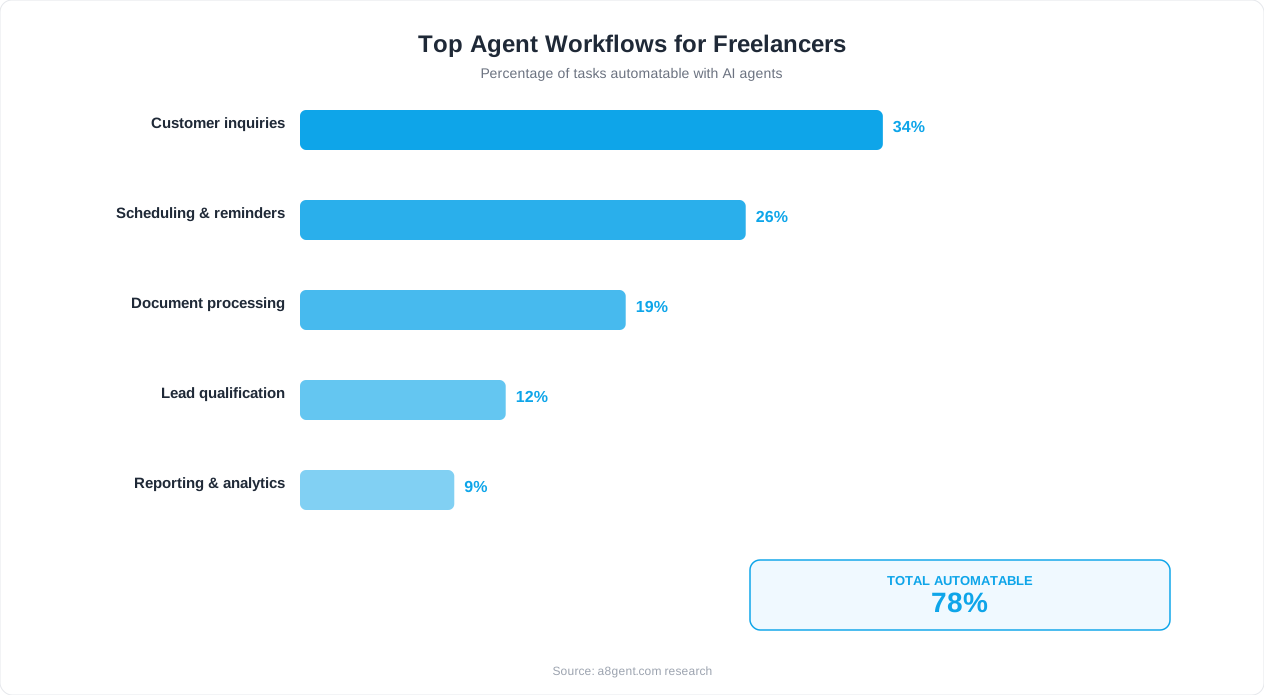
- Initial inquiry responses: When a potential client reaches out through your website, email, or LinkedIn, the agent sends a personalized response within minutes (not hours or days). It acknowledges their message, asks qualifying questions, and provides relevant portfolio examples - all in your voice and tone.
- Meeting scheduling: Instead of the 4-5 email back-and-forth to find a meeting time, the agent handles the entire dance. It checks your calendar, proposes times, handles timezone conversion, sends confirmations, and adds calendar events with agenda and meeting links.
- Project updates: For ongoing projects, the agent sends regular status updates to clients at intervals you define (weekly, bi-weekly). It pulls information from your project management tool and writes a clear, professional update email.
- Follow-up sequences: After sending a proposal, the agent follows up at optimal intervals (3 days, 7 days, 14 days) with increasingly direct but always professional messages. No more deals dying because you forgot to follow up.
- Payment reminders: When an invoice becomes overdue, the agent sends escalating payment reminders on a schedule you define. Friendly at first, more direct over time. This eliminates the emotional discomfort most freelancers feel about chasing money.
Maintaining your personal brand voice:
The biggest concern freelancers have is "will it sound like me?" The answer is yes - if you set it up correctly. Modern AI agents let you provide writing samples, tone guidelines, and specific phrases you use. Feed the agent 10-20 of your past client emails, tell it your communication style (casual professional, formal, friendly, direct), and it will generate messages that sound authentically like you. Most clients cannot tell the difference.
The key is to be specific: "Always address clients by first name. Use short paragraphs. End emails with a specific next step, not vague pleasantries. Never use exclamation marks more than once per email. Sign off with 'Best,' followed by just my first name." The more specific your instructions, the more authentic the output.
When to keep communication personal:
Not everything should be automated. Difficult conversations, creative feedback discussions, scope negotiations, and relationship-deepening moments should still be you. Use the agent for the 80% that is routine (scheduling, updates, reminders, acknowledgments) and save your personal energy for the 20% that actually requires your judgment and emotional intelligence. Platforms like Lindy make it easy to define exactly which types of messages the agent handles versus which get routed to you.
Automating Proposals, Contracts, and Client Onboarding
Writing proposals is one of the most time-consuming and lowest-conversion activities in freelancing. The average freelancer spends 2-4 hours per proposal, sends 5-10 proposals per month, and converts 20-30% of them. That is 10-40 hours per month for 1-3 new clients. AI agents dramatically improve both the time investment and the conversion rate.
AI-powered proposal generation:
An AI agent can generate a complete, customized proposal in 10-15 minutes instead of 2-4 hours. Here is how: you provide the agent with your proposal template, your service offerings and pricing, your portfolio of past work, and the information about the prospective client. When a new opportunity comes in, you give the agent the brief (or it extracts it from the inquiry email), and it generates a full proposal that includes a personalized understanding of their needs, relevant case studies from your portfolio, a detailed scope of work, timeline, pricing, and terms.
You review it for 5-10 minutes, make any adjustments, and send. The total time investment drops from 3 hours to 20 minutes, meaning you can respond to opportunities the same day they arrive instead of taking 3-5 days. This speed alone can double your conversion rate - the first freelancer to respond with a thoughtful proposal often wins.
Contract automation:
Once a proposal is accepted, the agent generates the appropriate contract by filling in your template with the agreed terms: scope, timeline, payment schedule, revision limits, kill fee, IP rights, and any project-specific clauses. It sends the contract via your e-signature platform (DocuSign, HelloSign, PandaDoc), tracks the signature status, and follows up if the client has not signed within 48 hours.
Client onboarding sequences:
New client onboarding involves a predictable series of steps: welcome email, questionnaire, access request for their systems, kickoff meeting scheduling, project setup in your management tool, and first milestone planning. An AI agent handles this entire sequence automatically once the contract is signed. The client gets a seamless, professional onboarding experience while you have done zero manual work.
This matters because most freelancers drop the ball on onboarding when they are busy. You sign a new client during a crunch period, the onboarding is sloppy, and the client relationship starts on a weak note. With an automated onboarding agent, every client gets the same excellent experience regardless of how busy you are.
The compound effect on revenue:
Consider the math. You currently send 6 proposals per month, convert 2 (33%), and spend 18 hours on proposals. With an AI agent, you can send 15 proposals per month in the same time, convert 5-6 (with the speed advantage improving conversion to 35-40%), and spend only 5 hours total on proposals. That is 3-4 extra clients per month from the same time investment. If your average project is $5,000, that is $15,000-$20,000 in additional monthly revenue. Use our ROI calculator to model the specific numbers for your freelance practice.
AI Agents for Freelance Invoicing, Expenses, and Bookkeeping
Financial admin is the task most freelancers procrastinate on until it becomes a crisis. Invoices go out late (delaying payment by weeks). Expenses pile up uncategorized until tax time creates a week-long emergency. Receipts get lost. Revenue tracking happens in your head instead of a system. AI agents fix all of this by making financial management continuous and automatic rather than a dreaded monthly chore.
Automated invoicing:
An AI invoicing agent monitors your project milestones, time tracking, or completion triggers and generates invoices automatically. When you mark a milestone complete in your project tool, the agent creates an invoice with the correct line items, applies your payment terms, sends it to the client, and starts the payment tracking cycle. No more "I finished the project two weeks ago and forgot to invoice." No more spending Sunday evening creating invoices for the past month's work.
The agent also handles recurring invoices for retainer clients (monthly on the 1st, quarterly, whatever your schedule), adjusts amounts based on usage or hours logged, and can even split invoices when a project has multiple payment milestones. Integration with payment processors like Stripe, PayPal, or Wise means clients can pay immediately, and the agent reconciles the payment against the invoice automatically.
Expense tracking and categorization:
Connect your business bank account or credit card, and the agent categorizes every transaction in real time. Software subscriptions, travel, meals, office supplies, professional development - each expense is tagged with the correct category for tax purposes. When it encounters an ambiguous transaction, it asks you once and remembers your answer for all future similar transactions. By the time tax season arrives, your books are already clean and categorized.
For freelancers who have project-specific expenses (materials for a client project, stock photos, subcontractor costs), the agent can allocate expenses to specific projects, making it easy to track true profitability per client and per project.
Tax preparation:
The agent tracks your quarterly estimated tax obligations based on year-to-date income, alerts you before quarterly payment deadlines, and can even generate the payment vouchers. At year-end, it produces a clean P&L statement, categorized expense summary, and all the numbers your accountant needs - eliminating the $500-$1,000 many freelancers pay for basic bookkeeping services.
Cash flow forecasting:
Based on your outstanding invoices, recurring client payments, and historical patterns, the agent forecasts your cash flow 30-60 days ahead. It warns you if a lean period is coming so you can increase prospecting or offer existing clients additional services. This proactive visibility prevents the feast-famine cycle that plagues freelancing.
For detailed guidance on automating your invoicing workflow specifically, see our invoice processing automation guide. Or explore Autonoly for an all-in-one platform that handles invoicing alongside your other freelance automations.
AI Agents for Freelance Project and Time Management
Managing multiple client projects simultaneously is one of the hardest aspects of freelancing. Deadlines overlap, priorities shift, and it is easy to lose track of where each project stands. AI project management agents act as your operations coordinator - tracking everything, flagging what needs attention, and keeping all your projects moving without you maintaining it all in your head.
Automated time tracking:
If you bill hourly (or need to track time for project estimates), manual time tracking is notoriously inaccurate. People forget to start timers, forget to stop them, or round up and down in ways that cost them money. An AI agent can track your time passively: it monitors which applications you are using, which documents you have open, which client Slack you are active in, and logs time to the appropriate project automatically. At the end of each day, you review a summary and make corrections instead of trying to reconstruct your day from memory.
Deadline and milestone management:
The agent maintains your project timeline and proactively manages deadlines. Three days before a deliverable is due, it checks your progress and alerts you if you are at risk. It also notifies clients proactively if a deadline needs to shift (with your approval), preventing the last-minute scramble email that damages trust. For recurring deliverables (monthly reports, weekly content batches), the agent auto-creates tasks in your project tool and tracks them through completion.
Priority recommendations:
When you start your day, the agent tells you exactly what to work on. It considers deadlines, client importance, task dependencies, and your energy patterns (if you tell it you do creative work best in the morning). Instead of spending 20 minutes deciding where to start, you open your computer and immediately begin the most impactful work. When priorities conflict - two deadlines on the same day - the agent recommends which to prioritize and can even draft a message to the lower-priority client explaining a brief delay.
Scope creep detection:
One of the most insidious problems in freelancing is scope creep - clients gradually requesting more work than the contract covers, and you accommodating because it seems small in the moment. An AI agent tracks requests against the original scope document and flags when cumulative additions exceed a threshold you set (say, 10% beyond the contracted scope). It can even draft a polite scope adjustment email for your review, making it easier to have the conversation before resentment builds.
End-of-project wrap-up:
When a project completes, the agent handles the administrative wrap-up: final invoice, deliverable handoff email, request for testimonial (timed 7 days after delivery when satisfaction is highest), project archive in your systems, and notes on what went well and what you would change. This systematic close-out process ensures nothing falls through the cracks and builds your testimonial library passively over time.
AI Agents for Freelance Marketing and Lead Generation
Most freelancers rely on referrals and inbound inquiries, which creates an unpredictable pipeline. When projects are flowing, you have no time to market. When work dries up, you scramble. AI agents maintain your marketing presence and lead generation consistently, regardless of how busy you are with client work.
Content creation and distribution:
The agent creates and distributes content that establishes your expertise and attracts potential clients. Based on your niche, past work, and target audience, it generates LinkedIn posts, Twitter threads, blog articles, newsletter editions, and portfolio updates. You provide the raw material (a quick voice note about a recent project insight, a screenshot of results, a lesson learned) and the agent transforms it into polished content formatted for each platform.
For freelancers who say "I know I should post on LinkedIn but never find the time" - this is the solution. The agent maintains a consistent 3-5 posts per week cadence without you writing a single word beyond occasional voice notes or bullet points. Over months, this compounds into significant visibility and inbound lead flow.
Inbound lead qualification:
When inquiries arrive (via your website form, email, or social media DMs), the agent immediately responds, asks qualifying questions, and scores the lead based on your criteria: budget, project type, timeline, fit with your expertise. High-scoring leads get prioritized and you are notified immediately. Low-scoring leads receive a polite redirect (perhaps to your courses, a resource page, or a referral to a more appropriate freelancer). This ensures you spend your limited sales time only on opportunities likely to convert.
Network maintenance:
The agent maintains relationships with past clients and professional contacts by sending periodic check-ins, congratulating them on professional milestones (job changes, company news), and sharing relevant content. This keeps you top-of-mind for referrals without the burden of manually tracking and reaching out to hundreds of contacts. Every 4-6 weeks, past clients receive a personalized touchpoint from you that costs zero time.
Portfolio and case study updates:
As you complete projects, the agent prompts you for key metrics and outcomes, then generates a case study or portfolio entry. It formats the content for your website, creates social media posts highlighting the results, and updates your proposal templates with fresh examples. Your portfolio stays current without dedicated "portfolio update days" that most freelancers never schedule.
The cumulative effect of consistent marketing automation is transformative. Freelancers who implement content and lead gen agents report 40-60% more inbound inquiries within 90 days, with higher quality leads because the content pre-qualifies them. Combine this with the proposal automation covered earlier, and you have a self-sustaining client acquisition machine that works while you sleep. See which specific agent platforms handle freelance marketing best in our Lindy review.
Best AI Agent Tools for Freelancers: Costs and Recommendations (2026)
The freelance AI agent market has specific requirements that differ from enterprise tools. You need affordability (no $500/month platforms), simplicity (no time for complex setup), flexibility (your workflows are unique), and reliability (one missed client email can lose a relationship). Here are the platforms best suited to freelancers in 2026.
Lindy - Best all-in-one for solo freelancers
Lindy excels for freelancers because it handles diverse tasks from a single platform. One Lindy agent manages your email triage and responses. Another handles scheduling. A third does your social media. You describe each agent's job in plain English, and it runs. The interface is designed for non-technical users, the pricing scales with usage (you pay for what you use rather than enterprise-tier flat fees), and the memory feature means your agents get better at mimicking your style over time. Starting cost: approximately $49/month for a robust freelance setup.
Autonoly - Best for multi-agent workflows
If you want multiple agents coordinating together (lead comes in -> qualify -> draft proposal -> schedule call -> onboard), Autonoly handles the orchestration elegantly. It is particularly strong for freelancers who have systematized their business processes and want end-to-end automation from prospect to paid invoice. The multi-agent coordination means you can build a complete "virtual operations team" without managing each piece independently. Starting cost: SMB tier accommodates most freelance volumes.
Specialized tools by function:
- Invoicing: Agents built on top of FreshBooks, Wave, or Xero handle invoice generation, sending, and follow-up. Cost: $15-$40/month (often included in your accounting software subscription).
- Scheduling: Calendly with AI enhancements, or agent-powered scheduling through Lindy. Cost: $12-$20/month.
- Proposals: AI proposal generators like Qwilr or PandaDoc with agent integrations. Cost: $25-$65/month.
- Social media: Content agents built into platforms like Buffer or Taplio (for LinkedIn-focused freelancers). Cost: $20-$50/month.
Budget-friendly starter stack ($50-$100/month total):
If you are just starting with AI automation and want maximum impact for minimum spend: use Lindy ($49/month) for email management, follow-ups, and scheduling, plus your existing invoicing tool's automation features (often free or included). This covers 60-70% of your admin burden for under $50/month. Add specialized tools as your saved time generates additional revenue to reinvest.
Full automation stack ($150-$300/month total):
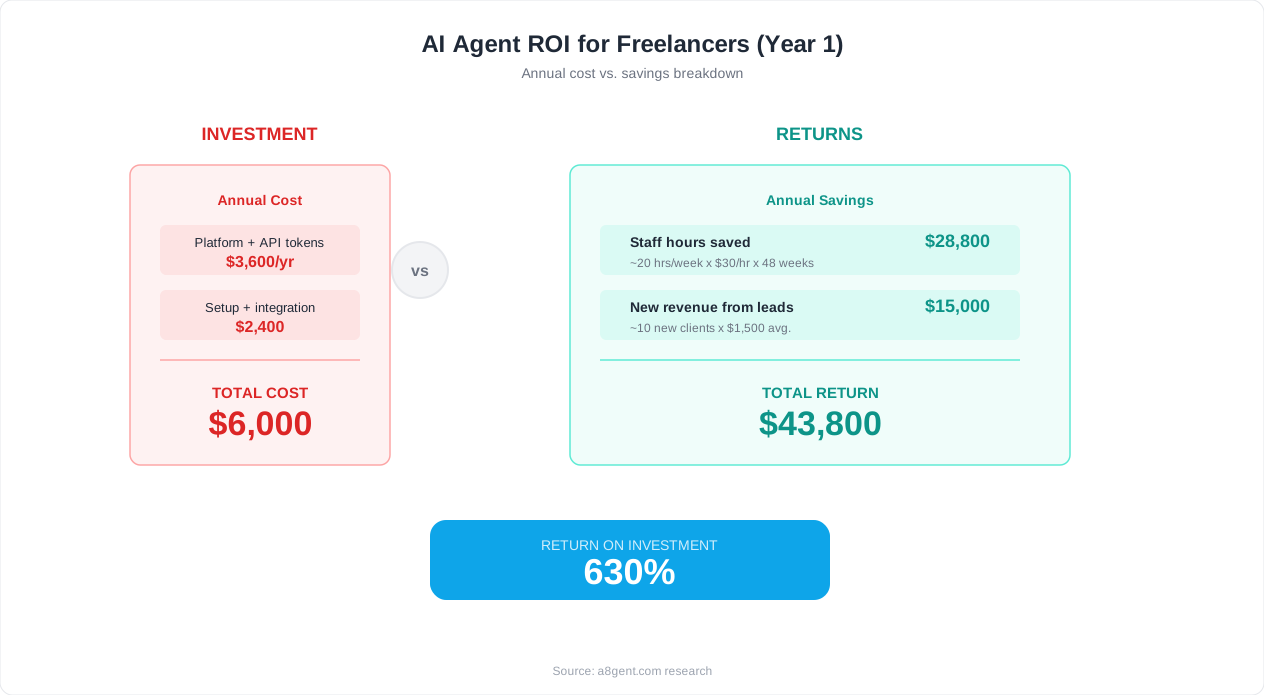
For established freelancers earning $10,000+/month who want comprehensive automation: Autonoly or Lindy for core workflows ($49-$99), dedicated invoicing and bookkeeping automation ($30-$50), social media and content agents ($25-$50), and CRM/pipeline management ($30-$50). At $150-$300/month total investment, you recover 12-16 hours per week - which at any reasonable hourly rate delivers 10-20x ROI.
Not sure which combination fits your specific freelance practice? Our ROI calculator helps you model the financial impact, or take the free assessment for personalized tool recommendations based on your services, client types, and biggest admin pain points. Also explore our guide on the cheapest automation tools if budget is your primary constraint.
Getting Started This Week: Your Freelance AI Agent Action Plan
You now know what AI agents can automate for your freelance business. Here is how to go from reading to running in the next 7 days, without disrupting your current client work or requiring a massive time investment upfront.
Day 1: Identify your top time-sink (30 minutes)
Track your time for one full working day, noting every non-billable task and how long it takes. Most freelancers find their top three time-sinks are: (1) email and client communication (3-5 hours/day), (2) scheduling and calendar management (30-60 minutes/day), (3) invoicing and financial admin (2-4 hours/week). Pick whichever causes you the most frustration or costs the most in lost billable time.
Day 2: Choose one tool and sign up (20 minutes)
Based on your biggest time-sink: if it is email/communication, sign up for Lindy. If it is invoicing and finances, set up automation in your accounting tool or try Autonoly. If it is scheduling, deploy Calendly with AI features or a Lindy scheduling agent. Do not overthink this - pick one and commit.
Day 3-4: Configure your first agent (1-2 hours)
Set up your agent with your specific instructions, tone guidelines, and business rules. Provide it with: your past emails as writing samples, your service descriptions, your typical client types, and your scheduling preferences. Run it in "draft mode" where it prepares responses but waits for your approval before sending.
Day 5-6: Review and refine (15 minutes/day)
Check the agent's outputs each morning and evening. Approve the ones that are good (most will be). Correct the ones that miss the mark by adjusting your instructions. Most freelancers find the agent is 85%+ accurate by day 2, reaching 95%+ by day 5.
Day 7: Activate and measure (10 minutes)
Switch the agent to live mode for the routine tasks where it has proven reliable. Keep approval mode for anything client-facing that involves nuance. Track your time savings over the next week - you should see at least 5-8 hours recovered immediately.
Common mistakes to avoid:
- Do not automate everything at once - one agent running well beats five running poorly.
- Do not hide that you use AI from clients if asked directly - transparency builds trust and most clients do not care as long as quality is high.
- Do not skip the review period - your brand voice matters and the agent needs calibration.
- Do not choose a tool with enterprise pricing - freelancer-friendly options exist at $30-$100/month.
- Do not automate relationship-critical moments like difficult conversations or creative direction discussions.
After week 1: Expand strategically
Once your first agent is running smoothly (usually by the end of week 2), add your second-highest time-sink. Most freelancers reach their full automation setup within 4-6 weeks, at which point they have recovered 12-16 hours per week of non-billable time. That is either an extra $1,200-$3,200 per week in billable work, or - equally valuable - time reclaimed for life outside of work.
Ready to identify your starting point? Take our 2-minute assessment for a personalized recommendation, or explore our detailed guide on automating business processes without code for more implementation strategies.
FAQ
Will my clients know I am using AI agents for communication?
Not unless you tell them. Well-configured AI agents match your writing style, tone, and personality so closely that recipients cannot distinguish agent-written emails from your own. That said, if a client asks directly, honesty is the best policy. Most clients care about responsiveness and quality, not whether you typed every word yourself.
How much does a freelance AI agent setup cost per month?
A basic setup (email management plus scheduling) costs $30-$60/month. A comprehensive setup covering communication, invoicing, proposals, and marketing runs $150-$300/month. At any reasonable freelance hourly rate, the time savings deliver 10-20x ROI. Most freelancers recover the cost within the first 2-3 days of each month through recovered billable hours.
Can AI agents handle creative work like design or writing?
AI agents excel at admin and communication tasks, not creative deliverables. They will not design your client's logo or write their brand copy. However, they can handle the administrative wrapper around creative work: scheduling feedback sessions, sending revision rounds, tracking approvals, writing project update emails, and managing the logistics that surround creative delivery.
What if an AI agent sends something wrong to a client?
Start in approval mode where you review every outgoing message. After 5-7 days of corrections, the agent learns your preferences and accuracy reaches 95%+. For high-stakes communications (scope changes, difficult feedback, payment disputes), keep permanent approval mode. For routine communications (scheduling confirmations, status updates, receipt of files), the risk of a minor imperfection is far lower than the cost of doing everything manually.
Do I need technical skills to set up AI agents as a freelancer?
No. Modern platforms like Lindy and Autonoly are designed for non-technical users. You describe what you want in plain English: 'When a new inquiry comes to my email, respond within 2 hours with a friendly message that asks about their budget and timeline.' The platform handles the technical implementation. Setup takes 1-2 hours, not days.
Can AI agents help with feast-or-famine income cycles?
Yes, in two ways. First, marketing agents maintain your visibility and lead generation even when you are buried in client work, preventing the pipeline drought that causes famine periods. Second, financial forecasting agents warn you 30-60 days ahead when a lean period is coming based on your project end dates and pipeline status, giving you time to prospect proactively.
Which admin task should I automate first as a freelancer?
Start with whatever costs you the most time or causes the most frustration. For most freelancers, this is email management and client follow-ups (saves 5-8 hours/week immediately). If cash flow is your biggest pain, start with invoicing automation (reduces payment delays by 40-60%). Take our free assessment for a personalized recommendation based on your specific situation.
Will AI agents work with my existing tools like Notion, Google Workspace, or Slack?
Yes. Major AI agent platforms integrate with hundreds of popular tools including Notion, Google Workspace (Gmail, Calendar, Drive, Sheets), Slack, Trello, Asana, FreshBooks, QuickBooks, Calendly, Stripe, PayPal, LinkedIn, and many more. If your tool has an API (most modern software does), an agent can connect to it.