HubSpot vs AI Agents: When to Upgrade Your Automation (2026)
Compare HubSpot's built-in automation with dedicated AI agents. Learn when HubSpot is enough, when you need more, and how to decide whether to supplement or replace your current setup.
10+ years shipping production ML across TensorFlow, PyTorch, AWS, and GCP. Ships every A8gent agent before it becomes a lesson. GitHub
- HubSpot excels as a CRM and marketing platform with good built-in automation for email sequences, simple workflows, and contact management - but its automation is rules-based and rigid, meaning it cannot adapt to individual customer behavior the way AI agents can.
- AI agents complement or replace HubSpot's automation when you need: intelligent lead qualification that goes beyond form fields, personalized multi-channel outreach that adapts in real-time, 24/7 conversational customer support, or complex workflows that require judgment rather than simple if-then logic.
- The cost comparison often surprises businesses: HubSpot Professional ($800-$3,600/month) includes basic automation, while dedicated AI agents ($99-$499/month) can handle the automation portion more intelligently - meaning the combination of HubSpot Starter plus AI agents often outperforms HubSpot Enterprise at a fraction of the cost.
- You do NOT need to leave HubSpot to use AI agents - most AI platforms integrate directly with HubSpot, using it as the CRM and data layer while adding intelligent automation on top, giving you the best of both worlds without migrating your data or retraining your team.
- The clearest sign you have outgrown HubSpot's built-in automation: you find yourself creating dozens of workflow branches to handle variations that an AI agent would handle naturally through contextual understanding, or you are paying for higher HubSpot tiers primarily to access more workflow features.
The Real Question: Not Which Is Better, But What Do You Need
If you are using HubSpot and wondering whether AI agents would serve you better, you are asking the wrong question. The right question is: what specifically are you trying to accomplish that HubSpot's built-in automation is not handling well enough? Because the answer is rarely "replace HubSpot entirely" and almost always "add intelligent automation where HubSpot falls short."
HubSpot is an excellent CRM platform. It stores contacts, tracks deals, manages your pipeline, hosts your website, sends emails, and provides analytics that help you understand what is working. Its built-in automation - workflows, sequences, and chatbots - handles basic task triggering, email scheduling, and simple branching logic competently. For many small businesses, this is genuinely sufficient.
But there is a ceiling. And in 2026, more businesses are hitting that ceiling than ever before.
The ceiling shows up as: leads who receive the same generic follow-up sequence regardless of their specific behavior and intent. Chatbots that frustrate visitors with rigid decision trees instead of natural conversation. Workflows that require 30 branches to handle variations that a thinking AI agent would navigate naturally. Support tickets that pile up because automation can only route, not resolve. Sales sequences that blast identical messages to every prospect even though they have completely different needs and objections.
When HubSpot's automation feels like a maze of "if-then" rules that you are constantly tweaking without getting genuinely intelligent behavior - that is the signal. Not that HubSpot is bad, but that you have needs that rules-based automation cannot meet.
This guide provides an honest comparison: what HubSpot does well, where it falls short, what AI agents add to the picture, how costs compare at different business sizes, and - critically - how to combine both for results that neither achieves alone. We will help you make a confident decision about whether to stay with HubSpot's native tools, supplement with AI agents, or restructure your stack entirely.
If you want a personalized recommendation based on your specific tech stack and workflows, use our agent comparison tool. It evaluates your current setup and recommends whether you need to supplement, replace, or stand pat. Otherwise, let us break down the comparison systematically.
Where HubSpot Still Wins: Strengths Worth Acknowledging
Before comparing HubSpot to AI agents, let us be fair about what HubSpot does exceptionally well. Recognizing these strengths helps you make a balanced decision rather than one driven by shiny-new-tool syndrome.
Unified Data and Contact Management
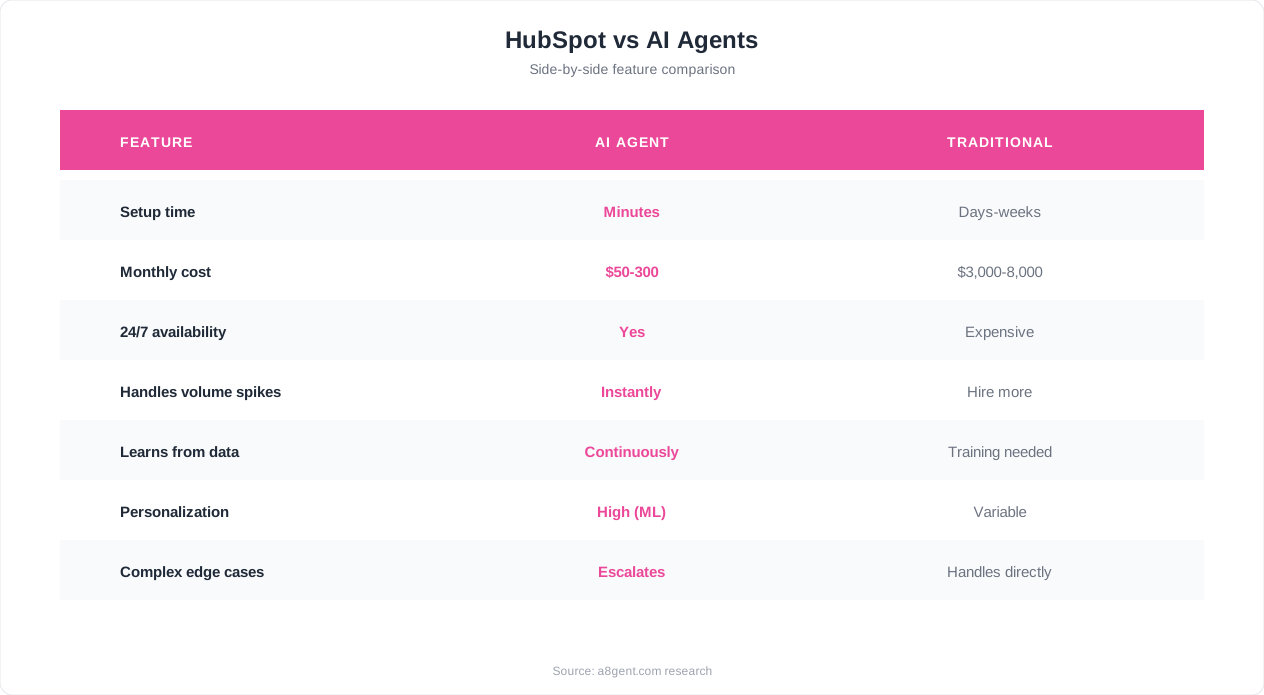
HubSpot's greatest strength is having everything in one place. Contacts, companies, deals, tickets, emails, calls, meetings, website activity, form submissions, ad interactions - all connected to a single contact record. This unified view is powerful. You can see every touchpoint a prospect has had with your business in one timeline. AI agents typically need to connect to a CRM like HubSpot to access this data - they are not replacements for the data layer, they are enhancements to what you do with it. HubSpot as a CRM is excellent and remains so regardless of how you automate above it.
Marketing Content and Campaign Management
HubSpot's content tools - email templates, landing pages, blog hosting, social publishing, and ad management - are mature and well-integrated. You can build a campaign, publish a landing page, create a follow-up email, and track results all within the same platform. AI agents do not typically handle content creation and publishing workflows. If you use HubSpot for content marketing execution (not just automation), that value remains regardless of your automation approach.
Reporting and Attribution
HubSpot's reporting connects marketing activities to revenue outcomes. You can see which blog posts generated leads, which emails influenced deals, and which campaigns drove revenue. This attribution reporting is where HubSpot justifies its higher-tier pricing for many businesses. AI agents generate their own performance data but do not typically provide this level of marketing attribution. If attribution reporting drives your decision-making, HubSpot's analytics are a genuine advantage.
Team Adoption and Familiarity
If your team already uses HubSpot daily, the friction of adoption is zero. They know where to find contacts, how to log activities, and how to use the tools. Introducing a new AI agent platform requires learning - even if it is minimal with no-code tools. This switching cost is real. The best transitions minimize disruption by keeping HubSpot as the user-facing system while adding AI automation in the background.
Ecosystem and Integrations
HubSpot connects to over 1,400 tools through its marketplace. Email providers, calling tools, proposal software, accounting systems, project management platforms - nearly everything has a HubSpot integration. This ecosystem means you can build a comprehensive tech stack around HubSpot without custom development. While AI agent platforms also offer integrations, HubSpot's marketplace breadth is hard to match for a newer category of tool.
Compliance and Security
HubSpot handles GDPR consent tracking, email compliance (CAN-SPAM, unsubscribe management), data retention policies, and enterprise security requirements out of the box. For businesses in regulated industries or those serving EU customers, this compliance infrastructure is valuable and complex to replicate elsewhere. AI agents need to work within these compliance frameworks rather than replacing them.
The point is clear: HubSpot is genuinely good at many things. The question is not whether HubSpot has value - it clearly does. The question is whether its automation capabilities (a subset of its total feature set) meet your growing needs. That is where the comparison gets interesting.
Where HubSpot Falls Short: The Automation Ceiling
Now the honest part: where HubSpot's automation capabilities hit their limits. These are not bugs or failures - they are inherent limitations of rules-based automation that no amount of HubSpot upgrades will fundamentally solve because the architecture itself has constraints.
Rigid, Rules-Based Logic
HubSpot workflows operate on if-then logic: if contact property equals X, then do Y. If date is past Z, then send email. This works for predictable, binary scenarios. But real customer interactions are not binary. A lead who read three blog posts, attended a webinar, and visited your pricing page twice has very different intent than one who downloaded a single PDF - yet HubSpot treats them identically unless you manually build branching logic for every possible behavior combination. As your business complexity grows, you end up with workflows that have 20, 30, or 50 branches - and they still cannot handle the nuance an AI agent processes naturally.
No True Conversational Ability
HubSpot's chatbot builder creates decision-tree bots. The visitor picks from predetermined options, follows a scripted path, and reaches a predetermined outcome. If they ask something outside the script, the bot fails. If they phrase a question differently than expected, the bot gets confused. These are not conversations - they are multiple-choice quizzes dressed up as chat windows. In 2026, customers expect actual conversational ability: asking questions in natural language and getting relevant, contextual answers. HubSpot's native chatbot cannot deliver this. AI agents can.
Static Sequences That Cannot Adapt
HubSpot sales sequences send predetermined emails at predetermined intervals. Everyone in the same sequence gets the same messages in the same order with the same timing. If a prospect shows buying signals (visiting pricing three times in one day), the sequence does not accelerate. If a prospect goes cold (zero opens for two weeks), the sequence does not change approach. If a prospect's situation changes mid-sequence, the messaging does not adapt. AI agents dynamically adjust timing, messaging, and channels based on real-time behavior - something that is architecturally impossible in HubSpot's sequence model.
Limited Personalization Depth
HubSpot personalization means inserting contact properties into templates: first name, company name, job title. That is field-level personalization, not message-level personalization. An AI agent can craft entirely different messages for different prospects based on their industry, pain points, engagement history, company stage, and expressed priorities - not just swap out a name field in a fixed template. The difference is receiving an email that says "Hi Sarah" versus receiving an email that genuinely speaks to Sarah's specific situation.
Escalating Costs for Automation Features
HubSpot's automation capabilities are gated behind pricing tiers. Basic workflows are available on Professional plans ($800/month for Marketing Hub Professional). Advanced features - branching logic, workflow extensions, custom objects in workflows, predictive lead scoring - require Enterprise ($3,600/month). Many businesses find themselves upgrading primarily for automation features, paying dramatically more for what amounts to more complex if-then rules. AI agent subscriptions at $99-$499/month often deliver more intelligent automation at a fraction of the cost.
Cannot Resolve, Only Route
HubSpot automation can route tickets, assign tasks, and trigger notifications - but it cannot resolve customer issues. It can send a canned response to a common question, but it cannot hold a conversation to understand the problem and solve it. It can assign a lead to a sales rep, but it cannot qualify the lead through intelligent conversation first. This routing-only limitation means human workload stays high even with extensive automation - the automation just organizes the work rather than reducing it.
These limitations are not HubSpot failures - they are the natural ceiling of rules-based automation platforms. The question is whether your business has grown complex enough to need something beyond rules. Our comparison tool can evaluate your specific situation and tell you whether you have hit that ceiling.
What AI Agents Add: Capabilities Beyond Rules-Based Automation
AI agents operate fundamentally differently from HubSpot workflows. Rather than following predetermined rules, they understand context, make judgment calls, and adapt their behavior based on the specific situation. Here is what that means in practical terms for each major business function.
Intelligent Lead Qualification
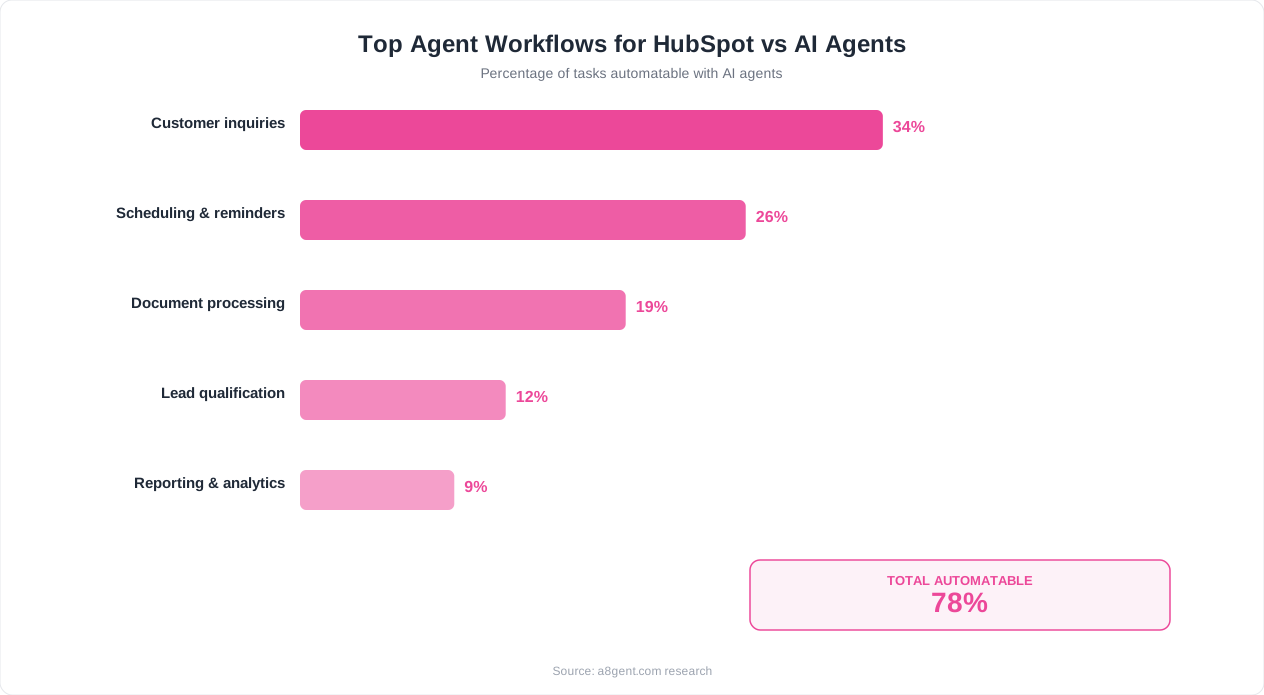
Instead of scoring leads based on static form fields and page views (HubSpot's model), AI agents qualify leads through actual conversation. They ask relevant questions, interpret natural language responses, assess urgency and fit in real-time, and make nuanced judgments about whether a lead is ready for sales engagement. A lead who mentions "we need to solve this before Q3" gets treated very differently from one who says "just researching options for next year" - not because of a workflow rule, but because the AI understands urgency from language. This conversational qualification is typically 30-50% more accurate than point-based scoring and saves sales teams significant time on unqualified calls.
Adaptive Multi-Channel Outreach
AI agents monitor how each prospect responds across channels and adapt accordingly. If a prospect ignores emails but responds to LinkedIn messages, the AI shifts communication there. If they engage with technical content but not case studies, future messages emphasize technical details. If their engagement pattern suggests they are an evening reader, messages get timed accordingly. This individual-level adaptation is impossible with static sequences - it requires real-time intelligence that adjusts per-contact behavior continuously.
Genuine Customer Support Resolution
Where HubSpot routes support tickets to humans, AI agents actually resolve them. They understand natural language questions, search knowledge bases for relevant answers, explain solutions conversationally, follow up to confirm the issue is resolved, and only escalate when they genuinely cannot help. For businesses receiving 100+ support inquiries monthly, AI resolution of 50-70% of tickets represents massive time savings that HubSpot's routing-only model cannot match.
Complex Workflow Decision-Making
Real business processes involve judgment calls that do not fit neatly into if-then rules. Should this customer get an exception to the refund policy based on their history? Should this lead get a more aggressive or more patient follow-up approach? Should this support ticket be prioritized based on the language used? AI agents make these contextual decisions reliably - not perfectly (nothing is perfect), but far better than rigid rules that force every situation into predefined boxes.
Natural Language Processing
Customers do not communicate in structured data fields. They write messy emails, informal messages, and ambiguous requests. HubSpot automation requires structured inputs - it cannot interpret an email that says "Hey, wondering if we could bump up our plan, maybe to the Pro tier, and also can we get a discount since we've been with you for 2 years?" AI agents parse this naturally: the customer wants to upgrade to Pro and is requesting a loyalty discount. They can respond appropriately, check policies, and either resolve or escalate with complete context.
Continuous Learning and Improvement
HubSpot workflows perform exactly the same on day 300 as day 1 unless you manually update them. AI agents learn from interactions - which responses generate positive outcomes, which approaches fail, what questions customers actually ask, and how language patterns correlate with intent. Over time, they become more accurate, more efficient, and more aligned with your business's actual patterns. This self-improvement means ROI grows over time without proportional investment of your time in optimization.
Platforms like HubSpot AI are beginning to add some of these capabilities natively, while dedicated platforms like Autonoly offer them as standalone solutions that integrate with HubSpot's CRM layer. The approach you choose depends on your specific needs, budget, and how deeply you want intelligence embedded in your workflows.
Real Cost Comparison: HubSpot Tiers vs. AI Agent Platforms
Money talks. Here is an honest cost comparison across different business sizes and needs, including both direct subscription costs and the hidden costs of each approach.
Small Business (1-10 employees, basic automation needs)
HubSpot approach: Starter plan ($20/month CRM + $45/month Marketing Starter) = ~$65/month. Includes basic email automation, simple forms, and landing pages. No workflows, no sequences, very limited automation. To get meaningful automation, you need Professional: $800/month minimum. AI agent approach: HubSpot Free CRM ($0) + dedicated AI agent ($99-$199/month) = $99-$199/month. You get the CRM for contact management plus intelligent automation that exceeds what HubSpot Professional offers for workflow capabilities. The savings: $600-$700/month compared to HubSpot Professional, with arguably better automation intelligence.
Mid-Size Business (10-50 employees, complex automation needs)
HubSpot approach: Professional Hub bundle ($800-$1,600/month depending on hubs combined). Includes workflows, sequences, and reporting. Enterprise for advanced automation: $3,600/month+. AI agent approach: HubSpot Starter ($65/month) + advanced AI agent ($199-$499/month) = $264-$564/month. The AI handles intelligent automation while HubSpot handles CRM, content, and reporting. The savings: $500-$3,000/month compared to equivalent HubSpot tiers, with automation that adapts rather than just follows rules.
What You Get at Each Price Point
For $200/month with AI agents: intelligent lead qualification, adaptive multi-channel follow-up sequences, conversational customer support, smart scheduling, and behavioral personalization. For $800/month with HubSpot Professional: rules-based workflows (up to 300), email sequences (up to 5,000 sequences/month), basic chatbot builder, A/B testing, and custom reporting. For $3,600/month with HubSpot Enterprise: advanced workflow features, predictive lead scoring, adaptive testing, custom objects, and advanced permissions. The comparison reveals something interesting: the specific capabilities most businesses upgrade HubSpot for (intelligent workflows, adaptive sequences, conversational support) are exactly what AI agents provide at a lower price point.
Hidden Costs to Consider
HubSpot hidden costs: onboarding fees ($500-$3,000 depending on tier), per-contact pricing (costs increase as your database grows), add-on charges for features like increased API calls or additional dashboards, and the constant pressure to upgrade tiers for features you need. AI agent hidden costs: initial setup time (4-12 hours of your time), potential middleware costs if direct integration is not available ($20-$99/month for Zapier/Make), and ongoing monthly optimization time (1-2 hours).
The Combination Approach (Best Value for Most Businesses)
The smartest businesses use both: HubSpot as the CRM, content platform, and reporting layer (Starter or free tier) combined with AI agents for the intelligent automation layer. This gives you HubSpot's strengths (unified data, content tools, attribution reporting) without paying $800-$3,600/month for its automation features - because the AI agent handles automation more intelligently for $99-$499/month. Total cost: $100-$564/month for capabilities that would require HubSpot Enterprise ($3,600/month) to even approach (and HubSpot Enterprise still would not match the AI's conversational and adaptive abilities).
Use our cost comparison tool to see the exact pricing breakdown for your specific situation - factoring in your contact database size, automation needs, team size, and current HubSpot tier. The tool also accounts for switching costs and setup time to give you an honest total cost of transition.
Clear Signs You Have Outgrown HubSpot's Native Automation
Not every business needs to move beyond HubSpot's built-in tools. Here are the specific signals that indicate you have hit the automation ceiling and would benefit from AI agent capabilities.
Sign 1: Your Workflows Have Become Unmanageable
If you have 50+ active workflows with intricate branching logic, and modifying one often breaks another, you have outgrown rules-based automation. The complexity is a symptom: you are trying to encode intelligence into a system that does not support intelligence. When you find yourself spending more time maintaining and debugging workflows than they save you in labor - when the workflow management itself becomes a full-time job - it is time for a system that handles complexity through understanding rather than through more branches.
Sign 2: Leads Complain About Generic Communication
If you are hearing feedback like "your emails feel automated" or "I already told you about my situation," HubSpot's personalization has reached its limit. Token replacement (Hi FirstName) is not personalization in 2026. When your audience expects communication that demonstrates understanding of their specific context and you cannot deliver that through property-based templates, you need AI that generates genuinely contextual messages.
Sign 3: Your Sales Team Ignores Automation Outputs
When salespeople stop trusting the leads that workflows send them - because too many are unqualified, poorly timed, or lack context - the automation is doing more harm than good. It is creating noise instead of value. AI-powered lead qualification sends fewer leads but significantly better ones, with conversation context and expressed needs attached. Sales teams engage eagerly with AI-qualified leads because they are actually ready for a conversation.
Sign 4: Support Costs Keep Growing Despite Automation
If you have built HubSpot's knowledge base, created ticket routing workflows, and set up auto-response templates - but your support team is still overwhelmed because all the automation does is organize tickets without resolving them - you need resolution, not just routing. AI agents that actually answer questions and solve problems reduce ticket volume by 50-70%, while HubSpot automation just sorts the same volume more efficiently.
Sign 5: You Are Paying for Higher Tiers Primarily for Automation Features
Review why you are on your current HubSpot plan. If the primary reason is access to workflow features, sequences, or the chatbot builder - and you use little of the other advanced features in that tier - you are overpaying for automation. The math is simple: if you are spending $800/month (Professional) primarily for workflows and sequences, and an AI agent at $199/month handles those same tasks more intelligently, you could downgrade to Starter and save $550/month while getting better automation.
Sign 6: Response Times Are Still Too Slow
HubSpot workflows trigger based on events but run on schedules - they are not truly real-time for complex actions. If leads submit forms and do not hear back for minutes or hours because the workflow has processing delays or depends on a human step - you are losing conversions to speed. AI agents respond in seconds, 24/7, with intelligent context rather than canned responses. If your funnel leaks from slow response and HubSpot's automation cannot close that gap, AI agents can.
Sign 7: You Need Intelligence, Not Just Logic
The fundamental question: do your automation needs require judgment, or just rules? If "if contact downloads PDF, wait 3 days, send follow-up email" is sufficient - HubSpot handles it fine. But if you need "understand what this lead actually needs based on their behavior and communications, then respond appropriately based on context" - that requires intelligence, and HubSpot's architecture does not provide it. If you find yourself wishing your automation could "think" rather than just "execute," you have answered the question.
How to Integrate AI Agents With HubSpot (Without Ripping and Replacing)
The good news: you almost certainly do not need to abandon HubSpot. The most effective approach for most businesses is layering AI agents on top of HubSpot's CRM foundation. Here is how to do it without disrupting your current operations.
The Layered Architecture
Think of your tech stack in layers. HubSpot remains your system of record - all contacts, deals, activities, and communications live there. Your team still uses HubSpot daily as their interface. The AI agent operates as the intelligence layer above it - monitoring HubSpot data, taking actions based on what it observes, and writing results back to HubSpot records. From your team's perspective, leads appear in the CRM more qualified, deals progress more smoothly, and tickets resolve faster - but the CRM interface they work in does not change.
Step 1: Connect Your AI Platform to HubSpot
Most AI agent platforms offer direct HubSpot integration - often a native connector that links in minutes. Connect your HubSpot portal to the AI platform using OAuth (secure, no password sharing required). This gives the AI read and write access to contacts, deals, tickets, and activities. It can see your existing data and create new records when needed. If your AI platform does not have a native HubSpot connector, Zapier or Make can bridge them with minimal configuration.
Step 2: Identify Which Workflows to Replace vs. Keep
Audit your current HubSpot workflows. Categorize each as: simple triggers that work fine (keep in HubSpot - no need to move simple email reminders or basic notifications), complex branching that would be better handled by AI intelligence (migrate to AI agent), and hybrid workflows where HubSpot handles the trigger and the AI handles the action (redesign for collaboration). Common migrations: lead follow-up sequences move to AI, support ticket handling moves to AI, lead qualification moves to AI. Common keepers: internal notifications, deal stage updates, simple enrollment triggers, and data cleanup workflows.
Step 3: Set Up Data Sync
Configure bidirectional data flow. AI agent to HubSpot: when the AI qualifies a lead, it updates the HubSpot contact record with qualification notes, score, and expressed needs. When it resolves a support ticket, it logs the resolution in HubSpot. When it books a meeting, it creates the meeting in HubSpot. HubSpot to AI agent: when a new contact is created, the AI is notified for potential outreach. When a deal stage changes, the AI adjusts its communication approach. When a ticket is created, the AI attempts resolution before routing to a human.
Step 4: Gradual Migration (Not Big Bang)
Do not turn off all HubSpot workflows on day one. Migrate one workflow at a time: start with your highest-pain, highest-volume automation. Run the AI version alongside the HubSpot version briefly to compare results. Once the AI demonstrates better performance, disable the HubSpot workflow and let the AI handle it fully. Then move to the next workflow. This approach takes 4-8 weeks for a typical business with 10-20 active workflows, and it is dramatically less risky than a full cutover.
Step 5: Retain HubSpot for What It Does Best
After migration, you should still use HubSpot for: contact and company management, deal pipeline tracking, email marketing campaigns and newsletters, landing pages and forms, reporting and attribution analytics, and team activity logging. Your HubSpot subscription can likely downgrade to a lower tier since you no longer need it for complex automation - saving potentially hundreds per month while losing nothing you actually use.
Common Integration Patterns
Pattern 1 - AI-First Lead Handling: New lead enters HubSpot via form submission. AI agent immediately reaches out with personalized response. AI qualifies through conversation. Once qualified, AI updates HubSpot contact with notes and assigns to sales rep. Sales rep sees a fully briefed lead in their HubSpot queue. Pattern 2 - AI Support Triage: Customer submits ticket via HubSpot. AI agent receives ticket, attempts resolution through knowledge base and conversation. If resolved, AI logs resolution in HubSpot and closes ticket. If not resolved, AI adds context notes and routes to appropriate human in HubSpot. Pattern 3 - AI Enriched Sequences: HubSpot triggers the initial sequence enrollment. AI agent takes over message generation and timing, personalizing each message based on real-time behavior rather than using HubSpot's static templates.
Making Your Decision: A Practical Framework
Here is a straightforward decision framework to determine the right path for your specific situation. Answer these questions honestly and the right choice becomes clear.
Question 1: What is your monthly automation budget?
Under $100/month: Stay with HubSpot Free or Starter. Use manual processes for what automation cannot handle at this budget. The AI agent market starts at roughly $99/month for meaningful capability. $100-$500/month: This is the sweet spot for HubSpot Free/Starter CRM + AI agent combination. You get intelligent automation at a price point below HubSpot Professional. $500-$1,000/month: You can choose between HubSpot Professional (rules-based automation) or HubSpot Starter + premium AI agent (intelligent automation). The AI route typically delivers more value at this budget. Over $1,000/month: At this budget, the question is not cost but capability. If you need intelligence over rules, AI agents win regardless of price comparison.
Question 2: How complex are your automation needs?
Simple (send email after form submit, assign leads to reps, trigger notifications): HubSpot handles this perfectly. No need for AI agents. Save your money. Moderate (multi-step sequences with some personalization, basic chatbot, workflow branching): HubSpot Professional can handle this, but AI agents handle it better and cheaper. This is the decision zone - either path works, AI path is usually superior. Complex (adaptive behavior, conversational qualification, multi-channel orchestration, context-aware responses): AI agents are clearly the right choice. HubSpot's rules-based model cannot deliver this regardless of which tier you purchase.
Question 3: How important is speed and adaptability?
If your competitive advantage depends on responding faster and more relevantly than competitors - if speed-to-lead, 24/7 availability, and personalized communication directly impact your revenue - AI agents are not optional, they are essential. If your business operates on longer sales cycles where a few hours of response delay does not matter, and personalization beyond basic fields is nice-to-have rather than critical, HubSpot's native tools may be sufficient.
Question 4: Are you willing to invest 4-12 hours in setup?
AI agents require initial configuration. If you cannot dedicate a few hours to setup and a couple of weeks to refinement, the automation will underperform. HubSpot's simpler workflows require less initial setup (though complex workflows can take just as long). Be honest about your capacity for a transition project. If now is not the time, that is a valid answer - you can revisit in a quarter.
Question 5: What does your team actually use HubSpot for?
If your team uses HubSpot as a CRM (contacts, deals, pipeline) and for content (emails, landing pages): keep HubSpot for those functions and add AI for automation. If your team uses HubSpot primarily for automation features and you are on Professional/Enterprise mainly for workflows: consider downgrading and adding AI agents - significant cost savings. If your team barely uses HubSpot and adoption is low: this might be the opportunity to simplify your stack entirely with a CRM that your team prefers plus AI agents for automation.
The Recommendation for Most Businesses
For 70% of businesses we advise, the answer is: keep HubSpot as your CRM (free or Starter tier), add a dedicated AI agent for intelligent automation, connect them through native integration, and gradually migrate your complex workflows. This gives you the best of both worlds at the lowest total cost while preserving everything your team already knows and uses. The remaining 30% split between "HubSpot's native tools are genuinely sufficient" (mostly small businesses with simple needs) and "a complete stack restructuring is warranted" (mostly businesses who never really needed HubSpot's full suite and are overbuilt).
For a personalized recommendation with specific platform suggestions and projected cost savings, try our comparison tool. It factors in your current HubSpot tier, automation complexity, team size, and industry to recommend the exact right combination for your situation.
FAQ
Can I use AI agents alongside HubSpot without replacing it?
Absolutely - this is the recommended approach for most businesses. AI agents integrate directly with HubSpot through native connectors or middleware like Zapier. HubSpot remains your CRM and content platform while the AI agent handles intelligent automation. Your team keeps using HubSpot as their daily interface, and the AI works in the background to qualify leads, handle support conversations, and manage follow-up sequences. You get the best of both worlds without any data migration or workflow disruption.
How much money can I save by adding AI agents and downgrading my HubSpot plan?
Businesses on HubSpot Professional ($800/month) who switch to HubSpot Starter ($65/month) plus an AI agent ($199/month) save approximately $536/month while typically getting more intelligent automation. Businesses on Enterprise ($3,600/month) who downgrade similarly save $3,000+/month. The exact savings depend on which HubSpot features you actually use beyond automation - if you rely heavily on advanced reporting or custom objects, you may need to stay on a higher tier for those specific features.
Is HubSpot's built-in AI (ChatSpot, AI tools) the same as dedicated AI agents?
HubSpot has added AI features like content generation and ChatSpot, but these are productivity tools within HubSpot rather than autonomous agents. They help you write emails faster or query your data using natural language - useful but fundamentally different from AI agents that independently manage customer conversations, qualify leads through dialogue, resolve support tickets, and adapt follow-up sequences. HubSpot's AI makes you faster at using HubSpot. Dedicated AI agents work autonomously on your behalf without requiring your involvement.
How long does it take to integrate an AI agent with HubSpot?
Initial connection typically takes 15-30 minutes using native integrations (OAuth connection, field mapping, and basic configuration). Full workflow migration - moving complex automations from HubSpot workflows to AI agent management - takes 2-6 weeks using a gradual approach where you migrate one workflow at a time. Most businesses have their first AI-managed workflow running alongside HubSpot within the first day, with full migration completed within a month.
Will my HubSpot data and contact history be affected?
No - your HubSpot data remains intact throughout and after integration. AI agents read from and write to HubSpot without modifying existing records (unless you specifically configure them to update fields). All historical data, contact timelines, deal histories, and reporting stay exactly as they are. The AI agent adds new activities and data to records but does not alter what already exists. You can disconnect an AI agent at any time without any data loss in HubSpot.
What if my team is resistant to adding another tool?
The beauty of the layered approach is that your team does not necessarily need to learn or interact with the AI agent directly. They continue working in HubSpot - seeing contacts, checking pipelines, managing deals. The AI works behind the scenes: qualifying leads before they appear in the CRM, resolving tickets before they hit the human queue, and managing sequences without manual intervention. From your team's perspective, their workload decreases and lead quality increases without changing their daily tools or habits. The AI is invisible to them.
Can AI agents handle HubSpot-specific features like deal pipelines and lifecycle stages?
Yes - AI agents that integrate with HubSpot can read and update deal stages, lifecycle stages, contact properties, and pipeline positions. When an AI agent qualifies a lead through conversation, it can automatically move them to the appropriate lifecycle stage and create a deal in the correct pipeline. When it resolves a support ticket, it can close the ticket and update the associated contact record. The AI respects your existing HubSpot data structure and works within it rather than requiring you to change how your CRM is organized.
Is this comparison different for HubSpot's different hubs (Marketing, Sales, Service)?
Somewhat. Marketing Hub automation (email workflows, lead nurturing) is most directly replaced by AI agents - the AI handles personalized outreach more intelligently. Sales Hub sequences are also well-replaced since AI agents adapt follow-up based on behavior. Service Hub ticket routing is supplemented (AI resolves before routing) but not fully replaced - HubSpot's ticketing structure is still useful for complex issues that need human handling. The hub where AI agents add the least additional value is CMS Hub (content management) since AI agents are not content hosting platforms.