Too Many Manual Tasks? How AI Agents Eliminate Busywork (2026)
If your team spends hours each day on repetitive tasks like data entry, email follow-ups, scheduling, and report generation, AI agents can take over. This guide shows business owners exactly how to identify, prioritize, and automate manual busywork - without coding or complex IT projects.
10+ years shipping production ML across TensorFlow, PyTorch, AWS, and GCP. Ships every A8gent agent before it becomes a lesson. GitHub
- The average knowledge worker spends 4.5 hours per day on repetitive tasks that AI agents can handle - reclaiming that time lets your team focus on work that actually grows the business.
- The best tasks to automate first are those that are frequent, rule-based, low-stakes, and currently consume more than 30 minutes per day of someone's time.
- No-code AI agent platforms like Autonoly and n8n let business owners build automations in plain English without hiring developers or running complex IT projects.
- Start with one painful task, automate it in supervised mode for a week, then expand to adjacent workflows once you have proven the value and built confidence.
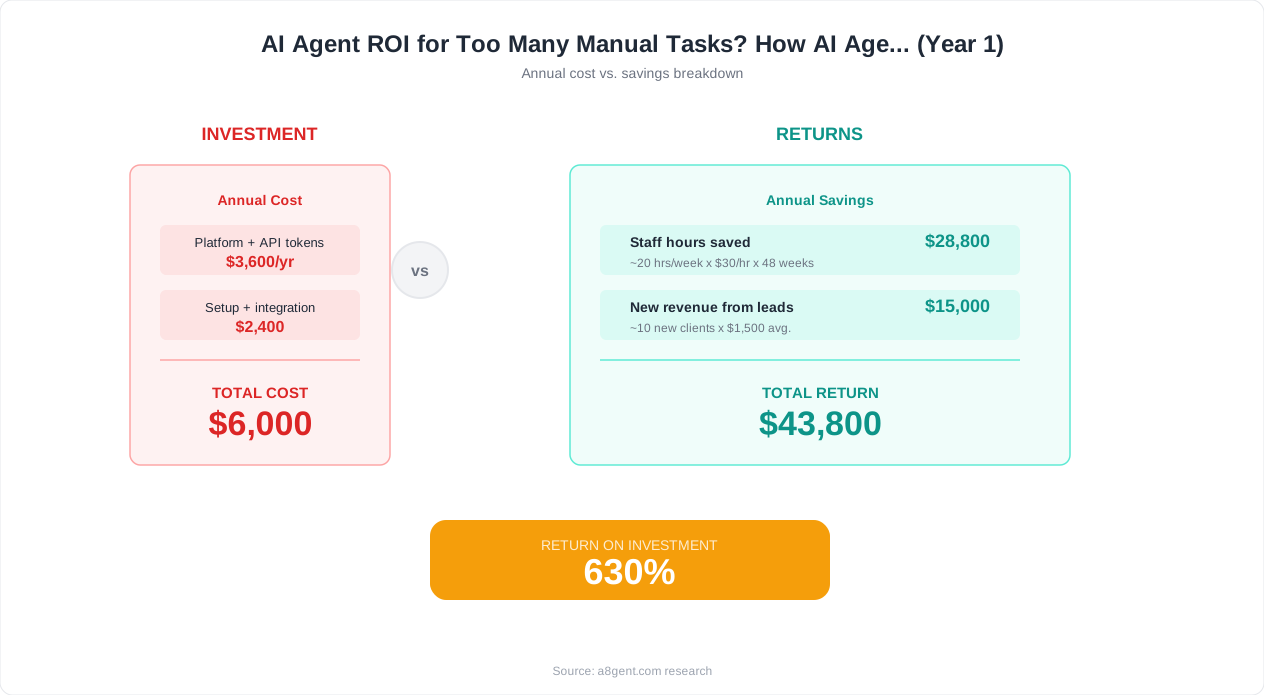
- Calculate your automation ROI using a simple formula: hours saved per week multiplied by hourly labor cost, minus the monthly tool cost - most businesses see 5-10x returns.
The Hidden Cost of Manual Busywork in Your Business
You started your business to solve interesting problems, serve customers, and build something meaningful. Instead, you spend your days copying data between spreadsheets, sending the same follow-up emails over and over, manually updating CRM records after every call, generating reports by pulling numbers from five different systems, and scheduling meetings through endless back-and-forth email chains. Sound familiar?
You are not alone. Research consistently shows that the average knowledge worker spends 4.5 hours per day - more than half their working time - on repetitive, manual tasks that could be automated. That is not just an efficiency problem. It is a growth problem. Every hour your team spends on busywork is an hour they are not spending on strategic thinking, customer relationships, product improvement, or revenue generation.
The financial cost is staggering when you calculate it honestly. If you have a team of five people each spending three hours per day on manual tasks, and your average fully loaded cost per employee is $40 per hour, you are spending $600 per day - $156,000 per year - on work that software could handle. That is the salary of two additional team members who could be driving growth instead of copying data.
Until recently, the solutions were not great. Traditional automation tools like Zapier and Make handle simple if-then triggers well, but they break down when tasks require judgment, context, or adaptation. Hiring virtual assistants helps but introduces management overhead, communication delays, and quality inconsistency. Custom software development is expensive and slow, taking months to deliver solutions that are outdated by the time they launch.
AI agents represent a fundamentally different approach. They combine the tirelessness of automation with the judgment of a human. They do not just follow rigid rules - they understand context, make decisions, handle exceptions, and get better over time. And in 2026, you do not need a technical background to deploy them. Platforms designed for business owners let you describe what you want done in plain English and have an agent running within hours, not months.
In this guide, we will show you exactly how to identify your highest-value automation opportunities, choose the right tools, set up your first agent, and measure the results. Whether you are a solopreneur drowning in admin or a team leader watching your people waste time on tasks a machine should handle, there is a clear path forward. Take our free assessment to get a personalized automation roadmap for your specific business, or read on for the complete framework.
How to Identify Which Tasks to Automate First
Not every manual task is equally worth automating. Some tasks take five minutes once a month - not worth the setup time. Others are deeply creative and benefit from human judgment - not suitable for automation. The key is finding your "automation sweet spots" - tasks where the combination of frequency, simplicity, and time consumption makes automation a clear win.
Here is a simple framework. For one week, track every repetitive task you or your team performs. Write down what it is, how long it takes, how often it happens, and how much judgment it requires. At the end of the week, score each task on four dimensions:
Frequency: How often does this happen? Daily tasks score highest. Weekly tasks are good candidates. Monthly tasks are worth automating only if they take several hours each time.
Rule-based nature: Can you write clear instructions for how to do this? If you could explain the task to a new hire in 10 minutes and they could execute it correctly 90 percent of the time, it is highly automatable. If it requires years of expertise and intuition, it is not a first candidate.
Time consumption: How many total hours per week does this task consume across your team? Tasks eating more than 5 hours per week should be prioritized. Tasks consuming 1-5 hours are good second-wave candidates.
Error tolerance: What happens if the task is done imperfectly? Low-stakes tasks (like organizing files, drafting first versions of emails, or data entry that gets reviewed) are ideal starting points. High-stakes tasks (like financial calculations that go directly to clients) should be automated later once you trust the system.
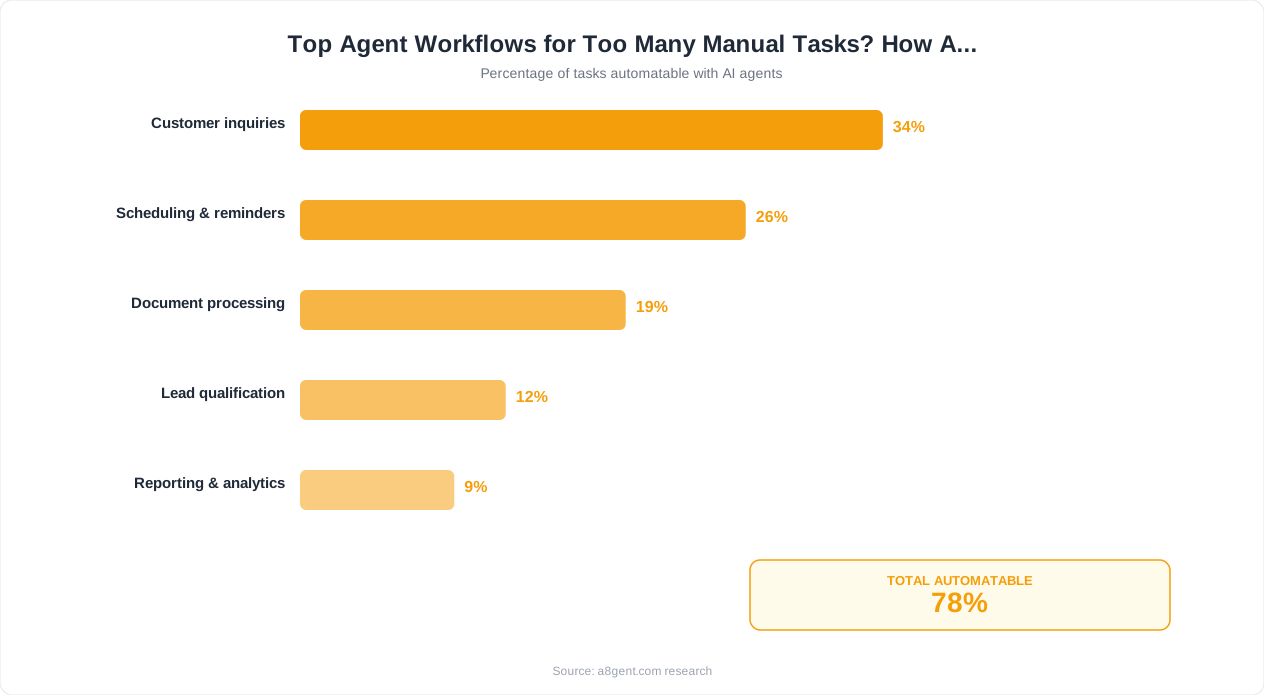
When you score tasks on these four dimensions, clear winners emerge. Here are the most common "best first automation" tasks across hundreds of businesses we have analyzed:
- Email triage and routing - sorting incoming emails by urgency and topic, drafting responses to routine inquiries
- Data entry and transfer - moving information between systems, updating CRMs after calls, logging transactions
- Meeting scheduling - finding available times across multiple calendars, sending confirmations and reminders
- Follow-up sequences - sending check-in emails at defined intervals, following up on proposals and invoices
- Report generation - pulling data from multiple sources and formatting it into a standard template
- Document processing - extracting information from PDFs, invoices, and forms into structured data
Use our ROI calculator to quantify the value of automating your specific tasks. Input the time each task takes, how often it happens, and your labor costs - the calculator shows you exactly how much you will save monthly and annually. This makes the business case crystal clear for any stakeholder who needs convincing.
Why AI Agents Succeed Where Traditional Automation Fails
If you have tried traditional automation tools before and found them frustrating, limiting, or fragile, you are not imagining things. Tools like Zapier, Make, and Power Automate work well for simple, predictable triggers - "when a form is submitted, add a row to a spreadsheet." But real business tasks are rarely that simple. They involve judgment calls, exceptions, context, and variation that break rigid automation rules.
Here is a concrete example. Say you want to automate responding to customer emails. With traditional automation, you might set up rules: if the email contains "refund," route it to the refund team. If it contains "pricing," send the pricing PDF. But what about the email that says "I'm frustrated with the product and want to discuss my options"? That does not match any keyword rule. A human reads it and understands the customer is considering leaving and needs a thoughtful, personalized response - maybe involving a partial refund, a feature walkthrough, or a call with a manager. Traditional automation chokes on this. AI agents handle it.
The difference is that AI agents understand meaning, not just keywords. They read the customer's email, understand the frustration, check the customer's history (how long they have been a customer, what plan they are on, whether they have had issues before), and craft an appropriate response that addresses the real concern. If the situation is complex enough to warrant human involvement, they escalate - but with full context so the human can jump in without starting over.
This same pattern applies across every category of manual task. Data entry is not just "copy field A to field B" - it is interpreting messy inputs, handling inconsistencies, merging duplicates, and flagging anomalies. Report generation is not just "pull numbers" - it is understanding which numbers matter this week, identifying trends worth highlighting, and presenting insights in context. Follow-up emails are not just "send at day 3 and day 7" - they should reference the specific conversation, acknowledge what the person said, and adapt the tone based on the relationship.
AI agents handle all of this because they process language and context the way a human does - they just do it faster, more consistently, and without getting tired or distracted. Platforms like n8n combine visual workflow building with AI decision-making at every step, giving you the structure of traditional automation with the intelligence of AI. Autonoly takes it further by letting you describe entire workflows in plain English and having the agent figure out the steps.
This is not about replacing everything you built in Zapier. Many businesses run both - using traditional automation for simple, predictable triggers and AI agents for anything that requires understanding, judgment, or adaptation. The combination is more powerful than either alone. But if you have been limited by rigid automation tools, AI agents are what breaks through that ceiling.
10 Manual Workflows AI Agents Can Take Over Today
Let us get specific about what AI agents can handle right now in 2026. These are not future promises - these are workflows that businesses are running today, saving hours every single day. For each one, we describe what the manual process looks like, what the automated version looks like, and how much time it typically saves.
1. Email Triage and Response
Manual: You open your inbox, read each email, decide what it needs, respond to routine ones, forward others, flag important ones. Takes 60-90 minutes daily. Automated: Agent reads every incoming email, responds to routine queries using your knowledge base and tone, routes complex ones to the right person with context, and surfaces urgent items for your immediate attention. Saves 45-70 minutes per day.
2. CRM Updates After Meetings and Calls
Manual: After every call, you open your CRM, find the contact, update notes, change deal stages, set follow-up tasks. Takes 10-15 minutes per interaction. Automated: Agent listens to call transcripts or reads meeting notes, extracts key information, updates all CRM fields, and creates follow-up tasks automatically. Saves 8-12 minutes per interaction - which adds up to hours for sales teams.
3. Invoice Processing
Manual: Open invoice PDF, read vendor name, amount, and line items, match to purchase order, enter into accounting system, route for approval. Takes 5-10 minutes per invoice. Automated: Agent reads incoming invoices (even messy PDFs), extracts all relevant data, matches to existing POs, enters into your accounting system, and routes exceptions for human review. Saves 80 percent of processing time.
4. Social Media Content Scheduling
Manual: Write posts for each platform, adapt format and tone, find relevant images, schedule at optimal times, monitor for engagement. Takes 45-60 minutes daily. Automated: Agent generates platform-specific content based on your brand guidelines and content calendar, schedules at optimal engagement times, and flags high-performing posts for amplification. Saves 30-45 minutes daily.
5. Lead Research and Qualification
Manual: New lead comes in, you look them up on LinkedIn, visit their company website, check company size, evaluate fit against your criteria. Takes 10-20 minutes per lead. Automated: Agent researches every lead instantly across multiple data sources, scores them against your criteria, and routes qualified leads to sales with a full briefing. Explore our operations automation guide for implementation details.
6. Meeting Scheduling and Reminders
Manual: Email back and forth to find a time, check your calendar, check theirs, send a calendar invite, send a reminder the day before. Takes 10-15 minutes per meeting. Automated: Agent handles all scheduling communication, finds optimal times, sends invites and reminders, and reschedules when conflicts arise. Saves 8-12 minutes per meeting.
7. Report Generation
Manual: Pull data from analytics, CRM, and financial tools, compile into a template, calculate metrics, write summary insights. Takes 2-4 hours weekly. Automated: Agent pulls data from all sources on schedule, generates formatted reports with trend analysis, and delivers them to stakeholders. Saves 75-90 percent of time.
8-10: Follow-up sequences, document filing, and expense categorization
Each of these follows the same pattern: frequent, rule-based tasks that consume significant time when done manually but take seconds when an AI agent handles them. Combined, these ten workflows typically represent 15-25 hours per week of manual work in a small team that can be reduced to 2-3 hours of agent oversight. Take our assessment to identify which workflows would deliver the biggest time savings in your specific business.
Setting Up AI Agents Without Coding: A No-Code Guide
One of the biggest misconceptions holding business owners back from AI agents is the belief that you need developers to set them up. In 2026, that is simply not true. The leading agent platforms are designed specifically for non-technical users, with interfaces that feel more like giving instructions to a new hire than programming software.
How No-Code AI Agent Platforms Work
The process is surprisingly straightforward. You sign up for a platform, describe what you want your agent to do in plain English, connect the tools it needs to access (email, CRM, calendar, etc.), test it with a few examples, and turn it on. No code, no APIs, no IT department required. The platform handles all the technical complexity behind the scenes.
Step-by-Step: Building Your First Agent
Let us walk through a real example. Say you want an agent to handle follow-up emails for proposals you have sent. Here is what that looks like on a platform like Autonoly:
Step 1: Create a new agent and name it (e.g., "Proposal Follow-Up Agent"). Step 2: Describe its job in plain English: "When I send a proposal email, wait three business days. If the prospect has not responded, send a friendly follow-up asking if they have questions. If they still haven't responded after five more days, send a second follow-up with a gentle urgency message. If no response after that, alert me to make a phone call." Step 3: Connect your email account through a simple OAuth flow (click "Connect Gmail," log in, authorize). Step 4: The platform shows you a visual workflow of what it will do - review and adjust if needed. Step 5: Test it by sending yourself a proposal and confirming the follow-up arrives correctly. Step 6: Activate and let it run.
That is it. No coding. No complex configuration. The entire setup takes 15-30 minutes for most workflows.
Choosing the Right No-Code Platform
Autonoly is ideal if you want to describe agents in plain English and have them built automatically. It excels at multi-step workflows and coordinating multiple agents together. Best for business owners who want maximum simplicity.
n8n uses a visual drag-and-drop builder that gives you more control over each step. It has a slightly steeper learning curve but offers more flexibility for complex workflows. Best for business owners who want to see and customize every step visually, or who have slightly technical team members.
Both platforms offer free tiers that are generous enough to automate your first few workflows and prove the concept. You do not need to commit to expensive plans before seeing results.
Tips for Success
Start with one simple workflow. Get it working reliably. Then build the next one. Resist the urge to automate everything at once - each agent you build teaches you something that makes the next one better. Keep your instructions clear and specific. And always run new agents in supervised mode for the first few days so you can catch and correct any issues before they affect real work. Take our assessment for a personalized recommendation on which platform and which starting workflow fits your situation best.
How to Measure Time Savings and Prove ROI
When you propose automating tasks with AI agents - whether to yourself, a business partner, or your team - you need concrete numbers. Gut feelings about saving time are not enough to justify the investment or sustain commitment. Here is a practical framework for measuring the real impact of your AI agents and calculating return on investment.
Step 1: Establish Your Baseline
Before deploying any agent, measure how things work today. For each task you plan to automate, track: how long it takes per occurrence (time a few instances with a stopwatch), how many times it happens per day or week, who does it (and their hourly cost), and the error rate (how often mistakes happen that require rework). This baseline is your "before" picture. Without it, you cannot prove improvement.
Step 2: Calculate Your Potential Savings
Use this formula: Weekly time savings = (time per task × frequency per week) × automation rate. The automation rate is the percentage of instances the agent handles without human intervention - typically 70-90 percent for well-suited tasks. If a task takes 10 minutes, happens 20 times per week, and the agent handles 80 percent of instances, your weekly savings are 10 × 20 × 0.80 = 160 minutes, or about 2.7 hours per week.
Convert time savings to dollar value: hours saved per week × hourly labor cost × 52 weeks = annual savings. If those 2.7 hours per week cost $50 per hour in labor, that is $7,020 per year from automating one task. Our ROI calculator does this math automatically for multiple tasks at once, showing you the combined savings across your entire automation roadmap.
Step 3: Track Actual Performance
Once your agent is running, measure real results weekly. How many tasks did the agent complete? How many required human intervention? What was the quality (did anyone catch errors or complaints)? Compare these actuals to your baseline. Most businesses find that real-world performance exceeds their conservative estimates because they forgot to account for secondary time savings - like eliminated context switching, reduced communication overhead, and faster throughput on dependent tasks.
Step 4: Calculate Total ROI
Total ROI = (total value generated - total cost) / total cost × 100 percent. Total value includes: direct time savings (hours reclaimed × hourly cost), error reduction (fewer rework hours), speed improvements (faster turnaround on tasks that previously bottlenecked workflows), and capacity gains (ability to handle more volume without hiring). Total cost includes: platform subscription fees, setup time (one-time), and ongoing management time (typically 30-60 minutes per week reviewing agents).
Real-World ROI Example
A marketing agency automated email triage, meeting scheduling, and client report generation using AI agents. Monthly costs: $200 for agent platform, $100 for connected tools, plus 2 hours per week of review time ($200 in labor). Total monthly cost: $500. Monthly value: 35 hours saved across the team at $60 per hour = $2,100, plus eliminated one part-time hire they were about to make ($1,500 per month). Total monthly value: $3,600. Monthly ROI: 620 percent. Payback period: less than one week.
These are not exceptional results. They are typical for businesses that follow the framework of starting with high-frequency, rule-based tasks and deploying agents systematically. The key is measuring from day one so you have the data to justify expansion and continued investment.
Scaling From One Agent to a Full Automation Stack
Once your first agent is running successfully, the natural question is: what next? The businesses that extract maximum value from AI agents do not stop at one - they build a coordinated system of agents that handles increasingly sophisticated workflows. Here is how to scale intelligently without creating a tangled mess.
The Expansion Sequence
Follow this order for maximum impact and minimum risk. First wave (month one): automate your single most painful repetitive task. Get it stable and reliable. Measure the ROI. Second wave (month two): automate two to three additional standalone tasks that are similar in structure to your first success. You will set these up faster because you have learned the platform. Third wave (months three to four): connect your agents so they share information and trigger each other. Your CRM update agent feeds data to your follow-up sequence agent, which feeds data to your reporting agent. Fourth wave (months four to six): introduce proactive agents that do not just respond to triggers but actively monitor situations and intervene - like watching for at-risk customers or identifying upsell opportunities.
Coordinating Multiple Agents
When you have multiple agents, coordination becomes important. You do not want your follow-up agent and your support agent both emailing the same customer on the same day. You do not want your data entry agent and your reporting agent working with different versions of the same data. Platforms like Autonoly specialize in multi-agent orchestration - ensuring agents share context, respect each other's actions, and present a unified experience to customers and team members.
Building an Automation Roadmap
Map out all the repetitive tasks in your business - across every department and role. Score each one using the framework from earlier (frequency, rule-based nature, time consumption, error tolerance). Arrange them in priority order. This becomes your automation roadmap - a clear sequence of what to automate next, with expected savings at each step. Most businesses find they have 15-25 automatable tasks, and systematically working through the list over six months transforms their operational efficiency.
When to Hire vs. Automate
AI agents do not replace every hire, but they change when you need to hire and what you hire for. If a role is 80 percent repetitive tasks and 20 percent creative judgment, you can often automate the 80 percent and redistribute the 20 percent to existing team members - eliminating the hire entirely. If a role is 20 percent repetitive and 80 percent strategic, automate the 20 percent so the person you hire can focus entirely on high-value work from day one. The ROI calculator helps you model these scenarios with real numbers.
Maintaining Your Automation Stack
A healthy automation stack needs minimal but regular maintenance. Spend 30-60 minutes per week reviewing agent performance, checking for edge cases they handled poorly, and updating instructions based on changes in your business. As your products, processes, and tools evolve, your agents need occasional updates to stay aligned. Think of it like managing a team - you do not micromanage every task, but you check in regularly to ensure things are on track. Explore our operations guide for detailed frameworks on maintaining and scaling your automation infrastructure over time.
Your Action Plan: Eliminate Busywork Starting This Week
You have read the framework. You understand the potential. Now it is time to act. Here is your step-by-step action plan for this week - designed to get you from "interested in automation" to "running your first agent" within five business days.
Monday: Audit Your Time (30 minutes)
Open a spreadsheet or document. List every task you or your team did today that was repetitive, manual, and felt like busywork. Be honest - include the small things that feel too minor to mention (but add up to hours). Note how long each took and how often it happens. If you have a team, ask each member to do the same. By end of day, you will have a clear picture of where time disappears.
Tuesday: Prioritize and Choose (20 minutes)
Score your task list using the four-dimension framework: frequency, rule-based nature, time consumption, and error tolerance. Identify your number one candidate - the task that scores highest across all four dimensions. This is your first agent project. Take our free assessment to validate your choice and get a platform recommendation tailored to your specific task.
Wednesday: Set Up Your Platform (45 minutes)
Sign up for the recommended platform. If your first task involves email or CRM workflows, Autonoly is an excellent starting point. If it involves connecting multiple apps in a sequence, n8n gives you great visual control. Both offer free tiers. Connect the tools your agent needs (email, calendar, CRM, etc.) and write your agent's instructions in plain English. Be specific about what it should do, when it should do it, and what success looks like.
Thursday: Test and Refine (30 minutes)
Run your agent on a few test cases. Send yourself test emails, create test tasks, or simulate the trigger conditions. Review what the agent does. Is it correct? Is the tone right? Does it handle edge cases? Adjust your instructions based on what you observe. This refinement step is what separates mediocre automation from great automation - take the time to get it right.
Friday: Go Live in Supervised Mode (15 minutes to activate, then monitor)
Turn on your agent for real tasks, but keep it in supervised mode - meaning it does the work and shows you the output before executing (or executes and copies you so you can review). Monitor throughout the day. At end of day, assess: How much time did it save? What did it get right? What needs adjustment? If it performed well, plan to run it all next week and measure the cumulative time savings.
Next Week and Beyond
After one successful week, remove the training wheels and let your agent run autonomously. Measure the weekly time savings. Then pick your second task from the priority list and repeat the process. Within 30 days, you will have two to three agents running, saving your team 10-20 hours per week. Within 90 days, you will wonder how you ever operated without them.
The businesses that thrive in 2026 and beyond are not the ones with the biggest teams - they are the ones that use their team's time most effectively. AI agents are the tool that makes that possible. Do not wait for the perfect moment. Start today with one task, one agent, one week. The compounding benefits of starting now versus starting "later" are enormous. Use our ROI calculator to see exactly what those benefits look like for your business.
FAQ
What types of manual tasks can AI agents actually automate?
AI agents can automate any task that is repetitive, follows a generally predictable pattern, and can be described in clear instructions. Common examples include email triage and response, data entry between systems, meeting scheduling, follow-up sequences, report generation, invoice processing, social media posting, lead research, CRM updates, and document filing. If you could train a new hire to do it in under an hour, an agent can likely handle it.
Do I need technical skills to set up AI agents for task automation?
No. Modern AI agent platforms like Autonoly and n8n are designed for non-technical business owners. You describe what you want done in plain English, connect your existing tools through simple click-to-authorize flows, and the platform handles all technical complexity. If you can write an email explaining a task to a colleague, you can set up an AI agent.
How much time can I realistically save with AI agents?
Most businesses save 10-25 hours per week within the first 30 days of deployment, starting with just two to three automated workflows. Individual task savings range from 70-90 percent of the time currently spent. The exact savings depend on which tasks you automate and their frequency, but our ROI calculator can give you personalized estimates based on your specific situation.
What if the AI agent makes mistakes on my tasks?
Every agent should start in supervised mode where you review its work before it takes effect. This lets you catch and correct mistakes during the learning period. Most agents reach 90-95 percent accuracy within the first week of refinement. For the remaining edge cases, you configure the agent to escalate to you rather than guess. Over time, the error rate decreases as you refine instructions based on real scenarios.
How much do AI agent automation tools cost?
Most platforms offer free tiers sufficient for automating your first few workflows. Paid plans typically range from $30 to $200 per month depending on volume and features. Compare this to the labor cost of manual work - if an agent saves 10 hours per week at $40 per hour, that is $1,600 per month in savings against $50-200 in tool costs. ROI is typically 5-10x or higher.
Can AI agents handle tasks that require judgment or decision-making?
Yes - this is what distinguishes AI agents from traditional automation tools. AI agents can understand context, interpret ambiguous inputs, make decisions based on criteria you define, and handle exceptions gracefully. They are not limited to rigid if-then rules. However, for high-stakes decisions, you should configure agents to recommend rather than act autonomously, keeping a human in the loop for final approval.
How long does it take to see results from AI task automation?
You can have your first agent running within a single day. Measurable time savings begin immediately - from the first task the agent handles. Most businesses report meaningful weekly time savings within the first week and clear ROI within 30 days. The longest part is usually the initial audit of your tasks, not the technical setup.
Will automating tasks with AI agents put my employees out of work?
For most small and mid-size businesses, AI agents free employees from tedious busywork so they can focus on higher-value activities like strategy, creativity, relationship-building, and problem-solving. Rather than eliminating positions, automation typically allows you to grow revenue without proportionally growing headcount - your existing team handles more volume and higher-quality work.