10 AI Agent Mistakes Businesses Make (And How to Avoid Them)
The most common AI agent deployment failures are not technical - they are strategic. Learn the 10 mistakes that cause businesses to waste money on AI agents and the proven frameworks for avoiding each one.
10+ years shipping production ML across TensorFlow, PyTorch, AWS, and GCP. Ships every A8gent agent before it becomes a lesson. GitHub
- The number one mistake is deploying AI agents without defining measurable success criteria first - 73% of failed deployments had no clear KPIs established before launch.
- Choosing the wrong use case kills more AI agent projects than bad technology. The ideal first use case is high-volume, rule-based, and low-risk, not the most complex process in your business.
- Over-automating too fast causes more failures than under-automating. Start with one process, prove ROI, then expand - companies that automate three or more processes simultaneously have a 72% failure rate.
- Ignoring data quality is the silent killer. AI agents are only as good as the data they work with, and most businesses overestimate how clean and structured their data actually is.
- Skipping the human-in-the-loop phase for the first 90 days leads to brand-damaging errors that could have been caught easily with a simple review workflow.
Mistake #1: Deploying Without Clear Success Metrics
This is the most common and most damaging mistake businesses make with AI agents. They deploy a system without first defining what success looks like in measurable terms. "We want to improve customer service" is not a success metric. "We want to reduce average ticket resolution time from 4.2 hours to under 30 minutes for tier-1 inquiries while maintaining CSAT above 80%" is a success metric. The difference is not pedantic - it is the difference between a project that can be evaluated and one that cannot.
When we surveyed businesses that abandoned their AI agent deployments within the first year, 73% had no quantifiable KPIs established before launch. They could not tell you whether the deployment was working or not because they had not defined "working." This creates a dangerous situation where the project's success depends on subjective feelings rather than objective data. If the CEO had a good day, the AI agent is working. If a customer complains loudly on Twitter, the AI agent is failing. Neither of those is a valid evaluation method.
The fix is straightforward but requires discipline. Before writing a single line of integration code, define three to five KPIs that you will use to evaluate the AI agent's performance. Each KPI needs: a current baseline (measured, not estimated), a target value, a timeline for achieving the target, and a measurement method. Good KPIs for AI agent deployments include: percentage of tasks handled without human intervention (automation rate), average handling time, error rate compared to human baseline, customer satisfaction scores, and cost per task.
Here is a template that works across industries. Current state: "Our team handles X tasks per month, each taking Y minutes on average, with a Z% error rate, costing us $W per task fully loaded." Target state: "The AI agent will handle A% of these tasks with no more than B% error rate, reducing average handling time to C minutes, at a cost of $D per task." Timeline: "We expect to reach this target within E months of deployment." If you cannot fill in every variable in those sentences, you are not ready to deploy.
One subtlety that trips up even experienced teams: make sure your KPIs include a quality floor, not just efficiency targets. An AI agent that handles 90% of tickets but with 15% errors is worse than one that handles 60% of tickets with 2% errors. The fastest path to destroying customer trust is an AI agent that is confidently wrong. Always pair your throughput targets with accuracy minimums. For a comprehensive implementation framework including KPI templates, see our complete guide to AI agent implementation.
According to Gartner's research, organizations that establish clear success metrics before AI deployment are 2.5x more likely to report the project as successful. That multiplier alone makes the upfront measurement work worth the time investment.
A practical tip: involve your finance team in defining KPIs. They think in terms of measurable outcomes and will push back on vague objectives. If your finance team cannot connect your KPIs to a line item on the P&L, your KPIs are not specific enough. The exercise of translating AI agent performance metrics into financial impact forces clarity that benefits the entire project.
Mistake #2: Choosing the Wrong First Use Case
The second most damaging mistake is selecting the wrong process to automate first. Many businesses choose their most complex, most visible, or most expensive process as their first AI agent deployment. This is backwards. Your first AI agent deployment should target the process that is most likely to succeed quickly, not the process that would deliver the most value if it worked perfectly.
The ideal first use case has four characteristics. First, high volume: the process happens hundreds or thousands of times per month, giving you plenty of data points to measure improvement and plenty of training examples for the AI. Second, rule-based logic: the correct action for each scenario is well-defined and can be documented in a decision tree. If handling the process requires extensive judgment, institutional knowledge, or emotional intelligence, it is not a good first candidate. Third, low risk: errors are easy to detect and cheap to fix. A wrong order status response is low risk. A wrong medical dosage recommendation is high risk. Start with low risk. Fourth, clear data trail: the inputs and outputs of the process are already captured digitally. If the process involves paper forms, phone calls without recordings, or tribal knowledge, the data preparation work will dwarf the AI agent work.
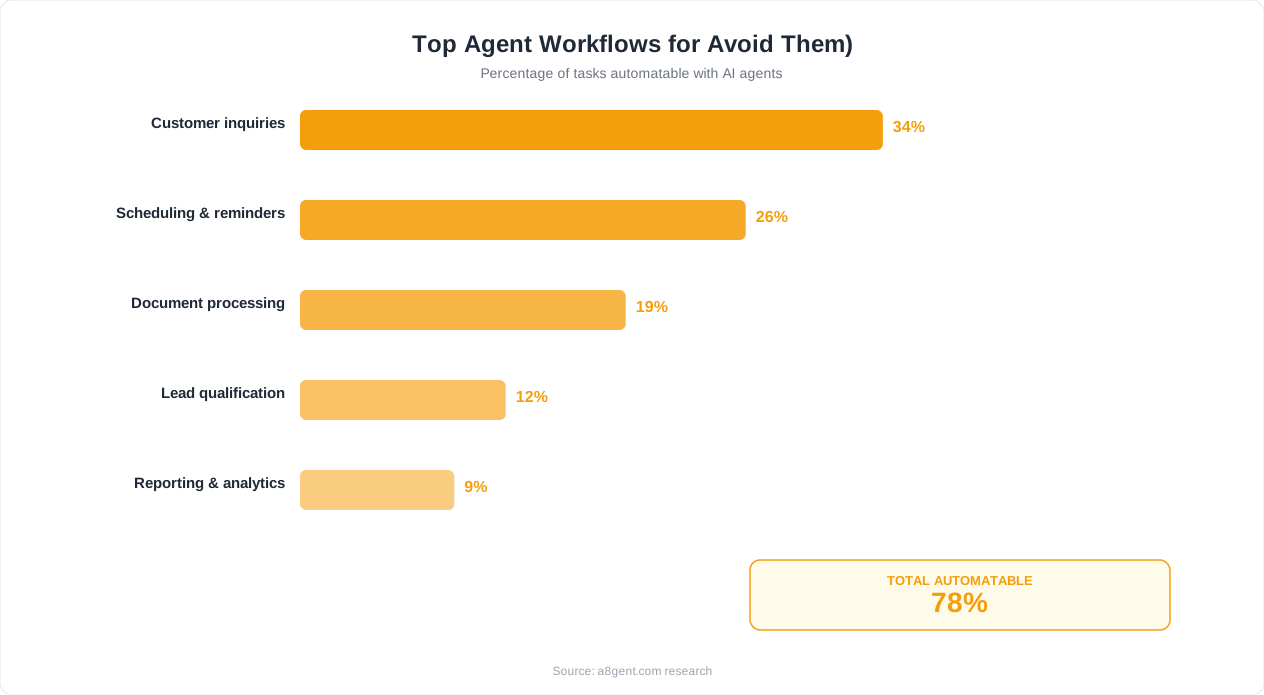
We have seen businesses pick their most painful process as the first target, reasoning that the biggest pain point should be addressed first. This is emotionally logical but strategically wrong. Your most painful process is usually painful because it is complex, ambiguous, and tangled with edge cases - exactly the wrong profile for an early AI agent deployment. You want your first deployment to be a clean, visible win that builds organizational confidence and demonstrates ROI. That win then funds and justifies tackling the harder problems.
Here is a concrete ranking framework. Score each candidate process from 1-5 on each of these dimensions: volume (5 = thousands per month), rule-based logic (5 = fully codifiable), risk level (5 = very low risk, inverted scale), data availability (5 = fully digital with clean data), and team enthusiasm (5 = the team actively wants this automated). Multiply the scores. The highest total wins. The "team enthusiasm" dimension is not soft - it is pragmatic. If the team that currently handles the process resists the AI agent, adoption will fail regardless of the technology's quality.
Common wrong first choices we see: automating sales calls (too much nuance and emotional intelligence required), automating strategy documents (too much creativity and context required), automating complex customer complaints (too many edge cases and too high risk). Common right first choices: order status inquiries, appointment confirmations, invoice data entry, document completeness checks, FAQ responses. If you are unsure which processes to automate, our guide on automating your business with no-code tools covers process selection in depth.
A telling statistic from our data: businesses that selected a use case scoring above 80% on our framework achieved positive ROI within 4 months on average. Businesses that scored below 50% took an average of 11 months, and 45% never achieved positive ROI at all. The use case selection alone explained more variance in outcomes than the choice of AI platform, the quality of the implementation team, or the size of the budget. According to BCG's generative AI research, use case selection is the single strongest predictor of AI project success across all industries.
Mistakes #3-5: Over-Automating, Skipping Tests, Ignoring Data
Mistake #3: Over-automating too fast. Enthusiasm is the enemy of good AI agent deployment. A successful pilot generates excitement, and the natural response is to immediately expand the AI agent to five more processes. This is almost always premature. Each new process requires its own integration, its own training data, its own edge case handling, and its own KPIs. Expanding before your first deployment is fully stabilized (which takes 60-90 days minimum) means you are simultaneously debugging multiple systems with a team that has not yet mastered the first one.
The compounding complexity is brutal. Two processes have four possible interaction patterns. Three processes have eight. Five processes have thirty-two. Each interaction pattern is a potential failure mode that needs testing. We tracked a marketing agency that deployed AI agents for email management, social media responses, client reporting, and proposal writing simultaneously. Within six weeks, the systems were producing contradictory outputs - the email agent promised a deliverable timeline that the reporting agent showed was impossible, and the proposal agent quoted prices that did not match what the email agent had discussed. The agency rolled everything back and started over, one process at a time. The sequential approach took longer but actually worked.
The rule we recommend: deploy one process, stabilize it for 60-90 days, document everything you learned, then deploy the second process incorporating those lessons. The third deployment can overlap with the second if your team is experienced. But never run more than two active deployments simultaneously until you have at least three successful ones under your belt.
Mistake #4: Skipping proper testing. AI agents are not traditional software - you cannot just write unit tests and call it done. AI agents need adversarial testing: deliberately trying to break them with edge cases, ambiguous inputs, contradictory instructions, and malicious prompts. They need load testing: what happens when volume spikes 3x during a holiday sale? They need integration testing: what happens when your CRM API returns an unexpected error code? And they need human evaluation testing: having real humans interact with the agent and rate the quality of responses.
The businesses in our dataset that skipped thorough testing had a 3x higher rate of customer-facing errors in the first 30 days. Those errors did not just cost money to fix - they eroded customer trust in a way that took months to recover from. One e-commerce company's AI agent told 47 customers that their out-of-stock product would ship "within 2 days" because it was not properly connected to the inventory system. The customer backlash was worse than if they had never deployed the agent. Test with real scenarios from your actual ticket history. If the agent cannot handle 95% of your last 200 real tickets correctly, it is not ready for production.
Mistake #5: Ignoring data quality. "Garbage in, garbage out" is a cliche because it is true, and it is especially true for AI agents. Your AI agent's performance ceiling is determined by the quality of the data it works with. If your CRM has duplicate records, inconsistent formatting, missing fields, and outdated information, your AI agent will inherit all of those problems and amplify them. An AI agent that confidently delivers wrong information from a dirty database is worse than a human who knows the database is unreliable and double-checks.
Before deploying an AI agent, audit the data sources it will access. Check for: completeness (what percentage of records have all required fields populated?), accuracy (when was the data last verified against reality?), consistency (are dates formatted the same way? Are product names standardized?), and currency (how old is the data? Is there a reliable update process?). If any data source scores below 85% on these dimensions, fix the data before deploying the AI agent. The data cleanup will benefit your entire organization, not just the AI agent, making it a worthwhile investment regardless. For more on evaluating your readiness for AI agents, see our AI agent evaluation guide.
Mistakes #6-8: No Human Fallback, Vendor Lock-in, Poor Training
Mistake #6: No human fallback path. Every AI agent must have a clear, fast, graceful path to a human being. This is non-negotiable. No matter how good your AI agent is, it will encounter situations it cannot handle. A customer in distress. A completely novel problem. A system error. When that happens, the agent needs to recognize its limitations and hand off to a human seamlessly - not force the customer to start over, not send them to a generic "contact us" form, not drop the conversation entirely.
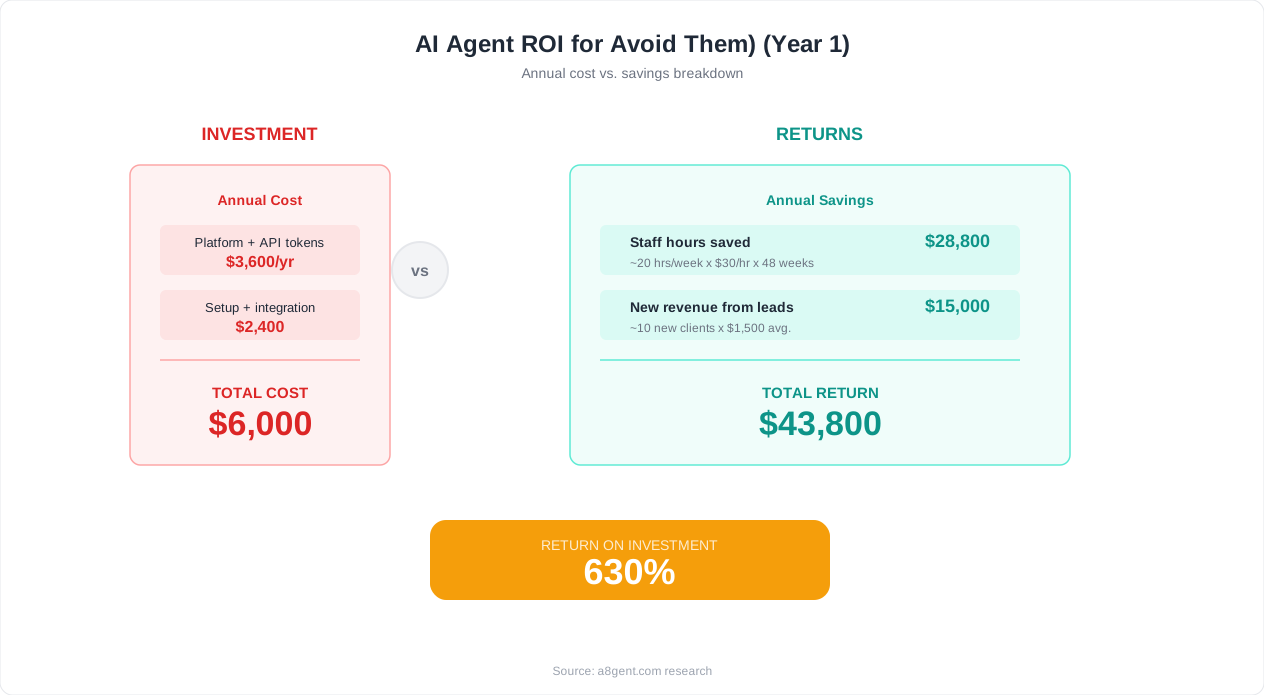
The fallback path needs to be designed, not bolted on. It should preserve full context (the human agent sees everything the AI discussed with the customer), it should be fast (under 60 seconds to reach a human during business hours), and it should feel natural (not "I am unable to help you, please call this number" but "I want to make sure you get the best help possible - let me connect you with a specialist who can handle this"). The dental clinics in our ROI case study saw complaints drop to near zero once they added an always-available "transfer to a person" option. Customers tolerate AI limitations well as long as they know a human is available.
A critical design decision: when should the AI agent escalate? Set explicit triggers rather than relying on the agent's judgment. Common triggers include: customer explicitly asks for a human, sentiment analysis detects frustration or anger, the same question has been asked three times (indicating the AI's answers are not resolving the issue), the conversation involves a financial value above a threshold, or the AI's confidence score drops below a minimum. Build these triggers before deployment, not after your first angry customer complaint.
Mistake #7: Vendor lock-in without exit planning. Many businesses choose an AI agent platform and build deep integrations without considering what happens if they need to switch. Platform pricing can change (and often does, dramatically). The platform could shut down (multiple AI startups have already closed or pivoted). Your needs might outgrow the platform's capabilities. If switching requires rebuilding everything from scratch, you are trapped.
Protect yourself by: keeping your business logic separate from the platform (use the platform for AI inference, but keep your workflows, rules, and data in systems you control), documenting your prompts and configurations in a platform-independent format, ensuring your data is always exportable, and avoiding proprietary features that have no equivalent on other platforms. Think of the AI platform as a replaceable engine, not a permanent foundation. Our comparison of n8n vs Make vs AI agents discusses platform portability in detail.
Mistake #8: Inadequate team training. AI agents do not eliminate the need for human knowledge - they transform it. Your team needs to understand how the AI agent works (at a conceptual level, not a technical one), what it can and cannot do, when it will escalate to them, and how to provide feedback that improves the system over time. Teams that are simply told "there is a new AI system, it handles X now" without proper training tend to either over-rely on the AI (not checking its work when they should) or under-rely on it (manually doing tasks the AI is already handling).
Effective training covers three areas. Operational training: how to monitor the AI agent's work, how to handle escalations, how to identify when the AI is making systematic errors. Quality training: how to evaluate AI-generated responses, what "good enough" looks like, when to intervene. Feedback training: how to report issues, how to suggest improvements, how to contribute to the AI agent's continuous improvement. Budget at least 8-12 hours of training per team member, spread over the first month of deployment. This is not a one-time event - schedule monthly refresher sessions for the first quarter as the system evolves. For help building a training program, see our AI agent training plan for managers.
Mistakes #9-10: Ignoring Security and Expecting Perfection
Mistake #9: Treating security as an afterthought. AI agents interact with your customers, access your data, and make decisions on your behalf. The security implications are significant and too often ignored in the rush to deploy. Common security gaps we see include: AI agents with overly broad database access (the agent only needs to read order status but has write access to the entire customer table), no input sanitization (allowing prompt injection attacks where users manipulate the AI into revealing system prompts or performing unauthorized actions), unencrypted data transmission between the AI platform and your internal systems, and no audit logging of what the AI agent does.
The minimum security requirements for any AI agent deployment are: principle of least privilege (the agent should have the minimum access necessary to perform its function and nothing more), input validation and sanitization (treat all user inputs as potentially hostile), encrypted data in transit and at rest, comprehensive audit logging (every action the AI agent takes should be logged with timestamps, inputs, outputs, and the user it was interacting with), and regular security reviews (at least quarterly, test for prompt injection, data leakage, and privilege escalation). For a thorough treatment of this topic, our AI agent security and privacy guide covers everything from prompt injection defense to GDPR compliance.
The risk is not theoretical. In 2024 and 2025, multiple publicly reported incidents involved AI agents leaking customer data, executing unauthorized transactions, and being manipulated through prompt injection to bypass business rules. OWASP's Top 10 for LLM Applications provides a comprehensive framework for understanding and mitigating these risks. Review it before your deployment goes live.
Mistake #10: Expecting perfection instead of continuous improvement. The final and perhaps most philosophically important mistake is expecting AI agents to be perfect from day one. They will not be. They will make mistakes. Some of those mistakes will be embarrassing. The question is not whether mistakes will happen but whether you have systems in place to detect them quickly, correct them efficiently, and prevent them from recurring.
Businesses with a "zero tolerance for AI errors" mindset tend to either never deploy (paralyzed by the pursuit of perfection) or deploy and immediately pull back at the first mistake (wasting the entire investment). The right mindset is: what error rate are we comfortable with, and how does it compare to the human error rate for the same task? In most cases, AI agents have a lower error rate than human workers for repetitive tasks - but the errors are different in character. Human errors tend to be random (typos, forgetting a step when tired). AI errors tend to be systematic (consistently misinterpreting a specific type of input). Systematic errors are actually easier to fix because once you identify the pattern, a single correction fixes all future occurrences.
Build a continuous improvement loop: monitor AI agent performance daily for the first month, weekly after that. Flag errors by category. Fix the highest-frequency error category each week. Track error rates over time - they should decrease steadily. If error rates plateau or increase, investigate. Share improvement metrics with stakeholders to maintain confidence. The businesses in our dataset that maintained this disciplined improvement loop saw error rates decrease by 60-80% over the first six months, eventually reaching levels significantly below human baselines.
The businesses that succeed with AI agents are not the ones that avoid all mistakes. They are the ones that make small mistakes early, learn from them quickly, and build systems that prevent the same mistake from happening twice. That is the same approach that works for any technology adoption - AI agents just require you to be more deliberate about it because the stakes are higher and the technology moves faster.
For a complete deployment framework that incorporates all ten lessons from this article, read our complete guide to AI agent implementation. And if you want to quantify the cost of getting it right versus getting it wrong, our AI agent ROI examples article has real numbers from businesses that measured their results.
Your Pre-Deployment Checklist: Avoiding All 10 Mistakes
Here is a consolidated checklist you can use before launching any AI agent deployment. If you can check every box, your probability of success increases dramatically. If you cannot, address the gaps before proceeding.
Strategy (Mistakes #1-2): We have defined 3-5 specific, measurable KPIs with baselines and targets. We have selected a use case that scores above 70% on the volume/rule-based/low-risk/data-available/team-enthusiasm framework. We have documented what success and failure look like in concrete, financial terms. Our finance team has reviewed and agreed with the ROI projections.
Scope (Mistakes #3-4): We are starting with exactly one process, not multiple. We have a 60-90 day stabilization period planned before expanding. We have completed adversarial testing with at least 200 real historical scenarios. We have load-tested at 3x our peak volume. Our integration tests cover all error scenarios from connected systems.
Data (Mistake #5): We have audited every data source the AI agent will access. Data completeness is above 85% for all required fields. Data accuracy has been verified within the last 30 days. Data formatting is consistent and documented. We have a process for keeping data updated going forward.
Operations (Mistakes #6-8): We have designed and tested a human fallback path that transfers full context. We have defined explicit escalation triggers (not relying on AI judgment alone). We have trained every team member who will interact with the AI agent (minimum 8 hours). We have scheduled monthly refresher training for the first quarter. Our vendor contract includes data export provisions and reasonable switching terms.
Security (Mistake #9): The AI agent has minimum necessary data access (least privilege). All inputs are validated and sanitized. Data is encrypted in transit and at rest. We have comprehensive audit logging enabled. We have conducted a prompt injection test. We have reviewed OWASP's LLM Top 10 and addressed relevant risks.
Improvement (Mistake #10): We have a monitoring dashboard tracking all KPIs in real time. We have a process for categorizing and prioritizing errors. We have weekly improvement reviews scheduled for the first month. We have a communication plan for sharing progress with stakeholders. We have realistic expectations calibrated to industry benchmarks, not vendor promises.
This checklist is not exhaustive - every business has unique considerations. But it covers the failure modes that account for over 80% of AI agent deployment failures in our dataset. Print it out, work through it with your team, and be honest about the gaps. The businesses that succeed with AI agents are not the ones with the biggest budgets or the most advanced technology. They are the ones that do the unglamorous preparation work that makes everything else possible.
If you are evaluating specific platforms and tools, our guide to evaluating AI agent tools provides a structured evaluation framework. And for pricing guidance, our comparison of affordable AI automation tools covers the current market. The path to successful AI agent deployment is not mysterious - it is methodical. Avoid these ten mistakes and you are already ahead of 80% of businesses attempting the same journey.
What to Do If You Have Already Made These Mistakes
If you are reading this article and recognizing mistakes you have already made, you are not alone. Most of the businesses we work with have made at least three of these ten mistakes. The good news is that every one of them is recoverable. Here is how to course-correct for each.
If you deployed without KPIs: Stop. Do not panic, but stop expanding. Go back and establish your baseline metrics now. Yes, you have lost the clean pre-deployment baseline, but you can establish a "current state" baseline and measure improvement from this point forward. Talk to your team about what they are seeing - they have qualitative insights that can help you identify the right metrics to track. Then set targets and start measuring rigorously. You have not lost the investment, you have just delayed the measurement.
If you chose the wrong use case: Evaluate honestly whether the current deployment is showing signs of positive progress. If error rates are above 10% and not improving after 60 days, cut your losses. Apply the framework in Mistake #2 to select a better use case, and redeploy. The integration work you did and the lessons you learned transfer to the new use case, so you are not starting from zero. One client of ours abandoned a complex claims processing deployment and redeployed against appointment scheduling. The scheduling deployment reached positive ROI in 6 weeks, and the confidence and experience it generated made the eventual claims processing deployment (attempt two) successful.
If you over-automated: Triage. Identify which of your multiple AI agent deployments is performing best and which is performing worst. Pause the worst performer and focus all optimization effort on the best performer. Once the best performer is fully stabilized and delivering measurable ROI, bring the second-best back online. Work your way through the list sequentially rather than trying to fix everything simultaneously.
If you skipped testing: Implement a shadow mode immediately. Route all AI agent interactions through a human review queue for two weeks. Use those two weeks to identify error patterns and build a proper test suite from real failure cases. Then fix the identified issues and gradually reduce human review from 100% to 50% to 10% to exception-only. This will temporarily increase your operational cost, but it is cheaper than continued customer-facing errors.
If you have no human fallback: This is the most urgent fix. Add a simple "transfer to human" option today - it does not need to be elegant, it needs to exist. Then over the next two to four weeks, build the proper context-preserving handoff. Every day without a human fallback is a day when a frustrated customer might leave a public review about their terrible experience with your AI system.
The overarching principle for recovery is the same as for prevention: be disciplined, be incremental, and measure everything. The businesses that recover from early AI agent mistakes and go on to achieve strong ROI are the ones that treat the initial missteps as learning investments rather than failures. Every mistake teaches you something about your processes, your data, your team, and your customers that makes the next iteration better. For structured guidance on getting back on track, our AI agent ROI examples article shows what successful recovery looks like in practice, and our best AI agents for small business guide can help you evaluate whether your current platform is the right fit.
FAQ
What is the most common AI agent mistake businesses make?
The most common mistake is deploying without clear, measurable success criteria. 73% of failed AI agent deployments in our dataset had no quantifiable KPIs established before launch. Without metrics, you cannot objectively evaluate whether the system is working, which leads to subjective decisions about whether to continue investing.
How do I choose the right first use case for an AI agent?
Score candidate processes on five dimensions: volume (how often it happens), rule-based logic (how codifiable the decisions are), risk level (how costly errors are), data availability (how clean and digital the data is), and team enthusiasm (whether the current team wants it automated). The highest-scoring process is your best first candidate.
How long should I test an AI agent before going live?
Plan for at least 2-4 weeks of testing with real historical data before any customer-facing deployment. Test with at least 200 real scenarios from your actual ticket/call/task history. The AI agent should handle 95% of those scenarios correctly before going live. After launch, keep human review in place for 60-90 days.
Can I recover from a failed AI agent deployment?
Yes. Every mistake in this article is recoverable. The most important step is to honestly diagnose which mistakes you made, then address them sequentially rather than trying to fix everything at once. Companies that pivot from a failed first deployment to a well-scoped second deployment typically achieve positive ROI within 3-4 months of the restart.
How do I prevent AI agent vendor lock-in?
Keep your business logic, workflows, and rules in systems you control rather than embedded in the AI platform. Document prompts and configurations in platform-independent formats. Ensure all data is exportable. Avoid proprietary features without equivalents on other platforms. Think of the AI platform as a replaceable engine, not a permanent foundation.