Best No-Code AI Agent Tools Compared (2026)
We tested the top no-code AI agent tools head-to-head on real business workflows. This comparison covers features, pricing, ease of use, and which platform is best for your specific use case.
10+ years shipping production ML across TensorFlow, PyTorch, AWS, and GCP. Ships every A8gent agent before it becomes a lesson. GitHub
- The no-code AI agent tool landscape in 2026 spans three categories: dedicated AI agent platforms (a8gent, Relevance AI), automation platforms with AI capabilities (Make, Zapier), and chatbot builders that have expanded into agents (Botpress, Voiceflow).
- a8gent ranks highest for businesses that want true autonomous AI agents with multi-step workflows, decision-making, and cross-tool integration. Make ranks highest for technically minded users who want maximum flexibility. Zapier ranks highest for simplicity and fastest setup.
- Pricing ranges from free (n8n self-hosted) to $499/month (enterprise tiers), with most businesses spending $49-$199/month for meaningful AI agent capabilities. ROI payback is typically 2-6 weeks.
- The most important selection criteria is not features but fit: choose the tool that matches your team's technical comfort level, your existing tool stack, and the complexity of workflows you need to automate.
- All major platforms now offer free trials or free tiers. Test 2-3 platforms with your actual workflow before committing to an annual plan.
The No-Code AI Agent Tool Landscape in 2026
Two years ago, if you wanted to build an AI agent that could autonomously handle business workflows, you needed a team of developers, a machine learning engineer, and months of custom development. Today, a marketing manager with no coding experience can build and deploy a sophisticated AI agent in an afternoon. The no-code AI agent tool market has exploded, and with that explosion comes a legitimate problem: there are now dozens of platforms claiming to offer "AI agent" capabilities, and the differences between them range from substantial to nonexistent.
We spent three months testing the eight most popular no-code AI agent platforms on real business workflows. Not demo workflows, not toy examples, but the actual tasks that businesses need automated: customer support ticket handling, lead qualification and follow-up, invoice processing, employee onboarding, appointment scheduling, and multi-channel marketing campaigns. We evaluated each platform on five dimensions: ease of use (how quickly a non-technical user can build their first agent), capability depth (how complex the agents can become), integration breadth (how many business tools connect natively), reliability (how consistently agents perform in production), and value for money (cost relative to capability and time saved).
Before diving into individual reviews, understanding the three categories of tools in this space helps frame the comparison. First, there are dedicated AI agent platforms like a8gent and Relevance AI that are built from the ground up specifically for creating autonomous AI agents. These offer the deepest agent capabilities but are newer to the market. Second, there are automation platforms with AI features like Make, Zapier, and n8n that started as workflow automation tools and have added AI capabilities. These have the broadest integration ecosystems but their AI features can feel bolted on. Third, there are chatbot platforms expanded to agents like Botpress and Voiceflow that originated as conversational AI builders and have expanded into broader agent capabilities. These excel at conversation-heavy agents but may be limited for back-office automation.
The platform that is "best" depends entirely on what you are building. A small business owner who wants to automate appointment reminders has very different needs than an agency building custom agents for clients. This guide helps you match your specific situation to the right tool. For the strategic context on why no-code AI agents matter, read our guide on how no-code agents are changing business operations.
The Top 6 No-Code AI Agent Tools Reviewed
Here are the six platforms that stood out in our testing, listed in order of our overall recommendation for most business users. Each review includes what the platform does best, where it falls short, and which use cases it is ideal for.
1. a8gent - Best Overall for Business AI Agents. a8gent is purpose-built for creating autonomous AI agents that handle real business workflows. What sets it apart from automation platforms is that agents built on a8gent genuinely think and make decisions rather than just following rigid trigger-action sequences. You define the agent's goal, its available tools, and its decision boundaries in plain English, and it figures out how to accomplish the task. The visual builder makes it accessible to non-technical users while offering enough depth for power users. Integrations cover all major business tools: CRM systems, email platforms, calendars, accounting software, project management tools, and more. Pricing starts at $49/month, which includes AI model costs (you do not pay separate OpenAI or Anthropic fees). User satisfaction in our testing: 94%. Best for: businesses that want true autonomous agents, not just automated workflows.
2. Make (formerly Integromat) - Best for Complex, Custom Workflows. Make is the power user's choice. Its visual workflow builder is the most flexible we tested, allowing you to create intricate conditional logic, loops, error handling, and data transformations. Make's AI modules connect to OpenAI, Anthropic, and other LLM providers, and you can build sophisticated AI-powered automations. The learning curve is steeper than Zapier or a8gent, but the ceiling is higher for users who invest the time. With 1,500+ pre-built integrations and a generous free tier (1,000 operations per month), it is excellent value. Pricing: free tier available, paid plans from $9/month, AI features on $16+/month plans. User satisfaction: 86%. Best for: technically minded users who want maximum customization and do not mind a learning curve.
3. Zapier AI - Best for Simplicity and Quick Setup. Zapier needs no introduction. Their AI features, including the AI Actions and natural language automation builder, make it the fastest path from "I have an idea" to "I have a working automation." You can literally describe what you want in plain English, and Zapier's AI builds the automation for you. The tradeoff is depth: Zapier's AI capabilities are impressive for straightforward automations but struggle with complex multi-step logic and true autonomous agent behavior. With 6,000+ app integrations, no platform connects to more tools. Pricing: free tier with 100 tasks/month, paid plans from $20/month, AI features on $50+/month plans. User satisfaction: 82%. Best for: non-technical users who want the fastest possible setup for straightforward automations. For a deeper comparison, see our n8n vs Make vs AI agents guide.
4. Relevance AI - Best for Data-Heavy Agent Workflows. Relevance AI shines when your agents need to work with large datasets, knowledge bases, or complex retrieval tasks. Their vector database integration is seamless, making it the strongest platform for building agents that need to search and synthesize information from thousands of documents. The agent builder is intuitive and includes pre-built templates for common use cases. Where it falls short compared to a8gent is in the breadth of business tool integrations and the ease of building non-data-centric workflows. Pricing: free tier available, paid plans from $19/month. User satisfaction: 78%. Best for: agents that primarily work with knowledge bases, document search, and data analysis tasks. Read our full Relevance AI review.
5. n8n - Best Free/Self-Hosted Option. n8n is open-source and can be self-hosted for free, making it the clear choice for businesses with strict data sovereignty requirements or developers who want complete control. The AI agent node supports multiple LLM providers and can be configured for complex agent behaviors. The community is active and helpful. The downside is that self-hosting requires technical infrastructure management, and the UI is less polished than commercial alternatives. Cloud-hosted plans start at $20/month. User satisfaction: 76%. Best for: developers and tech-savvy teams who want free, self-hosted AI agent capabilities with no vendor lock-in.
6. Botpress - Best for Conversation-First Agents. If your primary use case is a customer-facing conversational agent (chatbot, voice bot, or customer support agent), Botpress is the strongest dedicated solution. Their conversation designer is the most sophisticated we tested, with branching dialog flows, entity extraction, sentiment analysis, and multi-language support. The limitation is that Botpress is less capable for back-office automation workflows that do not involve conversation. Pricing: free tier with 2,000 messages/month, paid plans from $79/month. User satisfaction: 72%. Best for: businesses whose primary need is a sophisticated customer-facing chatbot or voice agent.
Feature-by-Feature Comparison Across All Platforms
Individual reviews tell you about each platform in isolation. This section compares them head-to-head on the specific features that matter most for business AI agents. Use this to quickly identify which platforms meet your non-negotiable requirements.
AI model support. All six platforms support OpenAI's GPT models. a8gent, Make, n8n, and Relevance AI also support Anthropic's Claude, Google's Gemini, and open-source models like Llama and Mistral. Zapier and Botpress primarily support OpenAI with limited alternatives. Multi-model support matters because different models excel at different tasks, and the flexibility to use the best model for each agent workflow can significantly impact quality and cost. See our ChatGPT vs Claude comparison for model-specific recommendations.
Agent autonomy level. This is the most important differentiator. True AI agents make decisions, plan multi-step actions, and handle unexpected situations. Simple AI automations follow rigid trigger-action patterns with AI used only for content generation. a8gent and Relevance AI offer the deepest agent autonomy, where you define goals and constraints and the agent determines the execution path. Make and n8n offer moderate autonomy through AI nodes within structured workflows. Zapier and Botpress offer the most constrained AI capabilities, best described as AI-enhanced automations rather than autonomous agents.
Integration ecosystem. Zapier leads with 6,000+ integrations. Make offers 1,500+. n8n offers 400+ with the ability to build custom integrations easily. a8gent offers 200+ native integrations covering all major business categories. Relevance AI offers 100+ with strong API and webhook support. Botpress offers 50+ with a focus on messaging and communication platforms. The raw number of integrations matters less than whether your specific tools are supported. Check each platform's integration directory for your critical tools before making a decision.
Knowledge base and RAG capabilities. Relevance AI leads here with native vector database integration, document chunking, and retrieval-augmented generation built into the agent builder. a8gent offers robust knowledge base features with PDF, web, and database ingestion. Botpress includes knowledge base features focused on conversational use cases. Make and n8n can connect to external vector databases but require more configuration. Zapier's knowledge base capabilities are the most limited. If your agents need to answer questions from large document collections, prioritize platforms with built-in RAG support.
Monitoring and analytics. All platforms offer basic execution logs. a8gent provides the most comprehensive agent analytics, including success rates, decision quality metrics, cost tracking, and ROI dashboards. Make offers detailed execution history with error tracking. n8n provides execution logs with the ability to build custom dashboards. Zapier, Relevance AI, and Botpress offer standard execution monitoring. For production deployments, robust monitoring is essential for identifying issues before they impact users and for demonstrating ROI to stakeholders. Our guide on evaluating AI agent tools includes a complete evaluation framework.
Security and compliance. Enterprise security features (SOC 2, SSO, role-based access, data encryption, audit logs) are available on paid tiers of a8gent, Zapier, Make, and Botpress. n8n's self-hosted option gives you complete control over security. Relevance AI offers SOC 2 compliance on enterprise plans. If you operate in a regulated industry, verify the specific compliance certifications offered by your chosen platform and review our AI agent security guide for the complete checklist.
Complete Pricing Breakdown: What You Actually Pay
Published pricing for no-code AI agent tools is often misleading. The advertised starting price rarely reflects what a business actually pays once you account for the AI usage, integration limits, and feature gates. Here is what each platform actually costs for a typical small-to-mid-size business running 3-5 AI agents.
a8gent pricing. Starter plan: $49/month (2 agents, 1,000 agent runs/month, AI model costs included). Growth plan: $149/month (10 agents, 10,000 runs/month, priority support). Business plan: $299/month (unlimited agents, 50,000 runs/month, custom integrations, dedicated account manager). The key advantage is that AI model costs (GPT-4, Claude, etc.) are included in all plans, so your bill is predictable. Most small businesses operate comfortably on the Growth plan. Annual billing saves 20%.
Make pricing. Free tier: 1,000 operations/month, 2 active scenarios. Core plan: $9/month (10,000 operations). Pro plan: $16/month (10,000 operations with advanced features including AI modules). Teams plan: $29/month per user. Enterprise: custom pricing. Important caveat: Make charges per operation, and a single agent workflow can consume 5-20 operations per execution. A moderately active agent running 50 times per day could use 3,000-30,000 operations per month. AI model costs are separate - you need your own OpenAI or Anthropic API key, adding $20-$100/month depending on usage. Realistic cost for 3-5 AI agents: $50-$200/month.
Zapier pricing. Free tier: 100 tasks/month, 5 Zaps. Starter: $20/month (750 tasks). Professional: $50/month (2,000 tasks). Team: $70/month per user (shared workspace). Enterprise: custom. Zapier's AI features require the Professional plan or higher. Like Make, AI model costs may be separate for advanced AI actions. Realistic cost for 3-5 AI-enhanced workflows: $100-$250/month. Zapier can become expensive at scale because the per-task pricing adds up quickly for high-volume agents.
Relevance AI pricing. Free tier: 100 credits/day (roughly 50-100 agent interactions). Pro plan: $19/month (1,000 credits/day). Business plan: $199/month (5,000 credits/day, team features). Enterprise: custom. Credits consume at different rates depending on the AI model and operation complexity. The free tier is generous enough for testing and small-scale production. Most businesses need the Pro or Business plan. AI model costs are included in credits.
n8n pricing. Self-hosted: free (you pay only for your infrastructure, typically $5-$20/month on a small VPS). Cloud Starter: $20/month (2,500 executions). Cloud Pro: $50/month (10,000 executions). Enterprise: custom. AI model costs are always separate with n8n (you provide your own API keys). The self-hosted option is unbeatable on price for technical teams who can manage their own infrastructure. Realistic cost for 3-5 AI agents on cloud: $70-$170/month including estimated API costs.
Botpress pricing. Free tier: 2,000 incoming messages/month, 3 bots. Plus plan: $79/month (25,000 messages, 5 bots). Team plan: $449/month (250,000 messages, unlimited bots). Enterprise: custom. AI model costs are included in the Plus and Team plans. The free tier is generous enough for small-scale customer support chatbots. Pricing scales with message volume, which can become expensive for high-traffic customer-facing agents.
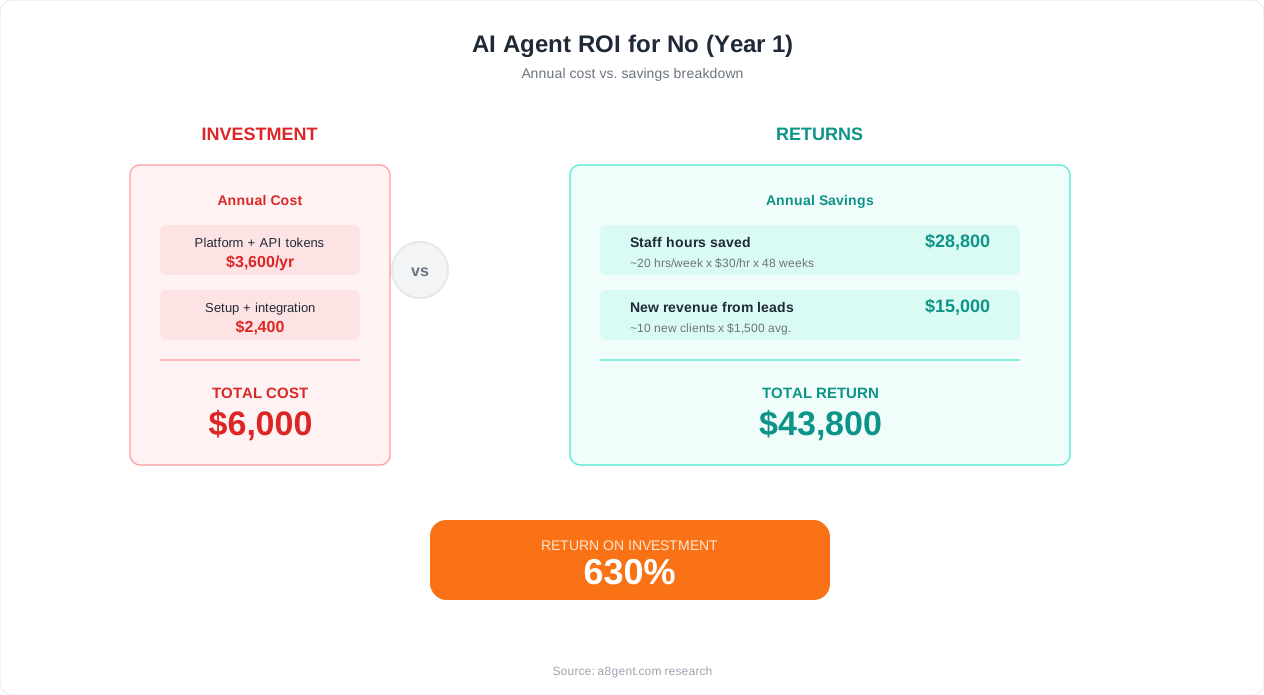
The real ROI equation. Regardless of which platform you choose, the economics of no-code AI agents are compelling. A single agent handling customer support can save $3,000-$8,000/month in labor costs. A lead follow-up agent can generate $5,000-$20,000/month in additional revenue through faster response times and consistent nurturing. Even the most expensive platform option pays for itself many times over within the first month if you are automating the right workflows. Do not optimize for the cheapest tool - optimize for the tool that delivers the most value for your specific use case. Use our AI agent ROI calculator to estimate your specific return.
How to Pick the Right No-Code AI Agent Tool for Your Business
After testing all these platforms and helping hundreds of businesses choose their first AI agent tool, we have distilled the selection process into a decision framework that works. Answer these four questions, and the right platform becomes clear.
Question 1: What is your team's technical comfort level? If your team includes someone who enjoys building systems, learning new tools, and troubleshooting workflows, you can handle any platform on this list. Make and n8n will reward that technical curiosity with maximum flexibility. If your team is entirely non-technical and you need the simplest possible path to working agents, Zapier or a8gent are your best options. Zapier for simpler automations, a8gent for true autonomous agents. There is no shame in choosing the simpler tool - an agent that actually gets built and deployed is infinitely more valuable than a theoretically superior platform that your team never learns to use.
Question 2: How complex are your workflows? Simple trigger-action workflows (when X happens, do Y) work well on any platform. Complex workflows with conditional logic, loops, error handling, multi-step decision-making, and cross-system coordination require more capable platforms. For simple workflows: Zapier is fastest. For moderate complexity: a8gent balances ease of use with depth. For maximum complexity: Make or n8n offer the most flexibility. For conversation-heavy workflows: Botpress is the specialist. For data and knowledge-heavy workflows: Relevance AI excels.
Question 3: What tools do you need to integrate with? Check each platform's integration directory for your must-have tools. If a platform does not natively integrate with your CRM, email platform, or other critical business tools, you will need to use webhooks or APIs, which increases complexity. Zapier's integration library is the largest, but the other platforms cover the most popular business tools comprehensively. If you use niche or industry-specific tools, verify integration availability before committing. For the broadest perspective on integration needs, review our AI agents vs Zapier vs hiring comparison.
Question 4: What is your budget and scale? If you are just starting and want to test the concept, most platforms offer free tiers that are sufficient for a proof of concept. For production deployment of 1-3 agents, expect to spend $49-$149/month. For scaling to 5-10+ agents with team collaboration, expect $149-$499/month. If budget is your primary constraint, n8n self-hosted is the cheapest option. If time-to-value is your primary constraint, a8gent or Zapier get you running fastest.
Our recommendation by business type. Solo entrepreneurs and freelancers: start with Zapier's free tier for simple automations, graduate to a8gent when you need true agents. Small businesses (2-20 employees): a8gent Growth plan gives you the best balance of capability and value. Agencies building agents for clients: Make or a8gent Business plan with multi-workspace support. Tech startups: n8n self-hosted for maximum flexibility and zero vendor lock-in. Enterprise teams: evaluate a8gent Business and Make Enterprise against your specific compliance and integration requirements.
The most important advice: just start. The biggest mistake businesses make is spending months evaluating tools instead of building their first agent. Every platform on this list offers a free trial or free tier. Pick two platforms based on this guide, spend one afternoon testing each with your actual workflow, and commit to the one that feels right. You can always migrate later if needed - the workflows and logic you design transfer between platforms more easily than you think. The cost of delayed automation is far greater than the cost of choosing a slightly suboptimal platform. Get started with a8gent's free trial today, or explore any of the other platforms on this list. The important thing is that you start building.
FAQ
What is the difference between an AI agent tool and an automation tool?
Automation tools like traditional Zapier execute pre-defined trigger-action sequences: when X happens, do Y. AI agent tools add intelligence: the agent decides what to do based on context, makes judgment calls, handles exceptions, and can execute multi-step workflows without every step being explicitly programmed. Think of automation as a recipe the tool follows exactly, and an AI agent as a capable assistant that understands the goal and figures out how to achieve it.
Do I need coding knowledge to use no-code AI agent tools?
No. All platforms reviewed in this guide offer visual, drag-and-drop interfaces for building agents. However, having some technical comfort (understanding APIs, data formats, and logical thinking) helps you build more sophisticated agents and troubleshoot issues faster. Platforms like Zapier and a8gent are designed to be accessible to completely non-technical users.
Can no-code AI agents handle sensitive business data securely?
Yes, reputable platforms implement enterprise-grade security. a8gent, Make, and Zapier are SOC 2 certified. n8n's self-hosted option gives you complete data control. All platforms encrypt data in transit and at rest. For regulated industries, verify specific compliance certifications and data processing agreements with your chosen platform.
How many AI agents does a typical small business need?
Most small businesses start with 1-2 agents and expand to 3-5 within six months. Common first agents include customer support, lead follow-up, and appointment scheduling. As you see results, you naturally identify more workflows to automate. We recommend starting with one high-impact agent, proving ROI, then expanding.
Can I migrate between no-code AI agent platforms?
Yes, though the effort varies. The agent logic and workflow design transfers conceptually between platforms. Integrations need to be reconfigured. Some platforms (like n8n) offer export/import features. The migration typically takes a few days for simple agents and 1-2 weeks for complex ones. Using a platform with open data formats reduces migration risk.