AI Agent Portfolio Projects That Land Clients
Five portfolio projects that demonstrate real AI automation skills to potential clients and employers. Each project includes what to build, how to present it, and the specific results that make hiring managers and clients say yes.
10+ years shipping production ML across TensorFlow, PyTorch, AWS, and GCP. Ships every A8gent agent before it becomes a lesson. GitHub
- A portfolio with 3-5 working projects and documented results converts 8x better than a resume listing skills or certifications alone.
- Each portfolio project should solve a real business problem, use real (or realistic) data, and include before-and-after metrics that quantify the value delivered.
- Live demos and video walkthroughs are the most persuasive portfolio formats - clients and hiring managers who see an automation working are 3x more likely to engage.
- The five highest-impact portfolio projects are: lead qualification bot, email automation system, document processing pipeline, customer support agent, and reporting dashboard automation.
- Present each project as a mini case study with Problem, Solution, Results, and Tools Used - this format maps directly to how clients evaluate automation proposals.
Why Your Portfolio Matters More Than Your Resume
In AI automation, your portfolio is your resume, your sales pitch, and your proof of competency rolled into one. When a client asks "can you build this for my business?" your portfolio answers with evidence, not promises.
Here is what the data shows about portfolio impact on landing clients and jobs:
- Freelancers with 3+ portfolio projects close deals at a 34% rate, compared to 8% for those without a portfolio
- Job applicants with working demos receive 4x more interview callbacks than those with only certifications
- Live demo portfolios convert at 42% - the highest rate of any portfolio format
- Video walkthroughs convert at 28% - effective when live demos are not feasible
- Static screenshots convert at 12% - better than nothing, but significantly less effective
The reason is simple: AI automation is hard to evaluate in the abstract. A client cannot tell from your LinkedIn profile whether you can actually build what they need. But when they see a working automation handling realistic business scenarios, the question shifts from "can this person do it?" to "when can they start?"
The five projects in this guide are specifically chosen to demonstrate the most in-demand AI automation skills. Together, they cover lead management, communication automation, document processing, customer interaction, and data analysis - the five pillars of business AI automation. Build all five and you will have a portfolio that opens doors to virtually any AI automation opportunity.
Each project description includes what to build, how to build it, what tools to use, which metrics to track, and how to present it to maximum effect. If you are starting your freelance journey, pair this guide with our complete freelancer roadmap for a step-by-step path to income.
Project 1: AI Lead Qualification and Follow-Up Bot
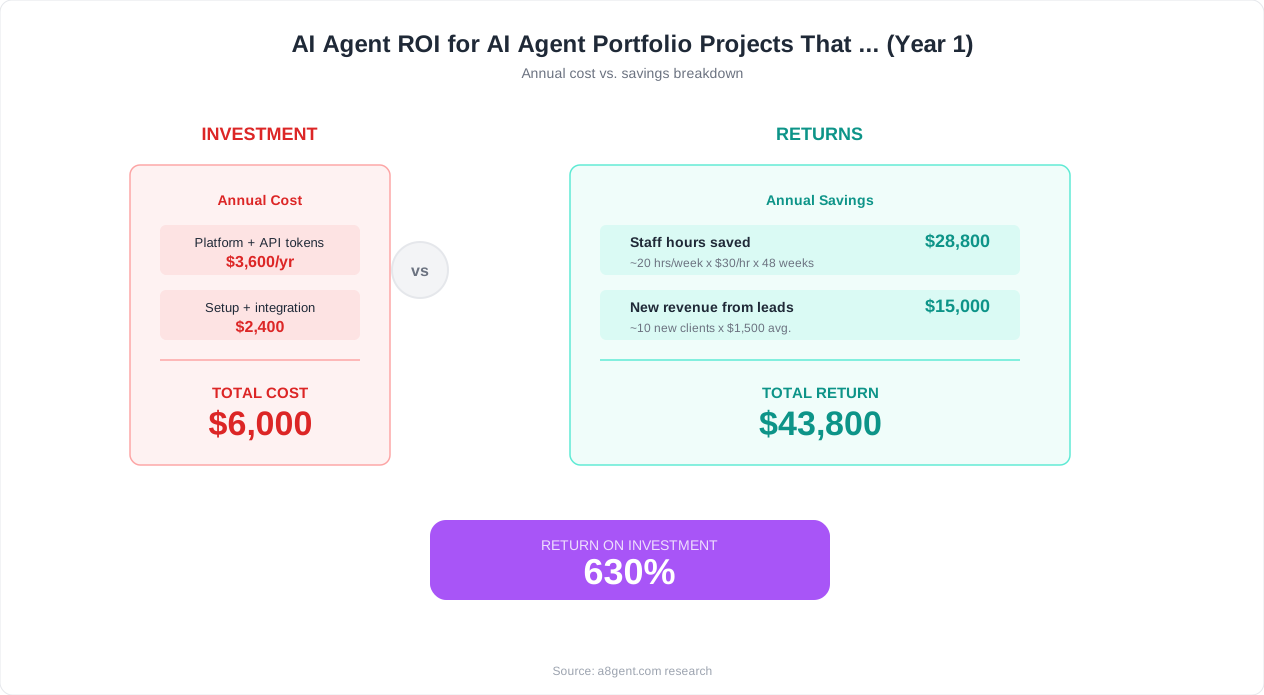
This is the single most impressive portfolio project you can build because it directly generates revenue for businesses. Every company needs leads, and most handle lead follow-up poorly.
What to build: An AI agent that receives incoming leads (from a web form, email, or ad platform), qualifies them based on predefined criteria, sends personalized follow-up messages, and routes qualified leads to the right salesperson - all within 60 seconds of the lead arriving.
Technical implementation:
- Trigger: Webhook from a form tool (Typeform, Tally, or a custom form) or CRM (HubSpot, Pipedrive)
- AI qualification: Pass lead data to GPT-4o or Claude with a scoring prompt that evaluates budget, timeline, company size, and need. The AI returns a score (1-10) and a brief analysis.
- Automated response: Based on the score, send a personalized email using a template customized by the AI. High-score leads get a meeting booking link. Medium-score leads get a nurture sequence. Low-score leads get a polite resource page.
- CRM update: Write the score, analysis, and lead status back to the CRM automatically.
- Notification: Send a Slack or SMS alert to the assigned salesperson for high-score leads.
Tools: n8n or Make for orchestration, OpenAI API for qualification, Gmail or SendGrid for emails, Google Sheets or HubSpot CRM for storage. Total platform cost: under $30/month.
Metrics to track and present:
- Average response time (target: under 60 seconds, compared to industry average of 47 hours per HubSpot research)
- Lead qualification accuracy (target: 85%+ agreement with manual qualification)
- Number of leads processed per day without human intervention
- Estimated hours saved per week versus manual follow-up
How to present it: Create a live demo where the prospect can submit a test lead through a form and watch the entire automation execute in real-time - receiving the personalized email, seeing the CRM update, and getting the Slack notification. This live demo is devastatingly effective in sales conversations. When a prospect sees their own name appear in a personalized follow-up email 30 seconds after submitting a form, the value becomes undeniable.
This project directly maps to the lead automation services described in our AI sales follow-up guide and demonstrates skills relevant to the lead nurturing use case.
Project 2: Intelligent Email Automation System
Email is the universal business communication channel, and it is universally inefficient. An intelligent email automation system demonstrates your ability to handle unstructured data, make nuanced decisions, and integrate with everyday business tools.
What to build: An AI agent that monitors an email inbox, categorizes incoming messages by type and urgency, drafts appropriate responses, routes messages to the right team member, and handles common inquiries automatically.
Technical implementation:
- Email monitoring: Connect to Gmail or Outlook via API. Poll for new messages every 2-5 minutes (or use webhooks where available).
- AI categorization: Pass each email to an LLM with a classification prompt. Categories might include: customer inquiry, support request, sales opportunity, billing question, spam, internal, and urgent. The AI also extracts key entities: customer name, order number, issue type.
- Smart routing: Based on category, route to the appropriate team member or department. Urgent messages trigger immediate notifications. Support requests create tickets in your help desk tool.
- Draft responses: For common inquiry types, the AI drafts a response using approved templates and contextual information. Drafts go to a review queue for human approval, or are sent automatically for low-risk categories (like appointment confirmations).
- Analytics dashboard: Track email volume by category, average response time, automation rate (what percentage of emails the AI handled without human intervention), and team member workload distribution.
Tools: n8n or Make for orchestration, OpenAI or Anthropic API for classification and drafting, Gmail API for email access, Google Sheets or Airtable for the analytics dashboard. See our detailed email management automation guide for additional configuration details.
Metrics to track and present:
- Classification accuracy (target: 92%+ on a test dataset of 100+ emails)
- Average response time reduction (from hours to minutes)
- Percentage of emails handled without human intervention (target: 40-60%)
- Time saved per day for the team
How to present it: Record a 3-minute Loom video showing emails arriving in a test inbox and the system categorizing, routing, and drafting responses in real-time. Show the analytics dashboard with volume trends and response time metrics. Include a case study narrative: "In a test run with 200 emails over 5 days, the system correctly categorized 94% of messages and drafted responses for 52%, reducing average response time from 3.2 hours to 8 minutes."
This project demonstrates skills that are directly applicable to client communication automation - one of the most requested services by businesses exploring AI. For businesses evaluating this type of solution, our customer onboarding automation guide shows how email automation fits into a broader client management system.
Project 3: Document Processing and Data Extraction Pipeline
Businesses process mountains of documents - invoices, contracts, applications, reports, receipts. Most of this processing is still done manually. A document processing pipeline demonstrates your ability to handle unstructured data and convert it into actionable information.
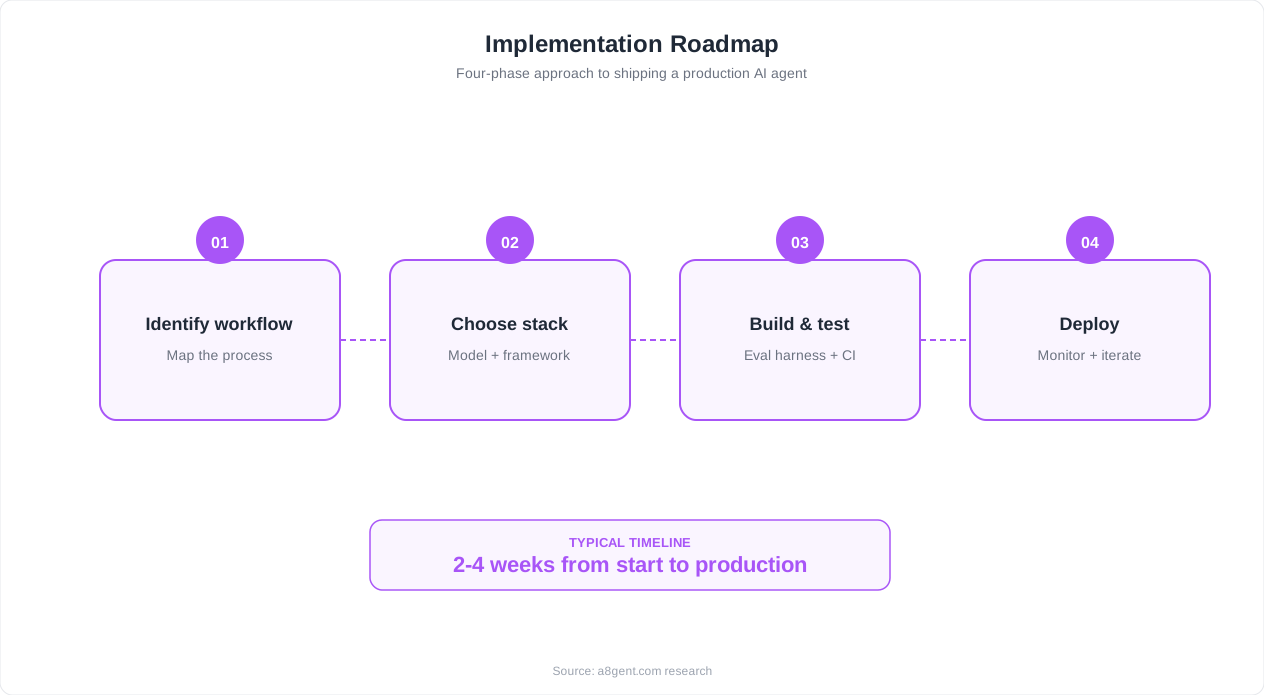
What to build: An AI pipeline that accepts documents (PDF, image, or email attachment), extracts key information, validates the data, and routes it to the appropriate system - whether that is a spreadsheet, database, accounting software, or CRM.
Technical implementation:
- Document intake: Accept documents via email attachment, file upload (Google Drive or Dropbox folder), or API endpoint. Support PDF, JPG, PNG, and common document formats.
- Data extraction: Use a vision-capable LLM (GPT-4o with vision) to read the document and extract structured data. For invoices: vendor name, invoice number, date, line items, amounts, total. For contracts: parties, key dates, terms, obligations.
- Validation: Cross-reference extracted data against existing records. Flag discrepancies (invoice total does not match line items, vendor not in approved list, contract dates overlap with existing agreements).
- Routing and storage: Route validated data to the appropriate system. Invoices go to accounting software (QuickBooks, Xero). Contracts go to a contract management spreadsheet. Flagged items go to a human review queue.
- Audit trail: Log every document processed with timestamp, extraction results, validation status, and routing destination.
Tools: n8n for orchestration, OpenAI GPT-4o (vision) for extraction, Google Sheets or Airtable for storage and validation, Gmail or Google Drive for document intake. For more on invoice-specific automation, see our invoice processing guide.
Metrics to track and present:
- Extraction accuracy by field (target: 95%+ for structured fields like dates and totals, 88%+ for variable fields like line items)
- Processing speed (target: under 30 seconds per document versus 5-10 minutes manually)
- Volume capacity (documents processed per hour)
- Error detection rate (how many data discrepancies the system catches that humans would miss)
How to present it: Create a demo where the viewer can email a sample invoice or contract to a designated address and watch the system extract data, validate it, and populate a spreadsheet in real-time. Include before-and-after comparisons: "Manual processing: 8 minutes per invoice, 3.2% error rate. AI pipeline: 22 seconds per invoice, 0.8% error rate." This is particularly compelling for clients in accounting, legal, and operations roles.
Document processing is one of the highest-value automation use cases because it touches every business function. Our guide on AI vs virtual assistants for data entry provides additional context on positioning this capability against alternatives clients might consider.
Project 4: Customer Support AI Agent With Knowledge Base
Customer support is the most visible AI agent use case - every business owner has experienced chatbots, and most have opinions about them. Building a support agent that actually works well (as opposed to the frustrating chatbots most people encounter) is a powerful portfolio differentiator.
What to build: An AI customer support agent that answers customer questions using a company knowledge base (RAG), escalates complex issues to human agents, tracks conversation history, and provides analytics on support volume and resolution rates.
Technical implementation:
- Knowledge base setup: Create a vector database (Pinecone, Weaviate, or Supabase with pgvector) and load it with FAQ documents, product information, policy documents, and previous support conversations. This is your RAG (Retrieval-Augmented Generation) foundation.
- Chat interface: Build a simple web chat widget or integrate with existing channels (website chat, WhatsApp, or Facebook Messenger via API). The interface should feel natural and responsive.
- AI response generation: When a customer asks a question, embed the query, retrieve the 3-5 most relevant knowledge base passages, and generate a response using an LLM with the retrieved context. This ensures accurate, company-specific answers rather than generic AI responses.
- Escalation logic: Define triggers for human handoff: low confidence scores, customer frustration signals (repeat questions, explicit requests for a human), and topic categories that require human judgment (refunds over $100, legal questions, complaints).
- Analytics: Track questions asked, resolution rate (answered without escalation), customer satisfaction (optional thumbs up/down), most common topics, and knowledge gaps (questions the AI could not answer).
Tools: LangChain or a similar framework for RAG, Pinecone for vector storage, OpenAI API for embeddings and generation, a simple React or HTML frontend for the chat widget, n8n or Make for escalation routing and analytics. For framework-level guidance, see our LangGraph human-in-the-loop tutorial.
Metrics to track and present:
- Resolution rate without human escalation (target: 60-75% for a well-configured knowledge base)
- Average response time (target: under 5 seconds)
- Answer accuracy rated by human reviewers (target: 90%+ on factual questions)
- Customer satisfaction score (target: 80%+ positive rating)
- Estimated support cost reduction (typically 40-60% for businesses with high ticket volumes)
How to present it: Deploy the support agent on a demo website with a realistic knowledge base (you can use publicly available product documentation). Let prospects interact with it live and try to stump it. Show the analytics dashboard with conversation logs, resolution rates, and topic breakdowns. The combination of a working demo plus analytics data is extremely compelling.
This project demonstrates RAG skills, prompt engineering, conversation design, and analytics - the most sought-after AI automation competencies. It is directly relevant to client projects described in our customer retention guide and small business AI guide.
Project 5: Automated Reporting Dashboard With AI Insights
Every business makes decisions based on data, but most businesses waste hours manually compiling reports from multiple sources. An automated reporting dashboard with AI-generated insights shows that you can handle the full data pipeline from collection to presentation.
What to build: A system that automatically collects data from multiple business tools (CRM, Google Analytics, ad platforms, accounting software), aggregates it into a unified dashboard, and generates AI-written insights and recommendations on a scheduled basis.
Technical implementation:
- Data collection: Set up scheduled API pulls from 3-5 business tools. For a marketing-focused demo: Google Analytics (website traffic), Google Ads or Meta Ads (ad performance), HubSpot or Mailchimp (email metrics), and social media platforms (engagement data).
- Data aggregation: Normalize data from different sources into a consistent format. Calculate key metrics: total leads, cost per lead, conversion rates, revenue attribution, and period-over-period changes.
- Dashboard generation: Build a visual dashboard using Google Sheets, Notion, or a lightweight tool like Retool. Include charts for trends, tables for detailed metrics, and KPI cards for headline numbers.
- AI insights: Pass the aggregated data to an LLM with a prompt that asks for: 3 key observations about performance trends, 2 anomalies or concerns, and 2 actionable recommendations. The AI should reference specific numbers and explain their significance in plain language.
- Scheduled delivery: Automate the entire pipeline to run weekly (or daily for high-volume businesses). Deliver the dashboard and AI insights via email to stakeholders every Monday morning.
Tools: n8n or Make for orchestration and scheduling, various APIs for data collection, Google Sheets or Airtable for dashboard, OpenAI API for insight generation, Gmail for delivery. For a detailed walkthrough of reporting automation, see our client reporting automation guide.
Metrics to track and present:
- Time saved per reporting cycle (target: 4-8 hours per week versus manual compilation)
- Number of data sources integrated
- Quality of AI insights (have a domain expert rate the insights for accuracy and actionability)
- Consistency and reliability (how many consecutive weeks did the report generate successfully without intervention)
How to present it: Show a sample report with real-looking data (use a demo business or anonymized data). Walk through the AI-generated insights and explain how they would influence business decisions. Demonstrate the end-to-end pipeline: "Every Monday at 7am, this system pulls data from 5 sources, calculates 20+ metrics, generates a visual dashboard, writes executive-level insights, and delivers everything to the team's inbox - all without anyone pressing a button."
This project is particularly attractive to marketing agencies (who create reports for multiple clients) and to executives who want better visibility into their business metrics. For additional context on this use case, see our guides on AI agents for marketing teams and Tableau's guide to business intelligence dashboards.
How to Present Your Portfolio for Maximum Impact
Building great projects is half the battle. Presenting them effectively is the other half. Here is how to structure your portfolio for maximum impact with both clients and employers.
Portfolio format: Create a simple website (a single-page Notion site, a GitHub Pages site, or a lightweight personal site) with the following structure for each project:
- Headline: A result-focused title. Not "Lead Qualification Bot" but "AI Agent That Qualifies Leads in 30 Seconds and Books Meetings Automatically."
- Problem: 2-3 sentences describing the business problem this project solves. Use language that business owners understand, not technical jargon.
- Solution: 3-4 sentences explaining what you built and how it works. Include a visual (screenshot, architecture diagram, or video thumbnail).
- Results: Specific numbers. "Reduced response time from 4 hours to 45 seconds. Processed 150 leads in one week with 93% qualification accuracy. Estimated savings: 18 hours per week."
- Demo link or video: Either a live demo they can interact with or a 2-3 minute video walkthrough showing the automation in action.
- Tools used: List the platforms and technologies. This helps prospects assess whether your skills align with their existing tech stack.
Presentation tips for client conversations:
- Lead with the most relevant project. If you are talking to a real estate client, show the lead qualification bot first. Relevance beats impressiveness.
- Tell a story, not a feature list. "A marketing agency was spending 8 hours every Monday compiling client reports. I built a system that does it automatically in 12 minutes. Now their team spends Monday mornings on strategy instead of spreadsheets."
- Let them interact. Whenever possible, let the prospect experience the automation firsthand. "Here, submit a test lead and watch what happens." Hands-on experience is 10x more persuasive than any slide deck.
- Address objections proactively. "You might be wondering if this works with [their specific tool]. Yes - the system integrates with HubSpot, Salesforce, and Pipedrive through their APIs."
Presentation tips for job interviews:
- Emphasize your decision-making process. Employers want to know why you chose certain tools, how you handled edge cases, and what you would do differently. Explain your reasoning, not just the end result.
- Show you can scope and estimate. For each project, mention how long it took to build and what the ongoing maintenance looks like. This demonstrates project management skills alongside technical skills.
- Discuss failures and iterations. Talk about what did not work on the first attempt and how you improved it. This shows maturity and a realistic understanding of AI systems. Our implementation guide covers common pitfalls and solutions that you can reference.
Your portfolio is a living document. Update it every time you complete a new client project (with permission) or improve an existing project. The best portfolios show growth and increasing sophistication over time. Within 6 months of active freelancing, your portfolio should have evolved from demo projects to real client case studies with testimonials - and that is when your close rate really takes off.
FAQ
Can I use demo data or do I need real client projects?
Start with demo data - it is perfectly acceptable for your first portfolio. Use realistic business scenarios with plausible numbers. As you land real clients, replace demo projects with actual case studies (with client permission). The key is that the automation must actually work, not just look good in a screenshot. A working demo with fake data is infinitely more impressive than a description of a real project without a demo.
How many portfolio projects do I need before I start selling?
Three is the minimum. Five is ideal. More than that has diminishing returns - prospects rarely look at more than 3-4 projects in detail. Focus on quality and diversity over quantity. Three projects covering lead management, customer communication, and data processing demonstrate enough range to handle most client requests.
Should I use free tools or paid platforms for portfolio projects?
Start with free tiers - n8n's self-hosted version, Make's free plan, OpenAI's free credits. This keeps your upfront investment near zero. As you start earning from clients, upgrade to paid plans for better performance and features. The total cost for a professional-grade portfolio (including API credits for demos) is typically under $50 per month.
How do I get permission to use client projects in my portfolio?
Ask during the onboarding process, not after the project is complete. Include a portfolio clause in your scope document: 'Client grants [your name] permission to showcase anonymized project results and automation screenshots in a professional portfolio. No confidential data or proprietary business information will be shared.' Most clients agree, especially if you offer a small discount (5-10%) in exchange for a testimonial and portfolio permission.
What if my portfolio projects stop working or APIs change?
This is a real concern - APIs update and break integrations regularly. Maintain your portfolio projects like you would maintain client automations: check them monthly, update API connections when needed, and have backup recordings of demos in case the live version is temporarily down. A Loom video walkthrough is a reliable backup that never breaks. Budget 1-2 hours per month for portfolio maintenance.