How to Onboard AI Automation Clients
A complete client onboarding framework for AI automation freelancers and agencies. Covers discovery calls, workflow audits, scope documents, quick wins, and handoff processes that maximize retention and referrals.
10+ years shipping production ML across TensorFlow, PyTorch, AWS, and GCP. Ships every A8gent agent before it becomes a lesson. GitHub
- Agencies with a structured onboarding process retain 94% of clients past the first project, compared to 38% for those without one - the onboarding experience determines whether a client becomes a long-term retainer.
- The discovery call should focus 80% on understanding the client's current workflows and pain points and only 20% on discussing what you will build - listen first, propose second.
- Delivering a quick win within the first 5 business days (a simple automation that shows immediate value) is the single most impactful retention tactic.
- A clear scope document with specific deliverables, timelines, and success metrics prevents 90% of client disputes and scope creep issues.
- The handoff process should include a training session, documentation, and an explicit retainer offer - do not leave the next step ambiguous.
Why Client Onboarding Makes or Breaks Your AI Agency
Here is a pattern we see constantly in AI automation agencies: technically brilliant freelancers who build amazing automations but lose clients after the first project. The problem is almost never the quality of the work. It is the onboarding experience.
When a client hires you for AI automation, they are already uncertain. They might not fully understand what AI agents can do. They do not know how the project will unfold. They are risking budget on something relatively new. Your onboarding process is how you transform that uncertainty into confidence.
The data is clear: agencies with a structured onboarding process retain 94% of clients past the first project and convert 67% into monthly retainers. Agencies without a formal process? They retain only 38% and convert fewer than 15% to retainers. The difference is not better automations - it is a better client experience from day one.
Good onboarding does three things simultaneously:
- Sets realistic expectations. Clients who understand exactly what they will get, when they will get it, and what success looks like are satisfied clients. Clients who have vague expectations are disappointed clients, even if you deliver excellent work.
- Builds trust quickly. A professional onboarding process signals competence. It tells the client "you are in good hands" without you having to say it. Templates, checklists, and clear communication patterns all contribute to this.
- Creates momentum. Delivering a quick win early in the engagement keeps the client excited and engaged. An engaged client gives better feedback, responds faster to questions, and is more likely to approve additional work.
This guide walks through every step of a proven onboarding framework. Whether you are a solo freelancer or running a small agency, these processes will dramatically improve your client relationships and revenue. If you are still in the process of finding clients, start with our guide on selling AI automations first, then come back here.
For context on pricing your onboarding and project work, our agency pricing guide covers the full spectrum of engagement models.
The Discovery Call: Your Most Important 45 Minutes
The discovery call is where you gather everything you need to write a winning proposal. It is also where the client decides whether they trust you. Most freelancers make the mistake of using this call to pitch their services. Instead, use it to understand the client's world.
Before the call (15 minutes of prep):
- Research the client's business: website, LinkedIn, recent news, company size, industry
- Identify 2-3 potential automation opportunities based on their industry (use our industry guides for real estate, e-commerce, or agencies for inspiration)
- Prepare your question list (below)
- Test your video call setup - technical issues on a discovery call kill credibility
The call structure (45 minutes):
Minutes 1-5: Rapport and context. Brief introductions. Ask what prompted them to look into AI automation. This tells you their motivation and urgency level.
Minutes 5-25: Deep workflow mapping. This is the core of the call. Ask these questions and take detailed notes:
- "Walk me through your team's typical day from start to finish. What does each person spend their time on?"
- "Which tasks does your team complain about most? What feels repetitive or tedious?"
- "What tools and software does your team use daily?" (Get specific names and how they connect)
- "How many times per week does your team manually move data between systems?"
- "What happens when something falls through the cracks? What are the consequences?"
- "Have you tried automating anything before? What worked and what did not?"
Minutes 25-35: Identify the top 3 opportunities. Based on what you heard, reflect back the biggest pain points and suggest 3 specific automations that could help. Keep explanations simple and focused on outcomes ("This would save your team about 15 hours per week on data entry") rather than technology ("We would use an n8n workflow with GPT-4o integration").
Minutes 35-45: Next steps. Explain your process: you will send a brief audit summary and proposal within 2-3 business days. Ask about their budget range, timeline, and who else is involved in the decision. Schedule a follow-up call for the proposal review.
The golden rule of discovery calls: talk for 20% of the time and listen for 80%. The more the client talks, the better your proposal will be, and the more they will trust you. People trust advisors who listen. According to Harvard Business Review research on active listening, clients rate advisors who ask follow-up questions 62% higher in trustworthiness than those who immediately offer solutions.
The Workflow Audit: Documenting What You Will Automate
After the discovery call, you need to turn your notes into a structured audit document. This serves two purposes: it shows the client you understood their problems, and it becomes the foundation for your proposal and project plan.
The audit document template:
Keep it to 2-3 pages maximum. Clients do not read long documents. Structure it as follows:
- Section 1: Current State Summary (half page). Summarize their current workflows, tools, and pain points. Mirror their language back to them - do not translate into technical jargon. This section proves you listened.
- Section 2: Automation Opportunities (1 page). List 3-5 specific automations with a one-paragraph description of each. For each opportunity, include: what the automation does, estimated time savings per week, estimated cost savings per month, and complexity rating (simple, moderate, complex).
- Section 3: Recommended Starting Point (half page). Pick the automation with the best combination of high impact and low complexity. This becomes your quick win. Explain why you recommend starting here.
- Section 4: Tools and Integration Requirements (half page). List which tools you will use, which of their existing tools you will integrate with, and any access or accounts you will need from them.
How to estimate time and cost savings:
Be conservative. Overpromising and underdelivering is the fastest way to lose a client. Use this formula:
- Ask the client how many times per week a task happens
- Ask how long each occurrence takes (or estimate based on complexity)
- Multiply to get weekly hours spent
- Assume your automation will handle 70-80% of occurrences (not 100% - there will always be edge cases)
- Calculate monthly savings: (weekly hours saved x 4 weeks x hourly labor cost)
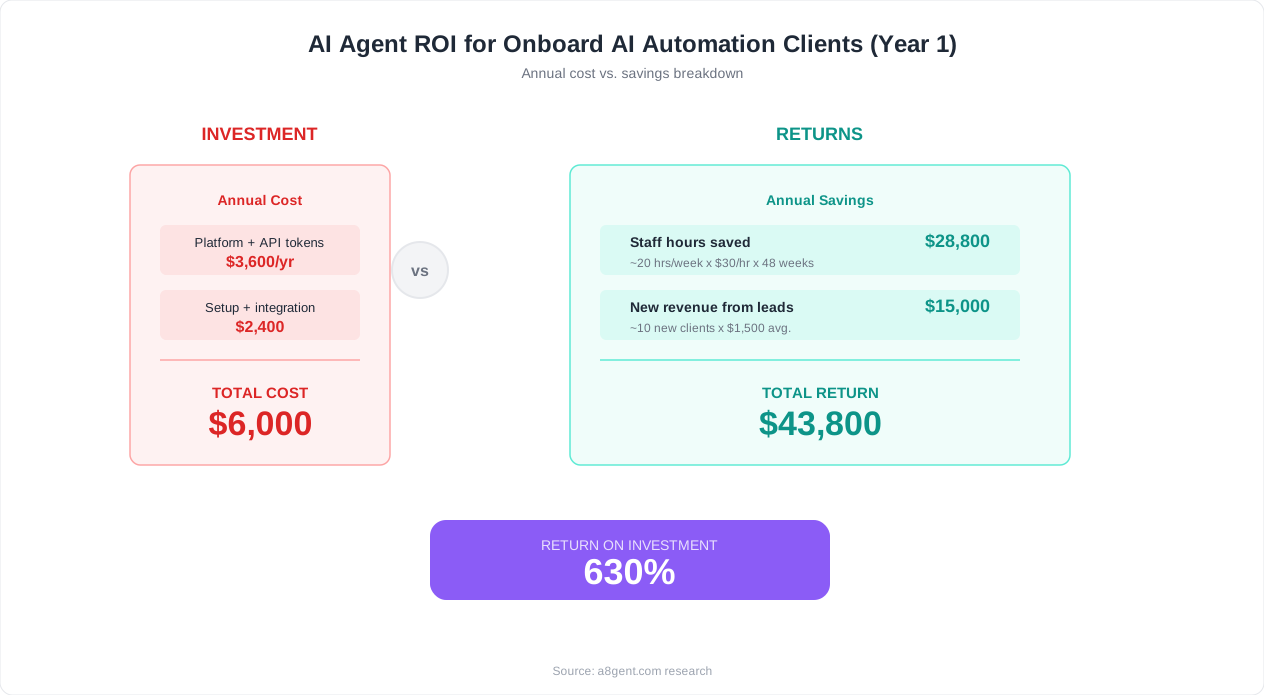
Example: A real estate agency's admin spends 30 minutes on each new lead follow-up, processes 40 leads per week (20 hours/week). Your AI agent automation handles 80% of follow-ups automatically. That is 16 hours/week saved, or 64 hours/month. At $25/hour admin labor cost, that is $1,600/month in savings. Present that number and your $3,000 project fee looks like a bargain.
Send the audit document within 2 business days of the discovery call. Speed matters - if you take a week, the client's enthusiasm fades and competitors move in. Include a note saying "I have put together an initial assessment based on our conversation. Let us review this together on our next call and I will walk you through the recommended approach." This sets up the proposal call naturally.
If you need help structuring your audit around specific industries, our guides on AI agents for small business and solving manual task overload provide industry-specific workflow examples you can reference.
Writing Scope Documents That Prevent Disasters
Scope creep is the number one profit killer for AI automation freelancers. A project scoped at 20 hours balloons to 50 hours because the client keeps adding "just one more thing." The solution is a scope document that is so clear and specific that both parties know exactly what is included and what is not.
Essential elements of an AI automation scope document:
- Project overview - 2-3 sentences describing what you are building and why. Written in the client's language, not yours.
- Deliverables list - Every single thing the client will receive, numbered. "1. Lead qualification AI agent that processes incoming form submissions and scores leads based on 5 criteria. 2. Automated email sequence triggered by lead score. 3. Dashboard showing lead status and conversion metrics." Be specific enough that you could hand this list to another developer and they would know what to build.
- Out of scope - Explicitly list what is NOT included. "This project does not include: custom CRM development, phone call integration, automations for the billing department, or training beyond one 60-minute session." This section prevents 80% of scope creep disputes.
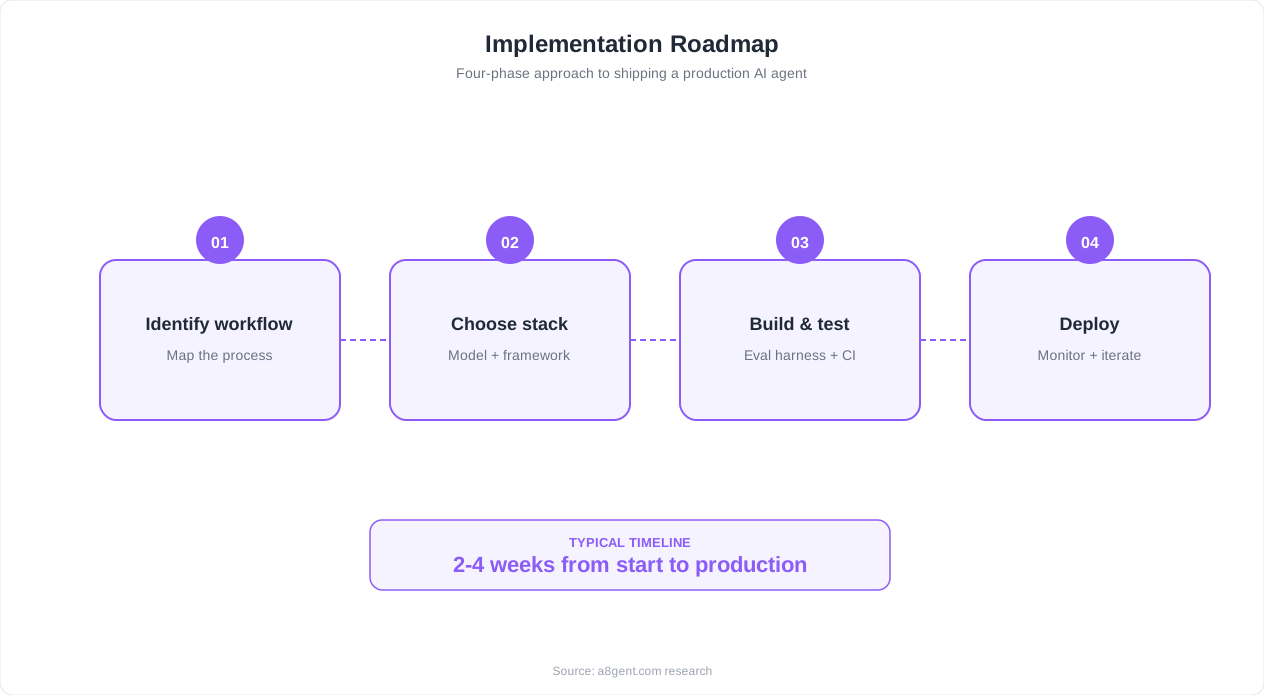
- Timeline - Break the project into weekly milestones. "Week 1: Quick win deployment + technical setup. Week 2: Core automation build + initial testing. Week 3: Full testing + client review + adjustments. Week 4: Final deployment + training + documentation."
- Success metrics - How both parties will measure whether the project was successful. "Success is defined as: lead response time reduced from 4 hours to under 5 minutes, 80% of leads scored automatically without manual intervention, and admin time on lead management reduced by at least 12 hours per week."
- Client responsibilities - What you need from them to do your job. "Client will provide: admin access to HubSpot CRM, access to current email templates, a 30-minute interview with the sales manager, and responses to questions within 1 business day."
- Payment terms - 50% upfront, 50% on completion is standard. For larger projects ($5,000+), consider 40/30/30 split across project milestones.
- Change request process - "Any requests outside the deliverables list above will be documented as a change request with an estimated additional cost and timeline. Change requests require written approval before work begins."
One critical mistake to avoid: do not include technical implementation details in the scope document. The client does not care whether you use n8n or Make, GPT-4o or Claude. They care about what the automation will do and what results it will produce. Keep the scope document focused on outcomes. Save the technical details for your internal project plan.
Have the client sign the scope document before starting any work. A verbal "looks good" is not enough - you need a written signature (even a simple email reply saying "approved" works). This protects both parties and creates a professional standard for the engagement. For pricing strategy behind these scope documents, reference our pricing guide.
The Quick Win Strategy: Delivering Value in Week 1
The most powerful retention tactic in AI automation is delivering a visible result within the first 5 business days. This is your quick win - a small automation that produces immediate, measurable value before the main project is even complete.
Why quick wins work: When a client pays $3,000-$10,000 for an automation project, they experience buyer's anxiety. Did they make the right choice? Is this person actually going to deliver? A quick win answers those questions definitively within the first week, transforming anxiety into excitement.
Our data shows that clients who receive a quick win in week 1 are:
- 3.2x more likely to approve additional projects
- 2.8x more likely to convert to a monthly retainer
- 4.1x more likely to provide a referral
Best quick win automations by industry:
- Real estate: Automated new lead notification with AI-generated lead summary sent to agent's phone within 60 seconds of form submission. Takes 2-3 hours to build.
- E-commerce: Automated order confirmation + shipping update emails with personalized product recommendations. Takes 3-4 hours to build.
- Marketing agencies: Automated weekly client reporting dashboard that pulls data from Google Analytics, ad platforms, and social media. Takes 4-5 hours to build. See our client reporting automation guide.
- Professional services: Automated appointment reminder sequence (email + SMS) that reduces no-shows by 40-60%. Takes 2-3 hours to build. See our appointment reminder guide.
- Any business: AI-powered email categorization and routing that sorts incoming emails by type and urgency. Takes 3-4 hours to build. See our email management guide.
How to present the quick win: Do not just deploy it silently. Schedule a 15-minute call to walk the client through what you built, show it working in real-time, and share the first results. Screen-share the automation running, show them the output, and let them see the magic happen. Then say: "This is just the first piece. The full system will be even more powerful."
This 15-minute demo is the single most important client interaction in your entire engagement. It is the moment where the client goes from "I hope this works" to "this is amazing, what else can you automate?" Every upsell, retainer conversation, and referral traces back to this moment.
Quick wins should be scoped as part of your main project, not as extra free work. They are the first deliverable in your timeline, not an add-on. This means they do not cost you additional time - they are just smart sequencing of work you were going to do anyway.
Communication Cadence During the Project
Poor communication kills more client relationships than poor technical work. Here is the exact communication cadence that top AI automation agencies use to keep clients informed and engaged throughout the project.
Weekly status updates (every Monday morning):
Send a brief email (5-7 sentences) covering:
- What was completed last week
- What is planned for this week
- Any blockers or questions that need client input
- Overall project status: on track, ahead, or behind (be honest)
Keep these updates factual and concise. Clients appreciate knowing the project is moving forward without having to ask. The biggest communication failure is silence - a client who does not hear from you for a week assumes the worst.
Milestone demos (at each major deliverable):
When you complete a significant piece of the automation, schedule a 15-20 minute screen-share demo. Show the automation running with real data, explain what it does in business terms, and ask for feedback. These demos serve multiple purposes:
- They keep the client engaged and excited
- They catch misunderstandings early (much cheaper to fix in week 2 than week 4)
- They give the client a sense of progress and value
- They create natural opportunities to discuss additional automation ideas
Issue communication (within 4 hours of discovering a problem):
When something goes wrong - and something always does - communicate immediately. Do not wait until you have a solution. Send a brief message explaining: what the issue is, what impact it has (if any), and what you are doing to resolve it. Clients forgive problems. They do not forgive surprises.
Tools for client communication:
- Slack or Microsoft Teams - For quick questions and informal updates. Many clients prefer this over email for day-to-day communication.
- Loom - For recording quick video walkthroughs instead of writing long emails. A 2-minute Loom video explains more than a 500-word email and feels more personal.
- Notion or Google Docs - For shared project documentation that both parties can reference.
- Your automation platform's dashboard - Give clients read-only access to see their automations running. Transparency builds trust.
One advanced tactic: create an automated status report using your own tools. Build a simple workflow that pulls project metrics (number of automations running, tasks processed, time saved) and sends the client a branded report every Monday morning. This demonstrates your capabilities while keeping the client informed - and it takes you zero time after the initial setup. It is the meta-move: automating your own client communication with the same tools you are selling.
For a broader perspective on managing client expectations around AI capabilities, our ChatGPT vs AI agents comparison is useful to share with clients who conflate the two. And for understanding the competitive landscape you are operating in, check Gartner's intelligent automation research.
The Handoff: Training, Documentation, and Retainer Conversion
The project handoff is where most freelancers leave money on the table. They deliver the final automation, say "let me know if you have questions," and move on to the next client. This is a mistake. The handoff is your highest-leverage moment for converting a one-time project into a recurring retainer.
The handoff process (schedule 60-90 minutes):
- Part 1: Live training (30-40 minutes). Walk through every automation with the team members who will interact with them daily. Show them how to use the outputs, where to find dashboards, and what to do if something looks wrong. Record this session with Loom for future reference - new team members can watch it later.
- Part 2: Documentation review (10-15 minutes). Walk through the documentation you have prepared (see below). Show them where it lives and how to use it. Make sure they know it exists - many clients never open documentation unless you explicitly show them.
- Part 3: Results review (10-15 minutes). Present the results from the project against the success metrics defined in your scope document. Show before-and-after numbers. "Before: 20 hours per week on lead management. After: 4 hours per week. Savings: 16 hours per week, approximately $1,600 per month." This sets up the retainer conversation.
- Part 4: Retainer pitch (10-15 minutes). Now that you have proven value and the client is looking at impressive numbers, present your retainer offering. "To keep everything running smoothly, optimize performance, and add improvements over time, I offer a monthly maintenance and optimization package at $X/month. This includes monitoring, bug fixes, monthly performance reviews, and up to Y hours of new automation work."
Documentation essentials:
Prepare a simple documentation package that includes:
- A one-page overview of all automations and what they do
- A troubleshooting guide ("If X happens, check Y")
- A list of all accounts, API keys, and access credentials used
- Contact information for support (yours or your agency's)
- The recorded training video
Retainer pricing structure: Offer two tiers to give the client a choice (people are more likely to buy when they feel they are choosing between options rather than deciding yes or no):
- Maintenance tier ($500-$1,000/month): Monitoring, bug fixes, monthly performance report, 2 hours of optimization work
- Growth tier ($1,500-$3,000/month): Everything in maintenance plus 5-10 hours of new automation development per month, priority support, quarterly strategy reviews
Our data shows that presenting two retainer options during the handoff converts at 67%, compared to 23% when the retainer is offered via email after the project is complete. The timing and context matter enormously. You have just shown the client concrete results - their willingness to invest in keeping and expanding those results is at its peak.
For broader guidance on building an AI automation agency with strong retention, see our guide on AI agents for agencies and selling AI agents to businesses.
FAQ
How long should the full onboarding process take?
From first discovery call to project kickoff, the onboarding process should take 5-7 business days. Discovery call on day 1, audit document delivered by day 3, proposal review call on day 4-5, and signed scope document by day 5-7. Longer than this and you risk losing the client's momentum and attention. The actual project delivery then follows your scope document timeline, typically 2-4 weeks for standard automation projects.
What if the client wants to skip the discovery call and just start building?
Politely decline. Explain that the discovery call ensures you build exactly what they need and avoids costly revisions later. Say something like: 'I have seen projects fail because the automation solved the wrong problem. This 45-minute call saves us both weeks of back-and-forth later.' Clients who resist discovery calls often have unrealistic expectations that need to be managed early. If they still refuse, consider it a red flag about the client relationship.
How do I handle scope creep during the project?
Reference the out-of-scope section of your scope document and use the change request process you defined. When a client asks for something new, respond with: 'That is a great idea and I can definitely build it. It is outside our current scope, so let me put together a quick estimate for the additional time and cost.' This reframes the request from 'free extra work' to 'a new investment decision.' Most clients respect this boundary, and many will approve the additional work at a premium rate.
What if the client is unresponsive during the project?
Set expectations in the scope document: 'Client will respond to questions within 1 business day.' When unresponsiveness happens, send a friendly but direct message: 'I am blocked on [specific item] and need your input to keep us on track for the [date] deadline. Can you get back to me by tomorrow?' If it continues, schedule a call to discuss whether the timeline needs adjustment. Document all delays in your weekly updates so there is a clear record if the project runs late due to client delays.
Should I offer a money-back guarantee?
Yes, for your first 3-5 clients. A guarantee like 'If the automation does not meet the success metrics defined in our scope document within 30 days of deployment, I will refund 100% of the project fee' dramatically reduces buyer resistance. In practice, you will almost never need to honor it if your discovery and scoping process is solid. After you have testimonials and case studies, the guarantee becomes less necessary but can still be a powerful differentiator.